https://github.com/unelmacoin/unelmapay-wordpress-woocommerce
Official UnelmaPay payment gateway plugin for WordPress and WooCommerce. Accept payments in NPR (Nepalese Rupee) through UnelmaPay's secure payment platform.
https://github.com/unelmacoin/unelmapay-wordpress-woocommerce
payment-gateway unelmapay upay woocommerce wordpress
Last synced: 6 months ago
JSON representation
Official UnelmaPay payment gateway plugin for WordPress and WooCommerce. Accept payments in NPR (Nepalese Rupee) through UnelmaPay's secure payment platform.
- Host: GitHub
- URL: https://github.com/unelmacoin/unelmapay-wordpress-woocommerce
- Owner: unelmacoin
- Created: 2025-12-23T17:36:29.000Z (6 months ago)
- Default Branch: main
- Last Pushed: 2025-12-24T17:37:15.000Z (6 months ago)
- Last Synced: 2025-12-26T07:55:34.017Z (6 months ago)
- Topics: payment-gateway, unelmapay, upay, woocommerce, wordpress
- Language: PHP
- Homepage: https://unelmapay.com.np
- Size: 45.9 KB
- Stars: 0
- Watchers: 0
- Forks: 0
- Open Issues: 0
-
Metadata Files:
- Readme: README.md
Awesome Lists containing this project
README
# UnelmaPay Payment Gateway for WordPress & WooCommerce
[](https://www.gnu.org/licenses/old-licenses/gpl-2.0.en.html)
[](https://wordpress.org/)
[](https://woocommerce.com/)
Official UnelmaPay payment gateway plugin for WordPress and WooCommerce. Accept payments in NPR (Nepalese Rupee) through UnelmaPay's secure payment platform.

## 🚀 Features
### Dual Mode Operation
- **Standalone Mode**: Use shortcodes to add payment buttons anywhere on your WordPress site
- **WooCommerce Mode**: Seamless integration with WooCommerce checkout
### Payment Features
- ✅ Secure payment processing through UnelmaPay
- ✅ Sandbox and production environment support
- ✅ IPN (Instant Payment Notification) for automatic payment verification
- ✅ Custom success, fail, and cancel URLs
- ✅ Payment tracking and management
- ✅ Debug logging for troubleshooting
- ✅ NPR (Nepalese Rupee) currency support
- ✅ Beautiful branded payment buttons with UnelmaPay logo
### Admin Features
- ✅ Easy configuration through WordPress admin
- ✅ Payment history with detailed transaction information
- ✅ Debug logs viewer with filter and download
- ✅ Merchant configuration (Name, Email, Custom URLs)
- ✅ Custom payment columns (Amount, Status, Transaction ID)
## 📋 Requirements
- WordPress 5.0 or higher
- PHP 7.2 or higher
- WooCommerce 3.0 or higher (optional, only for WooCommerce mode)
- UnelmaPay merchant account ([Sign up here](https://unelmapay.com.np))
## 📦 Installation
### Method 1: Install from GitHub (Recommended for Developers)
1. **Clone the repository:**
```bash
cd /path/to/wordpress/wp-content/plugins/
git clone https://github.com/unelmacoin/unelmapay-wordpress-woocommerce.git
```
2. **Or download as ZIP:**
```bash
wget https://github.com/unelmacoin/unelmapay-wordpress-woocommerce/archive/refs/heads/main.zip
unzip main.zip
mv unelmapay-wordpress-woocommerce-main unelmapay-wordpress-woocommerce
```
3. **Activate the plugin:**
- Go to WordPress Admin → Plugins
- Find "UnelmaPay Payment Gateway for WooCommerce"
- Click "Activate"
### Method 2: Install via WordPress Admin
1. **Download the latest release:**
- Go to [Releases](https://github.com/unelmacoin/unelmapay-wordpress-woocommerce/releases)
- Download the latest `.zip` file
2. **Upload to WordPress:**
- Go to WordPress Admin → Plugins → Add New
- Click "Upload Plugin"
- Choose the downloaded ZIP file
- Click "Install Now"
- Click "Activate Plugin"
### Method 3: Manual Installation
1. **Download the plugin files**
2. **Upload to your server:**
- Via FTP/SFTP to `/wp-content/plugins/unelmapay-wordpress-woocommerce/`
- Or via cPanel File Manager
3. **Activate via WordPress Admin → Plugins**
## ⚙️ Configuration
### For WooCommerce Mode
Navigate to: **WooCommerce → Settings → Payments → UnelmaPay**
| Setting | Description | Required |
|---------|-------------|----------|
| **Enable/Disable** | Enable the payment gateway | Yes |
| **Title** | Payment method title shown to customers | Yes |
| **Description** | Payment method description | No |
| **Merchant ID** | Your UnelmaPay merchant ID | Yes |
| **Merchant Password** | Your merchant password (for IPN verification) | Yes |
| **Merchant Name** | Your business name | No |
| **Merchant Email** | Your contact email | No |
| **Success URL** | Custom redirect after successful payment | No |
| **Fail URL** | Custom redirect after failed payment | No |
| **Cancel URL** | Custom redirect if payment cancelled | No |
| **Sandbox Mode** | Enable for testing (dev.unelmapay.com) | No |
| **Debug Mode** | Enable logging for troubleshooting | No |
### For Standalone Mode
Navigate to: **UnelmaPay → Settings**
Same configuration fields as WooCommerce mode.
## 🎯 Usage
### Standalone Mode (Shortcodes)
Add payment buttons anywhere using shortcodes:
#### Basic Payment Button
```php
[unelmapay_button amount="250" title="Tour Package" description="Jungle tour package"]
```
#### Custom Button Text
```php
[unelmapay_button amount="50" title="Donation" description="Support our cause" button_text="Donate Now"]
```
#### Shortcode Parameters
- `amount` (required) - Payment amount in NPR
- `title` (required) - Item/product name
- `description` (optional) - Item description
- `button_text` (optional) - Custom button text (default: "Pay with UnelmaPay")
### WooCommerce Mode
1. Add products to WooCommerce
2. Customer proceeds to checkout
3. Customer selects "UnelmaPay" as payment method
4. Customer clicks "Pay with UnelmaPay"
5. Redirected to UnelmaPay payment gateway
6. After payment, customer returns to your site
7. Order status updated automatically via IPN
## 🧪 Testing (Sandbox Mode)
1. **Enable Sandbox Mode:**
- Go to plugin settings
- Check "Enable Sandbox Mode"
- Save settings
2. **Get Test Credentials:**
- Contact UnelmaPay support for sandbox credentials
- Or use your existing test merchant account
3. **Test Payment Flow:**
- Create a test order
- Complete payment on dev.unelmapay.com
- Verify order status updates
4. **Check Debug Logs:**
- Go to **UnelmaPay → Debug Logs**
- Review payment processing logs
- Download logs if needed
## 🚀 Production Deployment
1. **Disable Sandbox Mode:**
- Uncheck "Enable Sandbox Mode" in settings
- Save settings
2. **Use Production Credentials:**
- Enter production Merchant ID
- Enter production Merchant Password
3. **Verify SSL:**
- Ensure your site has valid SSL certificate
- IPN callbacks require HTTPS
4. **Test with Real Payment:**
- Make a small test transaction
- Verify order completion
- Check IPN callback received
## 🔄 Transaction Flow
### Overview
The UnelmaPay payment gateway handles transactions through a secure, multi-step process that ensures payment integrity and provides real-time status updates.
### WooCommerce Mode Flow
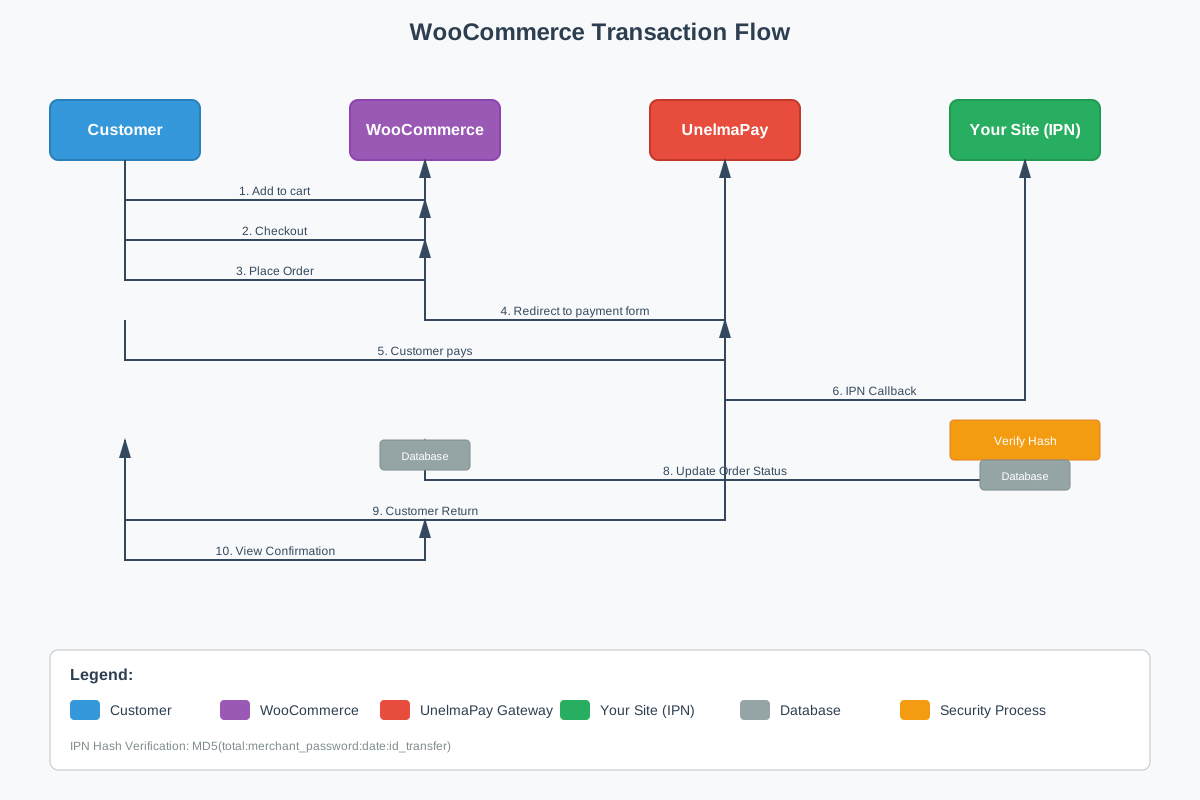
#### Step-by-Step WooCommerce Flow
1. **🛒 Cart & Checkout**
```
Customer → WooCommerce: Adds products to cart
Customer → WooCommerce: Proceeds to checkout
Customer → WooCommerce: Selects UnelmaPay payment method
Customer → WooCommerce: Clicks "Place Order"
```
2. **📝 Order Creation**
```
WooCommerce → Database: Creates order (Status: Pending)
WooCommerce → UnelmaPay: Redirect to payment form
Data sent: merchant_id, amount, order_id, return_url, notify_url
```
3. **💳 Payment Processing**
```
Customer → UnelmaPay: Enters payment details
Customer → UnelmaPay: Confirms payment
UnelmaPay → Payment Gateway: Processes transaction
```
4. **🔄 IPN Callback**
```
UnelmaPay → Your Site: Sends IPN callback
Your Site → Database: Verifies hash signature
Your Site → WooCommerce: Updates order status
Status: Pending → Processing/Completed
```
5. **🔙 Customer Return**
```
UnelmaPay → Customer: Redirects back to site
Customer → WooCommerce: Views order confirmation
```
---
### Standalone Mode Flow
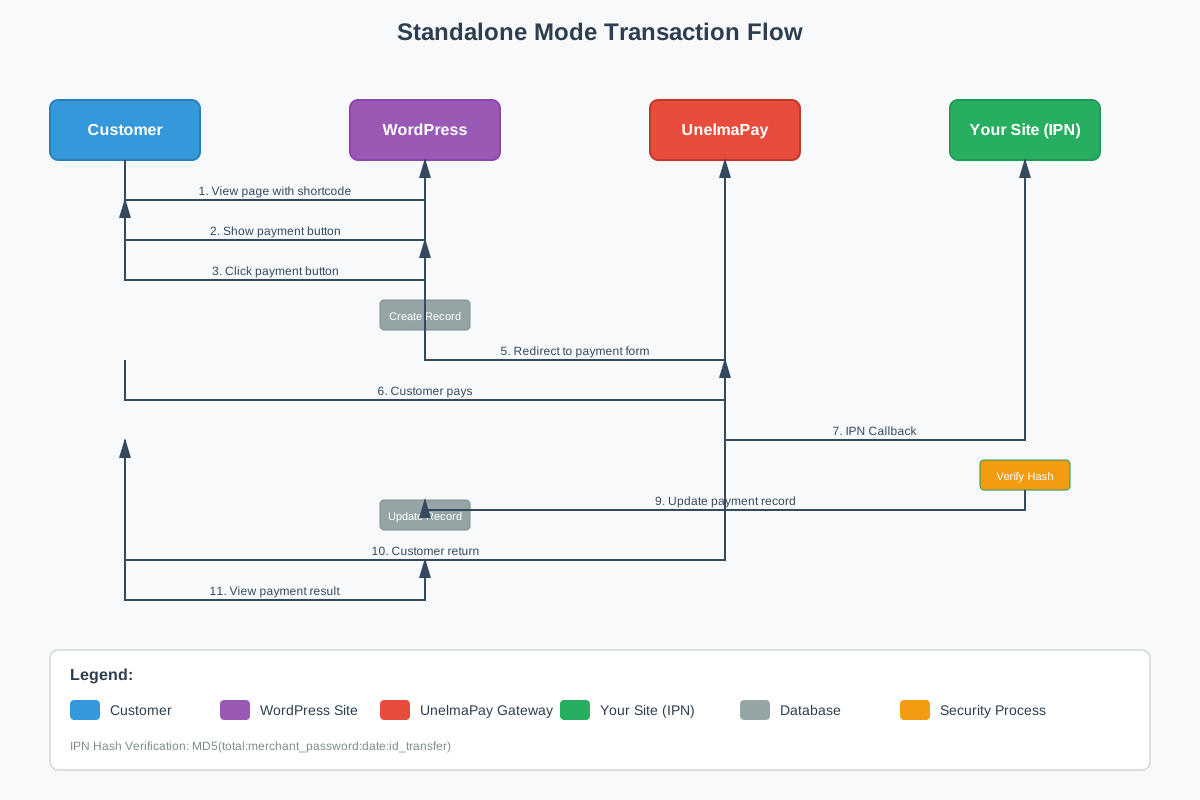
#### Step-by-Step Standalone Flow
1. **📄 Payment Button Display**
```
Customer → WordPress: Views page with shortcode
WordPress → Customer: Shows "Pay with UnelmaPay" button
```
2. **🎯 Payment Initiation**
```
Customer → WordPress: Clicks payment button
WordPress → Database: Creates payment record
WordPress → UnelmaPay: Redirect to payment form
Data sent: amount, title, description, payment_id
```
3. **💳 Payment Processing**
```
Customer → UnelmaPay: Enters payment details
Customer → UnelmaPay: Completes payment
UnelmaPay → Payment Gateway: Processes transaction
```
4. **🔄 IPN Processing**
```
UnelmaPay → Your Site: Sends IPN callback
Your Site → Database: Verifies hash signature
Your Site → Database: Updates payment record
Status: Pending → Completed
```
5. **🔙 Return Handling**
```
UnelmaPay → Customer: Redirects back to site
Customer → WordPress: Views payment result
```
---
### 📊 Technical Details
#### WooCommerce Mode Data Flow
**Payment Form Fields:**
```php
merchant: YOUR_MERCHANT_ID
item_name: Order #12345
amount: 2500.00
currency: debit_base
custom: 12345
return_url: https://yoursite.com/thank-you/
fail_url: https://yoursite.com/payment-failed/
cancel_url: https://yoursite.com/payment-cancelled/
notify_url: https://yoursite.com/wc-api/WC_Gateway_UnelmaPay
```
**IPN Callback Data:**
```php
total: 2500.00
merchant_password: YOUR_MERCHANT_PASSWORD
date: 2024-01-04 16:30:00
id_transfer: TXN123456789
```
#### Standalone Mode Data Flow
**Payment Form Fields:**
```php
merchant: YOUR_MERCHANT_ID
item_name: Tour Package
amount: 2500.00
currency: debit_base
custom: pay_1234567890abcdef
return_url: https://yoursite.com/payment-success/
fail_url: https://yoursite.com/payment-failed/
cancel_url: https://yoursite.com/payment-cancelled/
notify_url: https://yoursite.com/?unelmapay_ipn=1
```
**Payment Record:**
- Unique ID: `pay_1234567890abcdef`
- Status: Pending → Completed
- Transaction ID: `TXN123456789`
### Security & Verification
#### IPN Hash Verification
All IPN callbacks are verified using MD5 hash:
```php
$calculated_hash = md5($total . ':' . $merchant_password . ':' . $date . ':' . $id_transfer);
$received_hash = $_POST['hash'];
if ($calculated_hash === $received_hash) {
// Valid IPN - process payment
update_payment_status($order_id, 'completed');
} else {
// Invalid IPN - log and reject
log_error('Invalid IPN hash received');
}
```
#### Security Measures
- ✅ **Hash Verification**: All IPNs verified before processing
- ✅ **HTTPS Required**: Production requires SSL certificate
- ✅ **Password Protection**: Merchant password never exposed
- ✅ **Unique Payment IDs**: Prevent duplicate processing
- ✅ **IPN Logging**: All callbacks logged for audit
### Error Handling
#### Common Scenarios
1. **Hash Verification Failed**
- Log error with received vs calculated hash
- Do not update order status
- Notify admin via debug logs
2. **IPN Not Received**
- Order remains in "Pending" status
- Manual verification required
- Check UnelmaPay dashboard
3. **Payment Timeout**
- Customer redirected back after timeout
- Order status remains "Pending"
- Customer can retry payment
4. **Network Issues**
- IPN retry mechanism by UnelmaPay
- Plugin handles duplicate IPNs gracefully
- Status updated only once per payment
### Data Flow Summary
| Step | WooCommerce | Standalone | Data Sent |
|------|-------------|------------|-----------|
| 1. Initiation | Order created | Payment record created | Order/Payment ID |
| 2. Redirect | Payment form | Payment form | Amount, merchant, URLs |
| 3. Payment | Customer pays | Customer pays | Payment details |
| 4. IPN | Order status update | Payment record update | Transaction data |
| 5. Return | Thank you page | Custom page | Payment result |
### Debug Information
Enable debug mode to track transaction flow:
1. **Payment Form Generation**: Logs form data and URLs
2. **IPN Reception**: Logs received callback data
3. **Hash Verification**: Shows calculated vs received hash
4. **Status Updates**: Records order/payment status changes
5. **Error Events**: Captures any processing errors
View logs at: **UnelmaPay → Debug Logs**
## 🔍 Payment Tracking
### View All Payments
Navigate to: **UnelmaPay → All Payments**
View payment list with columns:
- Payment ID
- Amount (NPR)
- Status (Completed/Pending)
- Transaction ID
- Date
### View Payment Details
Click on any payment to see:
- Payment ID
- Item Name
- Description
- Amount in NPR
- Status (color-coded)
- Transaction ID
- Created At
- Completed At
## 📊 Debug Logs
Navigate to: **UnelmaPay → Debug Logs**
Features:
- View last 100 log entries
- Filter only UnelmaPay logs
- Clear logs button
- Download logs as text file
- Shows what gets logged
Logged events:
- Payment form generation
- IPN callback requests
- Hash verification results
- Payment status updates
- Error messages
## 🔒 Security
### IPN Verification
The plugin implements secure IPN verification using MD5 hash:
```php
hash = MD5(total:merchant_password:date:id_transfer)
```
All IPN requests are verified before processing to prevent fraud.
### Best Practices
- ✅ Always use HTTPS in production
- ✅ Keep merchant password secure
- ✅ Test in sandbox before going live
- ✅ Monitor debug logs initially
- ✅ Use strong WordPress admin passwords
- ✅ Keep WordPress and plugins updated
## 🛠️ Troubleshooting
### Orders not completing automatically
**Check:**
- IPN URL is accessible: `https://yoursite.com/?unelmapay_ipn=1`
- Firewall not blocking UnelmaPay requests
- Merchant password is correct
- Debug logs for errors
### Payment button not showing logo
**Solution:**
- Logo is embedded as inline SVG
- Should display automatically
- Clear browser cache if needed
### Sandbox mode not working
**Solution:**
- Uncheck sandbox mode checkbox
- Save settings
- Checkbox now properly saves unchecked state
- Should redirect to unelmapay.com.np
### Hash verification failing
**Check:**
- Merchant password matches exactly (case-sensitive)
- No extra spaces in password field
- Check debug logs for hash comparison
## 💻 Development
### File Structure
```
unelmapay-wordpress-woocommerce/
├── assets/
│ ├── css/
│ │ └── unelmapay.css # Button styling
│ └── images/
│ └── unelmapay-logo.svg # Logo file
├── includes/
│ ├── class-unelmapay-core.php # Standalone mode logic
│ └── class-wc-gateway-unelmapay.php # WooCommerce integration
├── languages/
│ └── unelmapay-woocommerce.pot # Translation template
├── unelmapay-woocommerce.php # Main plugin file
├── uninstall.php # Cleanup on uninstall
├── README.md # This file
├── CONFIGURATION_GUIDE.md # Detailed config guide
├── STANDALONE_MODE.md # Standalone usage guide
└── TESTING.md # Testing instructions
```
### Contributing
1. Fork the repository
2. Create a feature branch: `git checkout -b feature/my-feature`
3. Commit changes: `git commit -am 'Add new feature'`
4. Push to branch: `git push origin feature/my-feature`
5. Submit a Pull Request
### Coding Standards
- Follow WordPress Coding Standards
- Use proper escaping and sanitization
- Add inline documentation
- Test in both standalone and WooCommerce modes
## 📚 Documentation
- [Configuration Guide](CONFIGURATION_GUIDE.md) - Detailed configuration instructions
- [Standalone Mode Guide](STANDALONE_MODE.md) - Using without WooCommerce
- [Testing Guide](TESTING.md) - Complete testing procedures
- [UnelmaPay API Docs](https://docs.unelmapay.com/) - Official API documentation
## 🌐 API Endpoints
### Sandbox (Testing)
```
https://dev.unelmapay.com/sci/form
```
### Production
```
https://unelmapay.com.np/sci/form
```
### IPN Callback
```
https://yoursite.com/?unelmapay_ipn=1
```
## 💰 Currency
All payments are processed in **NPR (Nepalese Rupee)**, which is the base currency in the UnelmaPay system.
## 📞 Support
- **Email**: support@unelmapay.com
- **Website**: https://unelmapay.com.np
- **Documentation**: https://docs.unelmapay.com/
- **GitHub Issues**: https://github.com/unelmacoin/unelmapay-wordpress-woocommerce/issues
## 📝 Changelog
### Version 2.0.0 (Latest)
- ✅ Complete rewrite for modern WordPress/WooCommerce
- ✅ Dual mode support (Standalone + WooCommerce)
- ✅ Beautiful branded buttons with UnelmaPay logo
- ✅ Enhanced payment tracking with custom columns
- ✅ Debug logs viewer with filter and download
- ✅ Additional merchant configuration fields
- ✅ Custom success/fail/cancel URLs
- ✅ Fixed sandbox mode checkbox bug
- ✅ Inline SVG logo for guaranteed display
- ✅ NPR currency information throughout
- ✅ Improved IPN handling
- ✅ Better error handling and logging
## 📄 License
This plugin is licensed under the GPL v2 or later.
```
This program is free software; you can redistribute it and/or modify
it under the terms of the GNU General Public License as published by
the Free Software Foundation; either version 2 of the License, or
(at your option) any later version.
This program is distributed in the hope that it will be useful,
but WITHOUT ANY WARRANTY; without even the implied warranty of
MERCHANTABILITY or FITNESS FOR A PARTICULAR PURPOSE. See the
GNU General Public License for more details.
```
## 🙏 Credits
Developed and maintained by UnelmaPay Team.
---
**Made with ❤️ for the WordPress community**