https://github.com/unicodeveloper/supplement-research
Do a comprehensive research (from searching clinical databases, analyzing scientific studies) on supplements to improve your health immensely. Health is wealth!
https://github.com/unicodeveloper/supplement-research
ai-search-engine deepresearch health health-ai research search-engine supplements supplements-research valyu
Last synced: 7 months ago
JSON representation
Do a comprehensive research (from searching clinical databases, analyzing scientific studies) on supplements to improve your health immensely. Health is wealth!
- Host: GitHub
- URL: https://github.com/unicodeveloper/supplement-research
- Owner: unicodeveloper
- Created: 2026-01-12T10:22:05.000Z (7 months ago)
- Default Branch: main
- Last Pushed: 2026-01-12T11:07:06.000Z (7 months ago)
- Last Synced: 2026-01-12T19:10:21.201Z (7 months ago)
- Topics: ai-search-engine, deepresearch, health, health-ai, research, search-engine, supplements, supplements-research, valyu
- Language: TypeScript
- Homepage: https://supplement-research.up.railway.app
- Size: 187 KB
- Stars: 6
- Watchers: 0
- Forks: 0
- Open Issues: 0
-
Metadata Files:
- Readme: README.md
Awesome Lists containing this project
README
# Supplement Research
An AI-powered supplement research tool built with Next.js and [Valyu Deep Research API](https://docs.valyu.ai/guides/deepresearch).
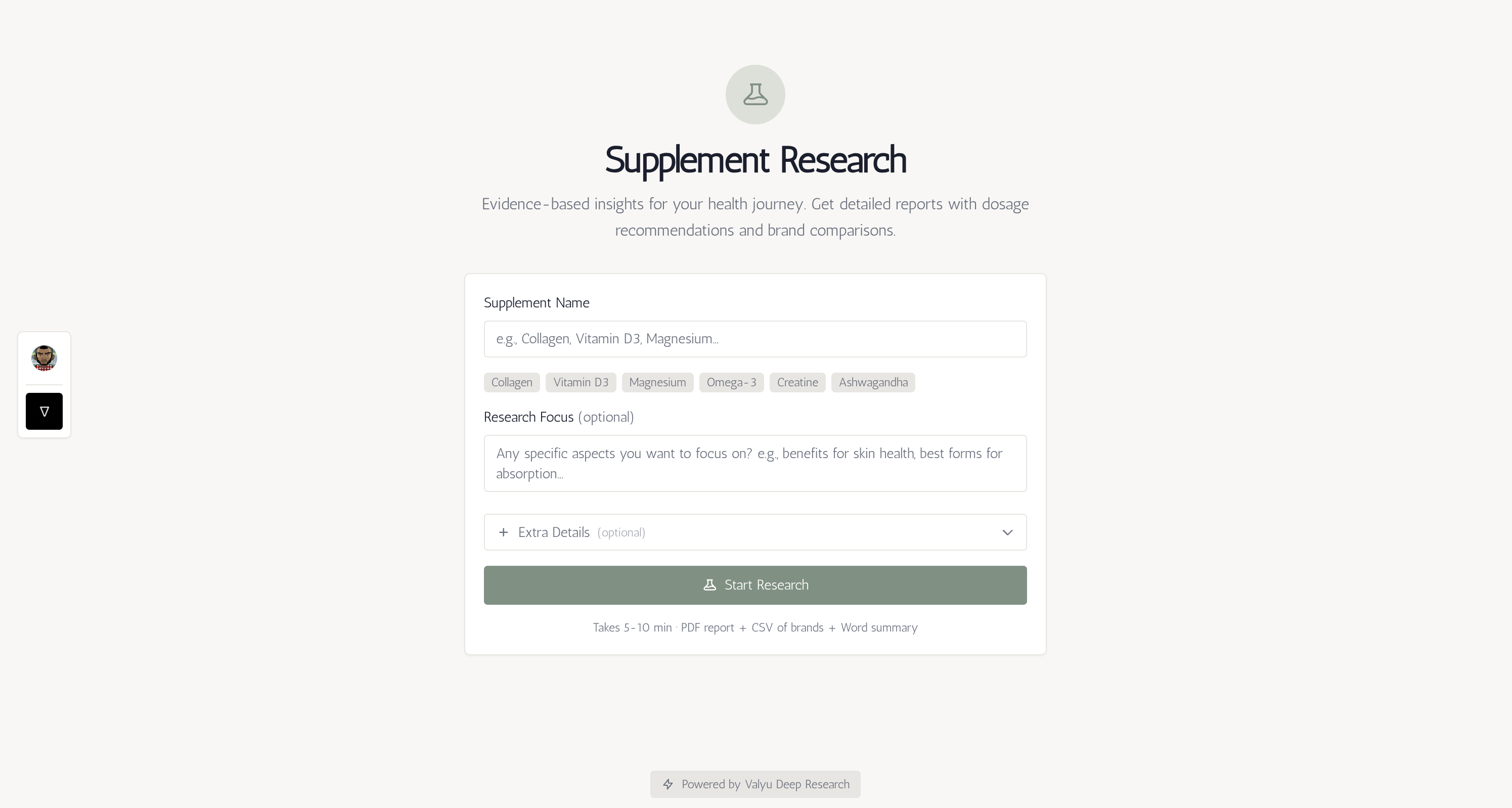
Get comprehensive, evidence-based research on any supplement including detailed reports, brand comparisons, and dosage recommendations from trusted sources.
Try it [live now!](https://supplement-research.up.railway.app)
## Features
- **Deep Research**: Leverages Valyu's AI to search multiple sources and analyze scientific studies
- **Comprehensive Reports**: Detailed analysis including benefits, dosage, side effects, drug interactions, and more
- **Brand Comparison CSV**: Downloadable spreadsheet comparing brands, prices, and product details
- **Summary Document**: One-page Word doc with key facts about the supplement
- **Beautiful UI**: Modern, responsive interface with sage-garden theme
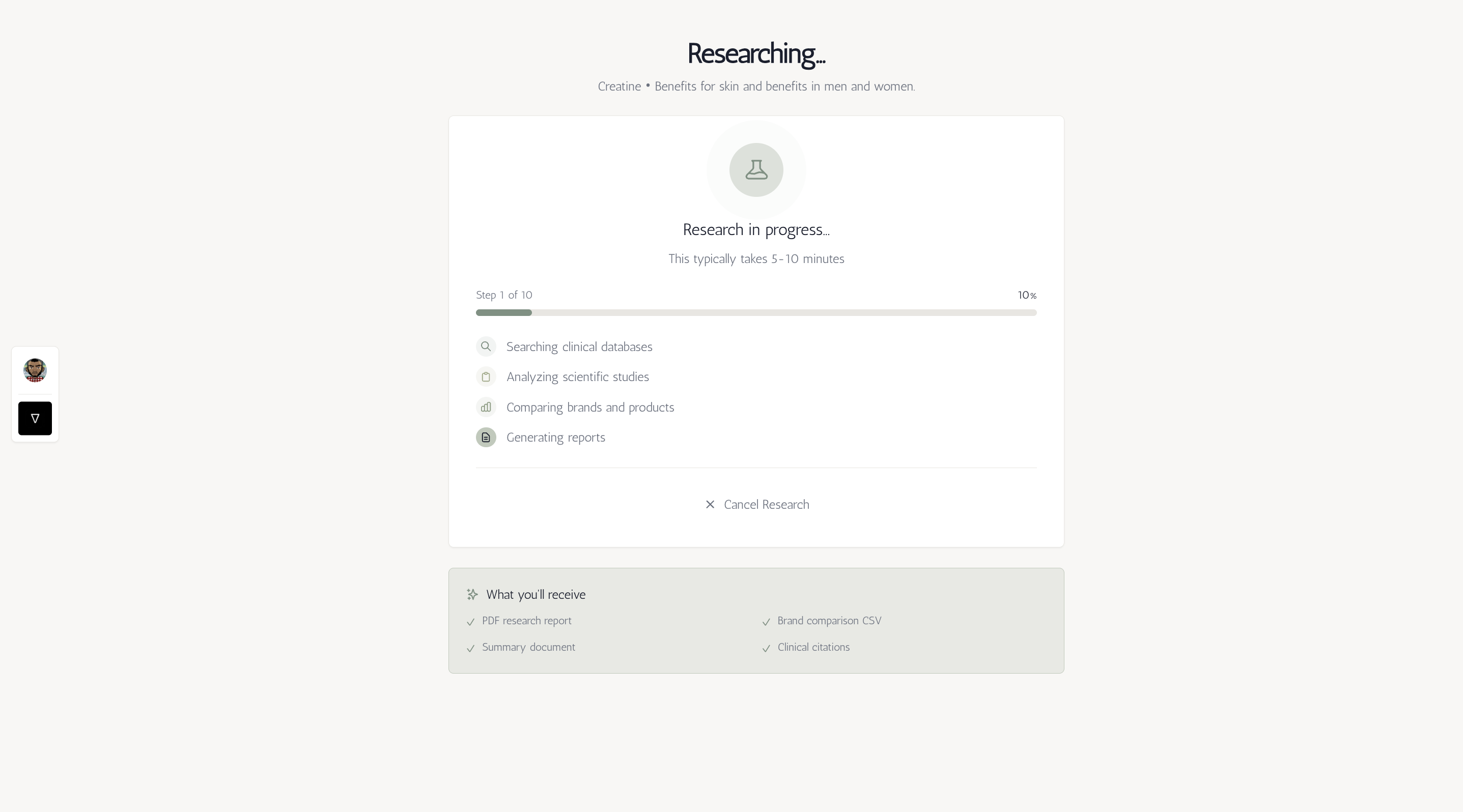
- **Real-time Updates**: Live progress tracking with step-by-step status updates (5-10 minutes)
- **Progress Indicators**: Visual progress bar showing current step and completion percentage
- **Mobile Friendly**: Fully responsive design that adapts to all screen sizes
- **PDF Export**: Download research reports as PDF (auto-generated with results)
- **Source Citations**: All research backed by verifiable scientific sources
## Quick Start (Self-Hosted)
Self-hosted mode is the simplest way to run the app. You only need a Valyu API key.
### Prerequisites
- Node.js 20+ installed
- A Valyu API key (get one at [Valyu Platform](https://platform.valyu.ai))
### Steps
1. **Clone and install dependencies**:
```bash
pnpm install
```
2. **Set up environment variables**:
Create a `.env.local` file in the root directory:
```bash
VALYU_API_KEY=your_valyu_api_key_here
```
That's it! No other configuration needed.
3. **Run the development server**:
```bash
pnpm run dev
```
4. **Open your browser**:
Navigate to [http://localhost:3000](http://localhost:3000)
## Valyu Platform Mode (Optional)
For production deployments on the Valyu platform, you can enable OAuth authentication. In this mode, users sign in with their Valyu account and API usage is billed to their account.
### Configuration
Set the following environment variables:
```bash
# Enable Valyu platform mode
NEXT_PUBLIC_APP_MODE=valyu
# OAuth credentials (contact contact@valyu.ai)
NEXT_PUBLIC_VALYU_AUTH_URL=https://auth.valyu.ai
NEXT_PUBLIC_VALYU_CLIENT_ID=your_client_id
VALYU_CLIENT_SECRET=your_client_secret
VALYU_APP_URL=https://platform.valyu.ai
NEXT_PUBLIC_REDIRECT_URI=http://localhost:3000/auth/valyu/callback
```
### Mode Comparison
| Feature | Self-Hosted | Valyu Platform |
|---------|-------------|----------------|
| API Key Required | Yes (server-side) | No |
| User Sign-in | Not required | Required |
| Billing | Your API key | User's Valyu account |
| Best For | Personal/team use | Public deployments |
## How to Use
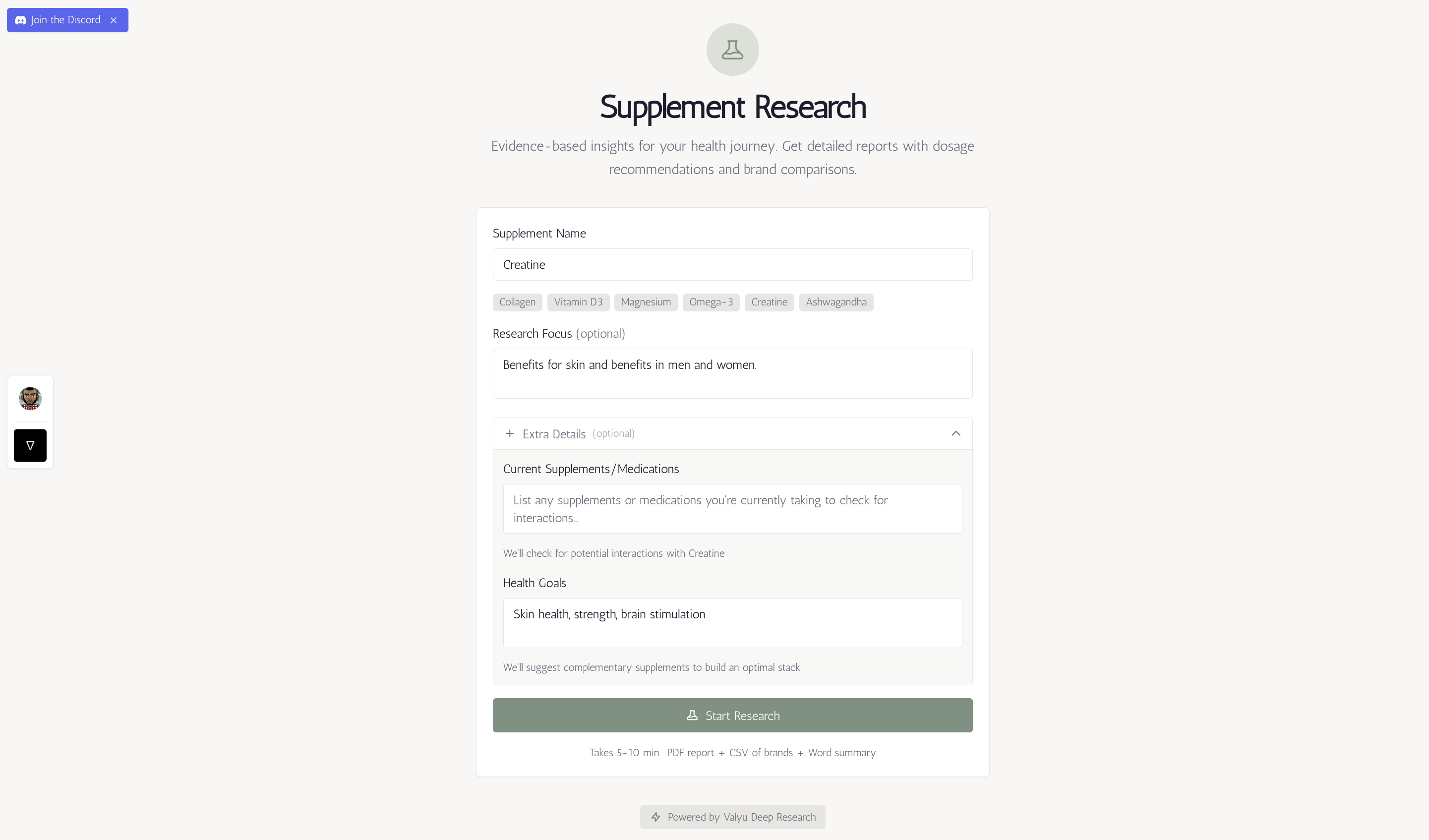
1. **Enter Supplement Name** (Left Panel): Type the supplement you want to research (e.g., "Collagen", "Vitamin D3", "Magnesium")
2. **Add Focus Areas** (Optional): Specify any particular aspects you want to focus on
3. **Start Research**: Click "Research Supplement"
4. **Watch Progress** (Right Panel): Real-time progress updates appear immediately
- See current step and percentage complete
- Visual progress bar shows research status
- Live status messages keep you informed
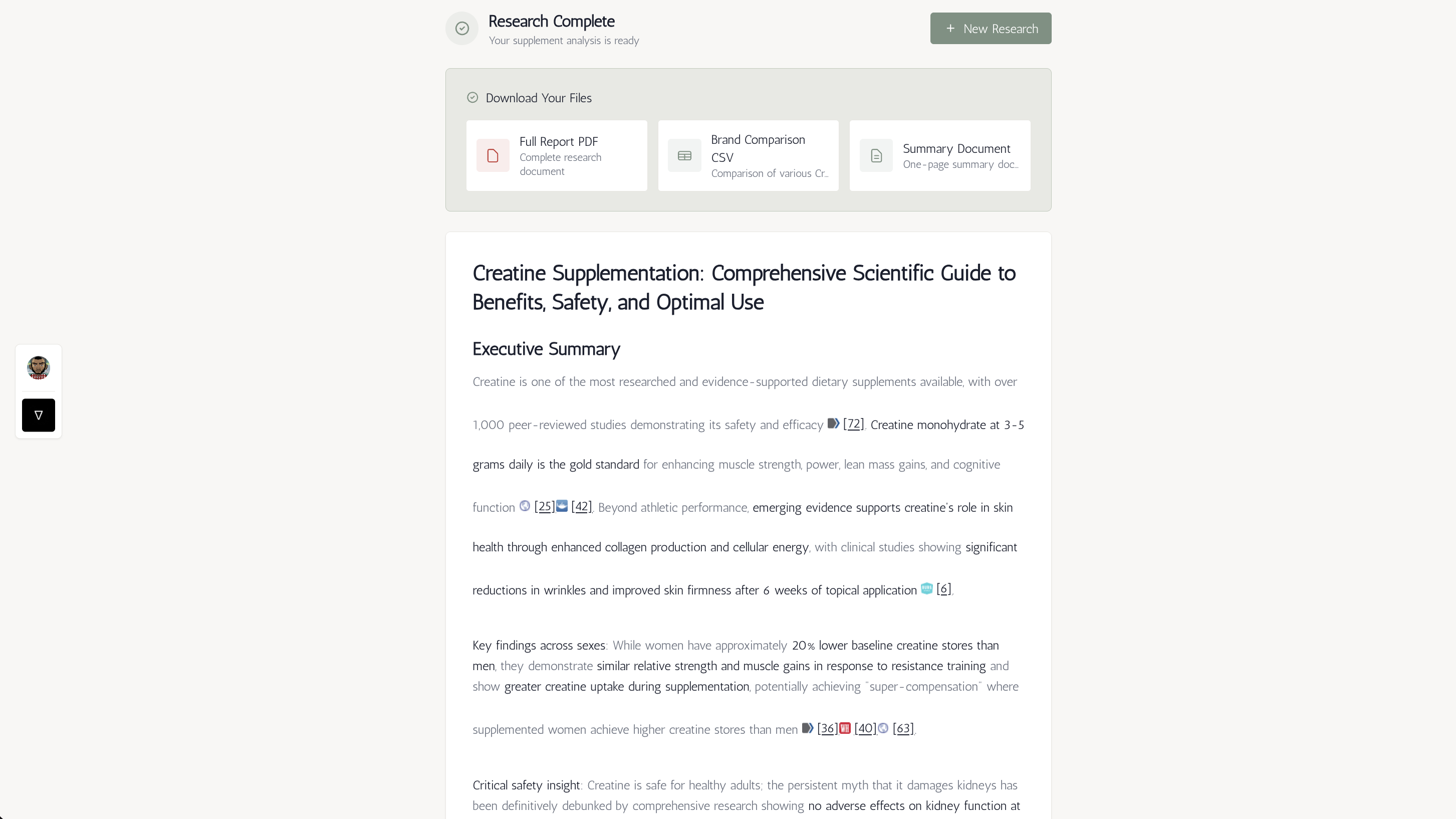
5. **Download Your Files**: When complete, download:
- **PDF Report**: Complete research document
- **Brand Comparison CSV**: Spreadsheet of brands and prices
- **Summary Document**: One-page Word doc with key facts
## Deliverables
The research generates three downloadable files:
1. **Full Report (PDF)**: Comprehensive analysis including:
- What the supplement is and how it works
- Scientific evidence for benefits
- Recommended dosage and timing
- Different forms and bioavailability
- Side effects and contraindications
- Drug interactions
- Quality markers to look for
2. **Brand Comparison (CSV)**: Spreadsheet with columns:
- Brand name
- Product name
- Price and price per serving
- Dosage
- Form (capsule/powder/liquid)
- Third-party testing status
- Rating
- Where to buy
3. **Summary Document (DOCX)**: One-page summary covering:
- What it is
- Key benefits
- Recommended dosage
- Best time to take
- Potential side effects
- Who should avoid it
- Drug interactions
## Project Structure
```
app/
├── api/
│ └── supplement-research/
│ ├── route.ts # API endpoint for creating research tasks
│ ├── cancel/
│ │ └── route.ts # API endpoint for cancelling research tasks
│ └── status/
│ └── route.ts # API endpoint for checking task status and progress
├── components/
│ ├── SupplementResearchForm.tsx # Input form with supplement examples
│ ├── ResearchResults.tsx # Results display with deliverables download
│ └── Sidebar.tsx # Navigation sidebar component
├── page.tsx # Main homepage with side-by-side layout
├── layout.tsx # Root layout
└── globals.css # Global styles with sage-garden theme
lib/
└── mode.ts # App mode detection utilities
```
## API Configuration
The deep research API is configured in [route.ts](app/api/supplement-research/route.ts):
- **Model**: `fast` (~5 min) - Can change to `standard` (10-20 min) or `heavy` (up to 90 min)
- **Architecture**: Asynchronous with client-side polling (no server timeouts!)
- **Poll Interval**: Checks status every 10 seconds
- **Output Formats**: Markdown, PDF, CSV, and DOCX
- **Deliverables**: Brand comparison CSV and summary document
- **Progress Tracking**: Real-time step-by-step progress updates
- **Max Duration**: No limit - polling continues until completion
## Deployment
### Deploy on Railway
1. Push your code to GitHub
2. Create a new project on [Railway](https://railway.app)
3. Click "Deploy from GitHub repo" and select your repository
4. Add your `VALYU_API_KEY` environment variable in the Variables tab
5. Railway will auto-detect Next.js and deploy!
**Note**: Railway's free tier works great for this app. The client-side polling architecture means no server timeout issues.
## Learn More
- [Valyu Deep Research Documentation](https://docs.valyu.ai/guides/deepresearch)
- [Next.js Documentation](https://nextjs.org/docs)
- [Tailwind CSS](https://tailwindcss.com/docs)
## Tech Stack
- **Framework**: Next.js 16 (App Router)
- **Language**: TypeScript
- **Styling**: Tailwind CSS 4 with Typography plugin (sage-garden theme)
- **Markdown Rendering**: react-markdown with GitHub Flavored Markdown
- **AI Research**: Valyu Deep Research API with deliverables
- **Deployment**: Railway
## Key Dependencies
- `valyu-js` - Official Valyu SDK for deep research with deliverables
- `react-markdown` - Beautiful markdown rendering
- `remark-gfm` - GitHub Flavored Markdown support
- `@tailwindcss/typography` - Typography styles for prose content