https://github.com/unlayer/elements
Write once in React. Render emails, web pages, and PDFs from the same component tree.
https://github.com/unlayer/elements
component-library developer-tools email-templates nextjs pdf-generation react react-email typescript
Last synced: 17 days ago
JSON representation
Write once in React. Render emails, web pages, and PDFs from the same component tree.
- Host: GitHub
- URL: https://github.com/unlayer/elements
- Owner: unlayer
- License: mit
- Created: 2025-08-25T16:24:19.000Z (11 months ago)
- Default Branch: main
- Last Pushed: 2026-06-24T18:23:34.000Z (20 days ago)
- Last Synced: 2026-06-24T19:03:10.814Z (20 days ago)
- Topics: component-library, developer-tools, email-templates, nextjs, pdf-generation, react, react-email, typescript
- Language: TypeScript
- Homepage: https://unlayer.com/elements
- Size: 18.6 MB
- Stars: 17
- Watchers: 1
- Forks: 0
- Open Issues: 8
-
Metadata Files:
- Readme: README.md
- Contributing: CONTRIBUTING.md
- License: LICENSE
Awesome Lists containing this project
README

Unlayer Elements
Write once in React. Render emails, web pages, and PDFs from the same component tree.



---

Unlayer Elements is an open-source React component library that lets you build content once and render it across three output modes:
- **Email** → Outlook, Gmail, Yahoo, Apple Mail
- **Web** → Responsive pages and embedded experiences
- **Document** → Print-ready HTML for PDF generation
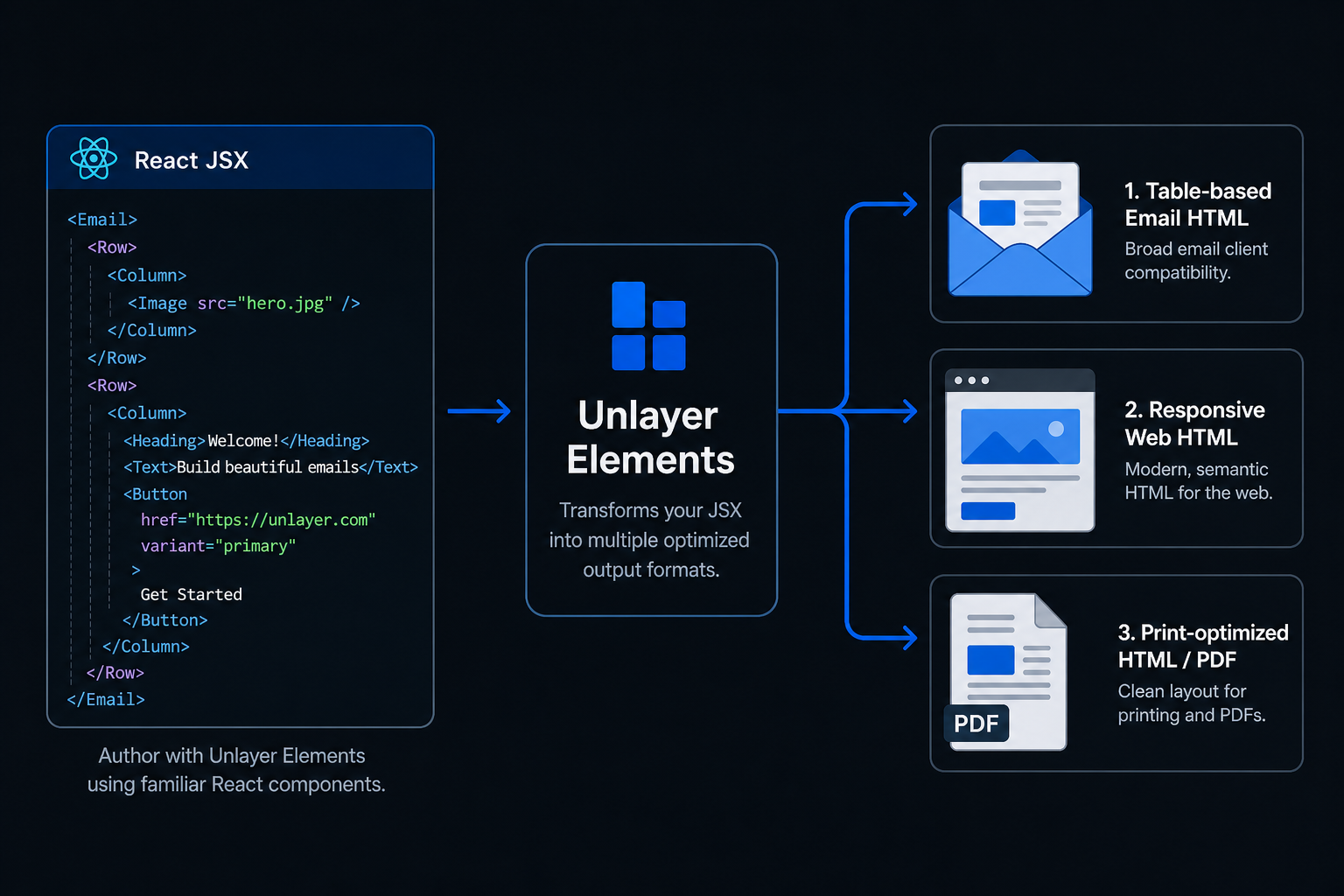
Elements is built and maintained by the team behind [Unlayer](https://unlayer.com), the content creation platform used by thousands of companies to power email, page, and document experiences inside their products.
## Why Elements?
| Tool | Email | Web | PDF |
|---------------|:-----:|:---:|:---:|
| React Email | ✅ | ❌ | ❌ |
| MJML | ✅ | ❌ | ❌ |
| PDF libraries | ❌ | ❌ | ✅ |
| **Elements** | ✅ | ✅ | ✅ |
Elements is designed for teams that need to generate email, web, and document experiences from a single React codebase.
## Quick Start
```bash
npm install @unlayer/react-elements
```
```tsx
import {
Email, Row, Column, ColumnLayouts,
Heading, Paragraph, Button, renderToHtml
} from '@unlayer/react-elements';
function WelcomeEmail() {
return (
Welcome!
Get Started
);
}
// Render to a clean HTML string — no React hydration markers
const html = renderToHtml();
```
## Features
### One Component Tree
Build content once and render it as email, web, or document. Share components, styling, and content across all three output modes from the same React codebase.
### React Developer Workflow
Works with React, Next.js, Remix, and Server Components. Use familiar JSX patterns and existing frontend workflows without learning a new templating language.
### Production Output
Generates email-safe HTML, responsive web HTML, and print-ready HTML for PDF generation — optimized output for each destination without maintaining separate implementations.
### Visual Builder Compatible
Export Unlayer-compatible design JSON with `renderToJson()` for round-tripping between code and the visual editor. Ideal for teams that want the flexibility of code alongside visual editing workflows.
### TypeScript First
Built with TypeScript from the ground up — full type definitions, autocomplete for components and props, and safer development with better IDE support.
### Clean HTML Output
`renderToHtml()` generates production-ready HTML with no React hydration markers, no framework artifacts, and no client-side JavaScript required.
### Lightweight & Tree-Shakeable
~12KB gzipped (under 60KB ESM), tree-shakeable, with zero client-side JavaScript required. Designed for performance-sensitive applications and server-side rendering environments.
## Real-World Use Cases
### Transactional Emails
Build and maintain order confirmations, password resets, and receipts from the same React codebase that powers your application.
### PDF Generation
Generate invoices, contracts, and reports server-side without maintaining a separate PDF system.
### CMS-Driven Content
Render content from a CMS, API, or database into emails, web pages, and documents using a shared component model.
### Email + Web Parity
Publish the same content as an email campaign, a web archive, and a public landing page from a single source of truth.
## Components
| Component | Description |
|-----------|-------------|
| `` | Root wrapper — email-safe HTML (tables for Outlook/Gmail) |
| `` | Root wrapper — responsive web (div + flexbox) |
| `` | Root wrapper — print/PDF optimized |
| `` | Layout container with column layout support |
| `` | Column inside a Row |
| `` | CTA button with hover states and links |
| `` | Heading (h1–h4) |
| `` | Rich text with plain text or HTML content |
| `` | Responsive image with alt text |
| `` | Horizontal separator |
| `` | Social media icon links |
| `` | Navigation menu |
| `` | Data table |
| `` | YouTube/Vimeo embed |
| `` | Custom HTML passthrough |
## Structure
Components follow a strict hierarchy:
```
← sets render mode
← layout container
← must match layout column count
← content components
```
## Column Layouts
```tsx
import { Row, Column, ColumnLayouts } from '@unlayer/react-elements';
// Each Row must contain the matching number of children.
{/* [1] → 100% */}
{/* content */}
{/* [1,1] → 50% + 50% */}
{/* content */}
{/* content */}
{/* [2,1] → 67% + 33% */}
{/* content */}
{/* content */}
{/* [1,1,1] → 33% each */}
{/* content */}
{/* content */}
{/* content */}
{/* [1,1,1,1] → 25% each */}
{/* content */}
{/* content */}
{/* content */}
{/* content */}
{/* custom ratio */}
{/* content */}
{/* content */}
```
## Documentation
For the full API reference, component props, design patterns, and common mistakes, see the **[React package documentation](./packages/react/README.md)**.
## Packages
| Package | Description | Published |
|---------|-------------|-----------|
| [`@unlayer/react-elements`](./packages/react) | React components and renderers | [](https://www.npmjs.com/package/@unlayer/react-elements) |
| [`@unlayer-internal/shared-elements`](./packages/shared) | Framework-agnostic shared logic | Internal |
| [`@unlayer/elements-demo`](./packages/demo) | Demo application | — |
## Development
```bash
# Prerequisites: Node.js (see .nvmrc), pnpm 9+
# Install dependencies
pnpm install
# Build all packages
pnpm build
# Run tests
pnpm test
# Run tests with coverage
pnpm test:coverage
# Launch Storybook
pnpm storybook:hub
```
## Contributing
See [CONTRIBUTING.md](./CONTRIBUTING.md) for setup instructions and guidelines.
## License
[MIT](./LICENSE) — Unlayer, Inc.