https://github.com/urbanware-org/msgui
Simple graphical front end for sending messages via 'msg.exe'
https://github.com/urbanware-org/msgui
message msg send server windows
Last synced: 5 months ago
JSON representation
Simple graphical front end for sending messages via 'msg.exe'
- Host: GitHub
- URL: https://github.com/urbanware-org/msgui
- Owner: urbanware-org
- License: mit
- Created: 2017-11-09T18:54:46.000Z (over 8 years ago)
- Default Branch: main
- Last Pushed: 2025-01-20T18:15:41.000Z (over 1 year ago)
- Last Synced: 2025-01-20T19:25:14.071Z (over 1 year ago)
- Topics: message, msg, send, server, windows
- Language: C#
- Homepage:
- Size: 872 KB
- Stars: 7
- Watchers: 1
- Forks: 0
- Open Issues: 2
-
Metadata Files:
- Readme: README.md
- License: LICENSE.md
Awesome Lists containing this project
README
# *MsgUI* 
**Table of contents**
* [Definition](#definition)
* [Details](#details)
* [Environment](#environment)
* [Requirements](#requirements)
* [Contact](#contact)
* [Useless facts](#useless-facts)
----

## Definition
Simple graphical front end for sending messages via `msg.exe` on *Windows* systems.
[Top](#msgui-)
## Details
Initially, *MsgUI* was developed for administrators of a terminal server to notify either all or a specific user of a certain event.
Even though, administrators should be able to use the command-line or the *PowerShell*, this program simplifies the notification process.
As you can see on the right, the project is quite elementary and, as such, not a complete alternative for the command-line use of `msg.exe`.
Notice that `msg.exe` is not included in all *Windows* editions. Details can be found [below](#requirements).
[Top](#msgui-)
## Environment
Even though *MsgUI* uses `msg.exe` on every *Windows* system, there are differences how the message is being displayed depending on the environment used.
### Locked screen with embedded message
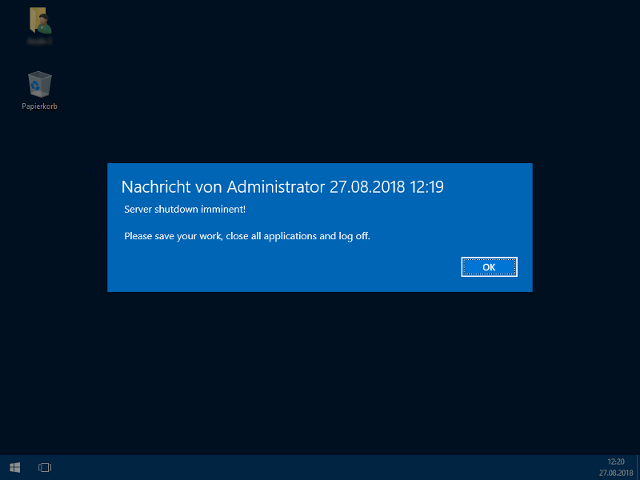 For example, on *Windows Server 2016*, after the message has been sent, the screen of the recipients gets darkened, sort of locked and the message is displayed in the center of the screen.
The user must confirm the message to continue working (if no delay is set to automatically hide it again).
### Movable message box
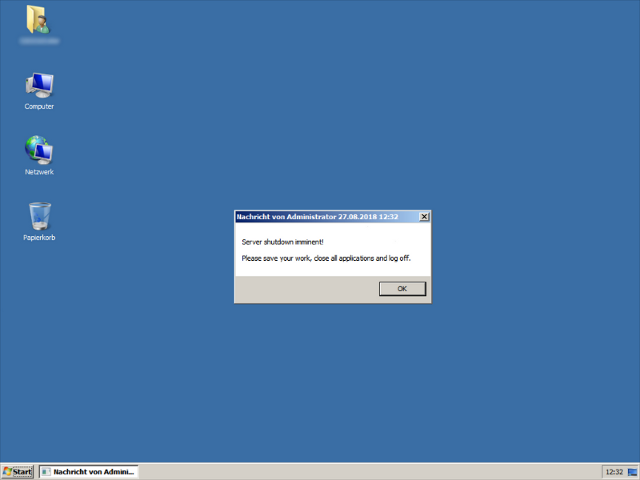 For example, on *Windows Server 2008 R2*, a simple message box appears that can be moved.
Nevertheless, it is always on top (in the foreground) and cannot be minimized.
[Top](#msgui-)
## Requirements
### Binary
There are only two requirements in order to use the program.
> [!NOTE]
> The `msg.exe` binary is only included in *Windows Professional*, *Windows Enterprise* and *Windows Educational* (e.g. *Windows 11 SE*) editions as well as *Windows Server* products in general.
* *Microsoft Windows 7* and above or alternatively *Microsoft Windows Server 2003* and above
* *Microsoft .NET Framework* 4.5 (or higher)
### Source code
The solution file requires at least *Microsoft Visual Studio 2012*. The initially uploaded binary has been compiled using *Visual Studio 2015 Community Edition*.
Feel free to fork and modify!
[Top](#msgui-)
## Contact
Any suggestions, questions, bugs to report or feedback to give?
You can contact me by sending an email to [dev@urbanware.org](mailto:dev@urbanware.org) or by opening a *GitHub* issue (which I would prefer if you have a *GitHub* account).
[Top](#msgui-)
## Useless facts
* The first version uploaded on *GitHub* was *MsgUI* 1.1.6.0 built on November 9th, 2017.
* The project name is an abbreviation for ***Msg**.exe Graphical **U**ser **I**nterface* (the second and thus repetitive "G" from "Graphical" was omitted).
[Top](#msgui-)