https://github.com/uriel1998/tasker-weasel
Tasks and profiles for Tasker
https://github.com/uriel1998/tasker-weasel
tasker
Last synced: 12 months ago
JSON representation
Tasks and profiles for Tasker
- Host: GitHub
- URL: https://github.com/uriel1998/tasker-weasel
- Owner: uriel1998
- License: mit
- Created: 2015-06-02T02:46:44.000Z (about 11 years ago)
- Default Branch: master
- Last Pushed: 2019-07-24T17:54:36.000Z (about 7 years ago)
- Last Synced: 2025-02-20T12:38:26.918Z (over 1 year ago)
- Topics: tasker
- Size: 297 KB
- Stars: 24
- Watchers: 3
- Forks: 4
- Open Issues: 0
-
Metadata Files:
- Readme: README.md
- License: LICENSE
Awesome Lists containing this project
README
# tasker-weasel
Tasks and profiles for Tasker
Of course, these all require [Tasker](https://play.google.com/store/apps/details?id=net.dinglisch.android.taskerm&hl=en).
## Contents
1. [License](#1-license)
2. [Timed Wallpapers](#2-timed-wallpapers)
3. [ICE Messages](#3-ice-messages)
4. [Check Net IP](#4-check-net-ip)
5. [Check Local Network Info](#5-check-local-network-info)
6. [Present Network Info To Minimalistic Text](#6-present-network-info-to-minimalistic-text)
***
## 1. License
This project is licensed under the MIT license. For the full license, see `LICENSE`.
## 2. Timed Wallpapers
`TimedWalls.prj.xml`
Dependencies: [Locale/Tasker Twilight Plug-In](https://play.google.com/store/apps/details?id=com.terdelle.twilight&hl=en).
This project sets the backdrop for the launcher to a curated background from
[unsplash.com](https://unsplash.com) based on the time of day.
To use it, *first* create a file (using your favorite file manager) called
`backdrop.jpg` in the root directory of your phone memory. The Twilight plugin
is already set to trigger based on whether it's daytime, nighttime, or twilight
and to pull an appropriate backdrop from one of three collections I've curated:
[Twilight](https://source.unsplash.com/collection/4900660),
[Daytime](https://source.unsplash.com/collection/4900670), or
[Nighttime](https://source.unsplash.com/collection/4900654) using the
simple [Source API](https://source.unsplash.com/) from Unsplash.
You can, of course, substitute your own collections if you like.
* Note: Dawn and Dusk are different triggers, but pull from the same collection.
## 3. ICE Messages
This profile provides a quick way to send a message to your "In Case of
Emergency" contacts quickly. I am currently using [Google Trusted Contacts](https://contacts.google.com/trustedcontacts/)
instead myself, as it's more robust, but it's preserved here for obvious reasons.
Use the text file **icenumbers.txt** to store the phone numbers of your *text* ICE contacts, separated by a | like so:
15555551212|15556661313|15557771414
then tie either ICE task to an event, and it will send a message to all those
contacts with your message and location. The message formats are as follows
(where %LOC is replaced by your location and %BATT% replaced by your battery
percentage):
`Send_ICE_message.tsk.xml`
I need help. Please call, text, or check on me.
I am at http://maps.google.com/maps?z=12&t=m&q=loc%LOC
Battery at %BATT%
`Silent_ICE_message.tsk.xml`
I need help. This is a SILENT alert. Call the authorities, not me.
I am at http://maps.google.com/maps?z=12&t=m&q=loc%LOC
Battery at %BATT%
## 4. Check Net IP
`net.checkip.tsk`
Calls http://checkip.dyndns.org/ . If the response is *anything* that doesn't
make sense, it sets the variable %IPaddy to 0.0.0.0 ; otherwise it will
return %IPaddy with the valid address.
## 5. Check Local Network Info
`net.localnet.info.tsk`
Returns the variable %LocalIP which gives you the local IP address of the
device and %SSID which gives the SSID of the WiFi network you are connected
to. Useful if you've set the particular IP address and want to test that
(along with SSID) to see if you want to perform a task, such as connecting
to a VPN.
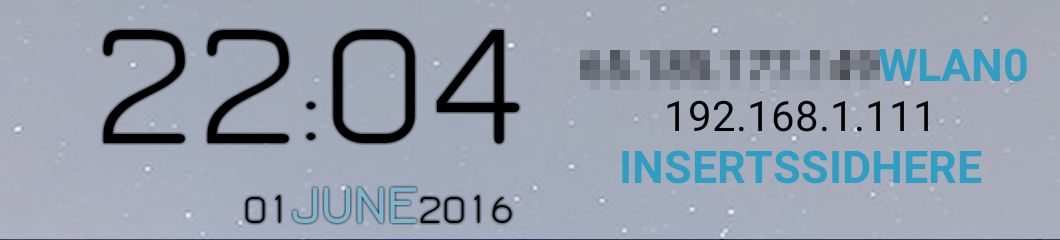
## 6. Present Network Info To Minimalistic Text
Depends: [Minimalistic Text](https://play.google.com/store/apps/details?id=de.devmil.minimaltext&hl=en)
`wifi.prj.xml`
This project provides the usage of `netcfg` and Tasker to check what
interface you're using (cell data, wifi, or VPN) and what your local and
internet IP addresses are, and provides a task to pass them to `Minimalistic
Text` for a conky-like interface for your Android phone.
The variables returned are:
* %Iface
* %LocalIP (your IP on the LAN, duh)
* %SSID (the SSID)
* %IPaddy (your WAN IP)
You can see all that is returned from netcfg by [installing a terminal emulator](https://play.google.com/store/apps/details?id=jackpal.androidterm&hl=en)
and simply running netcfg at the prompt.