https://github.com/urtaq/urparallaxscrollanimator
Show an animation as far as moved scroll while scrolling at the scroll view
https://github.com/urtaq/urparallaxscrollanimator
cocoapods ios lottie-ios parallax-scrolling swift swift3 uitableview
Last synced: 3 months ago
JSON representation
Show an animation as far as moved scroll while scrolling at the scroll view
- Host: GitHub
- URL: https://github.com/urtaq/urparallaxscrollanimator
- Owner: Urtaq
- License: mit
- Created: 2017-03-27T05:42:30.000Z (about 9 years ago)
- Default Branch: master
- Last Pushed: 2018-12-10T02:54:50.000Z (over 7 years ago)
- Last Synced: 2025-04-08T20:03:40.694Z (about 1 year ago)
- Topics: cocoapods, ios, lottie-ios, parallax-scrolling, swift, swift3, uitableview
- Language: Swift
- Size: 35.9 MB
- Stars: 35
- Watchers: 5
- Forks: 9
- Open Issues: 0
-
Metadata Files:
- Readme: README.md
- License: LICENSE
Awesome Lists containing this project
README
# URParallaxScrollAnimator
[](https://swift.org) [](https://cocoapod-badges.herokuapp.com/p/URParallaxScrollAnimator/badge.png) [](https://cocoapods.org/pods/URParallaxScrollAnimator)    [](https://codecov.io/gh/jegumhon/URParallaxScrollAnimator) [](https://github.com/CocoaPods/CocoaPods)
[](https://app.fossa.io/projects/git%2Bgithub.com%2Fjegumhon%2FURParallaxScrollAnimator?ref=badge_shield)
[](https://app.fossa.io/projects/git%2Bgithub.com%2Fjegumhon%2FURParallaxScrollAnimator?ref=badge_large)
## What is this?
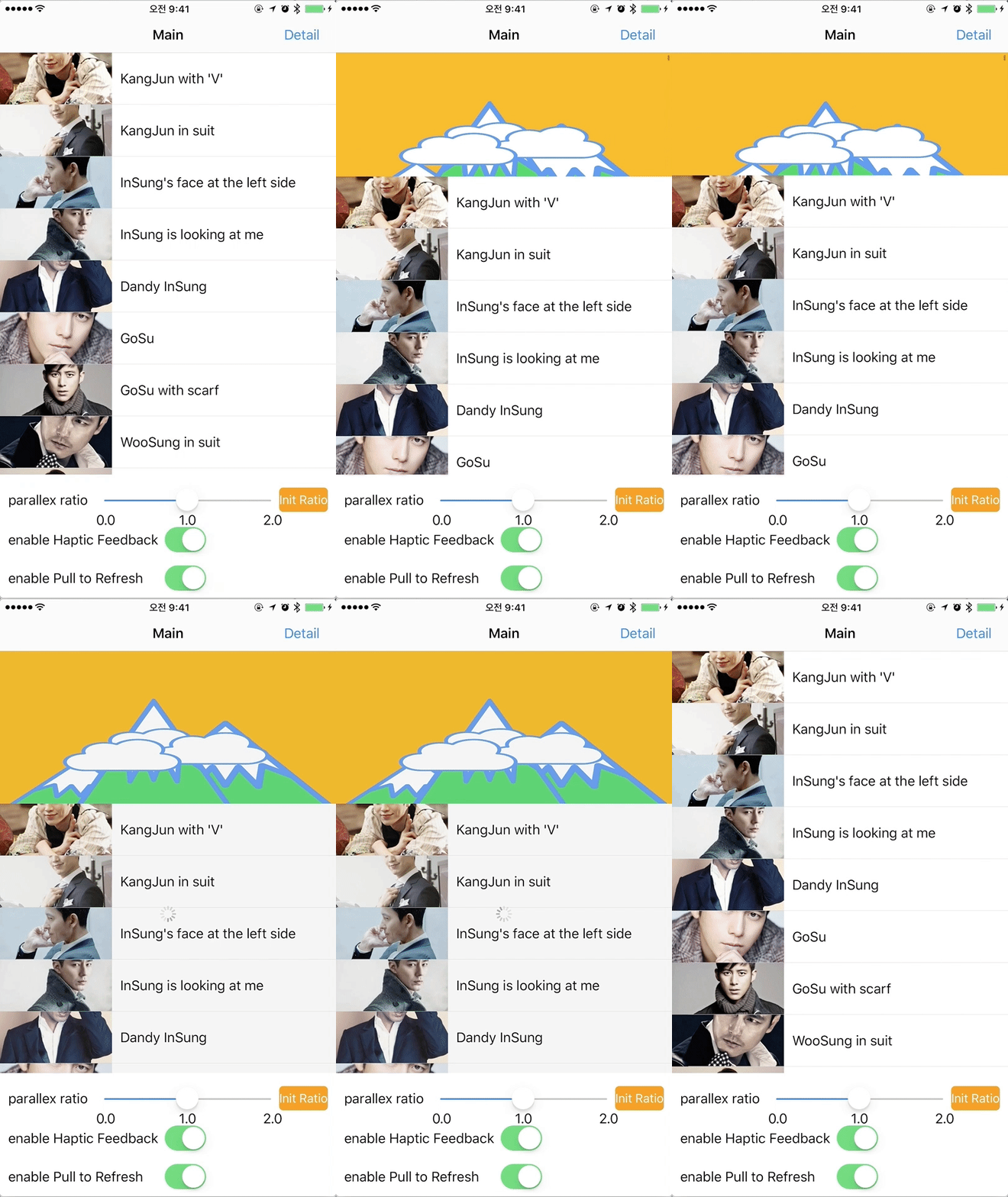
Show an animation as far as moved scroll while scrolling at the scroll view for **Swift3**
This code style is the **`Protocol Oriented Programming`**.
So some protocols are configured to implement the parallax scrolling.
This extends the scrollView to make the parallax scrolling feature on the Run time, using objc_getAssociatedObject.
To show the animation as scrolling, [Lottie](http://airbnb.design/lottie/) is able to be used instead of UIImageView.
In addition to, you can provide the funny factor, [Haptic feedback](https://developer.apple.com/ios/human-interface-guidelines/interaction/feedback/).
The haptic feedback is provided by scrolling down.(But only for iOS 10)
## Requirements
* iOS 8.1+
* Swift 3.0+
## Installation
### Cocoapods
Add the following to your `Podfile`.
pod "URParallaxScrollAnimator"
#### Dependancy
[Lottie-iOS](https://github.com/airbnb/lottie-ios)
## Examples
See the `Example` folder.
Run `pod install` and open the .xcworkspace file.
## Usage
```swift
import URParallaxScrollAnimator
```
#### 1. Set the Parallax Scroll maker
```swift
// for example...
func initView() {
self.tableView.parallaxScrollExtension.makeParallaxScrollExtensionConfiguration(upperImage: #imageLiteral(resourceName: "cloud_by_ur2"), lowerImage: #imageLiteral(resourceName: "mountain_by_ur2"), lowerLottieData: nil)
}
```
##### 1.1. How to use Lottie
* You can find the detail Lottie usage guide at the [Lottie-iOS](https://github.com/airbnb/lottie-ios)
* add the lottie files in the project, and then just use the json file name to load the Lottie View

#### 2. Set the scroll handling functions in each UIScrollViewDelegate functions
```swift
func scrollViewDidScroll(_ scrollView: UIScrollView) {
...
self.tableView.parallaxScrollExtension.parallaxScrollViewDidScroll(scrollView)
...
}
func scrollViewWillBeginDragging(_ scrollView: UIScrollView) {
...
self.tableView.parallaxScrollExtension.parallaxScrollViewWillBeginDragging(scrollView)
...
}
func scrollViewDidEndDragging(_ scrollView: UIScrollView, willDecelerate decelerate: Bool) {
...
self.tableView.parallaxScrollExtension.parallaxScrollViewDidEndDragging(scrollView)
...
}
```
#### 3. Call the Pull to refresh finishing function, if you need the Pull to refresh in your app
```swift
// for example, if calling the reload function,
// you must call the "parallaxScrollViewDidPullToRefresh" function just after reloading
func handleAPICallFinish() {
...
self.tableView.parallaxScrollExtension.parallaxScrollViewDidPullToRefresh()
...
}
```
#### 4. 😀 Configurable parameters of URParallaxScrollAnimator 😀
* **parallaxScrollRatio** : parallax ratio between the target scroll view and upper parallax view and lower parallax view.
* **backgroundColor** : parallax scrollView's background color.
* **isEnabledHapticFeedback** : enable the [Haptic feedback](https://developer.apple.com/ios/human-interface-guidelines/interaction/feedback/). Default is "true".(but this feature is only for **iOS 10**)
* **isEnabledPullToRefresh** : enable the Pull to refresh. Default is "false".
* **refreshAction** : callback to handle the Pull to refresh.(If you set this, "isEnabledPullToRefresh" is set automatically "true")
## To-Do
- [ ] support gif for scrolling animation.
## License
URParallaxScrollAnimator is available under the MIT license. See the [LICENSE](LICENSE) file for more info.