https://github.com/usbshield/usbshield
USBShield protects your Windows from unauthorized USB devices
https://github.com/usbshield/usbshield
security usb windows
Last synced: 4 months ago
JSON representation
USBShield protects your Windows from unauthorized USB devices
- Host: GitHub
- URL: https://github.com/usbshield/usbshield
- Owner: USBShield
- License: mit
- Created: 2026-03-10T12:16:39.000Z (4 months ago)
- Default Branch: main
- Last Pushed: 2026-03-10T12:57:55.000Z (4 months ago)
- Last Synced: 2026-03-10T19:14:00.723Z (4 months ago)
- Topics: security, usb, windows
- Language: C++
- Homepage:
- Size: 159 KB
- Stars: 0
- Watchers: 0
- Forks: 0
- Open Issues: 0
-
Metadata Files:
- Readme: README.md
- License: LICENSE
Awesome Lists containing this project
README
# USBShield
USBShield protects your Windows system from unauthorized USB devices.
- Automatically **disables unknown USB devices** when inserted
- Simple and readable **rule** syntax
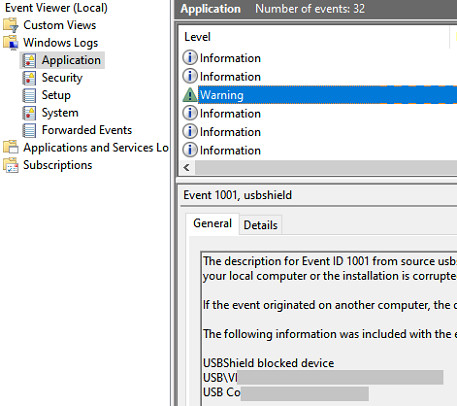
- Writes **warning logs** to Event Viewer
- **Portable** software
| Comparison | USBShield | Endpoint Protector | DeviceLock | ManageEngine Device Control | GiliSoft USB Lock |
|------------------------|-----------|--------------------|-----------|----------------------------------|-------------------|
| Paid / Free | **Free** | Paid | Paid | Paid | Paid |
| Open source | **Yes** | No | No | No | No |
| Can block USB devices | **Yes** | Yes | Yes | Yes | Yes |
| Can log events | **Yes** | Yes | Yes | Yes | Limited |
----
| - | - |
| -- | -- |
|  | |
|  |  |
|  |  |
## How to Use (Installer / Easy)
1. Download `setup.exe` and run the installer.
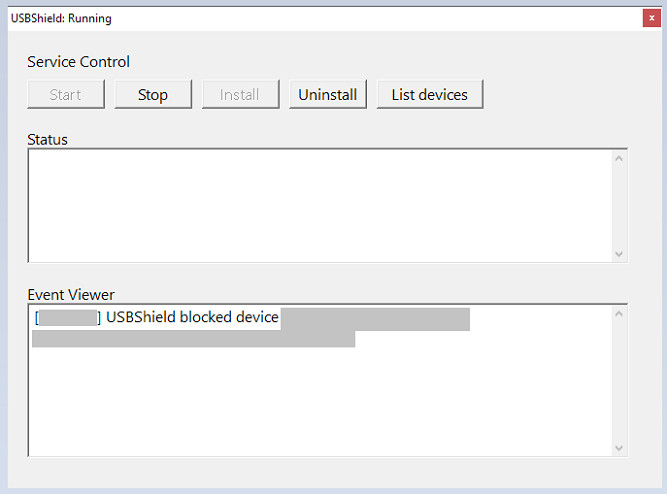
2. Open `USBShield`.
3. **Install** the service.
- You can start or stop USBShield from the UI.
- If you want to uninstall USBShield, make sure to uninstall the service first.
## How to Use (Portable)
1. Open **Command Prompt** (cmd).
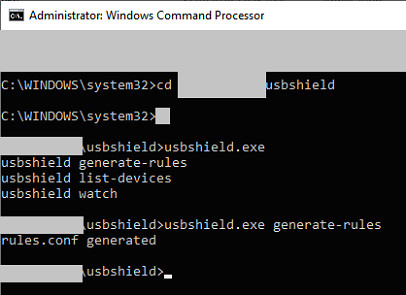
2. Run `usbshield.exe generate-rules` to create a `rules.conf` file.
3. Open `rules.conf` and edit it if necessary (see *Rules* below).
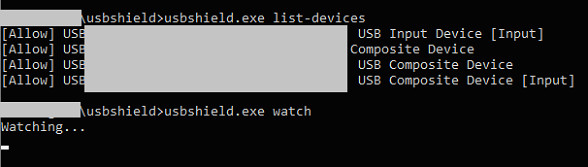
4. Run `usbshield.exe list-devices` to display currently connected devices and see how USBShield will respond.
5. Run `usbshield.exe watch` in an **elevated** (administrator) Command Prompt to start monitoring.
- Or just use `usbshield_gui.exe`.
## Rules / Format
- The default policy is: **deny any device not listed in `rules.conf`.** (except HUBs, which are allowed to prevent accidental blocking)
- By default, `allow input` and `allow connected` are included in generated config file - you can remove them for _stricter_ protection.
- Syntax: `allow {USBID}`
- Use `#` to add comments.
- **It is recommended to review your rules** with `usbshield.exe list-devices` _before_ starting `usbshield.exe watch`.
Special rules:
- `allow input`
- Allows _input_ devices (such as keyboards or mice) even if they are not listed in `rules.conf`.
- `allow connected`
- Allows currently connected devices even if they are not listed in `rules.conf`.
- When USBShield detects a device that is not listed in `rules.conf`, it will display a warning message and log it in the Event Viewer.
For Those who want strict rules:
- Removing "allow connected" is recommended. Just remember to run `usbshield.exe list-devices` to ensure your rules are correct.
## When Mistake Happens
- When USBShield takes an action, it logs the event in Event Viewer.
- To allow a previously disabled USB device:
1. Stop USBShield (because it will disable device again)
2. Open **Device Manager** (`devmgmt.msc`).
3. Find the disabled USB device and enable it.
4. (Optional) Update your `rules.conf` by running `usbshield.exe generate-rules` again or by editing it manually.
- Another solution:
- Stop USBShield temporarily while you're using your computer.
- Restart USBShield when you are away (e.g., when your computer is locked)
## Optional: Register as a Service
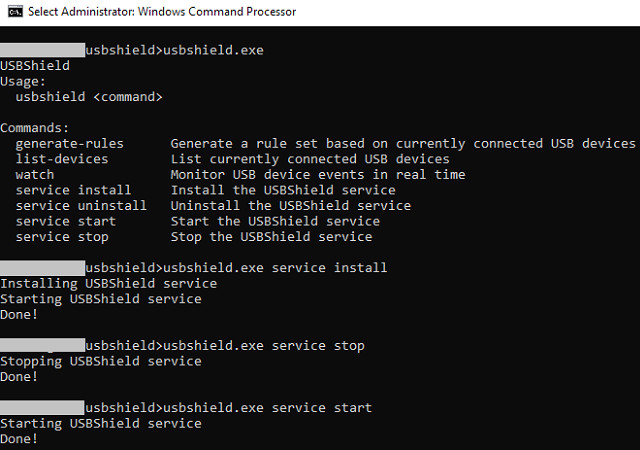
- Use `usbshield.exe service install` to register USBShield as a service, allowing it to monitor your computer in the background.
Other commands:
```
service install Install the USBShield service
service uninstall Uninstall the USBShield service
service start Start the USBShield service
service stop Stop the USBShield service
```