https://github.com/usrecnik/ddlfs
Filesystem which represents Oracle Database objects as their DDL stored in .sql files
https://github.com/usrecnik/ddlfs
ddl-scripts filesystem oracle sql-files
Last synced: 6 months ago
JSON representation
Filesystem which represents Oracle Database objects as their DDL stored in .sql files
- Host: GitHub
- URL: https://github.com/usrecnik/ddlfs
- Owner: usrecnik
- License: mit
- Created: 2017-08-16T18:00:04.000Z (almost 9 years ago)
- Default Branch: master
- Last Pushed: 2025-05-08T11:39:55.000Z (about 1 year ago)
- Last Synced: 2025-05-08T12:37:18.721Z (about 1 year ago)
- Topics: ddl-scripts, filesystem, oracle, sql-files
- Language: C
- Size: 13.9 MB
- Stars: 35
- Watchers: 7
- Forks: 4
- Open Issues: 3
-
Metadata Files:
- Readme: README.md
- License: LICENSE
Awesome Lists containing this project
README
# ddlfs
[](https://github.com/usrecnik/ddlfs/releases)
[](https://github.com/usrecnik/ddlfs/blob/master/LICENSE)
**FUSE filesystem, which represents Oracle Database objects as their DDL stored in `.SQL` files.**
Installation
------------
`apt install ./ddlfs-.deb`
`dnf install ./ddlfs-.rpm`
### Version 3.x compatibility (beta!)
This is the first release to support both, Windows (MSVC/Dokan) and Linux (GCC/libfuse3) environments.
* Windows 10, 11
* Ubuntu 24.04, 22.04 (for 24.04 use `ddlfs--ubuntu24.deb` package)
* Debian 12.0
* Oracle Linux 9
This release is based on:
* [libfuse3](https://github.com/libfuse/libfuse) (linux) and [Dokan](https://github.com/dokan-dev/dokany)
* [Oracle Instant Client 23.6](https://www.oracle.com/database/technologies/instant-client/downloads.html)
Use older releases for systems, which are older than described.
Supported database versions are >= 19c according to MOS 207303.1.
### Version 2.3 compatibility
* Ubuntu 16.4 and 18.4
* Oracle Enterprise Linux 6.0 and 7.5
Older/other versions might need to compile from source (due to different libc and fuse versions).
Supported Oracle Database versions are 10g, 11g, 12c, 18c.
Usage
-----
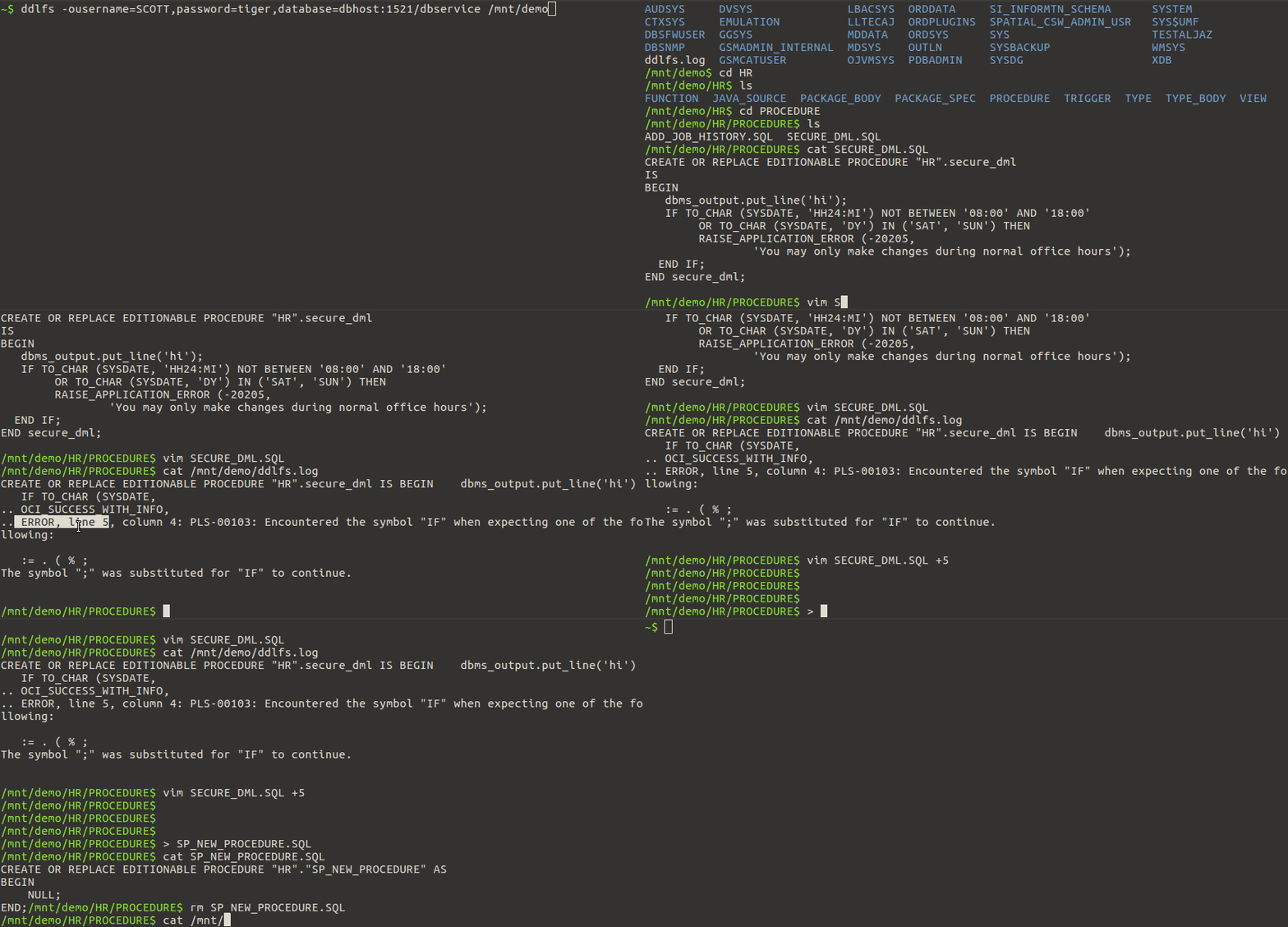
`mount -t fuse -o username=,password=,database=:/ ddlfs `
or
`ddlfs -o username=,password=,database=:/ `
In the latter, you can optionally use `-f` flag to run filesystem in foreground (especially useful with `loglevel=DEBUG` :-) )
When mounted, following directory tree is available under mountpoint:
* ``
* `FUNCTION`
* `JAVA_SOURCE`
* `MATERIALIZED_VIEW` _(read only)_
* `PACKAGE_BODY`
* `PACKAGE_SPEC`
* `PROCEDURE`
* `TABLE` _(read only)_
* `TRIGGER`
* `TYPE`
* `TYPE_BODY`
* `VIEW`
Each folder has `.SQL` file for each object of specified type (parent folder) in database. For example, folder `/VIEW/`
has one `.SQL` file for every view in this schema.
If you write to those files, filesystem will execute DDL stored in the file on file close (thus, you can edit database objects
via this filesystem). Filesystem keeps a local copy on regular filesystem while the file is open (between open and close calls).
If you delete such `.SQL` file, a `DROP ` is issued.
If you create new file (e.g. using `touch` utility), a new object is created from template - e.g. for views, it is
`create view ""."" as select * from dual"`.
All files have last modified date set to `last_ddl_time` from `all_objects` view. All files report file size 0 (or whatever
number is set for `filesize=` parameter); except for those that are currently open - those report their actual, correct, file size.
One special file exists, `ddlfs.log`, which contains log of every executed DDL operation along with possible errors and
warnings (e.g. indicating on which line syntax error occured). You can `tail -F` this file - just use capital `-F`, because this file
only exists in-memory and is rewritten in cyclic manner.
Mount Options
-------------
This section describes mount options specific to
ddlfs. Other generic mount options may be used as well; see **mount** and **fuse** for details.
**`database=`**`host:port/service`
Oracle EasyConnect string, used to connect to database. Use `/` to connect to local instance using bequeath protocol.
**`username=`**`string`
Username used to connect to database specified by `database` parameter.
Specify `/` to use os authentication (like in `sqlplus / as sysdba`).
**`password=`**`string`
Password used to connect to database specified by `database` parameter.
Specify `/` to use os authentication.
**`schemas=`**`string`
Schema or list of schemas, separated by `:`. Those are schemas of which objects are "exported" as `.sql` files. You may specify (multiple) partial schema name(s) using `%`
sign, e.g.: `APP_%:BLA_%`, which would match all schemas with names starting with either `APP_` or `BLA_`. It defaults '%' (to show all schemas).
**`pdb=`=**`string`
If you use os authentication, you'll be connected to `CDB$ROOT` by default in multitenan environment. This setting, if specified,
will cause **ddlfs** to issue `alter session set container=;` right after logon.
**`userrole`=**`string`
You can specify role such as `SYSDBA` or `SYSOPER` here.
**`loglevel=`**`[DEBUG|INFO|ERROR]`
Defines verbosity used for stdout messages. Default value is `INFO`.
**`temppath=`**`/tmp`
Where to store temporary files - offline copies of DDL statements while their files are open.
`/tmp` location is used by default. All files created by **ddlfs** have names prefixed by `ddlfs-` in this folder.
**`keepcache`**
Local temporary files (created in `temppath=` folder) are deleted on umount by default. Specify this mount option to
keep those temp files intact after umount. This has performance benefits when using `filesize=-1`.
**`dbro`**
Using this option will assume that database is opened as `READ ONLY`. That means that we can read
any object just once and never check if it has changed on database, because due to database
being open in `READ ONLY` means it cannot change. You can use this option even if database
is *not* in `READ ONLY` mode - this is useful for tools which can benefit from such a "snapshot"
view and increased performance (e.g. git & mercurial).
**`filesize=`**`0`
All `.sql` files report file size as specified by this parameter - unless if file is currently open; correct file size
is always returned for currently open files. Using default value `0` (or not specifying this parameter) should be OK for
most cases, however, some applications refuse to read files with zero length and only read files up to returned file size.
If you use such application with `ddlfs` specify this parameter to be `-1`, which will cause ddlfs to *always* return correct file sizes. This
has a bit of performance penalty as `ddlfs` must read contents of every object of specified type in order to list their correct file sizes (`ls -l`).
Possible alternative is to set this parameter to any value larger then any database object, e.g. to `10485760`, this is 10mb, which should be
enough in most cases). Note that this may also confuse some applications.
**`volname`=**`DOKAN`
(Windows only) Name of Windows Volume. It is what Explorer displays next to drive letter, e.g. `X: (MY_PROD_DB)`.
Tips for VIM
------------
If you are using VIM editor to edit files mounted with this filesystem, then you will wan to put following to your `.vimrc`.
This is because you can only store `.sql` files containing valid DDL on this filesystem (`~backup` and `.swp` files are not .sql files)
```
" The first line removes the current directory from the backup directory list (to keep the ~ backups out of your
" working directories). The second tells Vim to attempt to save backups to ~/tmp, or to /tmp if that's not possible. "
set backupdir-=.
set backupdir^=~/.vim/tmp,/tmp
```
```
" For Unix and Win32, if a directory ends in two path separators "//" or "\\", the swap file name will be built from
" the complete path to the file with all path separators substituted to percent '%' signs. This will ensure file name
" uniqueness in the preserve directory.
set directory=~/.vim/swapfiles//
```
Version Control
---------------
You can use this filesystem with version control software such as Git or Mercurial. For best
performance try to use following mount options (and (re)mount before each `git add` & `git commit` cycle):
`ro,dbro,username=/,password=/,database=/,userrole=SYSDBA,schemas=%,filesize=-1,keepcache,temppath=/vbs/ddlfs/_cache/`
Subversion won't work because it wants to create `.svn` subfolder in *every* folder. Problem is that ddlfs only
supports storing of DDL in `.SQL` files. (Git and Mercurial only require one folder bellow mountpoint and that's all)
Compiling on Linux
------------------
1. Download Oracle Instant Client (Basic + SDK Package):
http://www.oracle.com/technetwork/database/database-technologies/instant-client/overview/index.html
2. Files will probably be named something like
2.1. instantclient-**basic**-linux.x64-18.3.0.0.0dbru.zip
2.2. instantclient-**sdk**-linux.x64-18.3.0.0.0dbru.zip
3. Extract both files to the _same_ location, which is specified in `Makefile` (on line which starts with `LD_LIBRARY_PATH=...`)
4. Run `make clean all` from `./src/` folder.
Compiling on Windows
--------------------
Before you can build on Windows, you need to install the following:
* Visual Studio 2022 (Desktop development with C++)
* Dokan (https://dokan-dev.github.io/, I used version 2.2.0.1000)
* Select Development (Headers and Libs, Symbols) besides "Dokan Core".
* Oracle Instant Client (basic+sdk) and put it besides ddlfs folder (e.g. `C:\Users\test\repos\instant_client_23_6`)
* run `dotnet tool install --global wix` (only needed for building ddlfs-bundle.exe install package, I've tested with 5.0.2+aa65968c version)
* run `wix extension add -g WixToolset.BootstrapperApplications.wixext` (needed to create installer bundle of stuff just described)
finally, you can run:
```
nmake -f Makefile.win
nmake -f Makefile.win release
```
The first command produces `ddlfs.exe` and the second one creates .msi package and bundles it with everything else together into `ddlfs-bundle.exe`.