https://github.com/vanruesc/circlerasteriser
An implementation of a circle rasterisation algorithm.
https://github.com/vanruesc/circlerasteriser
Last synced: 10 months ago
JSON representation
An implementation of a circle rasterisation algorithm.
- Host: GitHub
- URL: https://github.com/vanruesc/circlerasteriser
- Owner: vanruesc
- License: zlib
- Archived: true
- Created: 2015-10-14T21:41:46.000Z (almost 11 years ago)
- Default Branch: master
- Last Pushed: 2015-11-20T17:50:27.000Z (over 10 years ago)
- Last Synced: 2024-10-02T08:44:13.240Z (almost 2 years ago)
- Language: JavaScript
- Homepage:
- Size: 113 KB
- Stars: 0
- Watchers: 2
- Forks: 1
- Open Issues: 0
-
Metadata Files:
- Readme: README.md
- License: LICENSE
Awesome Lists containing this project
README
# CircleRasteriser
[](https://travis-ci.org/vanruesc/circlerasteriser)
[](https://ci.appveyor.com/project/vanruesc/circlerasteriser)
[](http://badge.fury.io/gh/vanruesc%2Fcirclerasteriser)
[](https://david-dm.org/vanruesc/circlerasteriser)
An implementation of a [circle rasterisation algorithm](http://rosettacode.org/wiki/Bitmap/Midpoint_circle_algorithm)
for the course _Digital Media_ at the University of Applied Sciences, Brandenburg. This particular rasteriser allows you
to set a pixel size and a grid line width. The grid can also be deactivated by setting ```-g 0```.
## Installation
First, download and install [NodeJS](https://nodejs.org) (9Mb Download, 23Mb Installation).
```sh
# Download this project, unzip it and navigate to its topmost directory via command line interface.
$ cd circlerasteriser-master
# Register the program globally.
$ npm link
```
## Usage
```sh
# You may now generate new circles.
$ circle -r 60 -x 100 -y 75 -n myCircle
# The generated file will be stored in the output-folder.
```
```sh
Optional arguments:
-r Radius, Number.
-x Center x-coordinate, Number.
-y Center y-coordinate, Number.
-w Width, Number.
-h Height, Number.
-p Pixel size, Number.
-g Grid line width, Number.
-n, -o Name of the output file, String.
```
## Result
[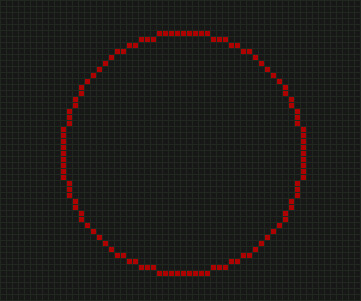](http://vanruesc.github.io/circlerasteriser/output/circle.jpg)
## Uninstallation
```sh
# Undo the global installation.
$ npm unlink
# After that, simply delete the project files.
```
## Documentation
Check the circlerasteriser [API](http://vanruesc.github.io/circlerasteriser/docs) in order to use this module in your own JavaScript projects.
## License
Copyright (c) 2015 Raoul van Rüschen
Licensed under the Zlib license.