https://github.com/varneon/unity-asset-move-prompt
Simple dialog for verifying user's intentions of moving assets inside Unity
https://github.com/varneon/unity-asset-move-prompt
unity unity-editor
Last synced: 2 months ago
JSON representation
Simple dialog for verifying user's intentions of moving assets inside Unity
- Host: GitHub
- URL: https://github.com/varneon/unity-asset-move-prompt
- Owner: Varneon
- License: mit
- Created: 2022-09-29T17:44:40.000Z (almost 4 years ago)
- Default Branch: main
- Last Pushed: 2022-10-14T09:44:49.000Z (over 3 years ago)
- Last Synced: 2025-04-06T11:49:58.062Z (over 1 year ago)
- Topics: unity, unity-editor
- Language: C#
- Homepage:
- Size: 15.6 KB
- Stars: 0
- Watchers: 1
- Forks: 0
- Open Issues: 1
-
Metadata Files:
- Readme: README.md
- Funding: .github/FUNDING.yml
- License: LICENSE
Awesome Lists containing this project
README
# Unity Asset Move Prompt [](https://github.com/Varneon/Unity-Asset-Move-Prompt/stargazers) [](https://github.com/Varneon/Unity-Asset-Move-Prompt/releases) [](https://github.com/Varneon/Unity-Asset-Move-Prompt/releases/latest)
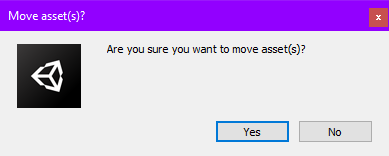
Simple dialog for verifying user's intentions of moving assets inside Unity
> ## *Why do I need this?*
> * *By default Unity doesn't ask you when you move assets, often resulting in accidentally moving assets to a different folder. This simple extension intercepts the asset modification event and allows the user to verify the action.*
# Installation
### Import with [VRChat Creator Companion](https://vcc.docs.vrchat.com/vpm/packages#user-packages):
> 1. Download `com.varneon.asset-move-prompt.zip` from [here](https://github.com/Varneon/Unity-Asset-Move-Prompt/releases/latest)
> 2. Unpack the .zip somewhere
> 3. In VRChat Creator Companion, navigate to `Settings` > `User Packages` > `Add`
> 4. Navigate to the unpacked folder, `com.varneon.asset-move-prompt` and click `Select Folder`
> 5. `Asset Move Prompt` should now be visible under `Local User Packages` in the project view in VRChat Creator Companion
> 6. Click `Add`
### Import with [Unity Package Manager (git)](https://docs.unity3d.com/2019.4/Documentation/Manual/upm-ui-giturl.html):
> 1. In the Unity toolbar, select `Window` > `Package Manager` > `[+]` > `Add package from git URL...`
> 2. Paste the following link: `https://github.com/Varneon/Unity-Asset-Move-Prompt.git?path=/Packages/com.varneon.asset-move-prompt`
### Import from [Unitypackage](https://docs.unity3d.com/2019.4/Documentation/Manual/AssetPackagesImport.html):
> 1. Download latest `com.varneon.asset-move-prompt.unitypackage` from [here](https://github.com/Varneon/Unity-Asset-Move-Prompt/releases/latest)
> 2. Import the downloaded .unitypackage into your Unity project
## Developed by Varneon with :hearts: