https://github.com/vatsalsaxena22/html
HTML Complete Notes
https://github.com/vatsalsaxena22/html
html html-css-javascript html-notes html5
Last synced: 4 months ago
JSON representation
HTML Complete Notes
- Host: GitHub
- URL: https://github.com/vatsalsaxena22/html
- Owner: vatsalsaxena22
- Created: 2024-09-17T05:57:11.000Z (almost 2 years ago)
- Default Branch: main
- Last Pushed: 2025-09-07T10:50:30.000Z (10 months ago)
- Last Synced: 2025-09-07T12:25:33.636Z (10 months ago)
- Topics: html, html-css-javascript, html-notes, html5
- Language: HTML
- Homepage: https://vatsalsaxena22.github.io/HTML/
- Size: 231 KB
- Stars: 0
- Watchers: 1
- Forks: 0
- Open Issues: 0
-
Metadata Files:
- Readme: README.md
Awesome Lists containing this project
README

# HTML Complete Notes
---
## HTML Introduction
### HTML First Program:
**Hello World!**, create a file named index.html and write -
Hello World!
### HTML Basic Layout:
Page Title
Heading
Paragraph
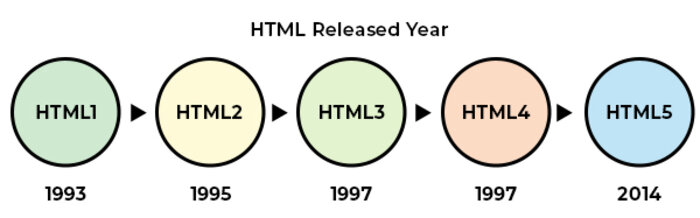
### HTML Versions:
### Parts of HTML:
Tags - Content....
Attributes - `` or ``
Elements - ` Content.... ` or Tag + Attribute
### Best Editor for HTML:
1. VS Code
2. Sublime Text 3
3. Web Storm IDE
4. Notepad++
## HTML Basics
### Document Type Declaration:
`` - Defines HTML 5 version
### HTML tag:
`` - html starts here
`` - html ends here
### Head tag:
Contains meta data
`` - head starts here
`` - head ends here
### Title tag:
` Site Title `
### Body tag:
Contains Body content
`` - body starts here
`` - body ends here
### Headings:
`
....
`
`....
`
`....
`
`....
`
`....
`
`....
`
### Paragraph:
`
....
`
### Link:
`....`
### Line Break:
`
`
### Horizontal line:
`
`
### View HTML Source Code:
#### View HTML Source Code:
Click CTRL + U in an HTML page, or right-click on the page and select "View Page Source". This will open a new tab containing the HTML source code of the page.
#### Inspect an HTML Element:
Right-click on an element (or a blank area), and choose "Inspect" to see what elements are made up of (you will see both the HTML and the CSS). You can also edit the HTML or CSS on-the-fly in the Elements or Styles panel that opens.
### Comments:
Shortcut - CTRL + /
### Blocks Elements:
`
----` `
` `
` `
` `` `` `` `` `` `` `` `` `- ` `
` `- ` `
- ` `` ``
### Inline Elements:
`` `` `![]() ` `
` `
` `` `` `` `` `` `` `` `` ``
## HTML Formatting
### Physical Tags:
These tags directly impact the visual appearance of the text, altering font styles, sizes, and other visual properties.
`` - bold
`` - italic
### Logical Tags:
These tags denote the logical or semantic value of the text. They convey meaning without directly affecting the visual appearance.
`` - strong
`` - emphasize
### Formatting Tags:
``
``
``
``
``
### Quotation tags:
``
`
`
``
``
``
``
``
## HTML Table
HTML tables allow web developers to arrange data into rows and columns.
### Tags:
`` - table tag
`` - table row tag
`` - table header tag
`` - table data tag
### Basic Layout:
Name
Phone
Email
Arvind
11223344
a123@mail.com
Bhanu
123123
b111@mail.com
Chandan
12344321
c121@mail.com
### Simple Table:
| Name | Phone | Email |
| ------- | -------- | ------------- |
| Arvind | 11223344 | a123@mail.com |
| Bhanu | 123123 | b111@mail.com |
| Chandan | 12344321 | c121@mail.com |
### Rowspan and Colspan:
#### Rowspan:
`....`
#### Colspan:
`....`
## HTML List
### Tags:
`
` - Unordered List
`
` - Ordered List
`
- ` - List Item
`
` - Description List
`
- ` - Description Title
`
- ` - Description Data
### Unordered List:
- Apple
- Banana
- Mango
- Orange
- Grapes
### Ordered List:
1. Lion
2. Tiger
3. Leopard
4. Wolf
5. Fox
6. Elephant
7. Rhino
8. Bear
### Description List:
Noun -
Noun is the name of a person, place or things. e.g. Ram, Book, Kanpur etc.
Pronoun -
The word which used in place of noun is called Pronoun. e.g. He, She, It etc.
### Nested List:
- Bus
- Car
- Sedan
- SUV
- Off-roader
- Crossover
- Hatchback
- MUV
- Bike
- Scooter
## HTML Form
### Tags:
`` `` `` `` `` ``
### Form Example:
Full Name:
Email:
Phone:
Message:
### Input Types:
Button
Checkbox
Color
Date
Date Time
Date Time Local
Email
File
Image
Month
Number
Password
Radio
Range
Reset
Search
Submit
Tel
Text
Time
URL
Week
## HTML Media
### Image:
Syntax - `![]() `
`
### Audio:
Syntax - ``
### Video:
Syntax - ``
### More Attributes for audio & video:
- autoplay
> automatically play the media.
- muted
> automatically mute the media.
- loop
> play the media in the loop.
### Object:
Syntax - ``
### Embed:
Syntax - ``
### Iframe:
Syntax - ``
### Download Link:
Syntax - ``
## HTML IDs and Classes
### Classes:
The HTML class attribute is used to specify a class for an HTML element. Multiple HTML elements can share the same class.
Syntax - `
`
CSS
.className{
// CSS
}
JavaScript
document.getElementsByClassName("className")
// js
### IDs:
The HTML id attribute is used to specify a unique id for an HTML element. You cannot have more than one element with the same id in an HTML document.
Syntax - `
`
CSS
#IDName{
// css
}
JavaScript
document.getElementById("IDName")
// js
## HTML with CSS
### How to link CSS with HTML?
### There are three ways to link css to a html file -
1. Inline CSS
2. Internal CSS
3. External CSS
### Inline CSS:
Heading
### Internal CSS:
Page Title
h1{
color: red;
background-color: blue;
}
Heading
### External CSS:
Page Title
Heading
### style.css
h1{
color: red;
background-color: blue;
}
## HTML Script
## HTML Advance
[Meta Tags](https://www.tutorialspoint.com/html/html_meta_tags.htm)
[Email Link](https://www.tutorialspoint.com/html/html_email_links.htm)
[Image map](https://www.w3schools.com/html/html_images_imagemap.asp)
[Picture Element](https://www.w3schools.com/html/html_images_picture.asp)
[iFrame](https://www.w3schools.com/html/html_iframe.asp)
## HTML Grapics
## HTML APIs
## HTML Full Stack