https://github.com/vbalagovic/flutter-presetup
Pre setup flutter application with flavors, riverpod, go router and localizations
https://github.com/vbalagovic/flutter-presetup
admob dart firebase flutter flutter-app flutter-builder flutter-examples flutter-firebase-auth flutter-flavors flutterbuilder riverpod
Last synced: 6 months ago
JSON representation
Pre setup flutter application with flavors, riverpod, go router and localizations
- Host: GitHub
- URL: https://github.com/vbalagovic/flutter-presetup
- Owner: vbalagovic
- License: mit
- Created: 2023-01-12T11:19:16.000Z (over 3 years ago)
- Default Branch: main
- Last Pushed: 2025-11-30T08:46:48.000Z (8 months ago)
- Last Synced: 2025-12-02T13:39:44.021Z (8 months ago)
- Topics: admob, dart, firebase, flutter, flutter-app, flutter-builder, flutter-examples, flutter-firebase-auth, flutter-flavors, flutterbuilder, riverpod
- Language: Dart
- Homepage:
- Size: 1.14 MB
- Stars: 127
- Watchers: 6
- Forks: 31
- Open Issues: 0
-
Metadata Files:
- Readme: README.md
- Changelog: changelog.txt
- Funding: .github/FUNDING.yml
- License: LICENSE
Awesome Lists containing this project
README
# Flutter Presetup project
## Coming soon
[Flutter Builder](https://flutter-builder.app)
Flutter Builder is a powerful tool that simplifies Flutter project setup, allowing you to generate new projects quickly with pre-configured integrations for Firebase, AdMob, Firebase Auth, Push Notifications, and more. Flutter Builder is based on this pre-setup project, which provides a solid foundation for building Flutter apps with essential features and best practices. It comes with GUI and new features!

## More structured documentation
[Flutter Presetup Gitbook](https://flutterapid.gitbook.io/flutter-presetup/)
This is a small project that saves me time when I need to start new project from scratch including flavors and firebase. It's kinda suited to my needs but it may help someone. Currently it's focused on iOS and Android.
Related article:
NOTE: dev & prod scheme must be added manually in xcode (check the article above if explanation is needed)
## Screenshots


### Task list [project from scratch with assembled features listed below]
- [x] Flavors with different icons
- [x] Renaming
- [x] Firebase setup
- [x] Auth setup with firebase
- [x] Social logins (google, apple, facebook)
- [x] Routing with auth session listener
- [x] Google Ads (native, reward int. banner)
- [ ] Select features you need on setup (now you need to finish all tasks to make app up and running, even admob key)
- [ ] Write better documentation
- [x] Push notifications
- [ ] Dynamic links
- [x] Fastlane deployment to App distribution and both Stores
- [ ] Create widgetbook
- [ ] Pack everything in GUI
## Dependencies & versions
Current Flutter version 3.38.2
Install all dependecies:
```bash
fvm flutter pub get
```
Dependencies used:
- Easy localization
- Go router
- Riverpod
- Flutter launcher icons
- flavors
### Step 1) Update project name
I made a little script that will update everything accordingly so run:
```bash
sh rename.sh
```
NOTE if script does not execute till the end:
If the last command grep and replace is not working on your OS just search and replace inside your text editor for "presetup" which is current package name and replace every occurance with something you want.
### Step 2) Create Signature key for Android
I made a little script that should run everything accordingly so run (use the code from the script manually if something is not working). key.properties file will be updated or created:
```bash
sh create_signature.sh
```
### Step 3) Update icons
Update the icons in assets/launcher icons folder and use same naming. Run following command since project uses flutter launcher icons.
```bash
fvm flutter pub get && fvm flutter pub run flutter_launcher_icons -f flutter_launcher_icons*
```
### Step 4) Generate freezed files
```bash
fvm flutter pub run build_runner build --delete-conflicting-outputs
```
### Step 5) Adding firebase
You can use approach where you create firebase project for ios and android, and just update google services dev/prod and GoogleInfo.plist accordingly. I'll try to fasten things up with new firebase flutter option, using FlutterFire CLI. (Scroll to First use for the first time setup)
Run the following command that will trigger flutterfire configure, check ios and android let te script update build gradle and then it will move files where needed.
```bash
sh setup_firebase.sh
```
#### First use of firebase CLI setup
Before you continue, make sure to:
- Install the Firebase CLI and log in (run firebase login)
- From any directory, run this command:
```bash
dart pub global activate flutterfire_cli
```
Then, at the root of your Flutter project directory, run this command:
```bash
sh setup_firebase.sh
```
that will trigger command below and put the files where they are needed for this setup
This automatically registers your per-platform apps with Firebase and adds a lib/firebase_options.dart configuration file to your Flutter project.
___________
## Authentication
### Firebase login
- Riverpod with go router is added to listen for changes in auth state
- Anonymus login works by default when you enable it on firebase with this code
- Social Login updates are coming
#### Google social login
Social login with google has been implemented as example. You need to add google login to your firebase auth and then run this script. It'll ask for a Google Reversed Id to update ios data per environment.
```bash
sh setup_google_login.sh
```
#### Facebook social login
Social login with facebook has been implemented as example. You need to add facebook login to your firebase auth and then run this script. It'll ask for a app id, token(secret) and app name. Package that was used is but no implementation to code should be done. Just create facebook app for credentials.
```bash
sh setup_facebook_login.sh
```
#### Apple social login
Apple social login for iOS should work when you setup your Firebase (enable apple signup) and add "Sign in with apple capabilities" on your apple developer account to this identifier. Update provision file or just open xcode and recheck automatic provisioning if it's not working.
___________
## Google Ads
### Setup admob
- First you need to create admob account
- Create iOS and android application and get ad mob id in admob app settings
- Run script to add this ad mob id-s everywhere where needed
```bash
sh setup_admob_credentials.sh
```
After running this script all 3 types of ads should be working.
There are three examples of apps so you can create them and update `ad_helper.dart`with correct id per type of app. Current values are test ids so you can use them for test purposes.
#### Banner Ads
Create banner add and update `ad_helper.dart` file `bannerAdUnitId` variable, link to banner ad if you have some issues [Banner ad](https://developers.google.com/admob/flutter/banner/get-started)
#### Rewarded Interstitial As
Create banner add and update `ad_helper.dart` file `rewardedInterstitialAdUnitId` variable, link to reward int. ad if you have some issues [Rewarded Interstitial ad](https://developers.google.com/admob/flutter/rewarded-interstitial)
#### Native Ads
There is a example of native list ad. Design can be changed in `list_tile_native_ad.xml` file for android & `ListTileNativeAdView.xib` for iOS. For any updates check the article about native ads in flutter. [Native Ads](https://medium.com/itnext/flutter-native-ads-92d802fbd927)
___________
## Dynamic links
Dynamic links should all be setup, run the following command and enter dev or prod dynamic link. You can handle dynamic links on `splash_screen.dart` in `initSystem()` function.
```bash
sh setup_dynamic_links.sh
```
___________
## Deployment (via Fastlane)
For more detailed articles (slightly different .env organization of files only) you can check [App distribution Deploy](https://medium.com/itnext/flutter-fastlane-deployment-to-the-firebase-app-distribution-easy-way-d5ca2fbdcdf9) & [Store Deploy](https://medium.com/itnext/flutter-fastlane-deployment-to-the-google-play-app-store-easy-way-baa1f491cc51)
### Firebase app distribution (example will be for dev environment)
Install fastlane:
```bash
sh setup_fastlane.sh
```
Populate `.env.development` in root folder with data and keys, for firebase you'll need to create new service account for selected app in [Google Cloud Console](https://console.cloud.google.com/projectselector2/iam-admin/serviceaccounts) follow the steps below:
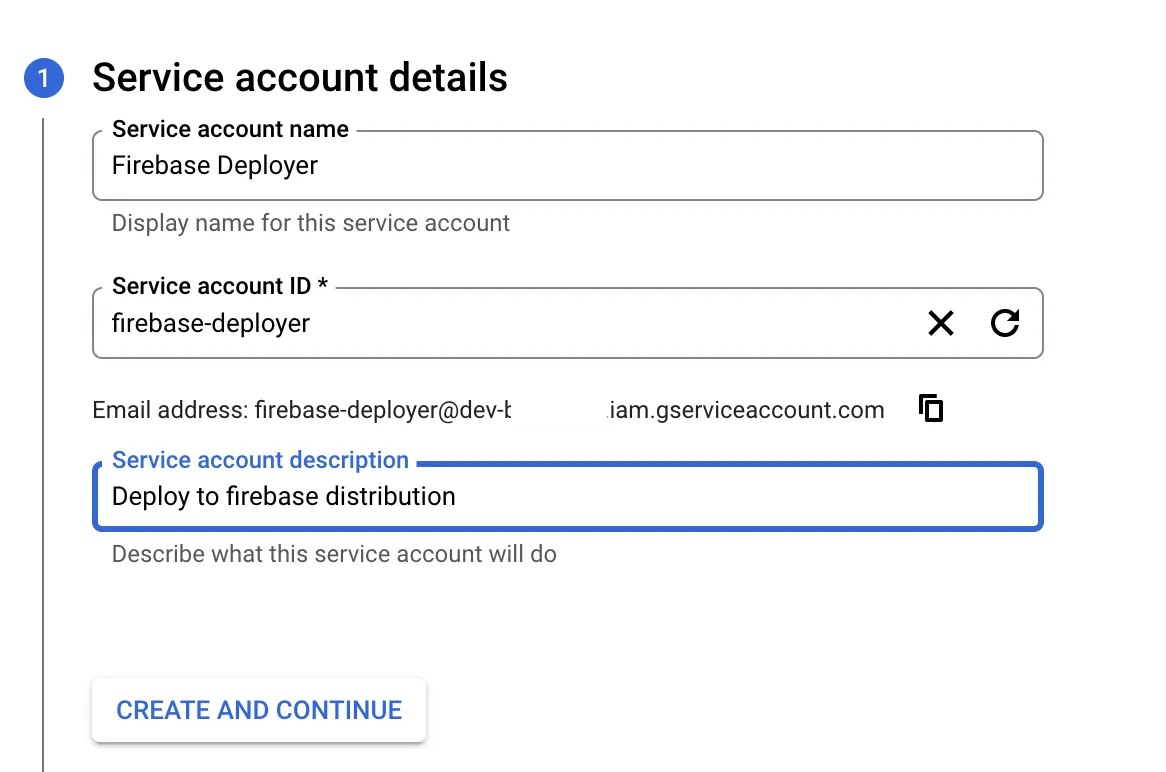
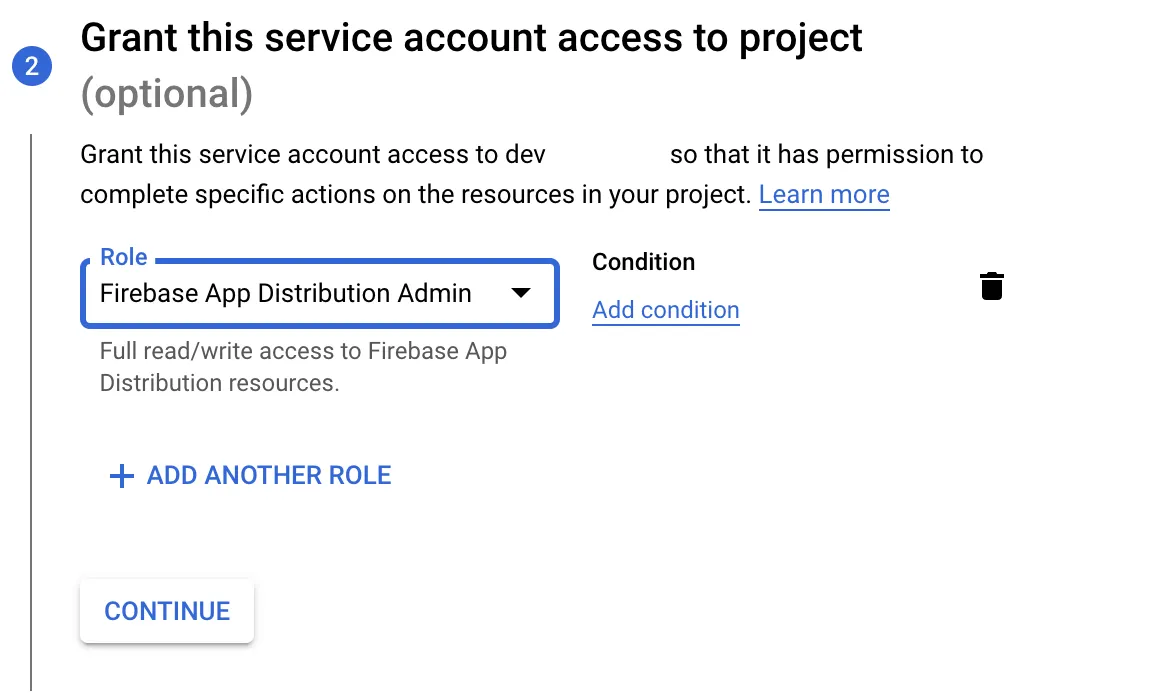

Store the json file as `firebase-distribution-creds-dev.json` in root folder if you don't want to change the path in .env.development file
Update chengelog.txt file in root folder for release notes & deploy dev app to Firebase app distibution:
```bash
sh deploy_dev.sh
```
### Google Play Store (example will be for prod environment)
Populate `.env.production` in root folder with data and keys, for that we need a JSON key file that will give us access to the play store which is explained [official docs](https://docs.fastlane.tools/actions/supply/#setup) I will add a screenshot for a sake of speed:
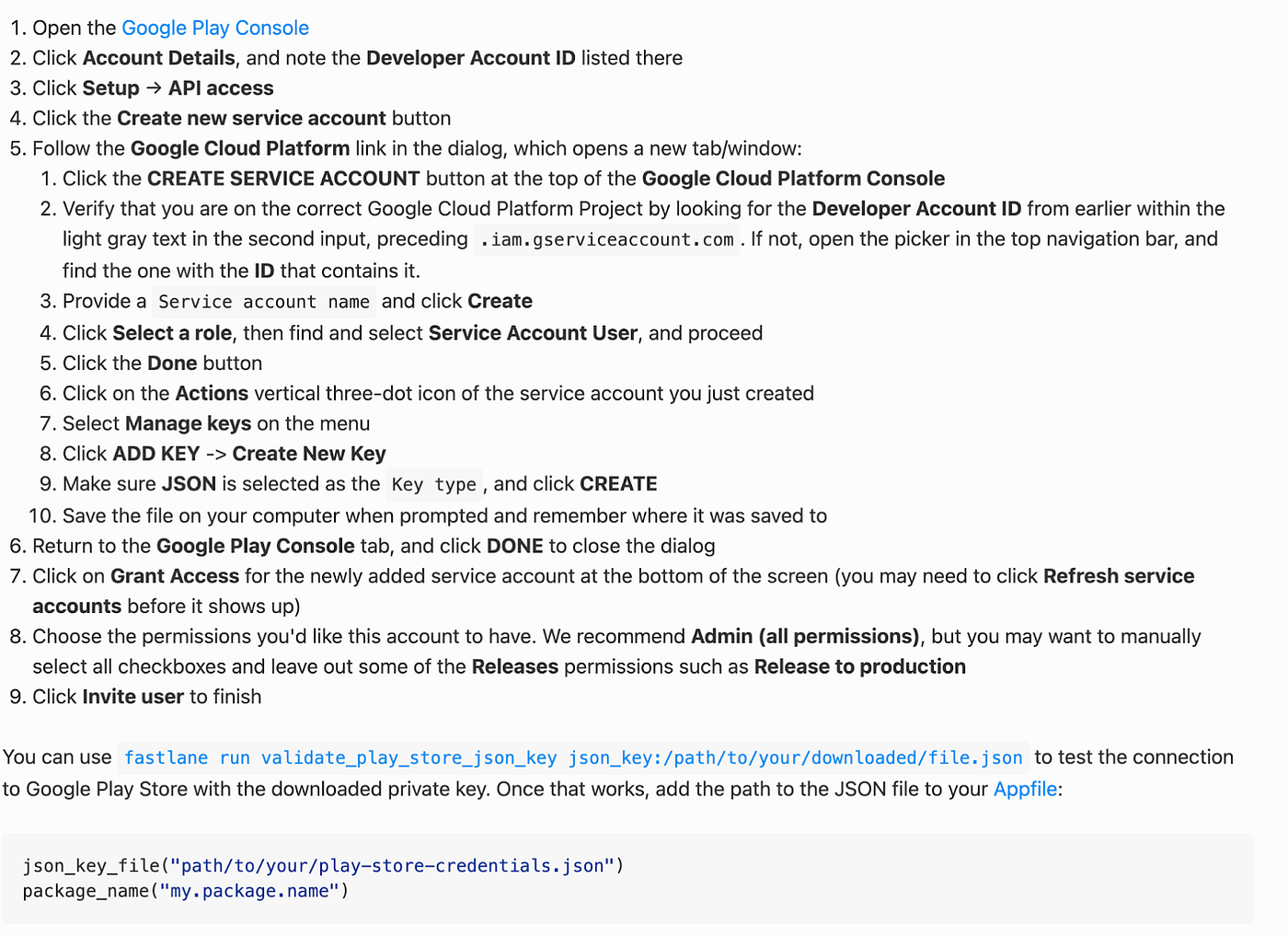
Populate `ANDROID_FIREBASE_APP_DISTRIBUTION_CREDENTIALS_FILE_PATH` (or for the path store the file to root directory and name it `google-creds-prod.json`)
### Apple Store Test Flight (example will be for prod environment)
Populate `.env.production` in root folder, As we did with google play here we’ll also create an API key to handle authentication from fastlane to the app store, copied from [testflight documentation](https://docs.fastlane.tools/app-store-connect-api/):
Creating an App Store Connect API Key:
- Create a new App Store Connect API Key in the [Users page](https://appstoreconnect.apple.com/access/api)
- For more info, go to the [App Store Connect API Docs](https://developer.apple.com/documentation/appstoreconnectapi/creating_api_keys_for_app_store_connect_api)
- Select the “Keys” tab
- Give your API Key an appropriate role for the task at hand. You can read more about roles in [Permissions in App Store Connect](https://developer.apple.com/support/roles/)
- Note the Issuer ID as you will need it for the configuration steps below
- Download the newly created API Key file (.p8)
- This file cannot be downloaded again after the page has been refreshed
Although the app manager or developer role should be enough, you can create a key with Admin permission if needed.
IMPORTANT: store the key somewhere safe!
Populate `KEY_ID`, `KEY_ISSUER_ID` & `PATH_TO_THE_P8_KEY` (or for the path store the file to root directory and name it `applestore_key.p8`)
## Deploy production to both stores
Update chengelog.txt file in root folder for release notes & deploy dev app to Firebase app distibution:
```bash
sh deploy_prod.sh
```
___________
## Push notifications
### Integration
For android it is straight forward, but for iOS you need to add Push notifications capability to indentifier and add certificate to firebase: Follow the first few steps on [official documentation](https://firebase.flutter.dev/docs/messaging/apple-integration) if you're not familiar with this. Background modes & push notifications are added (at least should be) in Xcode already.
### Handle notifications in code
States that are handled in code are in app, background mode and terminated state.
- For handling In app local notifications package is used
- To update anything related to push notification or handle onTap events etc. check `push_notif_service.dart` & `local_notif_service.dart` files
___________
## Extracted widgets
### Theme
- theme is extracted to FPTheme class and can be used and updated also the dark version data is there
- FPButton is extracted component with integrated loader
___________
## Cleaner
You can clean project build with this script
```bash
sh flutter_cleaner.sh
```