https://github.com/vectormike/probable-engine
https://github.com/vectormike/probable-engine
Last synced: about 1 year ago
JSON representation
- Host: GitHub
- URL: https://github.com/vectormike/probable-engine
- Owner: Vectormike
- License: mit
- Created: 2023-04-25T16:52:16.000Z (over 3 years ago)
- Default Branch: main
- Last Pushed: 2023-04-26T06:06:44.000Z (over 3 years ago)
- Last Synced: 2025-03-28T05:43:03.086Z (over 1 year ago)
- Language: JavaScript
- Size: 292 KB
- Stars: 0
- Watchers: 2
- Forks: 0
- Open Issues: 0
-
Metadata Files:
- Readme: README.md
- License: LICENSE
Awesome Lists containing this project
README
# **Backend Developer Assessment**

## Manual Installation
If you would still prefer to do the installation manually, follow these steps:
Clone the repo:
```bash
git clone --depth 1 https://github.com/Vectormike/probable-engine meekfi-assessment
cd meekfi-assessment
```
Install the dependencies:
```bash
yarn install
```
Set the environment variables:
```bash
cp .env.example .env
# open .env and modify the environment variables (if needed)
```
## Commands
Running locally:
```bash
yarn dev
```
Running in production:
```bash
yarn start
```
Testing:
```bash
# run all tests
yarn test
# run all tests in watch mode
yarn test:watch
# run test coverage
yarn coverage
```
Docker:
```bash
docker-compose -up -d
```
## Environment Variables
The environment variables can be found and modified in the `.env` file. They come with these default values:
```bash
# Port number
PORT=5222
# URL of the Mongo DB
MONGODB_URL=mongodb://127.0.0.1:27017/meekfi
# JWT
# JWT secret key
JWT_SECRET=thisisasamplesecret
# Number of minutes after which an access token expires
JWT_ACCESS_EXPIRATION_MINUTES=30
# Number of days after which a refresh token expires
JWT_REFRESH_EXPIRATION_DAYS=30
```
## API Documentation
To view the list of available APIs and their specifications, run the server and go to [Postman Doc](https://documenter.getpostman.com/view/5622145/2s93Y6tf4C) in your browser.
### API Endpoints
List of available routes:
**Auth routes**:\
`POST /v1/auth/register` - register\
`POST /v1/auth/login` - login\
`POST /v1/auth/refresh-tokens` - refresh auth tokens\
`POST /v1/auth/forgot-password` - send reset password email\
`POST /v1/auth/reset-password` - reset password\
`POST /v1/auth/send-verification-email` - send verification email\
`POST /v1/auth/verify-email` - verify email
**User routes**:\
`POST /v1/users` - create a user\
`GET /v1/users` - get all users\
`GET /v1/users/:userId` - get user\
`PATCH /v1/users/:userId` - update user\
`DELETE /v1/users/:userId` - delete user
---
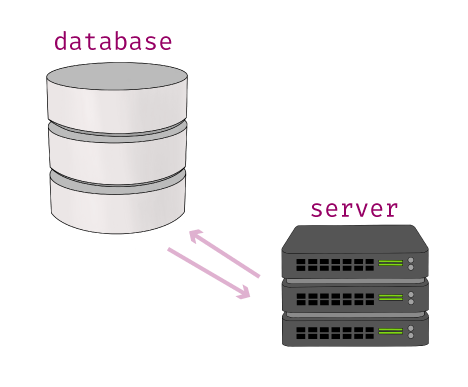
## **High Level System Design**
This documnet provides information about my solution to the MeekFi Backend Developer Assessment
which required that I build an API in that allow it's users perform the following actions:
- create an account
- login account
- update account
- delete account
The following sections give more details into the API and the various design choices that were made.
The diagram below shows the various components of the system as can be infered from its requirements.
# **Design Assumptions**
Below are some of the assumptions made while designing the features and functionality of this API:
## Data Models
### User:
- Name (string)
- Email address (string)
- Date of birth (date)
- Password (string)
## API Endpoints
## Create User
- URL: /register
- Method: POST
- Request body:
- Name (string)
- Email address (string)
- Date of birth (date)
- Password (string)
- Response body:
- User (object)
- Tokens (object)
#### Login
- URL: /login
- Method: POST
- Request body:
- Email address (string)
- Password (string)
- Response body:
- User (object)
- Tokens (object)
### Get User
- URL: /users/{userId}
- Method: GET
- Request headers:
- Authorization: Bearer {access_token}
- Response body:
- Name (string)
- Email address (string)
- Date of birth (date)
### Update User
- URL: /users/{userId}
- Method: PUT
- Request headers:
- Authorization: Bearer {access_token}
- Request body:
- Name (string)
- Email address (string)
- Date of birth (date)
- Password (string)
- Response body:
- User ID (string)
### Delete User
- URL: /users/{userId}
- Method: DELETE
- Request headers:
- Authorization: Bearer {access_token}
- Response body:
- User ID (string)
Authentication and Authorization:
To authenticate users, we can use the email address and password combination provided during login. Upon successful authentication, the server will generate an access token that is required for all subsequent requests to the API.
We can use JWT (JSON Web Token) to create access tokens that contain user ID and expiration date. We can store the secret key used to sign the tokens on the server-side, and include it in the access token when it is generated.
We can also include authorization logic in each endpoint to ensure that only authenticated and authorized users can access and modify their own user information.
**Generating Access Tokens**:
An access token can be generated by making a successful call to the register (`POST /v1/auth/register`) or login (`POST /v1/auth/login`) endpoints. The response of these endpoints also contains refresh tokens (explained below).
An access token is valid for 30 minutes. You can modify this expiration time by changing the `JWT_ACCESS_EXPIRATION_MINUTES` environment variable in the .env file.
**Refreshing Access Tokens**:
After the access token expires, a new access token can be generated, by making a call to the refresh token endpoint (`POST /v1/auth/refresh-tokens`) and sending along a valid refresh token in the request body. This call returns a new access token and a new refresh token.
A refresh token is valid for 30 days. You can modify this expiration time by changing the `JWT_REFRESH_EXPIRATION_DAYS` environment variable in the .env file.
### Additional Considerations
We included validation checks for all incoming requests to ensure that the request body is in the correct format and that all required fields are present.
We included error handling to return meaningful error messages to the client when something goes wrong.
We included rate limiting to prevent abuse of the API by limiting the number of requests a client can make within a certain timeframe.
We can include logging and monitoring to help us diagnose and fix issues that may arise with the system.
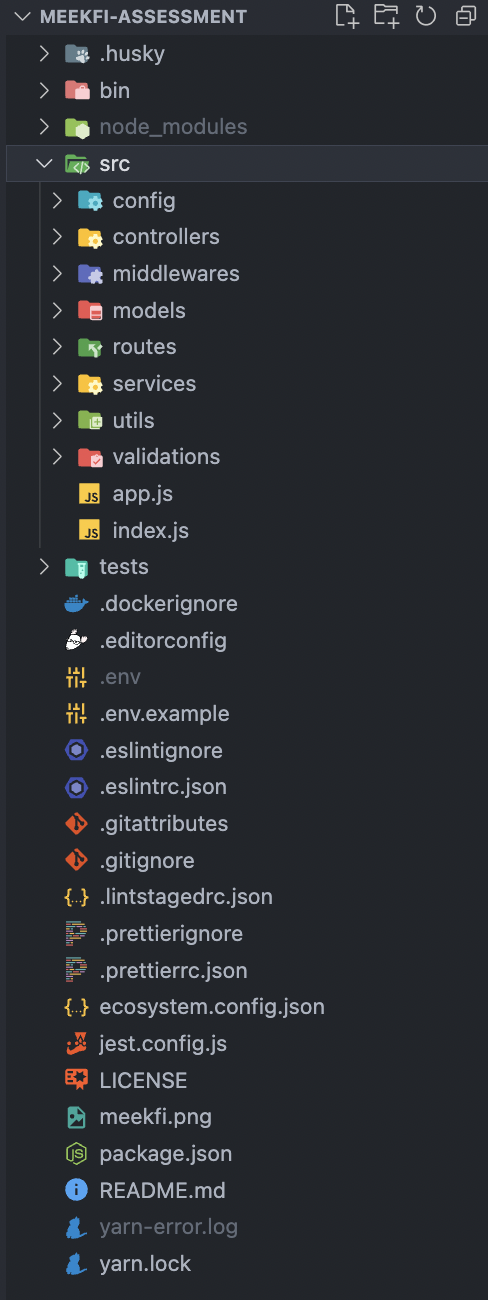
### Project Folder Structure
This section describes the structure of the files/folders which hold the project code.