https://github.com/veler/clipboardzanager
ClipboardZanager is a modern, quick and smart clipboard manager for Windows 10. It creates a historic of what you copy and let you paste the data at any time on any device.
https://github.com/veler/clipboardzanager
android clipboard-manager dropbox ios onedrive windows-desktop
Last synced: 11 months ago
JSON representation
ClipboardZanager is a modern, quick and smart clipboard manager for Windows 10. It creates a historic of what you copy and let you paste the data at any time on any device.
- Host: GitHub
- URL: https://github.com/veler/clipboardzanager
- Owner: veler
- Created: 2017-08-15T01:23:54.000Z (almost 9 years ago)
- Default Branch: master
- Last Pushed: 2024-07-01T15:34:35.000Z (about 2 years ago)
- Last Synced: 2024-12-22T04:11:46.012Z (over 1 year ago)
- Topics: android, clipboard-manager, dropbox, ios, onedrive, windows-desktop
- Language: C#
- Size: 899 KB
- Stars: 136
- Watchers: 6
- Forks: 28
- Open Issues: 13
-
Metadata Files:
- Readme: README.md
Awesome Lists containing this project
README

ClipboardZanager
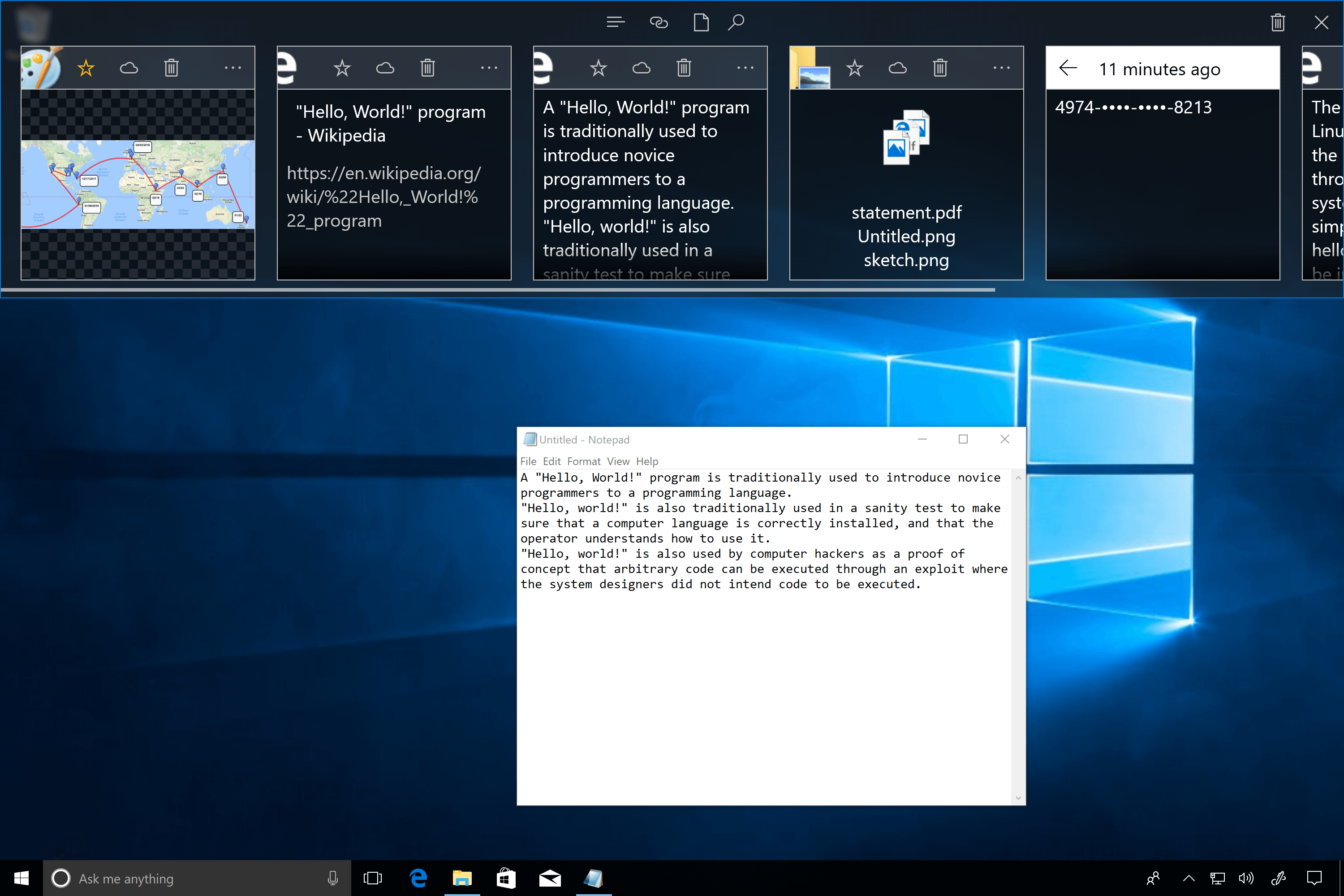
ClipboardZanager is a clipboard manager for ``Windows 10`` initiated by Etienne BAUDOUX in 2010. It is designed to keep a history of what the user copies in Windows and let him or her reuse it later. Since August 28th, 2017, ClipboardZanager is open source and is developed with the help of contributors.
## Features
* Clipboard conservation.
* Synchronization with the personal user Cloud storage service account (supports ``OneDrive`` and ``DropBox``).
* User's data is encrypted. The user can also decide to ignore all copied data from a specific application.
* Full integration to Windows 10.
[Release notes](https://github.com/veler/clipboardzanager/blob/master/RELEASENOTES.md)
[More info here](http://clipboardzanager.velersoftware.com)
# Requirements to run ClipboardZanager
* [Windows 10](https://www.microsoft.com/en-us/software-download/windows10) (Anniversary Update (14393) or later) edition Home, Pro, Education, Entreprise, S.
# Would you like to help the project?
* [Paypal donation](https://www.paypal.com/donate?hosted_button_id=T4NTSX8BYEAVL)
* [Steam wishlist](https://store.steampowered.com/wishlist/id/velersoftware)
* [Amazon wishlist](https://www.amazon.ca/hz/wishlist/ls/UCJ65HR9ZJSD?ref_=wl_share)
* [Feedback (reporting bugs, ideas, etc)](https://github.com/veler/PaZword/issues/new/choose)
* Create a review. :)
# Please, avoid selling this app as yours
I don't care if you copy the source code to use in your project, but please avoid simply changing the name and selling as your work.
That's not why I'm sharing the source code, at all.
# Setup a development environment
## Requirements
### For Windows
You will need the following tools :
* Windows 10
* .Net 4.6
* Visual Studio 2017 with ``Windows development`` and ``Visual Studio extension development toolset`` and ``Windows 10 SDK (10.0.14393.0)``
* ``AutoRunCustomTool`` extension (that you can find in repository/Tools/AutoRunCustomTool.vsix)
* ``DesktopBridgeDebuggingProject`` extension (that you can find in repository/Tools/DesktopBridgeDebuggingProject.vsix)
### For Android
You will need the following tools :
* Java 8
* Android Studio
* Android SDK to support version ``21`` to ``25``
### For iOS
Well, I need to start the project at least.
## Versioning & Passwords
### Versioning
The application version use the following pattern :
```
year.month.day.buildCountInTheDay
```
Each time that the ``Windows Desktop app is built (with Visual Studio)``, the desktop and Android version number are updated.
The Android app is not built by Visual Studio. The version number is updated but the project still need to be built from Android Studio.
### Passwords & AppKey
The user's data is encrypted with a private key. This key is generated thanks to the private ``OneDrive appkey``, ``DropBox appkey``, and ``assembly version`` number (that changes at each build).
## Build the project
Before building the project, you will need a ``OneDrive appkey`` and ``DropBox appkey`` to be able to generate correctly the private keys used by ClipboardZanager to encrypt data.
You will need to :
* Create an application on the [OneDrive developers portal](https://dev.onedrive.com/) with the following permissions :
* ``Files.ReadWrite.AppFolder``
* ``User.Read``
* Create an application on the [DropBox developers portal](https://www.dropbox.com/developers) with the following permissions :
* ``AppFolder``
Once done, you will have to rename the ``passwords-sample.txt`` file to ``passwords.txt`` and complete it with the ``appkey`` and ``redirection URI`` provided by OneDrive and DropBox.
In general, the security process can be improved and simplified.
Once done, open the solution in Visual Studio. Set ``DesktopBridgeDebuggingProject`` as the ``StartUp Project`` and ``Rebuild the Solution``. The private keys will be updated in the Windows Desktop project and Android project at the following locations :
* For the Windows Desktop app : ``ClipboardZanager\Sources\ClipboardZanager\Properties\Passwords.cs``
* For the Android app : ``Android\app\src\main\res\values\passwords.xml``
Those two files and ``passwords.txt`` are git ignored.
You can then open Android Studio and build the smartphone app.
## Run the project on Windows
There is two ways to debug :
* Running ``Windows Store\DesktopBridgeDebuggingProject`` in ``Debug`` mode. But on some machine dependencies are not well detected.
* The other solution that works everywhere but that is less practical consist in deploying the ``Windows Store\ClipboardZanager`` project in ``Debug`` mode and then use the ``Debug/Other Debug Targets/Debug Installed App Package`` to debug the ``ClipboardZanager`` package.
## Unit tests
On Windows, when we run all the unit tests, ``PasteBarWindowViewModel_Search`` fails, but success when we run it independently. It will be fix soon.
# Contribute
Feel free to contribute to this project in any way : adding feature, opening issues, translating.
# License
```
The MIT License (MIT)
Copyright 2018 Etienne BAUDOUX
Permission is hereby granted, free of charge, to any person obtaining a copy of this software and associated documentation files (the "Software"), to deal in the Software without restriction, including without limitation the rights to use, copy, modify, merge, publish, distribute, sublicense, and/or sell copies of the Software, and to permit persons to whom the Software is furnished to do so, subject to the following conditions:
The above copyright notice and this permission notice shall be included in all copies or substantial portions of the Software.
THE SOFTWARE IS PROVIDED "AS IS", WITHOUT WARRANTY OF ANY KIND, EXPRESS OR IMPLIED, INCLUDING BUT NOT LIMITED TO THE WARRANTIES OF MERCHANTABILITY, FITNESS FOR A PARTICULAR PURPOSE AND NONINFRINGEMENT. IN NO EVENT SHALL THE AUTHORS OR COPYRIGHT HOLDERS BE LIABLE FOR ANY CLAIM, DAMAGES OR OTHER LIABILITY, WHETHER IN AN ACTION OF CONTRACT, TORT OR OTHERWISE, ARISING FROM, OUT OF OR IN CONNECTION WITH THE SOFTWARE OR THE USE OR OTHER DEALINGS IN THE SOFTWARE.
```