https://github.com/venhdev/dio_curl_interceptor
A Flutter package providing a Dio interceptor that logs HTTP requests as cURL commands—perfect for debugging, sharing, and reproducing requests. Includes a modern Flutter UI for viewing, filtering, exporting, and managing cached cURL logs
https://github.com/venhdev/dio_curl_interceptor
ansi curl dio logging
Last synced: about 1 month ago
JSON representation
A Flutter package providing a Dio interceptor that logs HTTP requests as cURL commands—perfect for debugging, sharing, and reproducing requests. Includes a modern Flutter UI for viewing, filtering, exporting, and managing cached cURL logs
- Host: GitHub
- URL: https://github.com/venhdev/dio_curl_interceptor
- Owner: venhdev
- License: mit
- Created: 2025-05-07T03:37:48.000Z (about 1 year ago)
- Default Branch: main
- Last Pushed: 2025-10-23T16:24:07.000Z (8 months ago)
- Last Synced: 2026-05-10T16:32:32.939Z (about 2 months ago)
- Topics: ansi, curl, dio, logging
- Language: Dart
- Homepage: https://pub.dev/packages/dio_curl_interceptor
- Size: 1.65 MB
- Stars: 2
- Watchers: 1
- Forks: 1
- Open Issues: 0
-
Metadata Files:
- Readme: README.md
- Changelog: CHANGELOG.md
- License: LICENSE
Awesome Lists containing this project
README
# dio_curl_interceptor
[](https://pub.dev/packages/dio_curl_interceptor)
[](https://pub.dev/packages/dio_curl_interceptor/score)
[](https://pub.dev/packages/dio_curl_interceptor/score)
A Flutter package with a Dio interceptor that logs HTTP requests as cURL—ideal for debugging. Includes a modern UI to view, filter, and manage logs, plus webhook integration for team collaboration.
## Features
- 🔍 Converts Dio HTTP requests to cURL commands for easy debugging and sharing.
- 📁 Enhanced FormData handling with detailed file information in cURL commands.
- 💾 Caches cURL commands and responses with filtering and search options.
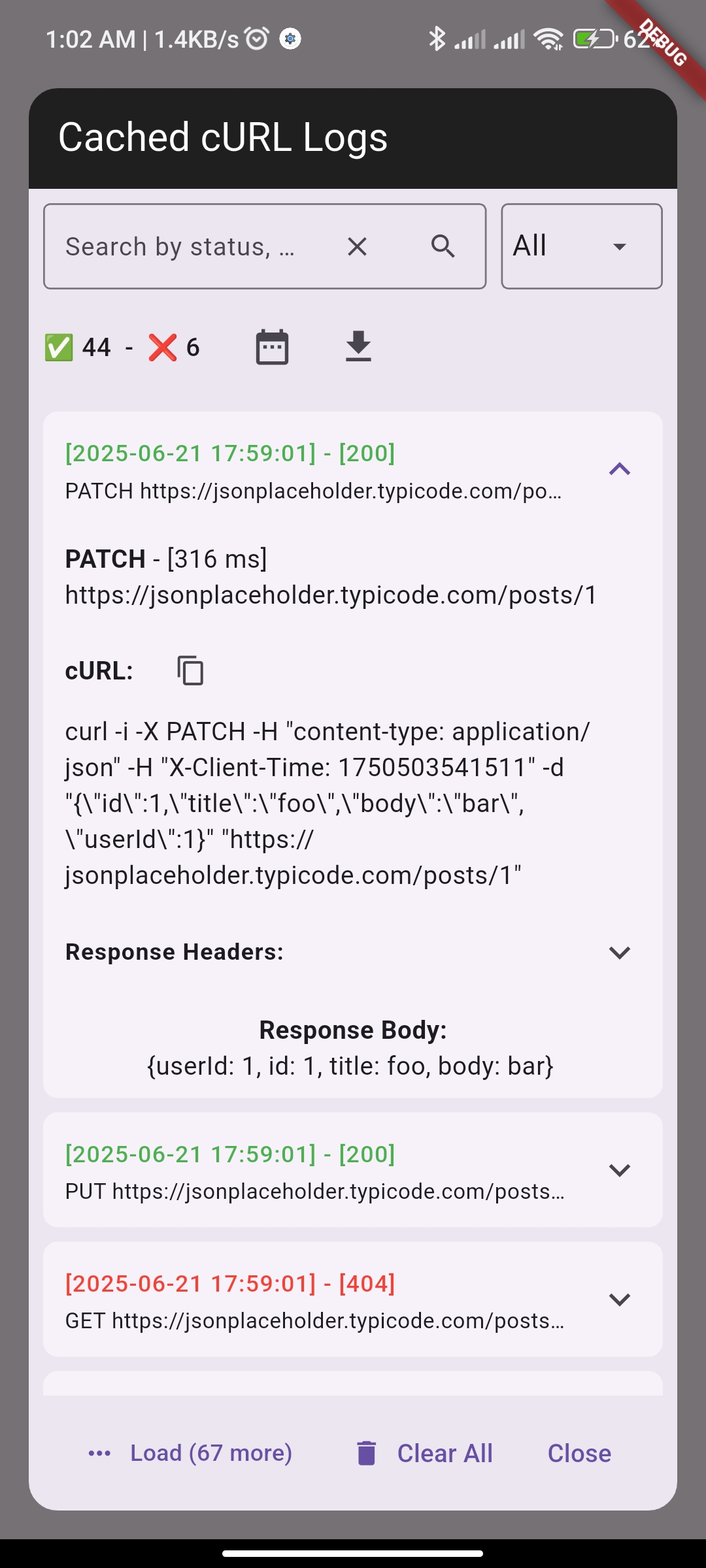
- 🖥️ Modern Flutter widget for viewing and managing cURL logs (search, filter by status/date, clear, copy, etc).
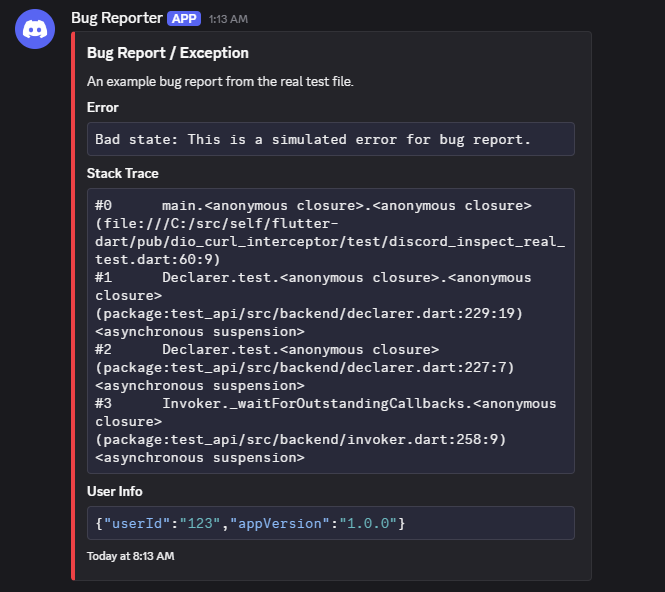
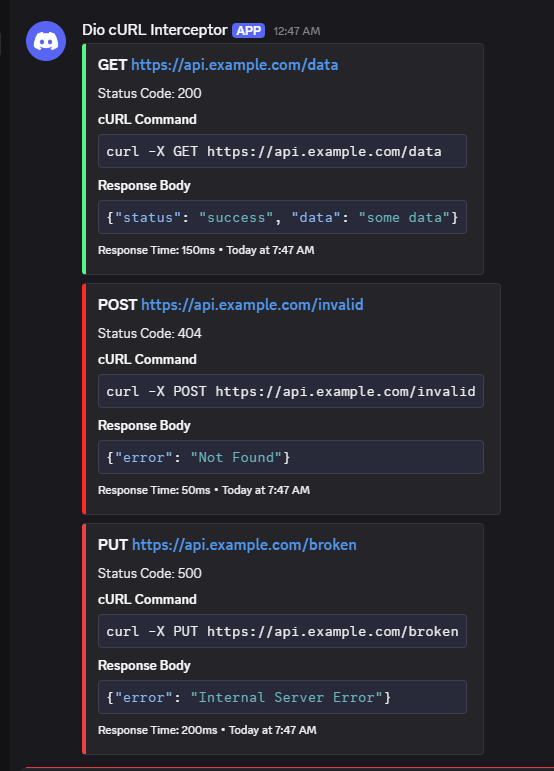
- 🔔 Webhook integration for remote logging and team collaboration (Discord & Telegram support, including bug and exception reporting).
- 🛑 Path filtering to stop specific API calls and return custom responses.
- ⚡ Real-time filter editing with test functionality directly in the CurlViewer UI.
- 📝 Utility methods for custom interceptors and direct use.
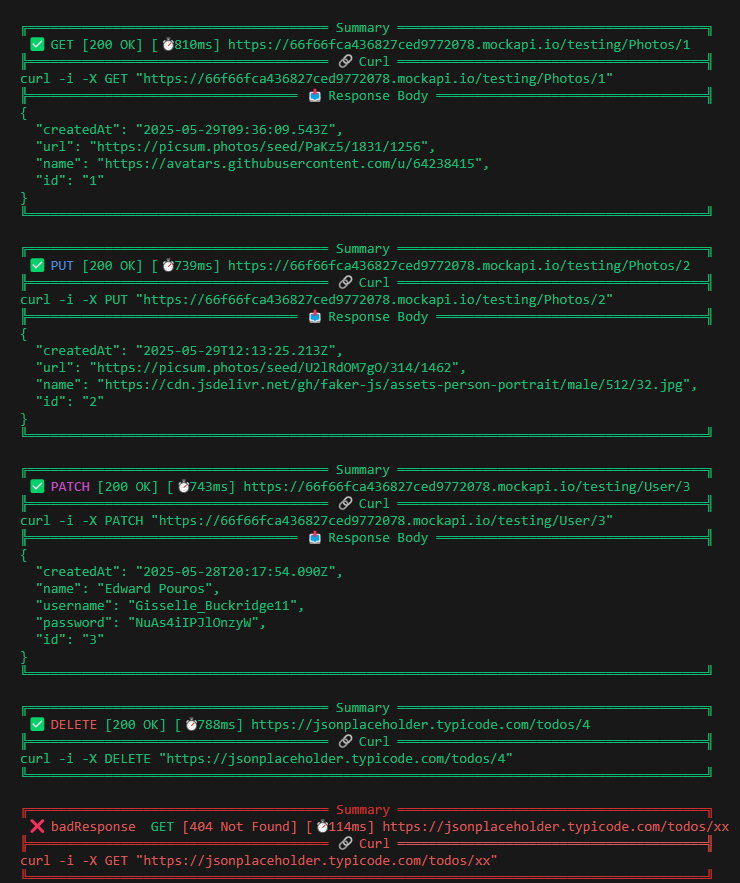
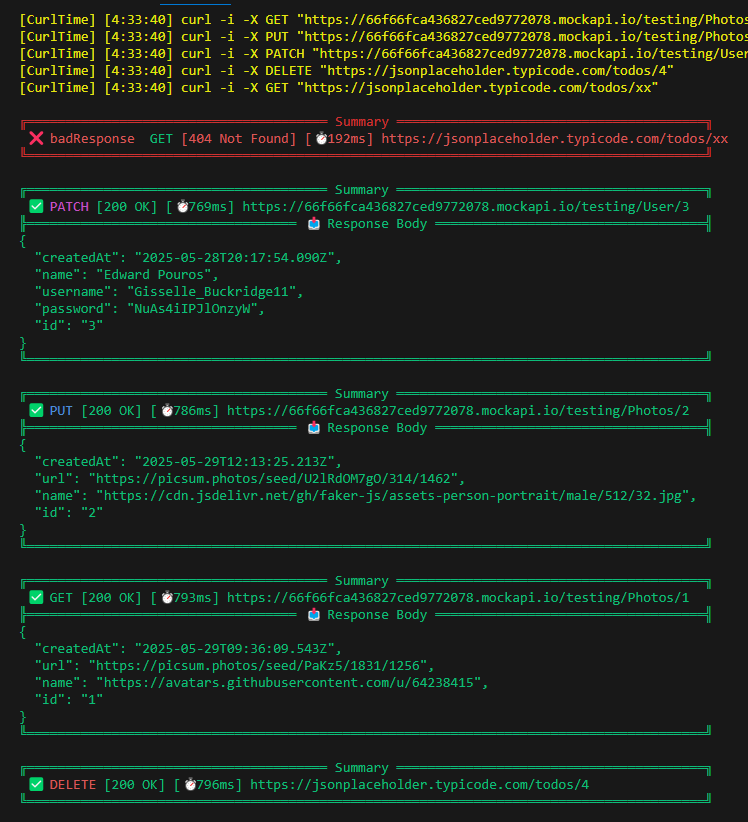
For detailed screenshots of the interceptor's behavior, including simultaneous and chronological logging, please refer to the [Screenshots](#screenshots) section at the bottom of this README.
## Migration Guide
For detailed migration instructions, breaking changes, and code examples, please see our comprehensive [MIGRATION.md](MIGRATION.md) guide.
## Terminal Compatibility
Below is a compatibility table for different terminals and their support for printing and ANSI colors:
| Terminal/Console | print | debugPrint | log (dart:developer) | ANSI Colors Support |
| --------------------- | :---: | :--------: | :------------------: | :-----------------: |
| VS Code Debug Console | ✅ | ✅ | ✅ | ✅ |
| IntelliJ IDEA Console | ❌ | ❌ | ❌ | ❌ |
## Usage
### Option 1: Using the CurlInterceptor
Simple add the interceptor to your Dio instance, all done for you:
```dart
final dio = Dio();
dio.interceptors.add(CurlInterceptor()); // Simple usage with default options
// or
dio.interceptors.add(CurlInterceptor.allEnabled()); // Enable all options
```
You can customize the interceptor with `CurlOptions` and `CacheOptions`:
```dart
dio.interceptors.add(CurlInterceptor(
curlOptions: CurlOptions(
status: true, // Show status codes + name in logs
responseTime: true, // Show response timing
behavior: CurlBehavior.chronological,
onRequest: RequestDetails(
visible: true,
ansi: Ansi.yellow, // ANSI color for request
),
onResponse: ResponseDetails(
visible: true,
requestHeaders: true, // Show request headers
requestBody: true, // Show request body
responseBody: true, // Show response body
responseHeaders: true, // Show response headers
limitResponseBody: null, // Limit response body length (characters), default is null (no limit)
ansi: Ansi.green, // ANSI color for response
),
onError: ErrorDetails(
visible: true,
requestHeaders: true,
requestBody: true,
responseBody: true,
responseHeaders: true,
limitResponseBody: null,
ansi: Ansi.red, // ANSI color for errors
),
// Configure pretty printing options
prettyConfig: PrettyConfig(
blockEnabled: true, // Enable pretty printing
colorEnabled: true, // Force enable/disable colored
emojiEnabled: true, // Enable/disable emoji
lineLength: 100, // Set the length of separator lines
),
// Custom printer function to override default logging behavior
printer: (String text) {
// do whatever you want with the text
// ...
// Your custom logging implementation
print('Custom log: $text'); // remember to print the text
},
),
webhookInspectors: [
DiscordInspector(
webhookUrls: ['https://discord.com/api/webhooks/your-webhook-url'],
inspectionStatus: [ResponseStatus.clientError, ResponseStatus.serverError],
includeUrls: const ['/api/v1/users', 'https://example.com/data'],
excludeUrls: const ['/api/v1/auth/login', 'https://example.com/sensitive'],
),
TelegramInspector(
botToken: 'YOUR_BOT_TOKEN', // Get from @BotFather
chatIds: [-1003019608685], // Get from getUpdates API
inspectionStatus: [ResponseStatus.clientError, ResponseStatus.serverError],
includeUrls: const ['/api/v1/users', 'https://example.com/data'],
excludeUrls: const ['/api/v1/auth/login', 'https://example.com/sensitive'],
),
],
))
```
### Option 2: Using CurlUtils directly in your own interceptor
If you prefer to use the utility methods in your own custom interceptor, you can use `CurlUtils` directly:
```dart
class YourInterceptor extends Interceptor {
// Initialize webhook inspectors
final webhookInspectors = [
DiscordInspector(
webhookUrls: ['https://discord.com/api/webhooks/your-webhook-url'],
inspectionStatus: [ResponseStatus.clientError, ResponseStatus.serverError],
),
TelegramInspector(
botToken: 'YOUR_BOT_TOKEN', // Get from @BotFather
chatIds: [-1003019608685], // Get from getUpdates API
inspectionStatus: [ResponseStatus.clientError, ResponseStatus.serverError],
),
];
@override
void onRequest(RequestOptions options, RequestInterceptorHandler handler) {
// ... your request handling logic (like adding headers, modifying options, etc.)
// for measure request time, it will add `X-Client-Time` header, then consume on response (error)
CurlUtils.addXClientTime(options);
CurlUtils.handleOnRequest(options);
handler.next(options);
}
@override
void onResponse(Response response, ResponseInterceptorHandler handler) {
// ... your response handling logic
CurlUtils.handleOnResponse(response, webhookInspectors: webhookInspectors);
handler.next(response);
}
@override
void onError(DioException err, ErrorInterceptorHandler handler) {
// ... your error handling logic
CurlUtils.handleOnError(err, webhookInspectors: webhookInspectors);
handler.next(err);
}
}
```
#### Using Multiple Webhook Inspectors
You can configure multiple webhook inspectors to send notifications to different services simultaneously. Each inspector operates independently with its own filters and configuration:
```dart
// Example of using multiple webhook inspectors
final webhookInspectors = [
DiscordInspector(
webhookUrls: ['https://discord.com/api/webhooks/your-discord-webhook'],
inspectionStatus: [ResponseStatus.clientError, ResponseStatus.serverError],
includeUrls: ['api.example.com'],
),
TelegramInspector(
botToken: 'YOUR_BOT_TOKEN', // Get from @BotFather
chatIds: [-1003019608685], // Get from getUpdates API
inspectionStatus: [ResponseStatus.serverError], // Only server errors to Telegram
includeUrls: ['api.example.com'],
),
];
// Use with CurlInterceptor
dio.interceptors.add(CurlInterceptor(
webhookInspectors: webhookInspectors,
// ... other options
));
```
### Option 3: Using path filtering
You can use path filtering to stop specific API calls and return custom responses:
```dart
final dio = Dio();
// Create filter options
final filterOptions = FilterOptions(
rules: [
// Block access to a specific endpoint
FilterRule.exact('/api/sensitive-data'),
// Mock a response for a specific endpoint
FilterRule.exact(
'/api/users/profile',
responseData: {
'id': 'mock-user-123',
'name': 'Mock User',
'email': 'mock@example.com',
},
),
// Use regex pattern to match multiple endpoints
FilterRule.regex(
r'/api/v1/.*',
responseData: {'message': 'API v1 is deprecated'},
statusCode: 410,
),
],
// Never filter these paths
exclusions: ['/api/health', '/api/version'],
);
// Add the interceptor with filtering
dio.interceptors.add(
CurlInterceptorFactory.withFilters(filterOptions: filterOptions),
);
```
For more detailed documentation on path filtering, see [Path Filtering Guide](doc/PATH_FILTERING.md).
### Option 4: Real-time filter editing with CurlViewer
You can now edit filter rules directly in the CurlViewer interface:
```dart
import 'package:dio_curl_interceptor/dio_curl_interceptor.dart';
// Show CurlViewer with filter editing capabilities
showDialog(
context: context,
builder: (context) => CurlViewer(
displayType: CurlViewerDisplayType.dialog,
enablePersistence: true, // Enable filter persistence
),
);
// Users can now:
// 1. Click the filters button (🔍) in the CurlViewer header
// 2. Add, edit, and delete filter rules in real-time
// 3. Test filter rules against sample requests
// 4. See immediate effects on API blocking
```
### Option 5: Using webhook integration
You can use webhook integration to send cURL logs to Discord channels or Telegram chats for remote logging and team collaboration:
#### Setting up Telegram Webhooks
For Telegram integration, you need to:
1. **Create a Telegram Bot:**
- Message [@BotFather](https://t.me/botfather) on Telegram
- Use `/newbot` command and follow the instructions
- Save your bot token
2. **Get your Chat ID:**
- Start a conversation with your bot
- Send any message to the bot
- Visit `https://api.telegram.org/bot/getUpdates`
- Find your chat ID in the response (it's a number, can be negative for groups)
3. **Configure the TelegramInspector:**
- Use `botToken` and `chatIds` parameters directly
- Example: `TelegramInspector(botToken: '123456:ABC-DEF1234ghIkl-zyx57W2v1u123ew11', chatIds: [123456789])`
```dart
// Using manual webhook configuration
dio.interceptors.add(CurlInterceptor(
webhookInspectors: [
DiscordInspector(
webhookUrls: ['https://discord.com/api/webhooks/your-webhook-url'],
includeUrls: ['api.example.com', '/users/'],
excludeUrls: ['/healthz'],
inspectionStatus: [ResponseStatus.clientError, ResponseStatus.serverError],
),
TelegramInspector(
botToken: 'YOUR_BOT_TOKEN', // Get from @BotFather
chatIds: [-1003019608685], // Get from getUpdates API
includeUrls: ['api.example.com'],
inspectionStatus: [ResponseStatus.serverError], // Only server errors
),
],
));
// Manual webhook sending
final discordInspector = DiscordInspector(
webhookUrls: ['https://discord.com/api/webhooks/your-webhook-url'],
);
final telegramInspector = TelegramInspector(
botToken: 'YOUR_BOT_TOKEN', // Get from @BotFather
chatIds: [-1003019608685], // Get from getUpdates API
);
// Send messages
await discordInspector.sendMessage(content: 'Hello from Discord!');
await telegramInspector.sendMessage(content: 'Hello from Telegram!');
// Send bug reports
await discordInspector.sendBugReport(
error: 'Example Error',
message: 'An example bug report.',
extraInfo: {'userId': 'testUser', 'appVersion': '1.0.0'},
);
await telegramInspector.sendBugReport(
error: 'Example Error',
message: 'An example bug report.',
extraInfo: {'userId': 'testUser', 'appVersion': '1.0.0'},
);
```
### Option 4: Using utility functions directly
If you don't want to add a full interceptor, you can use the utility functions directly in your code:
```dart
// Generate a curl command from request options
final dio = Dio();
final response = await dio.get('https://example.com');
// Generate and log a curl command
CurlUtils.logCurl(response.requestOptions);
// Log response details
CurlUtils.handleOnResponse(response);
// Cache a successful response
CurlUtils.cacheResponse(response);
// Log error details
try {
await dio.get('https://invalid-url.com');
} on DioException catch (e) {
CurlUtils.handleOnError(e);
// Cache an error response
CurlUtils.cacheError(e);
}
## Dio Cache Storage
### Public Flutter Widget: cURL Log Viewer
Show pre-built popup cURL log viewer widget with `showCurlViewer(context)`:
```dart
ElevatedButton(
onPressed: () => showCurlViewer(context),
child: const Text('View cURL Logs'),
);
```
The log viewer supports:
- Search and filter by status code, date range, or text
- Copy cURL command
- Clear all logs
- Enhanced sharing functionality with improved system integration
- Better error handling and UI responsiveness
### Floating Bubble Overlay
For a non-intrusive debugging experience, use the floating bubble overlay that wraps your main app content:
```dart
class MyApp extends StatelessWidget {
@override
Widget build(BuildContext context) {
return MaterialApp(
home: Scaffold(
body: CurlBubble(
// Wrap your main app content
body: YourMainContent(),
controller: BubbleOverlayController(),
style: BubbleStyle(
initialPosition: const Offset(50, 200),
snapToEdges: false, // Stays where you drag it
),
onExpanded: () => debugPrint('Bubble expanded'),
onMinimized: () => debugPrint('Bubble minimized'),
),
),
);
}
}
```
#### Bubble Features
- **Draggable**: Drag the bubble around the screen
- **Free Positioning**: Stays where you drag it (no auto-snapping by default)
- **Expandable**: Tap to expand and view cURL logs
- **Non-intrusive**: Stays on top without blocking your app
- **Controller-based**: Full programmatic control via `BubbleOverlayController`
- **Resizable**: Expand and resize the bubble content
- **Customizable**: Use custom widgets for minimized and expanded states
> **📖 Complete Integration Guide**: For detailed bubble integration instructions, custom configurations, programmatic control, and best practices, see our comprehensive [Bubble Integration Guide](doc/BUBBLE_INTEGRATION_GUIDE.md).
> **Note**: File export functionality has been removed in v3.3.3. Use copy/share features instead.
### Cache Storage Initialization
Before using caching or the log viewer, initialize storage in your `main()`:
```dart
void main() async {
WidgetsFlutterBinding.ensureInitialized();
await CachedCurlService.init();
runApp(const MyApp());
}
```
> **Note**: In v3.3.3, `CachedCurlStorage` was renamed to `CachedCurlService`. See [MIGRATION.md](MIGRATION.md) for details.
## Screenshots
### Simultaneous (log the curl and response (error) together)
### Chronological (log the curl immediately after the request is made)
### Cached Viewer
### Inspect Bug Discord
### Inspect cURL Discord
## License
This project is licensed under the MIT License - see the LICENSE file for details.
- **Repository**: [GitHub](https://github.com/venhdev/dio_curl_interceptor)
- **Bug Reports**: Please file issues on the [GitHub repository](https://github.com/venhdev/dio_curl_interceptor/issues)
- **Feature Requests**: Feel free to suggest new features through GitHub issues
[](https://www.buymeacoffee.com/venhdev)
Contributions are welcome! Please feel free to submit a Pull Request.