https://github.com/venkat-0706/strongpass-generator
A web-based application using HTML, CSS, and JavaScript to generate secure, customizable passwords with options for length, character types, and a copy-to-clipboard feature.
https://github.com/venkat-0706/strongpass-generator
css cyber-security front-end-development html javascript open-source password-generator responsive-design userinterface web-development
Last synced: about 2 months ago
JSON representation
A web-based application using HTML, CSS, and JavaScript to generate secure, customizable passwords with options for length, character types, and a copy-to-clipboard feature.
- Host: GitHub
- URL: https://github.com/venkat-0706/strongpass-generator
- Owner: venkat-0706
- License: mit
- Created: 2025-01-06T08:55:11.000Z (over 1 year ago)
- Default Branch: main
- Last Pushed: 2025-01-06T09:01:29.000Z (over 1 year ago)
- Last Synced: 2025-01-06T09:41:19.807Z (over 1 year ago)
- Topics: css, cyber-security, front-end-development, html, javascript, open-source, password-generator, responsive-design, userinterface, web-development
- Language: JavaScript
- Homepage: https://venkat-0706.github.io/StrongPass-Generator/
- Size: 0 Bytes
- Stars: 0
- Watchers: 1
- Forks: 0
- Open Issues: 0
-
Metadata Files:
- Readme: README.md
- License: LICENSE
Awesome Lists containing this project
README
A **Strong Password Generator** is a simple web-based application that allows users to generate secure, random passwords. The application is built using **HTML**, **CSS**, and **JavaScript** to provide a user-friendly interface and functionality.
## Features
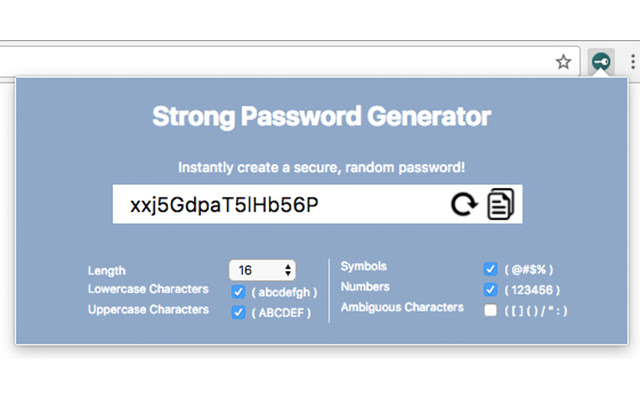
- **Customizable Password Length**: Users can select the desired length of the password (e.g., 8-20 characters).
- **Character Options**: Users can include/exclude:
- Uppercase letters
- Lowercase letters
- Numbers
- Special characters (e.g., `!@#$%^&*`)
- **Real-Time Preview**: The generated password is displayed dynamically as options are selected.
- **Copy to Clipboard**: Users can easily copy the generated password with a single click.
- **Responsive Design**: Works seamlessly across devices, including desktops, tablets, and mobile phones.
## Technology Stack
- **HTML**: Structure of the application
- **CSS**: Styling and layout
- **JavaScript**: Functionality and interactivity
## How It Works
1. **Password Criteria Selection**:
- Users choose the desired password length and toggle options for uppercase, lowercase, numbers, and special characters.
2. **Password Generation**:
- JavaScript logic generates a random password based on the selected criteria.
3. **User Interaction**:
- Users can click the "Generate Password" button to create a password.
- The "Copy" button allows users to copy the generated password to the clipboard.
## Code Snippet (JavaScript Logic Example)
```javascript
function generatePassword(length, options) {
const upperCase = "ABCDEFGHIJKLMNOPQRSTUVWXYZ";
const lowerCase = "abcdefghijklmnopqrstuvwxyz";
const numbers = "0123456789";
const specialChars = "!@#$%^&*()_+[]{}|;:,.<>?";
let characters = "";
if (options.uppercase) characters += upperCase;
if (options.lowercase) characters += lowerCase;
if (options.numbers) characters += numbers;
if (options.specialChars) characters += specialChars;
let password = "";
for (let i = 0; i < length; i++) {
const randomIndex = Math.floor(Math.random() * characters.length);
password += characters[randomIndex];
}
return password;
}
```
## Installation and Usage
1. Clone the repository:
```bash
git clone https://github.com/venkat-0706/strong-password-generator.git
```
2. Open the `index.html` file in a web browser.
3. Customize the password options and click "Generate Password."
## Live Demo
[Click Here]( https://venkat-0706.github.io/StrongPass-Generator/)
## Screenshots
## Future Enhancements
- Save generated passwords locally or in a database.
- Add strength indicators (e.g., weak, medium, strong).
- Support for multilingual interface.
## Contributions
Contributions are welcome! Feel free to open issues or submit pull requests.
## License
This project is licensed under the [MIT License](LICENSE).