https://github.com/venopyx/newtabplus
A feature-rich Chrome extension that replaces your new tab with an all-in-one productivity dashboard
https://github.com/venopyx/newtabplus
calendar chrome chrome-extension extension extension-chrome newtab newtablus note note-taking productivity reminder tab task timer todo
Last synced: about 1 year ago
JSON representation
A feature-rich Chrome extension that replaces your new tab with an all-in-one productivity dashboard
- Host: GitHub
- URL: https://github.com/venopyx/newtabplus
- Owner: venopyX
- License: mit
- Created: 2025-04-19T11:04:44.000Z (over 1 year ago)
- Default Branch: main
- Last Pushed: 2025-05-03T22:49:25.000Z (about 1 year ago)
- Last Synced: 2025-05-03T23:25:46.584Z (about 1 year ago)
- Topics: calendar, chrome, chrome-extension, extension, extension-chrome, newtab, newtablus, note, note-taking, productivity, reminder, tab, task, timer, todo
- Language: JavaScript
- Homepage:
- Size: 1.88 MB
- Stars: 3
- Watchers: 1
- Forks: 0
- Open Issues: 0
-
Metadata Files:
- Readme: README.md
- License: LICENSE
Awesome Lists containing this project
README
NewTab+
Transform Your Browser's New Tab Into a Productivity Powerhouse
A feature-rich Chrome extension that replaces your new tab with an all-in-one productivity dashboard
[](https://github.com/venopyx/newtabplus/issues)
[](https://github.com/venopyx/newtabplus/stargazers)
[](https://github.com/venopyx/newtabplus/blob/main/LICENSE)
## ✨ Features
### 🔍 Flexible Search Engine
- Easily search the web directly from your new tab
- Customizable search engine selection (ChatGPT, Google, Perplexity, Bing, DuckDuckGo, GitHub, Grep, Stack Overflow, and more)
- Add, edit, and delete custom search engines with your preferred icons
- Quickly switch between engines with a single click
### 🎵 YouTube Audio Player
- Listen to YouTube videos in a dedicated player window while you browse
- Search videos, create favorites, manage queues and build custom playlists
- Control playback with play/pause, seek, and volume controls
- Seamlessly continue playback across browsing sessions
- Access your video library with a single click on the YouTube icon
### 🔖 Bookmark Management
- Organize bookmarks with an intuitive folder structure
- Add custom tags to categorize and quickly find your links
- Powerful search capabilities across all your saved bookmarks
- Clean, modern interface with list and grid views for easy navigation
- Import and export functionality to backup your bookmark collection
### 📅 Timed Tab Recall
- Schedule tabs to open at specific times
- Choose between foreground or background opening
- Get notifications with quick "Open Now" buttons
### 📝 Notes Section
- Rich text support with Markdown formatting
- Organize with customizable categories (Personal, Work, Ideas)
- Powerful search with fuzzy matching
### 📋 Smart To-Do List
- Checkbox-style task management
- Set due dates and times for important tasks
- Color-coded priority levels
- Support for recurring tasks
### ⏰ Comprehensive Reminders
- One-time and recurring reminder options
- Link reminders to:
- Opening specific tabs
- Custom notifications
- Action triggers
### 🔔 Smart Notifications
- Seamless Chrome notification integration
- Desktop push notification fallbacks
- Customizable alert styles
### 🌘 Elegant Themed UI
- Dark mode for night owls
- Light mode for daytime productivity
- Automatic theme switching based on system preferences
### 🔒 Privacy-Focused
- All data stored locally on your device
- No external servers or cloud dependencies
- Your data belongs only to you
### 📆 Integrated Calendar View
- Flexible weekly/daily/monthly views
- Visual timeline of reminders, to-dos, and scheduled tabs
- At-a-glance productivity overview
## 📸 Screenshots
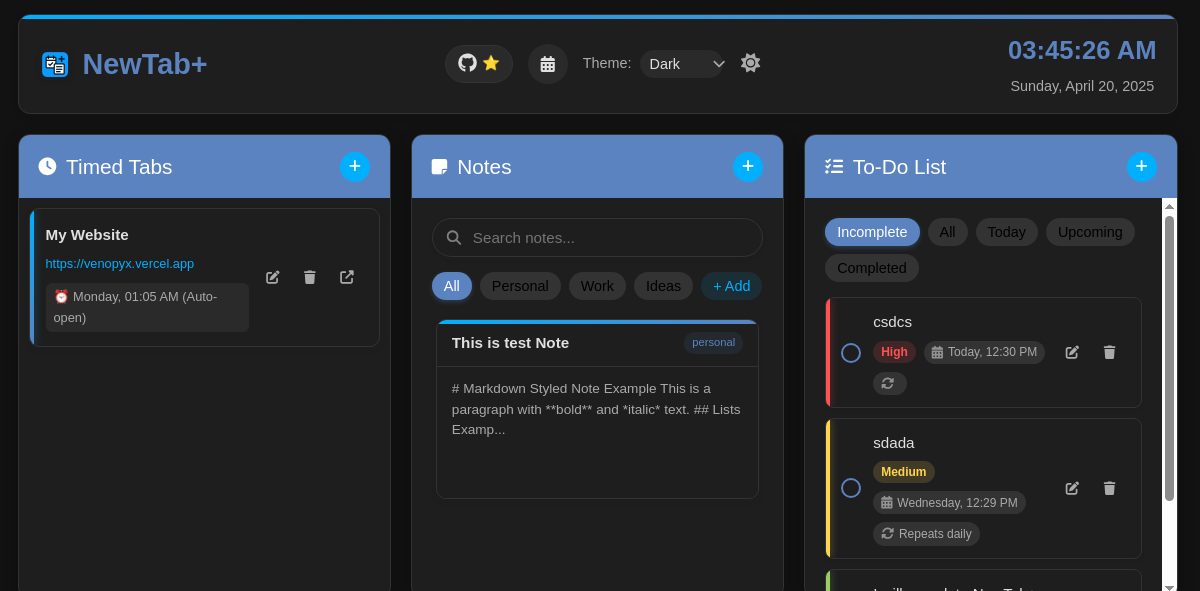
Main dashboard in Dark Mode
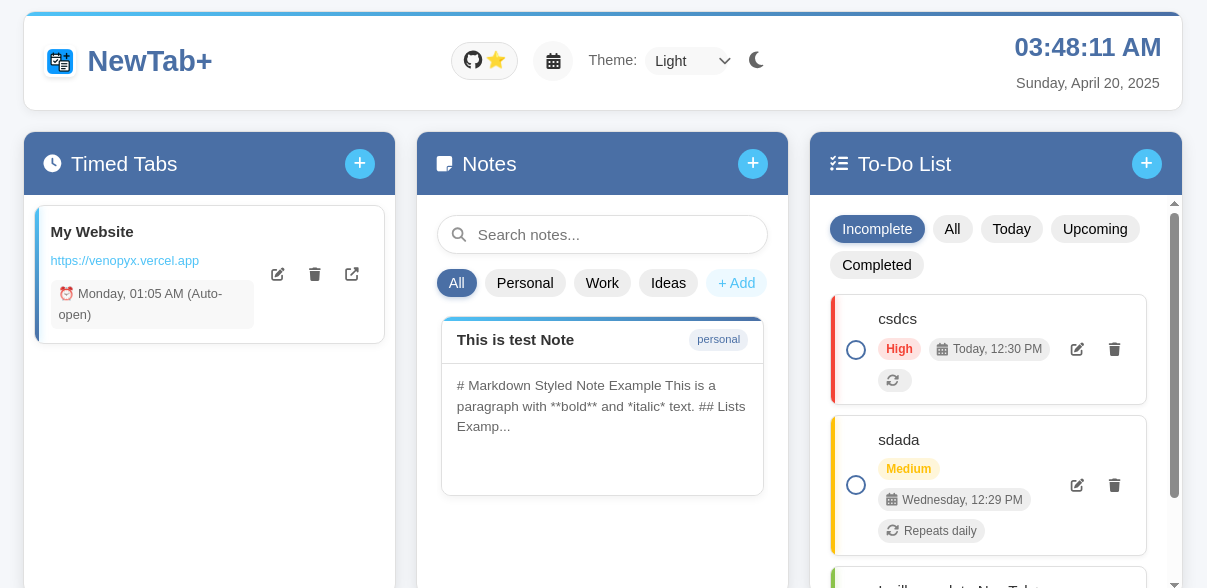
Main Dashboard in Light Mode
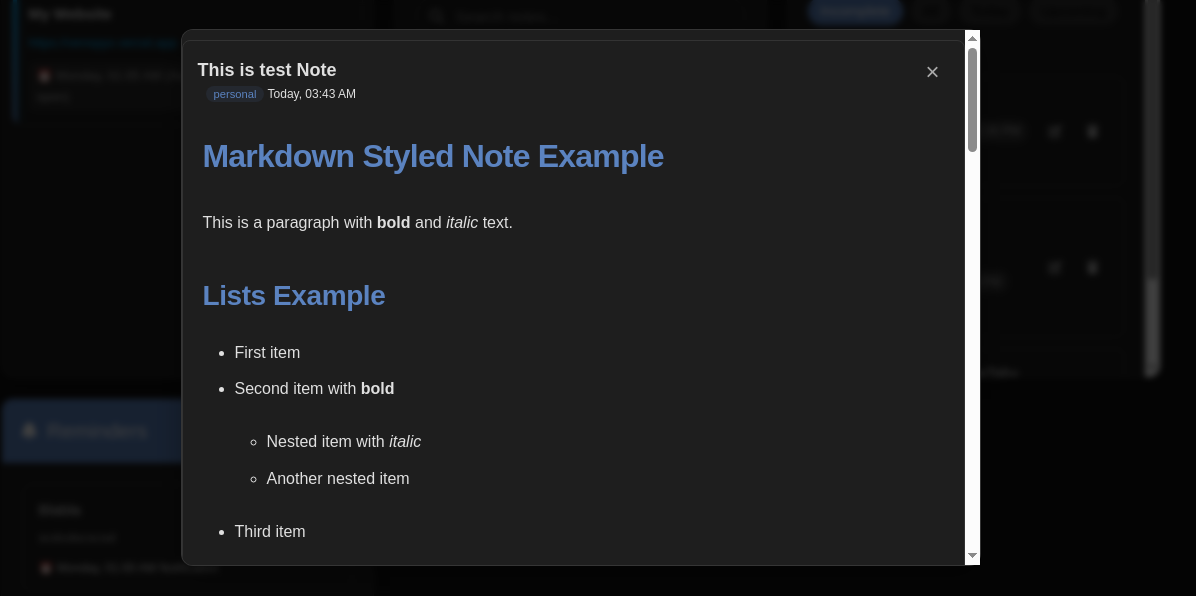
Rich text notes with Markdown support
## 🚀 Installation
1. **Chrome Web Store (Coming Soon)**
- Visit the Chrome Web Store and search for "NewTab+"
- Click "Add to Chrome"
2. **Manual Installation**
- Download the latest release from [GitHub Releases](https://github.com/venopyx/newtabplus/releases)
- Go to `chrome://extensions/` in your Chrome browser
- Enable "Developer mode" (top-right toggle)
- Click "Load unpacked" and select the unzipped extension folder
## 🛠️ Usage
NewTab+ automatically replaces your new tab page with a productivity dashboard:
1. **Timed Tabs**: Schedule websites to open at specific times
2. **Notes**: Quickly capture and organize your thoughts with Markdown support
3. **To-Dos**: Create, prioritize and track tasks with due dates
4. **Reminders**: Set up alerts for important events and deadlines
5. **Calendar**: View your scheduled items in an intuitive calendar format
6. **YouTube Audio Player**: Listen to YouTube videos in the background while managing your tasks
## 🤝 Contributing
Contributions are what make the open-source community such an amazing place to learn, inspire, and create. Any contributions you make are **greatly appreciated**.
1. Fork the Project
2. Create your Feature Branch (`git checkout -b feature/AmazingFeature`)
3. Commit your Changes (`git commit -m 'Add some AmazingFeature'`)
4. Push to the Branch (`git push origin feature/AmazingFeature`)
5. Open a Pull Request
## 📝 License
Distributed under the MIT License. See `LICENSE` for more information.
## 👨💻 Developer
**Gemechis Chala** - [@venopyx](https://github.com/venopyx)
- Twitter: [@venopyx](https://twitter.com/venopyx)
- GitHub: [venopyx](https://github.com/venopyx)
## 🙏 Acknowledgments
- [Marked.js](https://github.com/markedjs/marked) - For Markdown parsing
- [Font Awesome](https://fontawesome.com/) - For beautiful icons
- Icons and graphics created with love for productivity enthusiasts
---
Made with ❤️ for a more productive browsing experience