https://github.com/vgalvoso/phunctional-php
A functional programming PHP framework.
https://github.com/vgalvoso/phunctional-php
functional-programming no-dependencies php php-framework
Last synced: 5 months ago
JSON representation
A functional programming PHP framework.
- Host: GitHub
- URL: https://github.com/vgalvoso/phunctional-php
- Owner: vgalvoso
- Created: 2022-09-21T19:24:41.000Z (almost 4 years ago)
- Default Branch: master
- Last Pushed: 2025-06-17T20:23:36.000Z (about 1 year ago)
- Last Synced: 2026-01-11T13:16:51.706Z (5 months ago)
- Topics: functional-programming, no-dependencies, php, php-framework
- Language: PHP
- Homepage: https://phunctional.brewdevs.com
- Size: 187 KB
- Stars: 1
- Watchers: 1
- Forks: 0
- Open Issues: 0
-
Metadata Files:
- Readme: README.md
Awesome Lists containing this project
README
# PHunctional PHP
**Functional PHP Framework**
## Introduction
PHunctional PHP is a functional PHP framework.
Today's development uses complicated or too much abstraction of codes, it doesn't have to be that way.
Doesn't it cool to easily know what the code does in one look?
Doesn't it cool to focus on the output rather than wasting your time on technical stuffs?
Doesn't it cool to use a framework immediately without overwhelming configurations and dependencies?
This is what PHunctional PHP is all about.
## Structure
Here is the basic directory structure of PHunctional PHP.
```
api/
lib/
Database.php
DotEnv.php
Helper.php
Sql.php
public/
css/
js/
res/
routes/
api.php
view.php
view/
section/
header.php
footer.php
.env
.htaccess
index.php
README.md
```
## Installation
Download the latest version and extract it on your web server's root folder.
Then rename the extracted root folder into your project's name.
Or use composer:
```bash
composer create-project vgalvoso/phunctional your_project_name
```
After extracting or creating your project, open a terminal in your project directory and run:
```bash
composer install
```
This will initialize Composer to let you add dependencies when needed.
## Build Your First App
Hello World! Yes, let's create your first hello world using PHunctional PHP.
After you download and extract the latest version (see installation), create a PHP file inside the `view` folder and name it `hello_world.php`.
Let's assume you named your root folder "helloworld", this is what your project directory might look like.
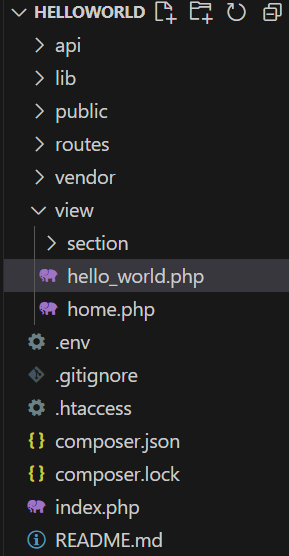
Copy and paste this code inside `hello_world.php`:
```php
Hello World!
```
Open `routes/web.php` and add a new view route. Your `routes/web.php` should look something like this:
```php
Hello World!
```
## Database Setup
PHunctional PHP uses a simple `Database.php` file for database connections. Configuration is managed via the `.env` file.
### 1. Configure `.env`
Add your database credentials to the `.env` file in your project root:
```
APP_ENV=development
DEFAULT_SERVER=localhost
DEFAULT_USER=root
DEFAULT_PASS=root
DEFAULT_DBNAME=helloworld_db
DEFAULT_DRIVER=mysql
DEFAULT_PORT=3306
```
### 2. Using `Database.php`
Here is a sample `lib/Database.php` file:
```php
array(
"server" => getenv('DEFAULT_SERVER'),
"user" => getenv('DEFAULT_USER'),
"pass" => getenv('DEFAULT_PASS'),
"dbname" => getenv('DEFAULT_DBNAME'),
"driver" => getenv('DEFAULT_DRIVER'),
"port" => getenv('DEFAULT_PORT')
)
);
```
This file loads the database credentials from environment variables and stores them in the `$db` array.
## Creating an API
You can easily create API endpoints in PHunctional PHP by adding files inside the `api` folder and defining routes in `routes/api.php`.
### 1. Create a Sample Database
First, create a sample database and a `users` table. You can run the following SQL queries in your MySQL client:
```sql
-- 1. Create the database
CREATE DATABASE IF NOT EXISTS myapp_db;
-- 2. Use the newly created database
USE myapp_db;
-- 3. Create the users table
CREATE TABLE users (
id INT AUTO_INCREMENT PRIMARY KEY,
username VARCHAR(50) NOT NULL UNIQUE,
email VARCHAR(100) NOT NULL UNIQUE,
password VARCHAR(255) NOT NULL,
created_at TIMESTAMP DEFAULT CURRENT_TIMESTAMP,
updated_at TIMESTAMP DEFAULT CURRENT_TIMESTAMP ON UPDATE CURRENT_TIMESTAMP
);
```
### 2. Create `api/add_user.php`
Create a new file `api/add_user.php` with the following code to handle adding a user:
```php
$username,
"email" => $email,
"password" => password_hash($password, PASSWORD_DEFAULT),
];
if ($sql->exec($query, $inputs))
echo "User added successfully.";
else
echo "Error adding user: " . $sql->getError();
```
> **Note:** In PHunctional PHP, POST payload keys are automatically converted into variables, so you can use `$username`, `$email`, and `$password` directly. No need to use `$_POST` or `$_GET`.
> **Note:** The `$sql` object is automatically available and uses the "default" database configuration from `Database.php`. If you want to use a different configuration, you can initialize it with `$sql = new Sql('configname');`.
### 3. Add the Route in `routes/api.php`
Open `routes/api.php` and add the following line:
```php
post("users", "add_user");
```
Now you can send a POST request to `/users` with `username`, `email`, and `password` in the JSON body to add a new user.