https://github.com/vicajilau/drag-pdf
Cross-platform Flutter app to create PDF documents from images or other PDFs, and to extract images from PDF files.
https://github.com/vicajilau/drag-pdf
flutter pdf pdf-generator pdf-tools
Last synced: about 1 year ago
JSON representation
Cross-platform Flutter app to create PDF documents from images or other PDFs, and to extract images from PDF files.
- Host: GitHub
- URL: https://github.com/vicajilau/drag-pdf
- Owner: vicajilau
- License: lgpl-3.0
- Created: 2025-05-27T13:49:48.000Z (about 1 year ago)
- Default Branch: main
- Last Pushed: 2025-06-02T08:35:50.000Z (about 1 year ago)
- Last Synced: 2025-06-09T07:03:34.698Z (about 1 year ago)
- Topics: flutter, pdf, pdf-generator, pdf-tools
- Language: Dart
- Homepage:
- Size: 1.35 MB
- Stars: 2
- Watchers: 0
- Forks: 0
- Open Issues: 1
Awesome Lists containing this project
README


# Drag PDF: Create PDF Documents Easy
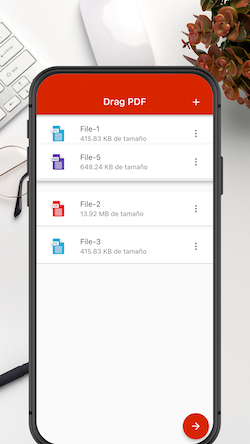
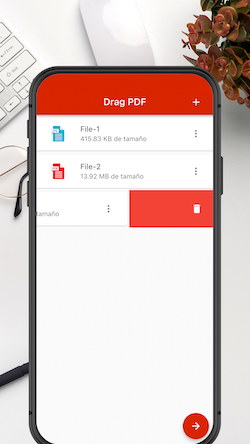
Drag PDF is a powerful and open-source mobile application developed with Flutter, designed to simplify the process of creating PDF documents. With intuitive features like image compilation, PDF merging, gallery integration, and an integrated document scanner, Drag PDF empowers users to effortlessly generate PDFs on the go.
## Features
### 1. Drag and Drop Interface
- **Intuitive Drag-and-Drop:** Arrange and organize your content effortlessly with a user-friendly drag-and-drop interface.
### 2. Create PDFs from Various Sources
- **Image Compilation:** Compile multiple images into a cohesive PDF document seamlessly.
- **PDF Merging:** Merge existing PDF documents effortlessly for comprehensive PDF creation.
- **Gallery Integration:** Access and utilize images directly from your device's gallery.
- **Document Scanner:** Leverage the integrated document scanner to convert physical documents into digital PDFs.
### 3. Customization Options
- **Page Layout:** Personalize the layout of your PDF with options for orientation, size, and margins.
- **Image Compression:** Optimize PDF size by adjusting image compression settings.
### 4. Save and Share
- **Local Saving:** Save your created PDFs directly to your device.
- **Share Options:** Share your PDFs seamlessly via email, messaging apps, or cloud storage services.
## Installation
### Prerequisites
- Make sure you have Flutter installed. If not, follow the [Flutter installation guide](https://flutter.dev/docs/get-started/install).
### Clone the Repository
```bash
git clone https://github.com/vicajilau/Drag-PDF.git
cd Drag-PDF
```
### Run the Application
```bash
flutter run
```
## Getting Started
1. Open the Drag PDF application on your device.
2. Choose your preferred method for creating a PDF: image compilation, PDF merging, gallery integration, or document scanning.
3. Utilize the intuitive drag-and-drop interface to arrange your content.
4. Customize your PDF by adjusting layout and compression settings.
5. Save the PDF locally or share it with others effortlessly.
## Where you can Download DragPDF
To start using DragPDF in your own project, the first thing you should do is:
* Download the DragPDF app file available in: [App Store](https://apps.apple.com/es/app/drag-pdf/id1640647538), [Play Store](https://play.google.com/store/apps/details?id=es.victorcarreras.drag_pdf) and [App Gallery](https://appgallery.huawei.com/app/C107001391).
## Contributing
We welcome contributions from the Flutter community! If you'd like to contribute to Drag PDF, please check out our [contribution guidelines](CONTRIBUTING.md).
## Bug Reporting
Encountered a bug? Please report it on our [issue tracker](https://github.com/vicajilau/Drag-PDF/issues).
## License
Drag PDF is licensed under the [LGPL v3](LICENSE).
## Privacy
Drag PDF is very committed to the security and [privacy](PRIVACY.md) of its users.