https://github.com/vicajilau/platform_detail
A lightweight Dart package for retrieving platform details in a simple and optimized way. Supports mobile, desktop, and web.
https://github.com/vicajilau/platform_detail
cross-platform dart device-info flutter os-detection platform platform-detection
Last synced: 11 months ago
JSON representation
A lightweight Dart package for retrieving platform details in a simple and optimized way. Supports mobile, desktop, and web.
- Host: GitHub
- URL: https://github.com/vicajilau/platform_detail
- Owner: vicajilau
- License: mit
- Created: 2022-05-18T06:09:13.000Z (about 4 years ago)
- Default Branch: main
- Last Pushed: 2025-06-02T08:47:12.000Z (about 1 year ago)
- Last Synced: 2025-06-02T19:45:19.719Z (about 1 year ago)
- Topics: cross-platform, dart, device-info, flutter, os-detection, platform, platform-detection
- Language: Dart
- Homepage: https://pub.dev/packages/platform_detail
- Size: 551 KB
- Stars: 5
- Watchers: 1
- Forks: 0
- Open Issues: 0
-
Metadata Files:
- Readme: README.md
- Changelog: CHANGELOG.md
- License: LICENSE
Awesome Lists containing this project
README
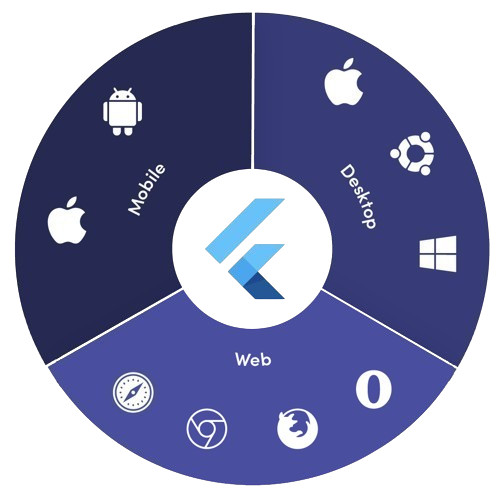
Platform Detail




## About
**Platform Detail** is a lightweight and developer-friendly Flutter package that makes platform detection easier, more complete, and cross-platform.
It provides a unified and consistent API for checking the platform your app is running on — **including web**, something that native Flutter classes like [`TargetPlatform`](https://api.flutter.dev/flutter/foundation/TargetPlatform.html) and `Platform` from `dart:io` don't currently support.
> ⚠️ Flutter’s native `Platform` and `TargetPlatform` do **not** provide support for detecting web, which can be a limitation in universal apps.
> ✅ `platform_detail` addresses this limitation by introducing a simple and intuitive API that includes web detection out of the box.
## ✅ Why Use This Package?
- ✅ Unified API across all platforms (including web).
- ✅ Clear separation between **platform type** and **platform group**.
- ✅ Singleton behavior via factory constructor.
- ✅ No need to manually check `kIsWeb` or rely on partial solutions.
- ✅ Detect private and public IP addresses.
- ✅ Detect device theme (light or dark).
## Getting Started
The recommended way to use the library is to call the static members of the [PlatformDetail] class.
Thanks to a factory constructor, multiple instances are not created — a singleton is used internally.
---
## 🔍 Basic Usage
### ✔️ Detecting Platform Type
```dart
import 'package:platform_detail/platform_detail.dart';
void main() {
PlatformType platform = PlatformDetail.currentPlatform;
print('This platform is: $platform'); // e.g., PlatformType.android
}
```
---
### 🌐 Why use `PlatformType`?
If you only rely on `TargetPlatform`, you’ll miss web support.
```dart
void main() {
// Native TargetPlatform doesn't detect web:
if (defaultTargetPlatform == TargetPlatform.android) {
// OK for Android
} else if (kIsWeb) {
// Web has to be checked manually
}
}
```
With `PlatformDetail`, the check is unified:
```dart
void main() {
if (PlatformDetail.isWeb) {
print('Web detected ✔️');
}
}
```
---
### 🔎 Group-based Detection
Check whether the current platform belongs to a broader category:
```dart
void main() {
if (PlatformDetail.isMobile) {
print('Mobile platform');
}
if (PlatformDetail.isDesktop) {
print('Desktop platform');
}
if (PlatformDetail.isDesktopOrWeb) {
print('Desktop or Web platform');
}
}
```
Or use the `PlatformGroup` enum directly:
```dart
void main() {
switch (PlatformDetail.currentGroupPlatform) {
case PlatformGroup.mobile:
print('Mobile');
break;
case PlatformGroup.web:
print('Web');
break;
case PlatformGroup.desktop:
print('Desktop');
break;
}
}
```
---
### 🎯 Detecting Specific Platforms
```dart
void main() {
if (PlatformDetail.isIOS) print('iOS');
if (PlatformDetail.isAndroid) print('Android');
if (PlatformDetail.isFuchsia) print('Fuchsia');
if (PlatformDetail.isWindows) print('Windows');
if (PlatformDetail.isLinux) print('Linux');
if (PlatformDetail.isMacOS) print('macOS');
if (PlatformDetail.isWeb) print('Web');
}
```
Or create different cases through the enum with a switch:
```dart
void main() {
switch (PlatformDetail.currentPlatform) {
case PlatformType.android:
print('Android');
case PlatformType.iOS:
print('iOS');
case PlatformType.isFuchsia:
print('Fuchsia');
case PlatformType.Windows:
print('Windows');
case PlatformType.Linux:
print('Linux');
case PlatformType.macOS:
print('macOS');
case PlatformType.Web:
print('Web');
}
}
```
---
### 🌐 Detecting IPs
You can detect the **private IP** of the device:
```dart
void main() async {
final List privateIps = await PlatformDetail.getPrivateIp;
}
```
You can also detect the **public IP** of the device:
```dart
void main() async {
final String publicIp = await PlatformDetail.getPublicIp;
}
```
> ℹ️ No configuration is required for most platforms.
> For **macOS**, you must add the following entry to both `DebugProfile.entitlements` and `ReleaseProfile.entitlements` files:
```xml
com.apple.security.network.client
```
---
### Get a device description
If you need more detailed information about the device and operating system it is running on.
```dart
void main() async {
final descriptionDevice = await PlatformDetail.deviceInfo();
}
```
Or maybe you need an information string about the device info:
```dart
void main() async {
final descriptionDevice = await PlatformDetail.deviceInfoDetails();
}
```
This will return something like this:
- Android: Android 9 (SDK 28), Xiaomi Redmi Note 7
- iOS: iOS 13.1, iPhone 11 Pro Max iPhone
- Web: Google Chrome (115.0.5790.170)
- Linux: Fedora 17 (Beefy Miracle)
- Windows: Windows 10 Home (1903)
- MacOS: macOS 13.5, MacBook Pro
---
### Light/Dark Mode
You can detect too if the device is configured in light or dark mode:
```dart
void main() {
if (PlatformDetail.isLightMode) {
print('The current platform is configured with light mode');
}
if (PlatformDetail.isDarkMode) {
print('The current platform is configured with dark mode');
}
}
```
Also, you can use the [DeviceTheme] enum for this:
```dart
void main() {
if (PlatformDetail.theme == DeviceTheme.light) {
print('The current device is configured in light mode');
}
if (PlatformDetail.theme == DeviceTheme.dark) {
print('The current device is configured in dark mode');
}
}
```
[PlatformDetail]: https://github.com/vicajilau/platform_detail/blob/master/lib/src/platform_detail.dart
[PlatformGroup]: https://github.com/vicajilau/platform_detail/blob/master/lib/src/platform_group.dart
[DeviceTheme]: https://github.com/vicajilau/platform_detail/blob/master/lib/src/device_theme.dart
[PlatformType]: https://github.com/vicajilau/platform_detail/blob/master/lib/src/platform_type.dart