https://github.com/vifon/yeetlight
A lightweight Yeelight smartlights web control panel
https://github.com/vifon/yeetlight
iot yeelight
Last synced: over 1 year ago
JSON representation
A lightweight Yeelight smartlights web control panel
- Host: GitHub
- URL: https://github.com/vifon/yeetlight
- Owner: vifon
- License: agpl-3.0
- Created: 2021-01-12T22:16:52.000Z (over 5 years ago)
- Default Branch: master
- Last Pushed: 2024-09-17T23:45:00.000Z (almost 2 years ago)
- Last Synced: 2024-09-18T17:43:08.496Z (almost 2 years ago)
- Topics: iot, yeelight
- Language: Rust
- Homepage:
- Size: 290 KB
- Stars: 4
- Watchers: 2
- Forks: 1
- Open Issues: 0
-
Metadata Files:
- Readme: README.md
- License: LICENSE
Awesome Lists containing this project
README
# Yeetlight
[](https://ci.codeberg.org/repos/13628)
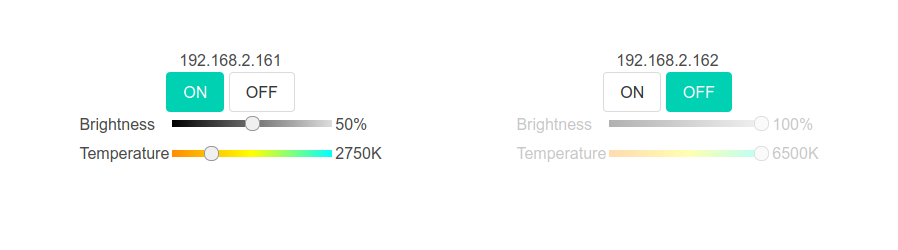
Yeetlight is a lightweight Yeelight smartlights web control panel.
It was created as a way so that I wouldn't *yeet* my *lights* when
interacting with their official smartphone app.
## Features
Remote control of the Yeelight/Xiaomi smartlights including:
- power on/off
- brightness
- color temperature
- RGB support (albeit ugly)
- multiple lights linked to each other and acting as a larger setup
Additional features:
- simple UI
- self-contained
- full controls of multiple smartlights in a single panel; no
subpanels per light as in the official app
- responsive web design
## Dependencies
A reasonably new [Rust](https://www.rust-lang.org/) compiler is needed
to build the application.
## Usage
Before running the build you may want to edit `public/config.json`
according to the intended smartlight setup. This file will get
embedded into the resulting binary, though it's possible to override
it with `--config some/path/config.json`.
Build and run with:
$ cargo build --release
$ ./target/release/yeetlight --iface 0.0.0.0:8080
The `--iface …` argument may be omitted if the above example is the
intended value, i.e. exposing the control panel on all network
interfaces on `8080` TCP port.
Open `http://localhost:8080` in a web browser.
## Configuration
`config.json` should contain a JSON object with a `bulbs` key contain
a list of bulbs. Each bulb has one of the following forms:
- named bulb
"Bulb name": {
"addr": "192.168.xxx.xxx"
}
- anonymous bulb (the address is also the name)
"192.168.xxx.xxx": {}
If a bulb is a part of a larger setup, it may contain a `linked` key
with a list of *names* of other bulbs that will follow its state
(controlled with a checkbox):
"192.168.xxx.xxx": {
"linked": [ "Bulb name" ]
}
…or more verbosely (and with the checkbox pre-checked):
"192.168.xxx.xxx": {
"linked": [
{
"name": "Bulb name",
"enable": true
}
]
}
To enable the RGB capabilities, add `"rgb": true` to the
bulb's config.
## Security considerations
*Yeetlight* was written with the assumption it's being run inside
a fully trusted network on a device like Raspberry Pi, so no
authentication is used at all. The bulbs themselves are not protected
either so as long as *Yeetlight* is accessible only from the same
network the bulbs are, it shouldn't create any additional
security risks.