https://github.com/villagecomputing/superpipe
Superpipe - optimized LLM pipelines for structured data
https://github.com/villagecomputing/superpipe
classification data-extraction data-labeling llm llm-evaluation llm-optimization structured-data
Last synced: 3 months ago
JSON representation
Superpipe - optimized LLM pipelines for structured data
- Host: GitHub
- URL: https://github.com/villagecomputing/superpipe
- Owner: villagecomputing
- Created: 2024-02-07T18:43:58.000Z (over 2 years ago)
- Default Branch: main
- Last Pushed: 2024-06-18T15:18:28.000Z (about 2 years ago)
- Last Synced: 2026-01-13T17:11:50.259Z (6 months ago)
- Topics: classification, data-extraction, data-labeling, llm, llm-evaluation, llm-optimization, structured-data
- Language: Python
- Homepage: https://superpipe.ai
- Size: 11.2 MB
- Stars: 109
- Watchers: 1
- Forks: 2
- Open Issues: 3
-
Metadata Files:
- Readme: README.md
- Roadmap: docs/roadmap.md
Awesome Lists containing this project
README
# Superpipe - build, evaluate and optimize LLM pipelines
_A lightweight framework for building, evaluating and optimizing data transformation and data extraction pipelines using LLMs. Designed for simplicity, rapid prototyping, evaluation and optimization._
---
Star us on Github! Read the docs



## Installation
Make sure you have Python 3.10+ installed, then run
```
pip install superpipe-py
```
## Build, evaluate, optimize
There are three stages of using Superpipe.
1. [**Build**](https://docs.superpipe.ai/build) — use your favorite LLM library (langchain, LlamaIndex) and combine with Superpipe's building blocks.
2. [**Evaluate**](https://docs.superpipe.ai/evaluate) — your pipeline needs to be evaluated on _your_ data. Your data and use case are unique, so benchmarks are insufficient.
3. [**Optimize**](https://docs.superpipe.ai/optimize) — build once, experiment many times. Easily try different models, prompts, and parameters to optimize end-to-end.
**To see a toy example, keep reading. For more details go to [Step 1: Build](https://docs.superpipe.ai/build)**
### Build
In this toy example, we'll use Superpipe to classify someone's work history into job departments. A superpipe pipeline consists of one or more [steps](https://docs.superpipe.ai/concepts/steps/). Each step takes in an input dataframe or dictionary and returns a new dataframe or dictionary with the outputs of the step appended.
Below, we use a built-in Superpipe step: [`LLMStructuredStep`](https://docs.superpipe.ai/concepts/steps/LLMStructuredStep) which extracts structured data using an LLM call. The expected structure is specified by a [Pydantic](https://docs.pydantic.dev/latest/) model.
```python
from superpipe.steps import LLMStructuredStep
from superpipe.models import gpt35
from pydantic import BaseModel, Field
work_history = "Software engineer at Tech Innovations, project manager at Creative Solutions, CTO at Startup Dreams."
input = {"work_history": work_history}
def current_job_prompt(row):
return f"""Given an employees work history, classify them into one of the following departments:
HR, Legal, Finance, Sales, Product, Founder, Engineering
{row['work_history']}"""
class Department(BaseModel):
job_department: str = Field(description="Job department")
job_department_step = LLMStructuredStep(
model=gpt35,
prompt=current_job_prompt,
out_schema=Department,
name="job_department")
job_department_step.run(input)
```
Output
{
"work_history": "Software engineer at Tech Innovations, project manager at Creative Solutions, CTO at Startup Dreams.",
"__job_department__": {
"input_tokens": 97,
"output_tokens": 10,
"input_cost": 0.0000485,
"output_cost": 0.000015,
"success": true,
"error": null,
"latency": 0.9502187501639128,
"content": {
"job_department": "Engineering"
}
},
"job_department": "Engineering"
}
In addition to the input (`work_history`) and result (`job_department`), the output also contains some step metadata for the `job_department` step including token usage, cost, and latency.
### Evaluate
Once you've built your pipeline it's time to see how well it works. Think of this as unit tests for your code. You wouldn't ship code to production without testing it, you shouldn't ship LLM pipelines to production without evaluating them.
This requires:
- **A dataset with labels** - the _correct_ label for each row in your data. You can use an early version of your pipeline to generate _candidate labels_ and manually inspect and correct to generate your ground truth.
- **Evaluation function** - a function that defines what "correct" is. In this example we use a simple string comparison evaluation function, but in general it could be any arbitrary function, including a call to an LLM to do more advanced evals.
```python
from superpipe.pipeline import Pipeline
import pandas as pd
work_histories = [
"Software engineer at Tech Innovations, project manager at Creative Solutions, CTO at Startup Dreams.",
"Journalist for The Daily News, senior writer at Insight Magazine, currently Investor at VC Global.",
"Sales associate at Retail Giant, sales manager at Boutique Chain, now regional sales director at Luxury Brands Inc."
]
labels = [
"Engineering",
"Finance",
"Sales"
]
input = pd.DataFrame([{"work_history": work_histories[i], "label": labels[i]} for i in range(3)])
evaluate = lambda row: row["job_department"] == row["label"]
categorizer = Pipeline(
steps=[job_department_step],
evaluation_fn=evaluate)
categorizer.run(input)
print(categorizer.statistics)
```
Output
+---------------+------------------------------+
| score | 1.0 |
+---------------+------------------------------+
| input_tokens | {'gpt-3.5-turbo-0125': 1252} |
+---------------+------------------------------+
| output_tokens | {'gpt-3.5-turbo-0125': 130} |
+---------------+------------------------------+
| input_cost | $0.0006259999999999999 |
+---------------+------------------------------+
| output_cost | $0.00019500000000000005 |
+---------------+------------------------------+
| num_success | 3 |
+---------------+------------------------------+
| num_failure | 0 |
+---------------+------------------------------+
| total_latency | 9.609524499624968 |
+---------------+------------------------------+
The `score` field is calculated by applying the evaluate function on each row. In this case we were able to correctly classify each row so the score is 1 (i.e. 100%). We can also see the total cost and latency.
### Optimize
The last step in using Superpipe is trying out many combinations of parameters to optimize your pipeline along **cost, accuracy, and speed**. In this example, we'll try two different models and two prompts (4 combinations). Superpipe's [grid search](https://docs.superpipe.ai/concepts/grid_search) makes it easy to try all combinations - build once, experiment many times.
```python
from superpipe.grid_search import GridSearch
from superpipe.models import gpt35, gpt4
def short_job_prompt(row):
return f"""Classify into: HR, Legal, Finance, Sales, Product, Founder, Engineering
{row['work_history']}"""
params_grid = {
job_department_step.name: {
"model": [gpt35, gpt4],
"prompt": [current_job_prompt, short_job_prompt]
},
}
grid_search = GridSearch(categorizer, params_grid)
grid_search.run(input)
```
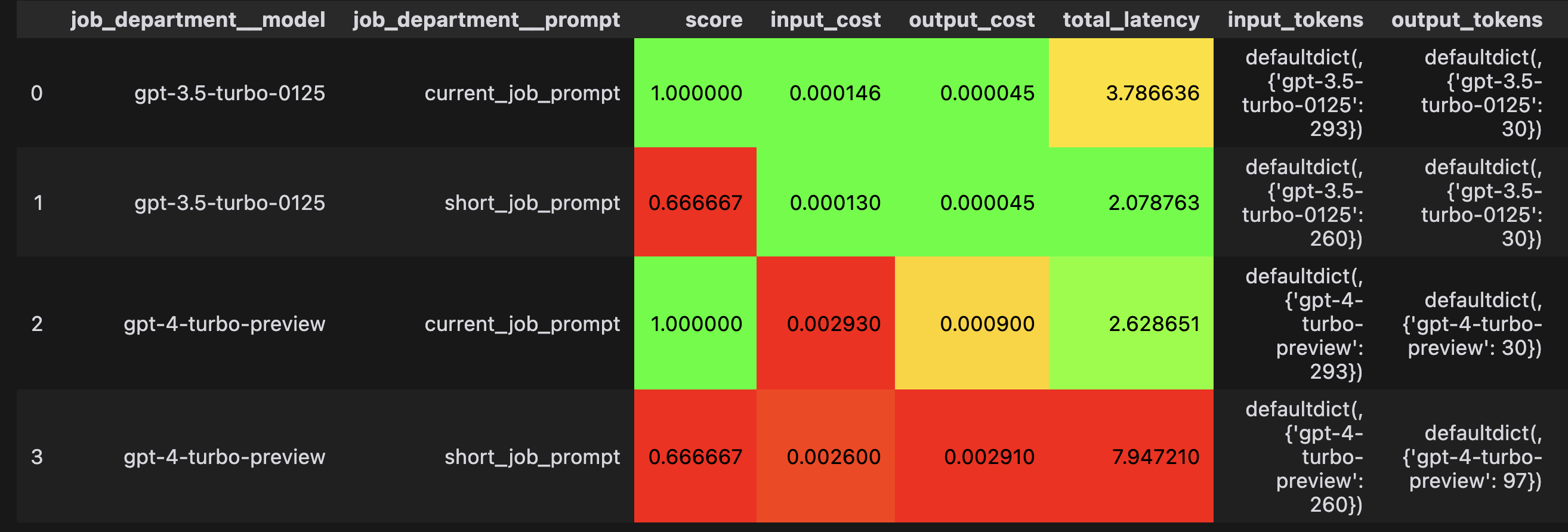
The results of the grid search show that:
1. The longer prompt is more accurate even though it costs more and is slower
2. There's no advantage in using gpt4 instead of gpt3.5
## Read the docs
Our [docs](https://docs.superpipe.ai) go much more in depth on how to use Superpipe including [concepts](https://docs.superpipe.ai/concepts/), [why Superpipe](https://docs.superpipe.ai/why/), and in depth [examples](https://docs.superpipe.ai/examples/).
## License
This project is licensed under the terms of the MIT License.
# Contributors