https://github.com/villysiu/springsecurityoauth2demo
Authentication by Github OAuth 2.0
https://github.com/villysiu/springsecurityoauth2demo
github jwt oauth2 rest-api spring-security springboot
Last synced: about 2 months ago
JSON representation
Authentication by Github OAuth 2.0
- Host: GitHub
- URL: https://github.com/villysiu/springsecurityoauth2demo
- Owner: villysiu
- Created: 2025-04-01T23:36:27.000Z (over 1 year ago)
- Default Branch: main
- Last Pushed: 2025-04-10T18:37:46.000Z (about 1 year ago)
- Last Synced: 2025-04-10T19:57:05.010Z (about 1 year ago)
- Topics: github, jwt, oauth2, rest-api, spring-security, springboot
- Language: Java
- Homepage:
- Size: 467 KB
- Stars: 0
- Watchers: 1
- Forks: 0
- Open Issues: 0
-
Metadata Files:
- Readme: Readme.md
Awesome Lists containing this project
README
In this tutorial, we are create a minimal rest api that uses GitHub for authentication and Jwt token.
## Summary ##
This application allows user to
- sign up with email and password
- login with valid credential
- login through GitHub authentication by OAuth 2.0
Upon successful login, either authenticated by email/password or GitHub,
- the authenticated user will be persisted in the SecurityContextHolder in Spring Security.
- a JWT token will be generated and stored in cookie which is automatically sent with every request within the same domain.
- The browser automatically includes this cookie in subsequent requests to the server (if it's within the same domain).
[](https://youtu.be/LYDzl2VVj48)
Since both Postman and Insomnia do not support redirection within the Oauth2Login,
We will be using the browser to demonstrate the authentication process with GitHub.
The configuration of my system
* Intellij Idea
* Springboot 3.4.2
* Java 17
* JDK 23
Maven dependencies for the project:
* Spring Boot DevTools
* Spring Web
* Spring Client
* Spring Resource Server
* Lombok
* JDBC API
* Spring Data JPA
* MySQL
* Json Web token
# About the project
This project is developed on top of [SpringSecurityRestAPIJWTDemo](https://github.com/villysiu/SpringSecurityRestAPIJWTDemo.git)
The following addition makes the project ready to be authenticated be GitHub.
In `pom.xml`, we added new dependencies for OAuth 2.0
```
org.springframework.security
spring-security-oauth2-resource-server
org.springframework.security
spring-security-oauth2-jose
6.4.4
org.springframework.boot
spring-boot-starter-oauth2-client
```
In `SecureConfig`, we added
```
.oauth2Login(config -> config
.authorizedClientService(this.customAuthorizedClientService)
.defaultSuccessUrl("/secure/github_login_success", true)
)
.oauth2ResourceServer(oauth2 -> oauth2.jwt(withDefaults()))
```
### GitHub Authentication
To authenticate by GitHub, we will visit the link, `http://localhost:8080/oauth2/authorization/github` in the browser,
or in frontend through a button. We will be redirected to a default GitHub page to enter out GitHub credentials.
Once authenticated,
Behind the scene, the Spring Security and Oauth 2.0 will do the following:
* obtain a code from GitHub
* exchange an access token with the code from GitHub
* request user information with the access token
* the user information will be saved in the SecurityContextHolder with authentication info.
We can access this OAuth2User through Authentication.
### CustomAuthorizedClientService
we customized `OAuth2AuthorizedClientService` so we can save the authenticated OAuth2User into our `Account` database if it is not already existed.
Then we generated a JWT token with the email from the Oauth2User object.
### /secure/github_login_success
When we are redirected to `/secure/github_login_success`, we will hit the JwtAuthenticationFilter first, which will validate the JWT token in the cookie, and persisted the UserDetails object in the SecurityContextHolder,
which can be accessed from Authentication.
## Cloning the project
Clone the project from https://github.com/villysiu/SpringSecurityOauth2Demo.git, and open it in Intellij.
**DO NOT RUN IT YET** as we still need to configure database and GitHub app.
## Create Database
Manually Create the Database `springbootRestApiJWT` in [MySQLWorkbench](https://www.mysql.com/products/workbench/)
It should be same name as specified in `/resources/application.properties`
```
spring.datasource.url = jdbc:mysql://localhost:3306/springbootRestApiJWT?useSSL=false&serverTimezone=UTC
spring.datasource.username = <-- MySQL username -->
spring.datasource.password = <-- MySQL password -->
```
## Configure GitHub App ##
Next, you need to configure your app to use GitHub as the authentication provider.
1. To add a new GitHub app, visit https://github.com/settings/developers
. After logging in, click `New OAuth App` button to create a new app

* Application name: `Oauth2test`
* Homepage URL: `http://localhost:8080`
* Authorization callback URL: `http://localhost:8080/login/oauth2/code/github`
** It is important not to change these fields
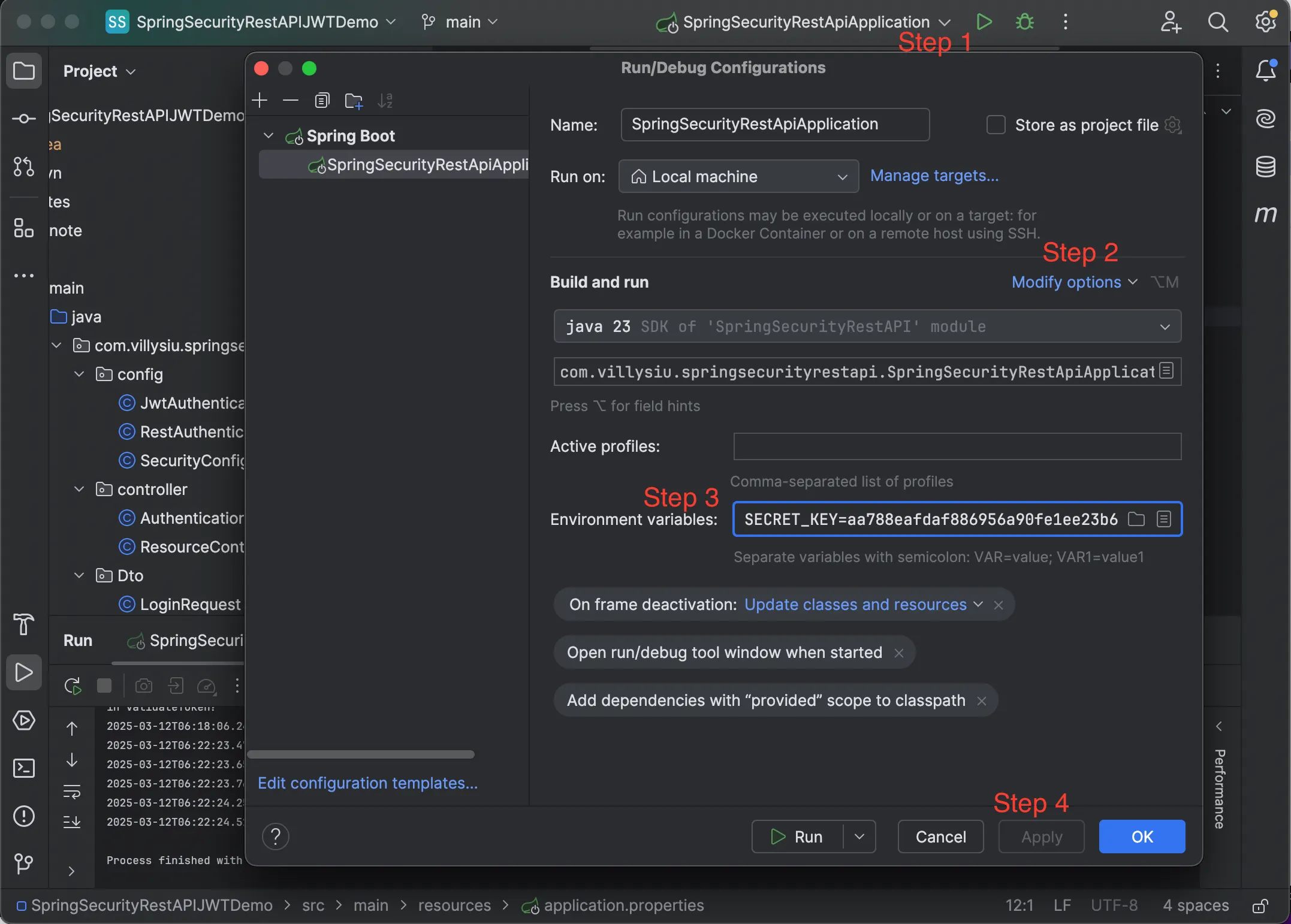
2. copy the Client Id into Environment Variables
3. Generate a new client secret and copy into the Environment Variables as well. Note that client secret will disappear once you leave the page. Save it immediately after you have generated it.
```json
CLIENT_ID: [client ID ]
GITHUB_SECRET: [secret]
```
## Running the project
Now we are ready to run the application.