https://github.com/vimalcvs/toasty
The usual Toast, but with steroids 💪
https://github.com/vimalcvs/toasty
android-app android-studio apk java toast toasty
Last synced: 3 months ago
JSON representation
The usual Toast, but with steroids 💪
- Host: GitHub
- URL: https://github.com/vimalcvs/toasty
- Owner: vimalcvs
- License: lgpl-3.0
- Created: 2020-07-18T01:33:13.000Z (about 6 years ago)
- Default Branch: master
- Last Pushed: 2020-07-18T01:35:03.000Z (about 6 years ago)
- Last Synced: 2025-06-16T08:06:19.223Z (about 1 year ago)
- Topics: android-app, android-studio, apk, java, toast, toasty
- Language: Java
- Homepage: https://www.technovimal.in/
- Size: 450 KB
- Stars: 1
- Watchers: 1
- Forks: 0
- Open Issues: 0
-
Metadata Files:
- Readme: README.md
- License: LICENSE
Awesome Lists containing this project
README
[](https://ko-fi.com/R6R21LO82)
# Toasty
[](https://android-arsenal.com/api?level=14) [](https://jitpack.io/#GrenderG/Toasty) [](https://android-arsenal.com/details/1/5102)

The usual Toast, but with steroids.
## Prerequisites
Add this in your root `build.gradle` file (**not** your module `build.gradle` file):
```gradle
allprojects {
repositories {
...
maven { url "https://jitpack.io" }
}
}
```
## Dependency
Add this to your module's `build.gradle` file (make sure the version matches the JitPack badge above):
```gradle
dependencies {
...
implementation 'com.github.GrenderG:Toasty:1.4.2'
}
```
## Configuration
This step is optional, but if you want you can configure some Toasty parameters. Place this anywhere in your app:
```java
Toasty.Config.getInstance()
.tintIcon(boolean tintIcon) // optional (apply textColor also to the icon)
.setToastTypeface(@NonNull Typeface typeface) // optional
.setTextSize(int sizeInSp) // optional
.allowQueue(boolean allowQueue) // optional (prevents several Toastys from queuing)
.apply(); // required
```
You can reset the configuration by using `reset()` method:
```java
Toasty.Config.reset();
```
## Usage
Each method always returns a `Toast` object, so you can customize the Toast much more. **DON'T FORGET THE `show()` METHOD!**
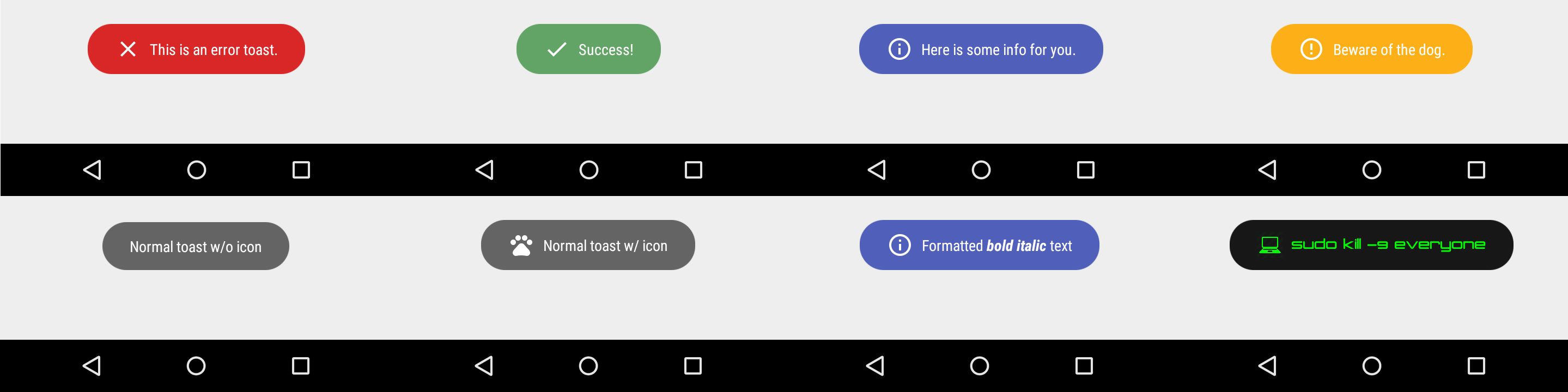
To display an error Toast:
``` java
Toasty.error(yourContext, "This is an error toast.", Toast.LENGTH_SHORT, true).show();
```
To display a success Toast:
``` java
Toasty.success(yourContext, "Success!", Toast.LENGTH_SHORT, true).show();
```
To display an info Toast:
``` java
Toasty.info(yourContext, "Here is some info for you.", Toast.LENGTH_SHORT, true).show();
```
To display a warning Toast:
``` java
Toasty.warning(yourContext, "Beware of the dog.", Toast.LENGTH_SHORT, true).show();
```
To display the usual Toast:
``` java
Toasty.normal(yourContext, "Normal toast w/o icon").show();
```
To display the usual Toast with icon:
``` java
Toasty.normal(yourContext, "Normal toast w/ icon", yourIconDrawable).show();
```
You can also create your custom Toasts with the `custom()` method:
``` java
Toasty.custom(yourContext, "I'm a custom Toast", yourIconDrawable, tintColor, duration, withIcon,
shouldTint).show();
```
### Extra
[You can pass formatted text to Toasty!](https://github.com/GrenderG/Toasty/blob/master/app/src/main/java/es/dmoral/toastysample/MainActivity.java#L98-L107)
**There are variants of each method, feel free to explore this library.**
## Screenshots
**Please click the image below to enlarge.**
## Third Party Bindings
### React Native
You may now use this library with [React Native](https://github.com/facebook/react-native) via this [module](https://github.com/prscX/react-native-toasty).
Apps using Toasty
--
Want to be here? Open an `issue` or make a `pull request`.

ColorHub - Color Palette

Daily – News flipped around

Oz! Comic Reader

Impactor Unroot

Fusemounter

BlueWords

Photo Map - Photo and Video Gallery

Maki for Facebook & Twitter

ModPE IDE

Rocket Notes

OpenHub for GitHub

openHAB

Saarang

Kad ce mi bus - red voznje

Hide Files

LogViewer for openHAB