https://github.com/vindarel/indent-tools
(mirror) Emacs mode to indent, navigate around and act on indentation units: perfect for yaml, python and the like.
https://github.com/vindarel/indent-tools
Last synced: 5 months ago
JSON representation
(mirror) Emacs mode to indent, navigate around and act on indentation units: perfect for yaml, python and the like.
- Host: GitHub
- URL: https://github.com/vindarel/indent-tools
- Owner: vindarel
- Created: 2018-07-10T14:41:27.000Z (almost 8 years ago)
- Default Branch: master
- Last Pushed: 2019-06-06T16:47:16.000Z (about 7 years ago)
- Last Synced: 2025-06-15T18:01:59.829Z (about 1 year ago)
- Language: Emacs Lisp
- Homepage: https://gitlab.com/emacs-stuff/indent-tools
- Size: 171 KB
- Stars: 13
- Watchers: 2
- Forks: 2
- Open Issues: 0
-
Metadata Files:
- Readme: README.org
Awesome Lists containing this project
README
* indent-tools
[[https://melpa.org/#/indent-tools][file:https://melpa.org/packages/indent-tools-badge.svg]]
Indent, move around and act on code based on indentation (yaml,
python, jade, etc).
Meant for indentation-based languages, but can be used any time with
indented text.
_Example:_
Navigating by blocks:
#+BEGIN_HTML

#+END_HTML
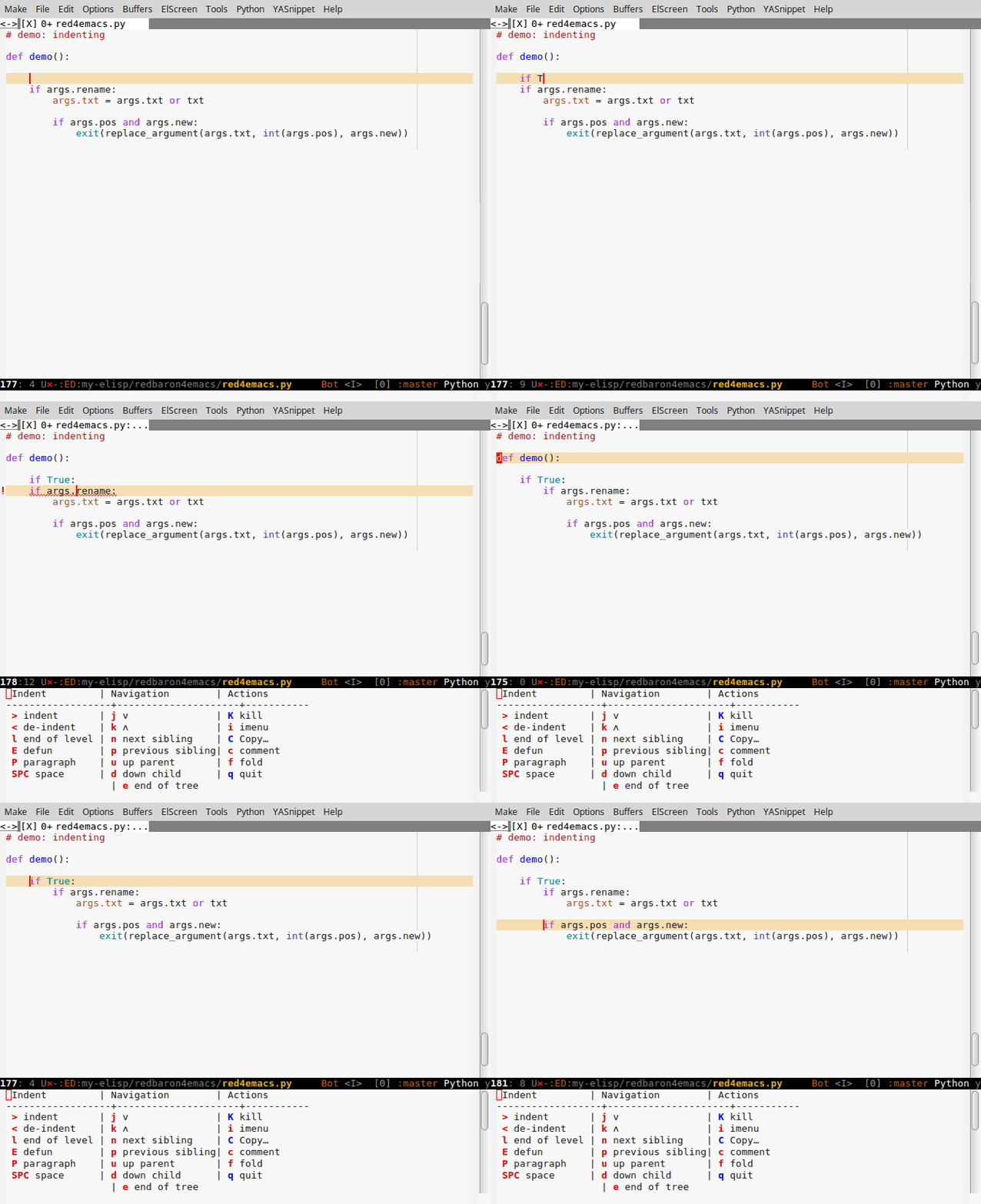
_Indenting_:
#+BEGIN_HTML
#+END_HTML
** Installation
Set up [[http://wikemacs.org/wiki/Package.el][MELPA]] and use [[http://wikemacs.org/wiki/Package.el][package.el]]: =M-x package-install RET indent-tools RET=.
** Usage
You can activate a minor mode or use an [[https://github.com/abo-abo/hydra/][Hydra]].
We recommand you to use the hydra because it shows all available
options and it allows to call an action multiple times in a row, with
a single keypress:
: M-x indent-tools-hydra/body
To bind the Hydra at =C-c >=:
#+BEGIN_SRC emacs-lisp
(require 'indent-tools)
(global-set-key (kbd "C-c >") 'indent-tools-hydra/body)
#+END_SRC
To bind this in python-mode:
#+BEGIN_SRC emacs-lisp
(add-hook 'python-mode-hook
(lambda () (define-key python-mode-map (kbd "C-c >") 'indent-tools-hydra/body))
)
#+END_SRC
(=C-c >= originally bound to indent the line).
With the minor mode (=M-x indent-tools-minor-mode=), the prefix key is
at =C-c >= (you can change the variable
=indent-tools-keymap-prefix=). See its keymap with =C-h f
indent-tools-minor-mode=.
*** Indent, de-indent
Indent an indentation tree: =M-x indent-tools-demote=. This indents
according to the major mode (currently specially supported: python,
jade, yaml. For other modes, it indents by
=indent-tools-indent-offset=, 4 spaces).
With the hydra, repeat this action as much as you wish.
Indent by only *one space* (useful for jade-mode): =SPC= key with the hydra.
Indent the *paragraph*: =M-x indent-tools-indent-paragraph=, or =P=
with the hydra.
See also: (de)indenting until the end of the current indentation level
(i.e., indent every nodes with the same level).
*** Move around
Move to the *end of the current indentation*,
to the *next* or the *previous sibling* (a line with the same indentation),
move *one parent up* or the first *child down* (line with lesser or
greater indentation), much useful for a large yaml file, but also for
code navigation.
*j* and *k* (with the hydra) as usual go to the next and previous line.
*** Recenter screen (L)
While you move around, you may want to recenter the screen, what we
usually do with =C-l= ("recenter-top-bottom"). We can not bind control
keys into hydras, so this is bound to =L=. Successive calls will put
the point in the middle, at the top or at the bottom of the screen.
*** Kill, copy, (un)comment, select, fold
See the hydra.
Some actions (kill, copy, comment) will ask you again what to operate
upon: the indented block, the whole level, or the paragraph.
Other actions (toggle fold) act straight away on the indented block.
So one can:
- kill something
- copy
- comment
- uncomment (only a paragraph)
- toggle the fold (of the current indentation)
- call imenu to go to another function definition, keeping the hydra.
There are interactive functions too:
: M-x indent-tools-kill-[hydra/body, tree, level, paragraph]
Copying:
: M-x indent-tools-copy-[hydra/body, tree, level, paragraph]
*** Undo
The hydra binds =_= to =undo-tree-undo=, so we can try commands and
undo anything by staying inside it.
** Configure
To know the indentation of the current major mode, call
=indent-tools-indentation-of-current-mode=.
If it doesn't know the current mode, see the variable
=indent-tools-indentation-of-modes-alist=. It is an alist which
associates a mode to a function which returns the desired indentation
level (an int).
If no indentation level is known for this mode, it uses
=indent-tools-indentation-offset=, which defaults to Emacs'
=standard-indent=.
Example:
#+BEGIN_SRC emacs-lisp
(defun indent-tools-indentation-of-python ()
"Return Python's current indentation as an int, usually 4."
(cond ((and (boundp 'python-indent-offset)
(numberp python-indent-offset))
python-indent-offset)))
;; The alist.
(setq indent-tools-indentation-of-modes-alist
'(
(python-mode . indent-tools-indentation-of-python)
(yaml-mode . indent-tools-indentation-of-yaml)
(jade-mode . indent-tools-indentation-of-jade)
))
#+END_SRC
** Develop
To run the unit tests, go into the tests file and run *ert*:
: M-x ert
and either choose a specific test, either keep =t= to run all.
You'll have an ert buffer with passing tests in green, failing ones in
red. Use TAB end ENTER in this buffer (à la org-mode).
** Ideas, todos
[X] Demote.
[X] Indent according to mode. Done for python, yaml and jade.
[X] Do something with the default behaviour of =M-x indent-rigidly= which
lets us indent interactively. Would be useful for jade templates. =>
just used the Hydra feature.
[X] See if the utilities functions of mine on [[https://gitlab.com/emacs-stuff/my-elisp/blob/master/yaml-utils.el][yaml-utils]] can be useful
(indent all siblings at once ? Move around siblings ?).
See `move-text` in melpa to move regions up and down.
[X] See how [[https://github.com/zenozeng/yafolding.el/blob/master/yafolding.el][yafolding]] did.
** See also
- [[http://wikemacs.org/wiki/Json#json-navigator_-_navigate_json_presented_as_a_tree][json-navigator]] - to display any JSON document as a tree,
which leafs you can unfold and follow. (Emacs 25.1) Based on the
more generic [[https://github.com/DamienCassou/hierarchy][hierarchy]].
** Change log
- <2018-01-24 mer.> simplify =Kill=: it kills the indented block, no
more choice to kill a paragraph or all the level in a hydra, not
fitting in this package.
- <2017-08-03 jeu.> =L= insteal of =C-l= to recenter the screen ("recenter-top-bottom").
- <2017-07-21 ven.> undo-tree within the hydra (press "_")
- <2017-07-21 ven.> small fix for ">" indent: go to the beginning of text before action.
- <2017-03-22 mer.> added Uncomment the paragraph