https://github.com/violentmonkey/amo-upload
Upload your web extension to AMO
https://github.com/violentmonkey/amo-upload
Last synced: 10 months ago
JSON representation
Upload your web extension to AMO
- Host: GitHub
- URL: https://github.com/violentmonkey/amo-upload
- Owner: violentmonkey
- License: mit
- Created: 2022-06-22T14:37:49.000Z (about 4 years ago)
- Default Branch: main
- Last Pushed: 2025-08-14T10:28:36.000Z (11 months ago)
- Last Synced: 2025-08-28T09:55:02.937Z (10 months ago)
- Language: TypeScript
- Size: 270 KB
- Stars: 5
- Watchers: 2
- Forks: 2
- Open Issues: 0
-
Metadata Files:
- Readme: README.md
- License: LICENSE
Awesome Lists containing this project
README
# amo-upload


Upload your web extension to [AMO](https://addons.mozilla.org/) and get the download URL after being signed.
Note: This package only provides ES module, see [here](https://gist.github.com/sindresorhus/a39789f98801d908bbc7ff3ecc99d99c) for more details.
## Highlights
- Upload zipped extension file
- Optionally upload source code for review
- Idempotent commands, CI friendly
- List all version statuses with a single command
## Command-line Usage
The following options can also be loaded from environment variables:
| Global Option | Environment Variable |
|--------------------|----------------------|
| `--api-key` | `AMO_KEY` |
| `--api-secret` | `AMO_SECRET` |
| `--api-url-prefix` | `AMO_URL_PREFIX` |
| `--addon-id` | `AMO_ADDON_ID` |
Note: the command-line options take precedence over the environment variables.
### Upload and Sign
```bash
$ npx amo-upload \
sign \
--api-key $API_KEY \
--api-secret $API_SECRET \
--addon-id $ADDON_ID \
--addon-version $VERSION \
--channel listed \
--dist-file path/to/dist.zip \
--source-file path/to/source.zip
--output path/to/my-ext-v1.2.3.xpi
```
For `listed` channel, we don't wait for the signed package if no `output` is specified. The output will be the filename of the package.
For `unlisted` channel, we will wait for the package to be signed. After the signed file is downloaded, the path of the downloaded file will be printed to the console. Otherwise an error will be thrown.
### List Statuses
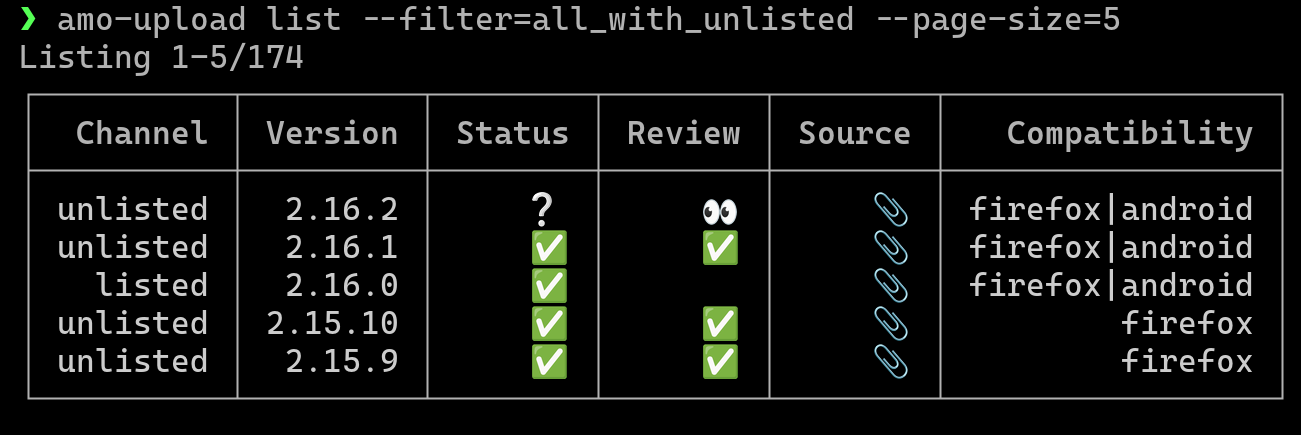
```bash
# List all public versions
$ npx amo-upload list
# List all listed and unlisted versions
$ npx amo-upload list --filter all_with_unlisted
```
See [the documentation](https://addons-server.readthedocs.io/en/latest/topics/api/addons.html#version-filtering-param) for more details about `filter`.
## API
```js
import { signAddon } from 'amo-upload';
try {
const output = await signAddon({
apiKey,
apiSecret,
addonId,
addonVersion,
channel: 'listed',
distFile: 'path/to/dist.zip',
sourceFile: 'path/to/source.zip',
output: 'path/to/my-ext-v1.2.3.xpi',
});
console.info('The signed file is stored at:', output);
} catch (err) {
console.error('File not signed yet');
}
```
## References
- addons-server: https://addons-server.readthedocs.io/en/latest/index.html