https://github.com/viraj-sh/uniclare-client
View end-semester marks and detailed performance data that are hidden on the Uniclare App or Student Portal.
https://github.com/viraj-sh/uniclare-client
dypatil fastapi mydy restapi studentportal uniclare
Last synced: 3 months ago
JSON representation
View end-semester marks and detailed performance data that are hidden on the Uniclare App or Student Portal.
- Host: GitHub
- URL: https://github.com/viraj-sh/uniclare-client
- Owner: viraj-sh
- Created: 2025-10-07T12:39:43.000Z (9 months ago)
- Default Branch: main
- Last Pushed: 2026-01-27T11:46:58.000Z (5 months ago)
- Last Synced: 2026-01-27T23:36:54.162Z (5 months ago)
- Topics: dypatil, fastapi, mydy, restapi, studentportal, uniclare
- Language: Python
- Homepage:
- Size: 1.27 MB
- Stars: 1
- Watchers: 0
- Forks: 0
- Open Issues: 0
-
Metadata Files:
- Readme: README.md
- Contributing: CONTRIBUTING.md
Awesome Lists containing this project
README
# Unofficial Uniclare Client
An unofficial [Uniclare](https://play.google.com/store/apps/details?id=com.uniclarepro&hl=en_IN&pli=1) / [Student Uni Portal](https://studentportal.universitysolutions.in/) client built to reveal full ESE marks and every hidden result field the official portal doesn’t display. Includes [Frontend](https://github.com/viraj-sh/uniclare-client/wiki/Frontend-Documentation), [MCP Server](https://github.com/viraj-sh/uniclare-client/wiki/MCP-Documentation), [API](https://github.com/viraj-sh/uniclare-client/wiki/API-Documentation), developed for personal educational purposes and not affiliated with Uniclare or Student Portal.


---
### What Makes This Client Better than the Official [Uniclare App](https://play.google.com/store/apps/details?id=com.uniclarepro&hl=en_IN&pli=1) or [Student Uni Portal](https://studentportal.universitysolutions.in/)
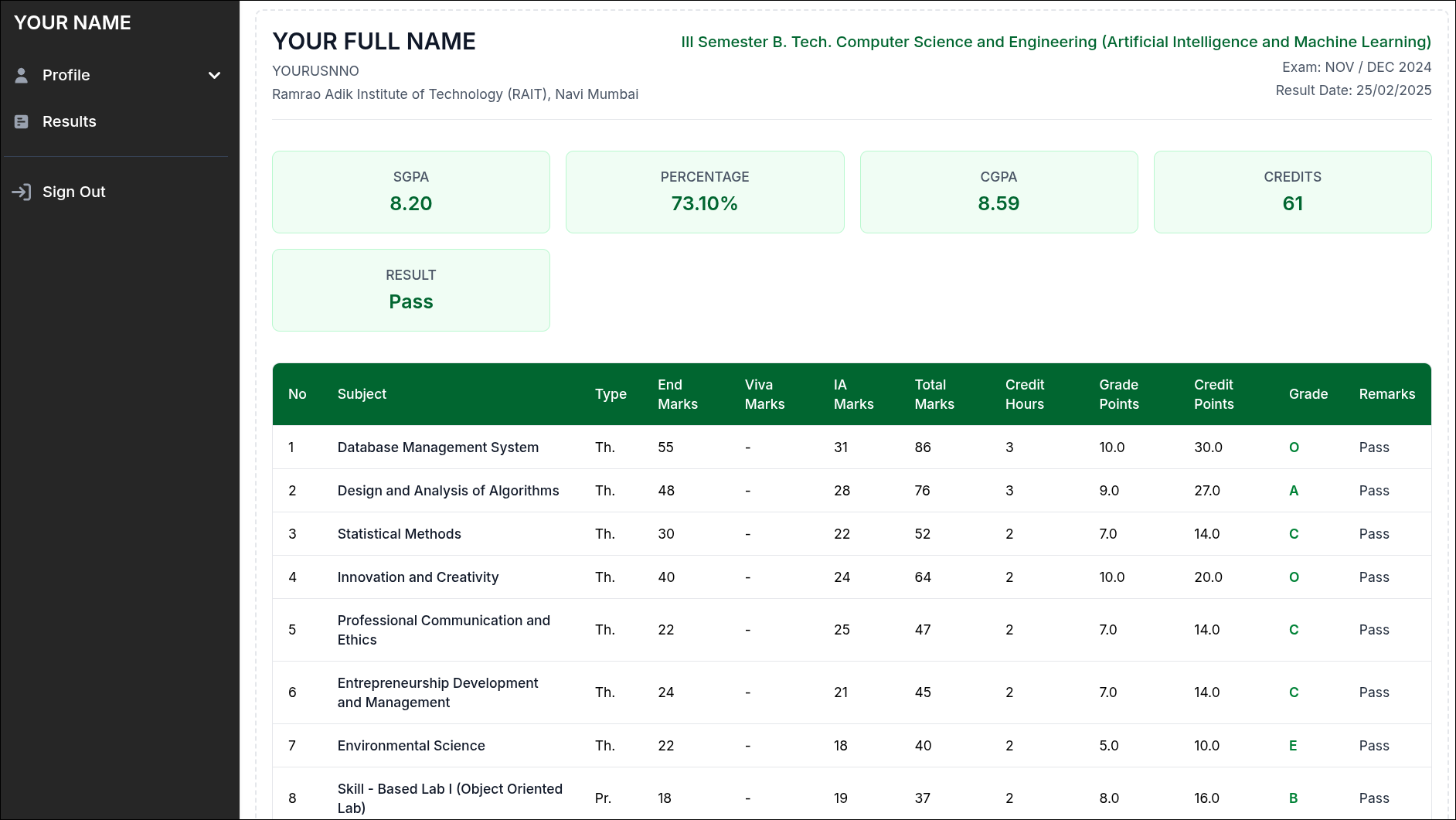
- **End-semester marks**: Shows full ESE marks for every subject, which the official client hides even though the backend provides them.
- **Complete marks breakdown**: Displays all components returned by the API — end marks, IA marks, viva/practical marks, and totals.
- **Additional result fields**: Reveals extra data like percentage, credits, grade points, credit points, and more that the official portal doesn’t show.
- **MCP server support**: Allows integration with LLMs for automation, summarization, or custom result analysis.
---
## Installation & Usage
The client can be run in several ways. For detailed steps, see the **[Getting Started](https://github.com/viraj-sh/uniclare-client/wiki/Getting-Started)** wiki page.
Option 1. **[Prebuilt Releases](https://github.com/viraj-sh/uniclare-client/wiki/Getting-Started#prebuilt-releases)** – Download and run the latest release for your platform:
[-x64-blue?style=flat-square)](https://github.com/viraj-sh/uniclare-client/releases/download/v1.1.3/uniclare-client-v1.1.3-win-x64.exe)
[](https://github.com/viraj-sh/uniclare-client/releases/download/v1.1.3/uniclare-client-v1.1.3-linux-x86__64)
[](https://github.com/viraj-sh/uniclare-client/releases/download/v1.1.3/uniclare-client-v1.1.3-macos-arm64)
Option 2. **[One-Click Deployment](https://github.com/viraj-sh/uniclare-client/wiki/Getting-Started#one-click-deployment-render) (Render)** – Deploy the client instantly in the cloud:
[](https://render.com/deploy?repo=https://github.com/viraj-sh/uniclare-client)
Option 3. **[Run from Source](https://github.com/viraj-sh/uniclare-client/wiki/Getting-Started#running-from-source)** – Clone the repository and run the client directly in development mode.
- For developers who want to modify the client.
```bash
git clone https://github.com/viraj-sh/uniclare-client
cd uniclare-client
python -m venv venv
venv\Scripts\activate # Windows
source venv/bin/activate # macOS/Linux
pip install --upgrade pip
pip install -r requirements/base.txt
python app.py
```
Option 4. **[Build from Source](https://github.com/viraj-sh/uniclare-client/wiki/Getting-Started#building-from-source)** – For developers or contributors: clone the repo, install dependencies, and run locally.
Option 5. **[Docker](https://github.com/viraj-sh/uniclare-client/wiki/Getting-Started#docker-deployment)** – Run the client in a consistent containerized environment.
> For complete instructions, platform-specific steps, and Docker usage, see the **[Getting Started wiki](https://github.com/viraj-sh/uniclare-client/wiki/Getting-Started)**.
---
### Available Services
Once the client is running, these endpoints are accessible (host may vary):
* **[Frontend](https://github.com/viraj-sh/uniclare-client/wiki/Frontend-Documentation)** [[http://localhost:8000/](http://localhost:8000/)] : Static interface to interact with the API.
* **[MCP Server](https://github.com/viraj-sh/uniclare-client/wiki/MCP-Documentation)** [[http://localhost:8000/mcp](http://localhost:8000/mcp)] : Endpoint (`/mcp`) compatible with Model Context Protocol (MCP) clients like LLM Clients or LangChain bots.
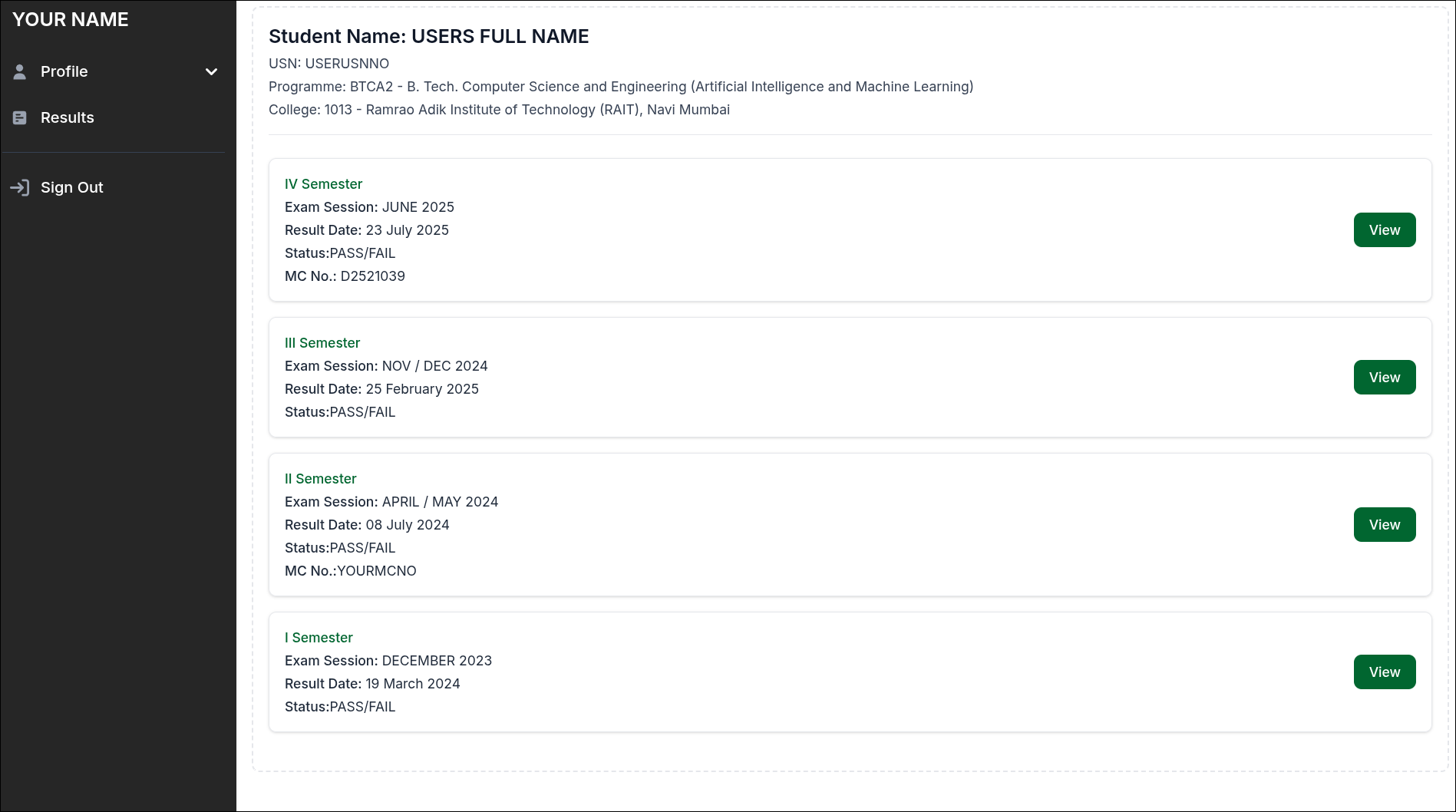
* **[API](https://github.com/viraj-sh/uniclare-client/wiki/API-Documentation)** [[http://localhost:8000/api](http://127.0.0.1:8000/api)] : FastAPI backend for authentication, semesters, subjects, documents, and attendance.
* **Interactive Docs:** [[http://localhost:8000/docs](http://127.0.0.1:8000/docs)] : API testing Swagger UI for developers.
---
## MCP Usage
> For full instructions on configuring the MCP server, check out the **[MCP Documentation](https://github.com/viraj-sh/uniclare-client/wiki/MCP-Documentation)**.
## Preview
| Detailed Result | Login |
| :-------------------------------------------- | :-------------------------------------------- |
|  |
|  |
|
| Result List | Profile |
| :------------------------------------------- | :-------------------------------------------- |
|  |
|  |
|
---
## Disclaimer
This project is **unofficial** and intended for **personal and educational use only**.
Uniclare, Student Portal or the college has **no affiliation or endorsement** with this project.
Use responsibly. The author is **not liable** for misuse, data loss, or any violations of institutional policies.