https://github.com/virtru/protect-and-track
This project illustrates the capabilities of Virtru's JavaScript SDK.
https://github.com/virtru/protect-and-track
example javascript tdf3
Last synced: 11 months ago
JSON representation
This project illustrates the capabilities of Virtru's JavaScript SDK.
- Host: GitHub
- URL: https://github.com/virtru/protect-and-track
- Owner: virtru
- License: other
- Created: 2019-06-20T20:01:49.000Z (about 7 years ago)
- Default Branch: main
- Last Pushed: 2024-11-21T22:07:54.000Z (over 1 year ago)
- Last Synced: 2024-11-29T11:00:07.186Z (over 1 year ago)
- Topics: example, javascript, tdf3
- Language: JavaScript
- Homepage: https://developer.virtru.com
- Size: 3.61 MB
- Stars: 9
- Watchers: 30
- Forks: 16
- Open Issues: 28
-
Metadata Files:
- Readme: README.md
- Changelog: CHANGELOG.md
- License: LICENSE.md
- Codeowners: .github/CODEOWNERS
Awesome Lists containing this project
README
# Protect and Track Demo · [](https://buildkite.com/virtru/protect-and-track)
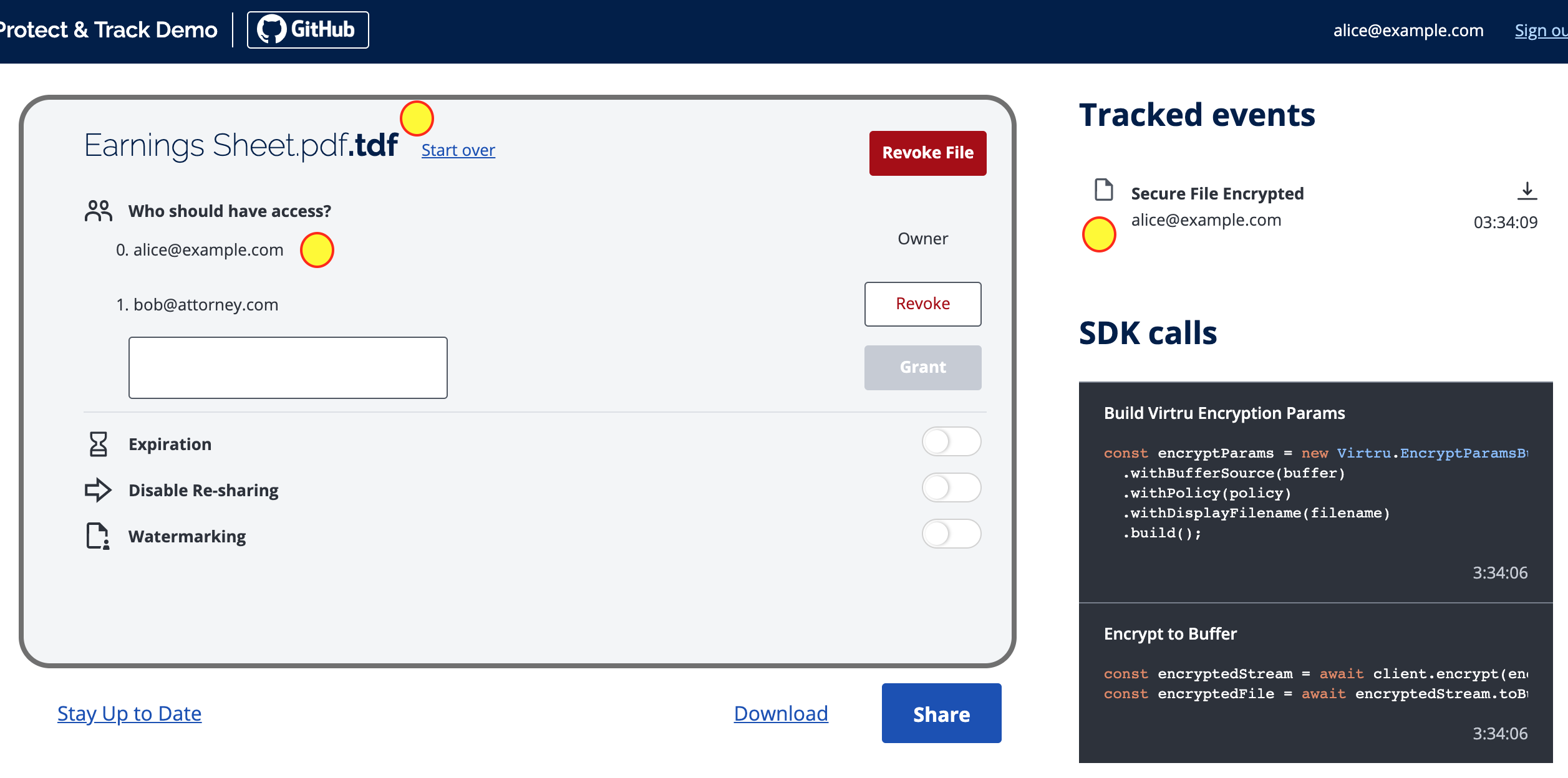
The Protect and Track Demo leverages the [Virtru SDK for JavaScript](https://docs.developer.virtru.com/js/latest/index.html) as well as the [TDF Architecture](https://developer.virtru.com/docs/tdf-overview) in order to secure files and share them with others, while maintaining visibility and control of your data.
This demo showcases features such as:
- Securing a file such that only intended recipients can access its data
- Sharing a secured file with others, using Google Drive, or Dropbox
- Revoking access to a secured file, so users can no longer access its data
## See it Live
[Go here](https://demos.developer.virtru.com/protect/) to test drive the live demo. Afterwards, check the out Virtru's [Developer Hub](https://developer.virtru.com/docs/protect) for a step-by-step guide on how it all works.
## See How it Works
To see how the Virtru SDK works within this demo look for comments with `Virtru:`. Specifically, you can look at:
_Authorizations_
- [AuthSelect.js](https://github.com/virtru/protect-and-track/blob/master/src/scenes/AuthSelect/AuthSelect.js)
- use of the Auth Widget
- [Header.js](https://github.com/virtru/protect-and-track/blob/master/src/components/Header/Header.js)
- sign out
_Encrypt & Decrypt_
- [Document.js](https://github.com/virtru/protect-and-track/blob/master/src/scenes/Document/Document.js) to see how we
- create client
- encrypt a file
- build a policy
- revoke a policy
- build a policy from an id
- [download.js](https://github.com/virtru/protect-and-track/blob/master/src/utils/download.js)
- unwrap a TDF html file
- decrypt an encrypted file
_Policy Changes_
- [policyChanger.js](https://github.com/virtru/protect-and-track/blob/master/src/scenes/Document/scenes/Policy/services/policyChanger.js)
- create policy builder
- set the policy id
- [Access.js](https://github.com/virtru/protect-and-track/blob/master/src/scenes/Document/scenes/Policy/components/Access/Access.js)
- enable access
- disable access
- [Expiration.js](https://github.com/virtru/protect-and-track/blob/master/src/scenes/Document/scenes/Policy/components/Expiration/Expiration.js)
- enable a deadline
- disable a deadline
- [Resharing.js](https://github.com/virtru/protect-and-track/tree/master/src/scenes/Document/scenes/Policy/components/Resharing/Resharing.js)
- enable resharing
- disable resharing
- [Watermarking.js](https://github.com/virtru/protect-and-track/blob/master/src/scenes/Document/scenes/Policy/components/Watermarking/Watermarking.js)
- enable watermarking
- disable watermarking
## Run it Locally
This demo can run on your local environment. Please ensure you meet the prerequisites and follow the steps.
## Run Tests
- E2E tests:
- Make sure SAUCE_USER, SAUCE_PASS, you can find them in 1Password
- `npm run test-e2e`, available environment vars:
- any valid TEST_ENVIRONMENT_NAME, such as production, staging, or develop01
- any valid TEST_MARKER, such as smoke and regression.
- WARNING: due to e2e tests requires BP CRX to send secure email, it could be very slow when uploading BP CRX to SauceLabs for testing, especially when BP CRX files are large
- [automated-test-scripts-v3](https://github.com/virtru/automated-test-scripts-v3) is to provide BDD-based tests to make it simpler to be understood across team.
- Benefits of using [automated-test-scripts-v3](https://github.com/virtru/automated-test-scripts-v3):
- Separation of concerns. tests(including the feature files and the skeleton test_xxx.py files) can now reside inside of the product repo, without the need to switch context to different repos
- Common BDD step implementations and 3rd party integrations will be provided by automated-test-scripts-v3
- It is possible to provide a `conftest.py` file in the same `e2e` test folder to override or define new test step implementations
- No need to use triggered steps, test steps and test reports will be available directly in the product build pipeline.
- TEST_ENVIRONMENT_NAME determines which URL the e2e test will run against, in BuildKite CI/CD pipelines:
- For master/staging/develop branches, TEST_ENVIRONMENT_NAME will be set based on BUILDKITE_BRANCH accordingly
- for other branches, TEST_ENVIRONMENT_NAME will be based on DEPLOY_ENVIRONMENT_NAME, currently only develop01 is supported, because it needs BP CRX with that environment in chrome store to be able to run the tests
- For detailed use cases and explanations, please refer [use cases section](https://github.com/virtru/automated-test-scripts-v3#use-cases)
### Prerequisites
To be able to use Federated OAuth we suggest you to modify your `/etc/hosts`. This is an optional step, but note the fallback authentication will be email code only.
#### Windows
- Install a POSIX-compatible environment such as [Cygwin](https://www.cygwin.com/) or [Cmder](https://cmder.net/)
- Install [NVM](https://github.com/coreybutler/nvm-windows#node-version-manager-nvm-for-windows)
- Edit `c:\Windows\System32\Drivers\etc\hosts` to include `127.0.0.1 local.virtru.com`
Alternatively you could install [Windows Subsystem for Linux](https://docs.microsoft.com/en-us/windows/wsl/install-win10) and use the instructions below for Linux
#### Linux / MacOS
- Install [NVM](https://github.com/nvm-sh/nvm#installation-and-update)
- Edit `/etc/hosts` to include `127.0.0.1 local.virtru.com`
### Getting Started
```console
# Clone the repository
$ git clone git@github.com:virtru/protect-and-track.git
# Change directory
$ cd protect-and-track
# Install node via NVM
$ nvm use
# Install node modules
$ npm ci
# Start the node server
$ sudo npm start
```
If running successfully, your default browser may automatically open. If not visit `https://local.virtru.com`.
---
You may be presented with a warning screen with a message similar to "Your connection is not private." This is due to the self-signed SSL certificate when running in development mode. To access the demo:
- Chrome: Click `Advanced` then `Proceed to local.virtru.com (unsafe)`
- Firefox: Click `Advanced` then `Accept the Risk and Continue`
- Safari: Click `Show Details` then `visit this website`
- Opera: Click `Help me understand` then `Proceed to local.virtru.com (unsafe)`
## Getting Help
There are many ways to get our attention:
- You can [join](https://docs.google.com/forms/d/e/1FAIpQLSfCx5tSl9hGQSZ-H-ZIzNw6uWIPN3_HSpMtYssKQ9jytj9yQQ/viewform) Virtru's Developer Hub Community Slack channel to get your questions answered.
- You can open a support ticket [here](https://support.virtru.com/hc/en-us/requests/new?ticket_form_id=360001419954).
### License
Copyright © 2019 Virtru Corporation
This repository is released under the MIT license for all artifacts in this repository, with the following exceptions which are subject to our [Virtru Data Protection Platform Subscription Agreement](https://www.virtru.com/terms-of-service/):
- virtru-sdk