https://github.com/visactor/univer-vchart-plugin
https://github.com/visactor/univer-vchart-plugin
Last synced: over 1 year ago
JSON representation
- Host: GitHub
- URL: https://github.com/visactor/univer-vchart-plugin
- Owner: VisActor
- Created: 2024-06-17T09:12:15.000Z (about 2 years ago)
- Default Branch: main
- Last Pushed: 2024-07-27T03:26:17.000Z (about 2 years ago)
- Last Synced: 2025-04-08T02:51:17.579Z (over 1 year ago)
- Language: TypeScript
- Size: 410 KB
- Stars: 8
- Watchers: 12
- Forks: 1
- Open Issues: 1
-
Metadata Files:
- Readme: README.md
- Contributing: CONTRIBUTING.md
- Code of conduct: CODE_OF_CONDUCT.md
Awesome Lists containing this project
README


univer-vchart-plugin
The vchart univer plugin encapsulates the capability to create chart overlays within [Univer](https://univer.ai/zh-CN).


[](https://www.npmjs.com/package/@visactor/univer-vchart-plugin)
[](https://www.npmjs.com/package/@visactor/univer-vchart-plugin)
[](https://github.com/visactor/univer-vchart-plugin/blob/main/CONTRIBUTING.md#your-first-pull-request)
 [](https://github.com/visactor/univer-vchart-plugin/blob/main/LICENSE)
[English](./README.md) | 简体中文
## Introduction
VChart is a chart component library within the VisActor visualization system. [Univer](https://univer.ai/) is an open-source Office suite. Using the univer-vchart-plugin, you can easily create chart overlays.
## 🔨 Usage
### 📦 Installation
```bash
# npm
$ npm install @visactor/univer-vchart-plugin
# pnpm
$ pnpm add @visactor/univer-vchart-plugin
```
### 📊 A Simple Chart
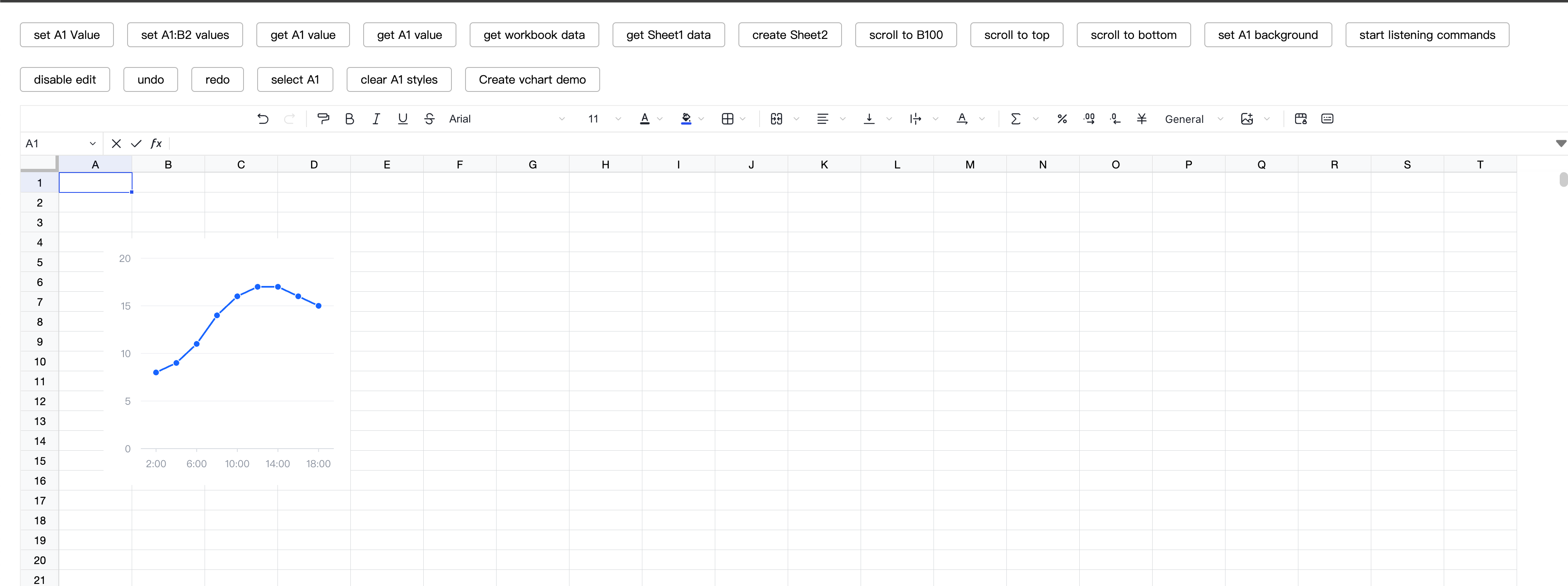
```typescript
import {
UniverVChartPlugin,
CREATE_VCHART_COMMAND_ID,
} from "@visactor/univer-vchart-plugin";
export function setupUniver() {
const univer = new Univer({
theme: defaultTheme,
locale: LocaleType.EN_US,
locales: {
[LocaleType.EN_US]: enUS,
},
});
univer.registerPlugin(UniverVChartPlugin);
}
export function setupVChartDemo($toolbar: HTMLElement, univerAPI: FUniver) {
const $button = document.createElement("a");
$button.textContent = "Create vchart demo";
$toolbar.appendChild($button);
$button.addEventListener("click", async () => {
if (!univerAPI) throw new Error("univerAPI is not defined");
const activeWorkbook = univerAPI.getActiveWorkbook();
if (!activeWorkbook) throw new Error("activeWorkbook is not defined");
const activeSheet = activeWorkbook.getActiveSheet();
if (!activeSheet) throw new Error("activeSheet is not defined");
await univerAPI.executeCommand(CREATE_VCHART_COMMAND_ID, {
spec: {
type: "line",
data: {
values: [
{
time: "2:00",
value: 8,
},
{
time: "4:00",
value: 9,
},
{
time: "6:00",
value: 11,
},
{
time: "8:00",
value: 14,
},
{
time: "10:00",
value: 16,
},
{
time: "12:00",
value: 17,
},
{
time: "14:00",
value: 17,
},
{
time: "16:00",
value: 16,
},
{
time: "18:00",
value: 15,
},
],
},
xField: "time",
yField: "value",
},
});
});
}
```
## 🔗 Related Links
- [Homepage](https://www.visactor.io/vchart)
- [VCharts Chart Examples](https://www.visactor.io/vchart/example)
- [VChart Chart Tutorial](https://www.visactor.io/vchart/guide/tutorial_docs/VChart_Website_Guide)
- [VChart Chart Configuration Options](https://www.visactor.io/vchart/option/)
- [VChart API](https://www.visactor.io/vchart/api/API/vchart)
- [VGrammar](https://www.visactor.io/vgrammar)
- [VRender](https://www.visactor.io/vrender)
- [FAQ](https://www.visactor.io/vchart/guide/tutorial_docs/FAQ)
- [CodeSandbox Template](https://codesandbox.io/s/the-template-of-visactor-vchart-vl84ww?file=/src/index.ts) for submitting bugs
## 🤝 Contributing [](https://github.com/visactor/univer-vchart-plugin/blob/main/CONTRIBUTING.md#your-first-pull-request)
If you would like to contribute, please read the [Code of Conduct](./CODE_OF_CONDUCT.md) and the [Contribution Guide](./CONTRIBUTING.zh-CN.md) first.
Small streams make big rivers!
