https://github.com/vitaliy-ch25/melafit
melafit: High-precision 24h melatonin profile analysis. Features bimodal skewed baseline cosine fitting (Van Someren & Nagtegaal, 2007) and a robust cost function (Gabel et al., 2017) for superior convergence, even with sparse data.
https://github.com/vitaliy-ch25/melafit
baseline-cosine-function bimodal-baseline-cosine-function bimodal-skewed-baseline-cosine-function circadian-phase circadian-rhythm curve-fitting melatonin melatonin-phase nonlinear-constrained-optimization python skewed-baseline-cosine-function waveform-analysis
Last synced: about 2 months ago
JSON representation
melafit: High-precision 24h melatonin profile analysis. Features bimodal skewed baseline cosine fitting (Van Someren & Nagtegaal, 2007) and a robust cost function (Gabel et al., 2017) for superior convergence, even with sparse data.
- Host: GitHub
- URL: https://github.com/vitaliy-ch25/melafit
- Owner: vitaliy-ch25
- License: mit
- Created: 2026-04-19T10:45:56.000Z (3 months ago)
- Default Branch: main
- Last Pushed: 2026-05-28T20:57:18.000Z (about 2 months ago)
- Last Synced: 2026-05-28T22:14:45.857Z (about 2 months ago)
- Topics: baseline-cosine-function, bimodal-baseline-cosine-function, bimodal-skewed-baseline-cosine-function, circadian-phase, circadian-rhythm, curve-fitting, melatonin, melatonin-phase, nonlinear-constrained-optimization, python, skewed-baseline-cosine-function, waveform-analysis
- Language: Python
- Homepage:
- Size: 236 KB
- Stars: 1
- Watchers: 0
- Forks: 0
- Open Issues: 0
-
Metadata Files:
- Readme: README.md
- License: LICENSE
Awesome Lists containing this project
README
# melafit
Python package for **high-precision circadian melatonin profile analysis.**
Features a variety of baseline cosine functions for curve fitting
([Van Someren & Nagtegaal, 2007](https://doi.org/10.1016/j.sleep.2007.03.012))
and a robust cost function for superior convergence, even with sparse data
([Gabel et al., 2017](https://doi.org/10.1038/s41598-017-07060-8)).
## Overview
[melafit](https://github.com/vitaliy-ch25/melafit) is a Python package
designed for high-precision modeling of 24-hour melatonin secretion. While
standard cosinor or harmonic analyses fail to capture the physiological
nuances of the melatonin "wave,"
[melafit](https://github.com/vitaliy-ch25/melafit) implements several
**baseline cosine functions** including bimodal, skewed and bimodal-skewed
modifications. This approach accounts for the characteristic baseline,
asymmetry and dual peaks often seen in high-resolution circadian melatonin
data.
Furthermore, the library utilizes a **specialized cost function** developed
to overcome common optimization hurdles (trivial all-zero solutions),
ensuring stable convergence even when working with sparse or incomplete
time series.
## Key Features
* **Bimodal Waveform Fitting:** Implementation of the
[Van Someren & Nagtegaal (2007)](https://doi.org/10.1016/j.sleep.2007.03.012)
model for superior physiological accuracy.
* **Optimized Convergence:** Leverages the robust cost function described in
[Gabel et al. (2017)](https://doi.org/10.1038/s41598-017-07060-8) to ensure
reliable fits across diverse datasets.
* **Sparse Data Support:** Capable of reconstructing full profiles and
estimating circadian phase from limited data points, as well as
determining dim light melatonin onset (DLMO) with partial data.
* **Research-Ready:** Direct derivation of `Amplitude`, `DLMOn`,
`DLMOff`, `Midpoint`, `Area` and `COG` markers from continuous,
fitted waveforms.
## Installation
`melafit` is available on [PyPI](https://pypi.org/project/melafit/) and can be
installed with `pip`. However, installing directly into your system Python
environment without a virtual environment is strongly discouraged, as it may
cause conflicts with other packages. The recommended approach is to use
[miniforge](https://conda-forge.org/download/) as the package and environment
manager to create a dedicated virtual environment, as described below.
### Standard installation
Download file
[`melafit.yml`](https://github.com/vitaliy-ch25/melafit/blob/main/melafit.yml)
to a directory of your choice (``). Navigate to the directory,
create and activate the conda environment:
```bash
cd
conda env create -f melafit.yml
conda activate melafit
```
The environment configuration file
[`melafit.yml`](https://github.com/vitaliy-ch25/melafit/blob/main/melafit.yml)
uses `conda-forge` as the sole package channel, ensuring reproducibility and
avoiding potential conflicts between packages from different channels.
`melafit` itself is installed from [PyPI](https://pypi.org/project/melafit/)
via `pip` as part of the environment setup. This will create a fully
functional analysis environment, including all supporting packages (`numpy`,
`scipy`, `pandas`, `openpyxl` and `matplotlib`).
### Developer installation
Click to expand
If you intend to follow the development closely or contribute to the
package, clone the repository first to a dedicated directory
``. Navigate to it and clone the repository as follows:
```bash
cd
git clone https://github.com/vitaliy-ch25/melafit.git
cd melafit
```
Then create and activate the conda environment using the developer
configuration file
[`melafit-dev.yml`](https://github.com/vitaliy-ch25/melafit/blob/main/melafit-dev.yml),
which installs `melafit` directly from the cloned directory in editable mode:
```bash
conda env create -f melafit-dev.yml
conda activate melafit
```
With an editable install, any changes to the source code in the cloned
directory take effect immediately without reinstalling the package.
## Updating
### Standard update
Download the latest
[`melafit.yml`](https://github.com/vitaliy-ch25/melafit/blob/main/melafit.yml)
to ``. Navigate to it and run the update command as follows:
```bash
cd
conda env update -f melafit.yml --prune
```
This updates both the dependencies and `melafit` itself to the latest
released version.
### Developer update
Click to expand
Navigate to the cloned repository directory and pull the latest version
from the main branch:
```bash
cd /melafit
git pull
```
The editable install picks up the changes immediately. If dependencies in
[`melafit-dev.yml`](https://github.com/vitaliy-ch25/melafit/blob/main/melafit-dev.yml)
have changed, also run:
```bash
conda env update -f melafit-dev.yml --prune
```
This updates both the dependencies and the `melafit` package itself to
the latest version.
## Getting Started
Code examples and some dummy data demonstrating melatonin profile curve
fitting with this package are included in
[./examples/](https://github.com/vitaliy-ch25/melafit/blob/main/examples/) and
[./data/](https://github.com/vitaliy-ch25/melafit/blob/main/data/). Copy
sample scripts and datasets to your working directory and start from there. If
you have performed the steps above as described, your script will 'see' all
the required packages from any location. Simply make sure to use the virtual
environment `melafit` you created.
### Minimal example — fit a single participant and compute area/COG
Click to expand
```python
import os
import matplotlib.pyplot as plt
from matplotlib import dates
import melafit as mf
# Read full profile data from Excel spreadsheet
data = mf.read_data("./data/dummy_data_full.xlsx")
# Prepare results directory and collector
result_path = "./results/one_fit/"
os.makedirs(result_path, exist_ok=True)
collector = mf.ResultsCollector()
participant = 1
# Prepare data for the participant
p_data = mf.prepare_part_data(data, participant)
# Fit curve and compute resampled waveform
res = mf.fit(p_data.Timestamp, p_data.Mel, mf.bsbcf)
resampled_t = mf.gen_time_range(p_data.Timestamp, step="1min")
resampled_f = mf.bsbcf(t=resampled_t, p=res)
# Compute area and COG
ac = mf.area_cog(resampled_t, resampled_f)
# Collect all results for this participant
meta = mf.SessionInfo(p_data)
collector.add(meta, ac)
# Print summary
print(meta)
print(res)
print(ac)
# Visualize results
title_str = (f"{meta}, {ac}, R²={res.r2:.3f}")
plt.close("all")
plt.figure(figsize=(12, 5))
plt.scatter(p_data.Timestamp, p_data.Mel, c='b')
plt.plot(resampled_t, resampled_f, 'g')
plt.xlabel("Time, hh:mm")
plt.gca().xaxis.set_major_formatter(dates.DateFormatter('%H:%M'))
plt.ylabel("Concentration, pg/ml")
plt.title(title_str)
plt.legend(["Melatonin data", "BSBCF curve"])
plt.savefig(result_path + f"mel_data_{participant}_BSBCF.png")
# Keep the figure open until a button is pressed
plt.waitforbuttonpress()
# Save results to Excel file
collector.save(result_path, "results_one_fit_BSBCF.xlsx")
```
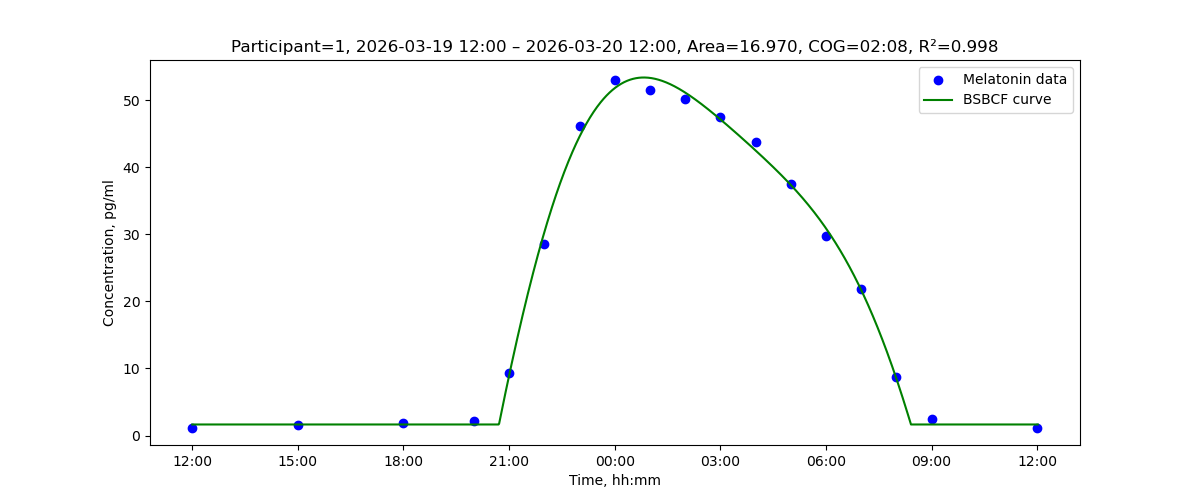
Running this code contained in [example_one_fit.py](https://github.com/vitaliy-ch25/melafit/blob/main/examples/example_one_fit.py) produces the following text output in the terminal
```bash
Participant=1, 2026-03-19 12:00 – 2026-03-20 12:00
Fitted function: BSBCF, parameters: phi=0.108, b=1.650, H=65.766, c=0.235, v=0.185, m=0.198, R²=0.9978
```
and the following figure is displayed with a fitted BSBCF waveform and the data it was fitted to. Besides that, the results are stored to an Excel table `results_one_fit_BSBCF.xlsx` under `./results/one_fit/`.
### Data preparation
Follow the Excel table format and column naming conventions as in
[./data/](https://github.com/vitaliy-ch25/melafit/blob/main/data/):
* *Participant* for study participant ID
* *Date* for dates of the respective samples
* *Time* for sample timestamps
* *Mel* for melatonin level values
## Scientific Foundations
If you use [melafit](https://github.com/vitaliy-ch25/melafit) in your
research, please cite the following foundational publications:
### Human-Readable
1. [Van Someren, E. J., & Nagtegaal, E. (2007). Improving melatonin circadian phase estimates. Sleep Medicine, 8(6), 590-601.](https://doi.org/10.1016/j.sleep.2007.03.012)
2. [Gabel, V., et al. (2017). Differential impact in young and older individuals of blue-enriched white light on circadian physiology and alertness during sustained wakefulness. Scientific Reports, 7, 7620.](https://doi.org/10.1038/s41598-017-07060-8)
### BibTeX
Click to expand
```bibtex
@article{vansomeren2007,
title={Improving melatonin circadian phase estimates},
author={Van Someren, Eus JW and Nagtegaal, Elsbeth},
journal={Sleep Medicine},
volume={8},
number={6},
pages={590--601},
year={2007},
publisher={Elsevier}
}
@article{gabel2017,
title={Differential impact in young and older individuals of
blue-enriched white light on circadian physiology and alertness
during sustained wakefulness},
author={Gabel, Virginie and Reichert, Carolin F and Maire, Micheline
and Schmidt, Christina and Schlangen, Luc JM
and Kolodyazhniy, Vitaliy and Garbazza, Corrado
and Cajochen, Christian and Viola, Antoine U},
journal={Scientific Reports},
volume={7},
pages={7620},
year={2017},
publisher={Nature Publishing Group}
}
```
If there is no associated publication on `melafit` yet, please cite the
package directly using the following reference:
```text
Kolodyazhniy, V., Cajochen, C. (2026). melafit: High-precision circadian
melatonin profile analysis (Version x.y.z). [Computer software].
Available at https://github.com/vitaliy-ch25/melafit (Accessed: dd mmm yyyy).
```
## Authors
* Vitaliy Kolodyazhniy – Lead Developer
* Christian Cajochen – Scientific Lead
## Revision History
Click to expand
### [v0.4.1](https://github.com/vitaliy-ch25/melafit/releases/tag/v0.4.1) - Bugfix and documentation polish
- `ResultsCollector.save()` now appends `.xlsx` only when the supplied
filename does not already end with `.xlsx`, preventing double-extension
filenames such as `results.xlsx.xlsx`
- Unit test `test_save_filename_with_xlsx_extension` added to verify that a
filename passed with `.xlsx` already present is written without modification
- Docstrings improved in `markers.py` and `results.py`
- README: collapsible sections added for BibTeX citation block, Revision
History, Developer installation, and Developer update; section captions and
markup refined; recommended package/environment manager updated to
[Miniforge](https://github.com/conda-forge/miniforge)
- `midpoint()` now raises `ValueError` with a descriptive message (data range
and threshold value included) when the threshold is never crossed, replacing
a silent `IndexError`
- `area_cog()` now raises `ValueError` with a descriptive message when the
baseline is never crossed from below, or when the area under the curve is
zero
- `prepare_part_data()` issues `warnings.warn()` instead of `print()` when
correcting a duplicate timestamp, so the message integrates with standard
Python warning filters
- Unused imports removed from `markers.py` (`phase_to_string`) and
`utils.py` (`os`, `scipy.optimize`)
- Unit tests added: `test_threshold_never_crossed_raises` (`TestMidpoint`),
`test_baseline_never_crossed_raises` and `test_zero_area_raises`
(`TestAreaCog`)
- `pyproject.toml`: `keywords`, `classifiers`, and `Documentation` URL added
### [v0.4.0](https://github.com/vitaliy-ch25/melafit/releases/tag/v0.4.0) - Improved API and examples
- `AmplitudeResult` now includes a `baseline` field (waveform minimum)
- `ResultsCollector` records and Excel output now include the `baseline` column
- `__str__()` added to all `AnalysisRecord` subclasses for human-readable
`print()` output:
- `SessionInfo`: participant name and session date/time range
- `AmplitudeResult`: amplitude and baseline values
- `MidpointResult`: DLMOn, DLMOff and Midpoint times
- `AreaCogResult`: area and COG time
- `FitResult`: function name, parameters and R²
- `AnalysisRecord` base: generic fallback derived from `to_dict()`
- Example scripts updated to use `print(meta)`, `print(res)`,
`print(mid, ac)` directly via the new `__str__` representations
- Unit tests extended to cover the new `baseline` field and `ResultsCollector`
column
- All example scripts simplified to `import melafit as mf` (single top-level
import replaces multiple `from melafit.xxx import ...` lines)
- New minimal getting-started example `example_one_fit.py`: single-participant
fit with `bsbcf`, `area_cog`, result collection, plot and Excel export
- `os.makedirs(result_path, exist_ok=True)` added to `example_dlmo.py` and
`example_full_profile.py` so result directories are created automatically
- README: collapsible getting-started example with output figure added to the
Getting Started section
- Version is now managed in a single source of truth: `melafit/_version.py`
contains `__version__`; `pyproject.toml` uses `dynamic = ["version"]` with
`[tool.setuptools.dynamic]` pointing to `melafit._version.__version__`;
`melafit/__init__.py` imports and re-exports `__version__` from `._version`
- Fixed citation author in module docstring: "Ruf et al. (1992)" → "Ruf (1992)"
### [v0.3.0](https://github.com/vitaliy-ch25/melafit/releases/tag/v0.3.0) - Cleaner API
- `AnalysisResult` renamed to `AnalysisRecord`
- `AnalysisInfo` renamed to `SessionInfo`; describes the data acquisition
session only (`participant`, `start`, `end`); `func` and `r2` removed
- `SessionInfo` constructor simplified: accepts a single `p_data` DataFrame
(as returned by `prepare_part_data()`); `participant`, `start` and `end`
are derived automatically
- `FitResult.to_dict()` now includes `func` (waveform function name) and `r2`
(R² goodness of fit), both computed automatically at the end of `fit()`
- `r2` is no longer a field of `SessionInfo`; `fit()` computes and stores it
in `FitResult` directly
- `compute_wave()` eliminated; replaced by the `gen_time_range()` +
waveform-function pattern: `gen_time_range()` accepts a Timestamp series or
explicit `tmin`/`tmax` bounds and a pandas offset string for `step`, and
returns a time axis as float days since the Unix UTC epoch, which is
then passed directly to the waveform function (e.g.
`bsbcf(t=gen_time_range(series, step="1min"), p=fit_result)`)
- New helper `to_days()` converts timestamps to float days since the Unix UTC
epoch; timezone-naive input is treated as UTC, timezone-aware input is
converted to UTC first
- New helper `from_days()` is the inverse of `to_days()`; returns a
UTC-aware `pd.DatetimeIndex`
- `day_profile()`, `midpoint()` and `area_cog()` now accept a float days
array (as returned by `gen_time_range()`) in addition to `pd.DatetimeIndex`
- `fit()` now accepts a `datetime64` array or pandas `Timestamp` Series for
`time_fit`; conversion via `to_days()` is automatic
- `prepare_part_data()` no longer adds a `Timedays` column to the returned
DataFrame; time handling is done internally via `to_days()`
- `prepare_part_data()` returns an independent copy of the participant's data;
mutations to the returned DataFrame do not affect the original; redundant
`Date` and `Time` columns are dropped (both are combined in `Timestamp`)
### [v0.2.0](https://github.com/vitaliy-ch25/melafit/releases/tag/v0.2.0) - Simplified API
- New module `results.py` with classes: `AnalysisResult` (abstract
base), `AnalysisInfo`, `AmplitudeResult`, `MidpointResult`, `AreaCogResult`,
`FitResult` and `ResultsCollector` for result management
- `FitResult` wraps `scipy.optimize.OptimizeResult` in its `result` field;
`fit()` now returns `FitResult`
- `FitResult` can be passed directly to waveform functions and `compute_wave`
- `amplitude()`, `midpoint()` and `area_cog()` now return their respective
result classes instead of tuples/floats
- `to_dict()` on all result classes: timing fields returned as `HH:MM`
strings, other fields as native types
- `AnalysisInfo.r2` defaults to `NaN` for convenience in DLMO workflows
- New `string_to_phase()` utility function in `utils.py` (inverse of
`phase_to_string`)
- `day_profile()` accepts separate times and values parameters
- `PARAM_NAMES` renamed to `BUILTIN_PARAM_NAMES`
- Example scripts simplified via `ResultsCollector` and result classes
- Unit tests for all new classes and methods
### [v0.1.3](https://github.com/vitaliy-ch25/melafit/releases/tag/v0.1.3)
- Improved documentation
- Developer installation option
### [v0.1.2](https://github.com/vitaliy-ch25/melafit/releases/tag/v0.1.2)
- Improved documentation
### [v0.1.1](https://github.com/vitaliy-ch25/melafit/releases/tag/v0.1.1) - First PyPI release
- Enhanced function `fit()` to support custom waveform functions with
user-defined initial parameters and bounds
- Changed named parameter order in `fit()`: `cost_f` and `cost_p` are
now the last two parameters
- Fixed returned type hints in `func_defaults()`
- Additional unit tests for new functionality
- Improved README
- Package registered in Python Package Index PyPI
### [v0.1.0](https://github.com/vitaliy-ch25/melafit/releases/tag/v0.1.0) - First public release
- Dictionary support for waveform function parameters throughout the
package: all functions accept both `dict` and `np.ndarray` for
parameter input
- Named parameter constants: `BCF_PARAM_NAMES`, `SBCF_PARAM_NAMES`,
`BBCF_PARAM_NAMES`, `BSBCF_PARAM_NAMES` and `PARAM_NAMES` lookup
- New utility functions `params_to_array()` and `array_to_params()` for
conversion between array and named dictionary representations
- `fit()` now returns named parameter dictionary as `res.p` in addition
to the standard scipy `res.x` array
- `fit()` now accepts `cost_p` dictionary for passing parameters to the
cost function (e.g. `{"eps": 1e-6}`)
- New utility function `params_to_string()` for human-readable parameter output
- Fixed `area_cog()`: baseline subtraction and bin size normalization
- Unit tests for all public functions in `fitting`, `markers` and `utils`
### Initial revisions (v0.0.1 – v0.0.9)
- Full implementation of melatonin profile analysis as described in
[Gabel et al. (2017)](https://doi.org/10.1038/s41598-017-07060-8)
- Waveform functions: `bcf`, `sbcf`, `bbcf`, `bsbcf`
- Markers: `amplitude`, `midpoint`, `DLMOn`, `DLMOff`, `area`, `cog`
- Utilities: `read_data`, `prepare_part_data`, `compute_wave`,
`day_profile`, `abs_threshold`, `time_to_phase`, `phase_to_string`,
`phase_diff`
- Example scripts: `example_dlmo.py` (DLMO from partial data) and
`example_full_profile.py` (full profile analysis)
- MIT license, packaging metadata and README
## License
This project is licensed under the MIT License. See the
[LICENSE](https://github.com/vitaliy-ch25/melafit/blob/main/LICENSE) file for
details.