https://github.com/vitroid/panojector
Panojector is an alternative of mathmap for Mac. You can easity expand the functionality by adding your own plugin filters.
https://github.com/vitroid/panojector
Last synced: 8 months ago
JSON representation
Panojector is an alternative of mathmap for Mac. You can easity expand the functionality by adding your own plugin filters.
- Host: GitHub
- URL: https://github.com/vitroid/panojector
- Owner: vitroid
- Created: 2012-05-02T14:28:17.000Z (about 14 years ago)
- Default Branch: master
- Last Pushed: 2022-03-05T10:36:44.000Z (over 4 years ago)
- Last Synced: 2023-03-12T07:53:08.690Z (over 3 years ago)
- Language: C++
- Homepage:
- Size: 63.7 MB
- Stars: 17
- Watchers: 5
- Forks: 1
- Open Issues: 0
-
Metadata Files:
- Readme: README.md
Awesome Lists containing this project
README
# Panojector Manual
Panojector is a modular panorama image converter.
## Plugin specs
explanation
input
output
options / argument
box
Develop a box
equirectangular
plain image
-b x,y,z
aspect ratio of the box
-e x,y,z
eye position
cone
Develop a cone
equirectangular
plain image
-r 0.3
radius of the base
-e 0.2
eye height to cone height
cylindrical_to_equirectangular
Cylindrical to equirectangular
Side of a circular cylinder
equirectangular
-s 6
Number of sides
equirectangular
Mercator to equirect
Mercator
equirectangular
No option
exponential
exponential
complex (plain image)
complex (plain image)
No option
invert
invert
complex (plain image)
complex (plain image)
No option
log
log
complex (plain image)
complex (plain image)
No option
mercator
Equirect to Mercator
equirectangular
Mercator
No option
power
power
complex (plain image)
complex (plain image)
-n 2
Power of n
prism
Develop a prism
equirectangular
plain image
-e 0.5
Eye height.
-h 0.5
Height of the prism.
-s 6
Number of sides.
-z 2
Specify where to attach the zenith cap.
-n 2
Specify where to attach the nadir cap.
ribbon
Convert a long image to a ribbon
plain image
plain image
-a 0.5 or -a 200/500
Aspect ratio of the input image.
rotate
Rotate an image
plain image
plain image
-a 0
Specify angle in degree.
scale
Scale an image
plain image
plain image
-x 1
Specify amounts
-y 1
-xy 1
-p
slide
Slide an image
plain image
plain image
-x 0
Specify amounts (in image coordinate)
-y 0
stereographic
Equirect to stereographic
equirectangular
plain image
-a 90
Field of view.
swap
Swap xyz axes
equirectangular
equirectangular
-n 1
Swap xyz axes multiple times.
tile
Slanted tiling of a long image. (incommensurate)
plain image
plain image (Mercator)
-a 0.5 or -a 200/500
Aspect ratio of the input image.
-s 8
Number of stories
tile2
Slanted tiling of a long image. (commensurate)
plain image
plain image (Mercator)
-a 0.5 or -a 200/500Aspect ratio of the input image.
tilt
Tilt an equirectangular image around the x axis.
equirectangular
equirectangular
-a 0
Specify angle in degree.
tumblerfan
Create your own tumbler
Mercator
plain image
-s wtop,wbot,height
Size of the fan. Wtop and wbot specifies the top and bottom width of the developed fan, and height specifies the fan height.
load
Load an image file
file
plain image
file name
interpolate
Load an image file
file
plain image
file name
## Panojector command
Panojector command accepts a few options.
### Usage:
panojector [-s size][-o outfile][list of plugins.....] load filename
### Options:
-s n Set image size to n x n.
-o file Specify the output file name.
## Notes
Plugin describes how to project the `(-1..+1)x(-1..+1)` plane onto another `(-1..+1)x(-1..+1)` plane. You can apply these projection plugins to the original image by giving plugin(s) as an argument(s) of the panojector command.
For example,
./panojector -s 400 mercator load original.jpg
converts the equirectangular image into mercator projection and output as a 400x400 image.
./panojector -s 600 box equirectangular load original.jpg
converts an Mercator panorama into equirectangular panorama and then develops as a box.
When multiple plugins are given, they work as a pipeline. Each plugin accepts options as its argument. Note that x coordinate points to the right, while y coordinate directs downwards. For complex coordinate, real points to the right, and imaginary directs downwards.
## Other Examples
### Example 1
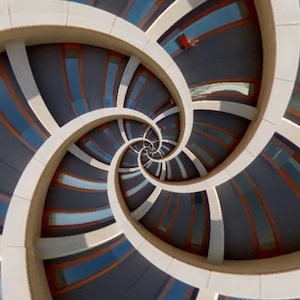
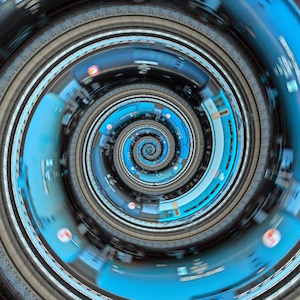
This converts the sample rectangular image to a swirl:
./panojector -s 600 stereographic equirectangular tile2 -a 706/881 load sample.jpg
The first plugin “tile2” tiles the original image, second plugin “equirectangular” regards the image as a Mercator (conformal) panorama and convert it into equirectangular panorama image, and the last plugin “stereographic” converts the equirectangular panorama into stereographic (conformal) image.
This converts the inverted little planet image back to equirectangular panorama:
./panojector -s 1000 slide -x 1.25 equirectangular rotate -a 90 slide -x -0.25 exponential load sample2.jpg
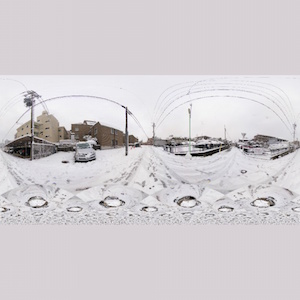
(The sample image is provided by Pedro Moura Pinheiro at http://www.flickr.com/photos/pedromourapinheiro/4929306871 under Creative Commons (CC BY-NC-SA 2.0) License.)
### Example 2
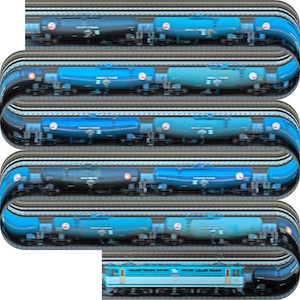
This converts a long train image to 6-story ribbon:
./panojector -s 1000 ribbon -a 826/29999 -s 6 load sample3.jpg
### Example 3
This converts the same image into a swirl:
./panojector -s 1000 stereographic equirectangular tile -a 826/29999 -s 8 load sample3.jpg
and a tilted swirl:
./panojector -s 1000 rotate -a 45 stereographic -a 300 tilt -a 30 equirectangular tile -a 826/29999 -s 8 load sample3.jpg
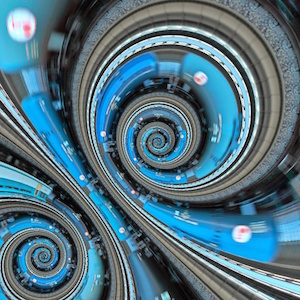
For now, we provide only one rotation plugin, “tilt”, to give a rotation angle around the X axis to an equirectangular image. In order to rotate the equirectangular image with YAW, PITCH, and ROLL angles in PTgui and Hugin way, use the following parameters: (YAW, PITCH, and ROLL should be replaced by the values.)
./panojector -s 1000 swap tilt -a -YAW swap tilt -a PITCH swap tilt -a ROLL load sample4.jpg
### Example 4
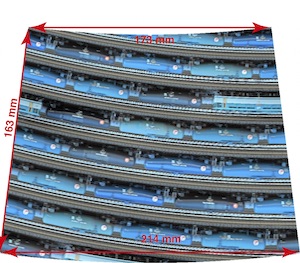
You can even “Create Your Own Starbucks Tumbler.”
./panojector -s 1000 tumblerfan -s 214,173,163 tile -a 826/29999 -s 8 load sample3.jpg
### Example 5
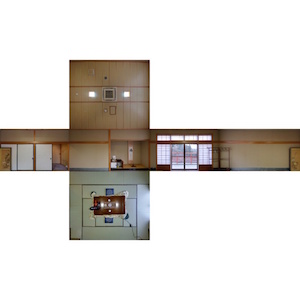
A small utility `boxsize.py` calculates the proper dimension of the box for your equirectangular panorama image. Here is an example image of a Japanese room. (The sample image is provided in a courtesy of Simon Sherwin. Original photo is available at [Flickr](https://www.flickr.com/photos/simons/4524005292). Please download the [original image](https://farm5.staticflickr.com/4051/4524005292_5c0c99cffa_o.jpg) by yourself and rename it as `sample.jpg`.)
1. Measure the dimensions of the images:
picture width, positions of four corners, and ceiling and floor positions at the first corner.
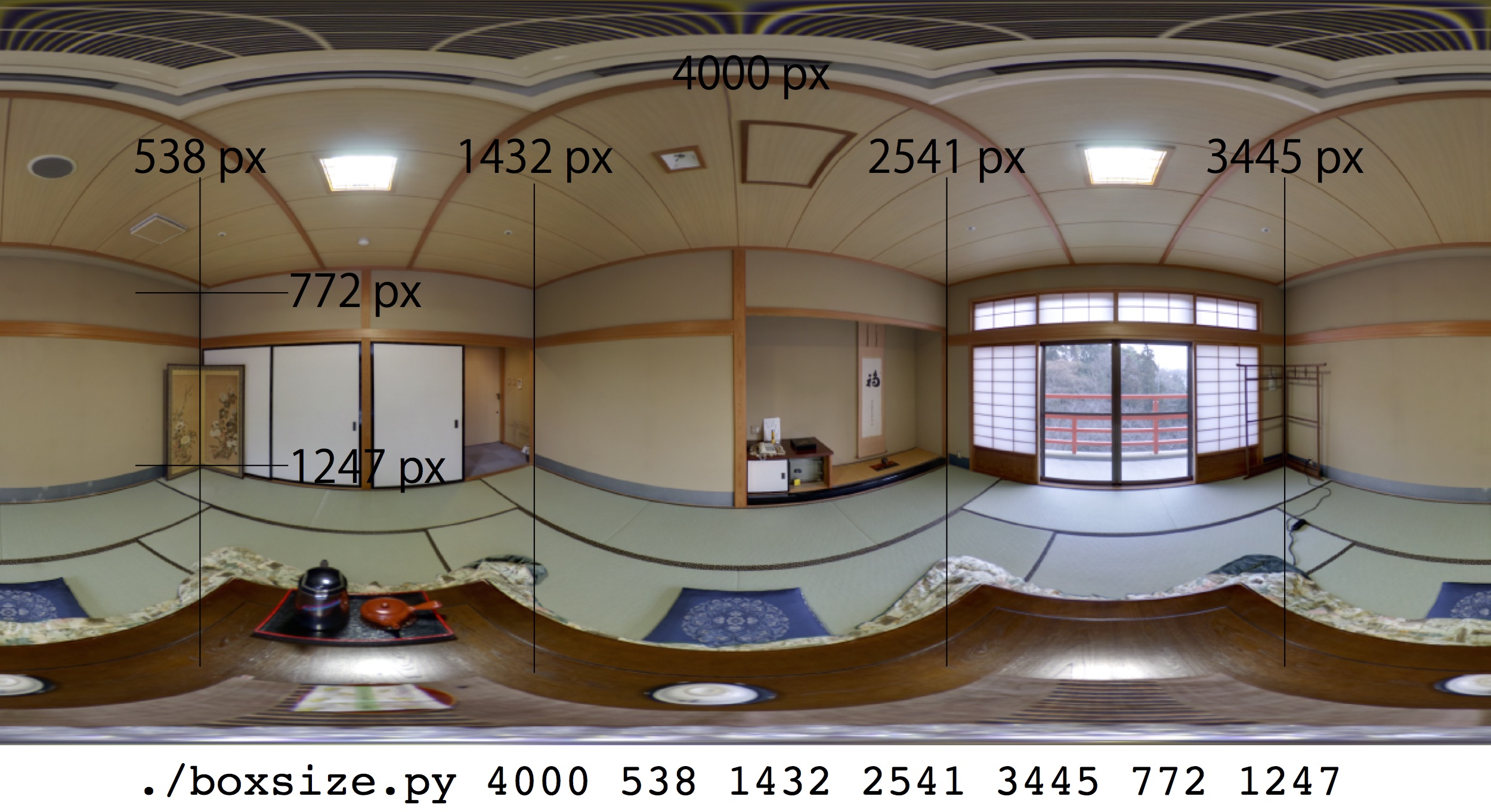
2. Put them as arguments of the boxsize.py program and run it. The program estimates the eye position in the box.
./boxsize.py 4000 538 1432 2541 3445 772 1247
3. You get the optimal parameters to convert the image into a box development. Modify as you like, and run it.
./panojector -s 4000 box -b 1,1.1724609375,0.609415798286 -e 0.5064453125,0.504081292687,0.521980455925 slide -x 0.269 interpolate sample.jpg