https://github.com/vivek-suthar/cryptoreact
Web3 Starter Kit for React Native+Expo ,Bootstrap your next DApp in few seconds
https://github.com/vivek-suthar/cryptoreact
expo react-native starter-kit web3
Last synced: about 1 year ago
JSON representation
Web3 Starter Kit for React Native+Expo ,Bootstrap your next DApp in few seconds
- Host: GitHub
- URL: https://github.com/vivek-suthar/cryptoreact
- Owner: VIVEK-SUTHAR
- Created: 2023-10-03T14:08:48.000Z (over 2 years ago)
- Default Branch: main
- Last Pushed: 2024-01-27T15:13:09.000Z (over 2 years ago)
- Last Synced: 2025-04-13T20:15:05.989Z (about 1 year ago)
- Topics: expo, react-native, starter-kit, web3
- Language: TypeScript
- Homepage:
- Size: 515 KB
- Stars: 11
- Watchers: 1
- Forks: 1
- Open Issues: 0
-
Metadata Files:
- Readme: README.md
Awesome Lists containing this project
README
# CryptoReact - React Native+Expo Starter Kit
Building Web3 applications for mobile can be a complex task.
That's where CryptoReact comes in – it's a React Native + Expo starter kit meticulously crafted to jumpstart your journey in developing blockchain and cryptocurrency-focused mobile apps
It comes with essential features including WalletConnect support, Dark/Light Theme using Shopify Restyle, and TypeScript readiness.
## Features
- **WalletConnect Support**: Easily integrate WalletConnect to allow users to connect their wallets to your app securely.
- **Dark/Light Theme**: Customize the look and feel of your app with built-in Dark and Light theme support using Shopify Restyle.
- **TypeScript Ready**: The project is TypeScript ready, making it easier to maintain and scale as your app evolves.
## Getting Started
Follow these steps to get started with CryptoReact:
1. **Clone the Repository**:
```sh
git clone https://github.com/VIVEK-SUTHAR/cryptoreact
```
## Install Dependencies
Follow these steps to install the required dependencies for CryptoReact:
1. **Change Directory**: Navigate to the project directory after cloning the repository:
```sh
cd cryptoreact
```
2. **Install Packages**: Use Yarn or npm to install the project's dependencies:
```sh
yarn
#or
npm install
```
## Configure the Wallet Connect Project ID and RPC Url
1. **WalletConnect Project ID**: Grab a Project id from [Wallect Connect Cloud](https://cloud.walletconnect.com/),and replace it with `projectId` in `root/src/components/WallectConnectModal.tsx`
```ts
const projectId = "GRAB_FROM_WC_CLOUD_ANDPASTE_HERE";
```
2. **Alchemy RPC URL**: We use Alchemy's RPC API for querying the onchain data.Go to [Alchemy](https://www.alchemy.com/),one you have one project with polygon-mainnet,copy the https url and paste to `root/src/constants/index.ts`
```ts
export const ALCHMEY_RPC_URL = "ADD_RPC_URL_HERE";
```
## Run the App
To run the CryptoReact app locally, follow these steps:
1. **Start the Development Server**: Run the following command to start the Expo development server:
```sh
yarn start
```
2. Scan the QR code in your expo go app and you are good to go.
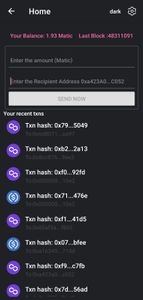
### The Home Screen :
## Things one can work
- [ ] : Add ENS Resolving/reverse resolve support
- [ ] : Conduct thorough performance optimizations for smoother user experience.
- [ ] : Add Chain Switch support
- [ ] : Add Config for callling smart-contracts
- [ ] : Build CLI tool that just bootsraps the starter kit in seconds
## Found a Bug?
If you encounter any issues, bugs, or unexpected behavior while using CryptoReact, please help us improve the project by reporting them. To report a bug, follow these steps:
1. **Check Existing Issues**: Before creating a new issue, please search the [existing issues](https://github.com/VIVEK-SUTHAR/cryptoreact/issues) to see if someone has already reported the same problem. If you find a similar issue, you can add a comment with additional details.
2. **Create a New Issue**:
- Click on the ["Issues" tab](https://github.com/VIVEK-SUTHAR/cryptoreact/issues) on the GitHub repository.
- Click the "New Issue" button.
- Provide a descriptive title that summarizes the issue.
- In the issue description, include the following details:
- A clear and concise description of the problem or bug or the feature you want in Starter Kit.
- Steps to reproduce the issue (if applicable).
- Any error messages or screenshots that can help us understand the problem.
- Information about your environment, including the version of CryptoReact and the device or emulator you're using.
- Assign appropriate labels to the issue, such as "bug" or "help wanted."
3. **Submit the Issue**: Click the "Submit new issue" button to create the issue.
I'll do my best to address it ASAP. Your feedback is valuable in making CryptoReact better.
Thank you for helping us improve the project!
## Contributing
I welcome contributions to CryptoReact! To contribute, please follow these steps:
1. Fork the repository.
2. Create a new branch for your feature or bug fix.
3. Make your changes and commit them with descriptive messages.
4. Push your changes to your fork.
5. Create a pull request to the `main` branch of the original repository.
## Support the Project
CryptoReact is a project that I maintain in my free time as one of my Side Project, and your support can help me continue to improve and maintain it.
If you find this project useful and would like to show your appreciation, you can support the work in the following ways:
- **Buy Me a Coffee**: You can [buy me a coffee](https://www.buymeacoffee.com/devvivek)
- **Crypto**: Send some eth at `devvivek.eth`
Your support is greatly appreciated !
Thank you for being a part of this project!
Let's Build Web3 with React Native
WAGMI