https://github.com/vk/dash-express-components
Widgets to bring Plotly Express style plots to Dash
https://github.com/vk/dash-express-components
dash plotly-dash python
Last synced: about 1 year ago
JSON representation
Widgets to bring Plotly Express style plots to Dash
- Host: GitHub
- URL: https://github.com/vk/dash-express-components
- Owner: VK
- License: other
- Created: 2021-12-26T16:27:19.000Z (over 4 years ago)
- Default Branch: main
- Last Pushed: 2025-05-09T20:10:11.000Z (about 1 year ago)
- Last Synced: 2025-05-09T21:24:41.069Z (about 1 year ago)
- Topics: dash, plotly-dash, python
- Language: JavaScript
- Homepage:
- Size: 12.3 MB
- Stars: 9
- Watchers: 1
- Forks: 0
- Open Issues: 69
-
Metadata Files:
- Readme: README.md
- Contributing: CONTRIBUTING.md
- License: LICENSE
Awesome Lists containing this project
README
# Dash Express Components

[](https://pypi.org/project/dash-express-components)
[](https://www.npmjs.com/package/dash_express_components)
[](https://vk.github.io/dash-express-components)
[](https://github.com/VK/dash-express-components/actions/workflows/test.yml)
[](https://codecov.io/gh/VK/dash-express-components)
### Components to bring [Plotly Express](https://plotly.com/python/plotly-express/) style plots to [Dash](https://dash.plotly.com/):
* [**dxc.Filter**](https://vk.github.io/dash-express-components/Filter.html) to define filter configurations for numerical, categorical or temporal columns.
* [**dxc.Transform**](https://vk.github.io/dash-express-components/Transform.html) to specify a series of data transformations like melt, group by or aggregate.
* [**dxc.Plotter**](https://vk.github.io/dash-express-components/Plotter.html) to set a plot layout like scatter, box, image or table.
* [**dxc.Configurator**](https://vk.github.io/dash-express-components/Configurator.html) is a component that combines
[**dxc.Filter**](https://vk.github.io/dash-express-components/Filter.html),
[**dxc.Transform**](https://vk.github.io/dash-express-components/Transform.html) and
[**dxc.Plotter**](https://vk.github.io/dash-express-components/Plotter.html)
to make the components even easier to use, since the interaction between them is handled automatically.
* [**dxc.Graph**](https://vk.github.io/dash-express-components/Graph.html) uses [dcc.Graph](https://dash.plotly.com/dash-core-components/graph) and [dash_table.DataTable](https://dash.plotly.com/datatable) to show a plot or a table based on the plot configuration.
### A typical data flow looks like this:
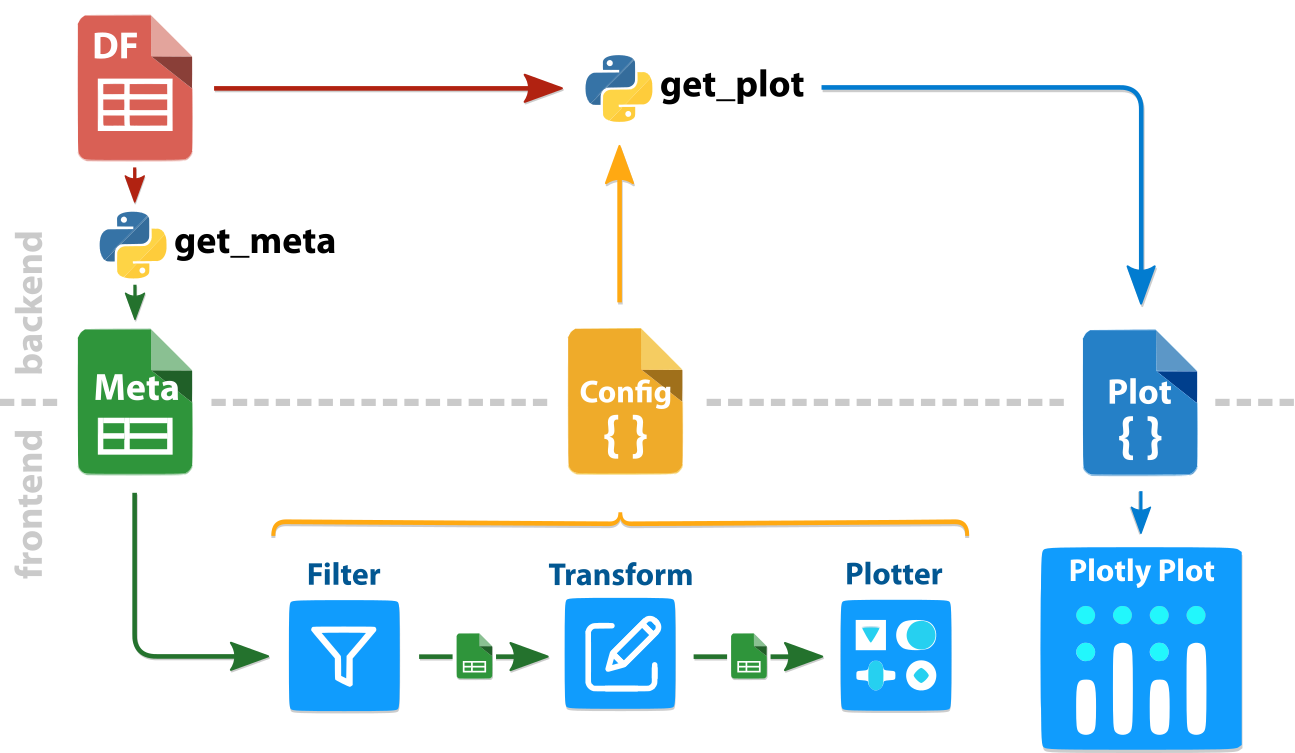
First, the metadata is extracted from the dataframe ***df*** with **dxc.get_meta(*df*)**. This ***meta*** json is needed for
[**dxc.Filter**](https://vk.github.io/dash-express-components/Filter.html),
[**dxc.Transform**](https://vk.github.io/dash-express-components/Transform.html) or [**dxc.Plotter**](https://vk.github.io/dash-express-components/Plotter.html) to show all options without additional queries to the dataframe. As a result, the components react quite quickly.
Since the metadata can be changed by filter or transform operations, and we don't want additional server calls, the changes are directly computed in the web components. You can access the metadata after transformations via the ***meta_out*** property of [**dxc.Filter**](https://vk.github.io/dash-express-components/Filter.html) and [**dxc.Transform**](https://vk.github.io/dash-express-components/Transform.html).
A combined ***config*** is needed to compute the final plot with **dxc.get_plot(*df*, *config*)**. You can combine the configurations of each component yourself or use the [**dxc.Configurator**](https://vk.github.io/dash-express-components/Configurator.html) to get a combined configuration like:
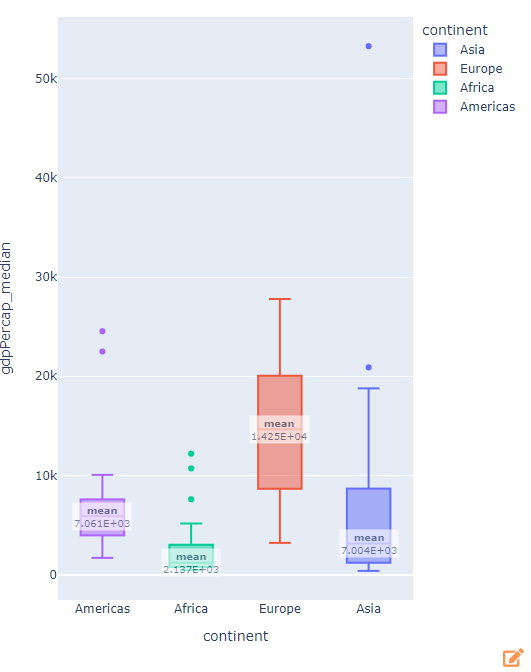
```python
{
"filter": [
{
"col": "continent",
"type": "isnotin",
"value": ["Oceania"]
}
],
"transform": [
{
"type": "aggr",
"groupby": [
"country",
"continent"
],
"cols": ["gdpPercap"],
"types": ["median"]
}
],
"plot": {
"type": "box",
"params": {
"x": "continent",
"y": "gdpPercap_median",
"color": "continent",
"aggr": ["mean"],
"reversed_x": True
}
}
}
```
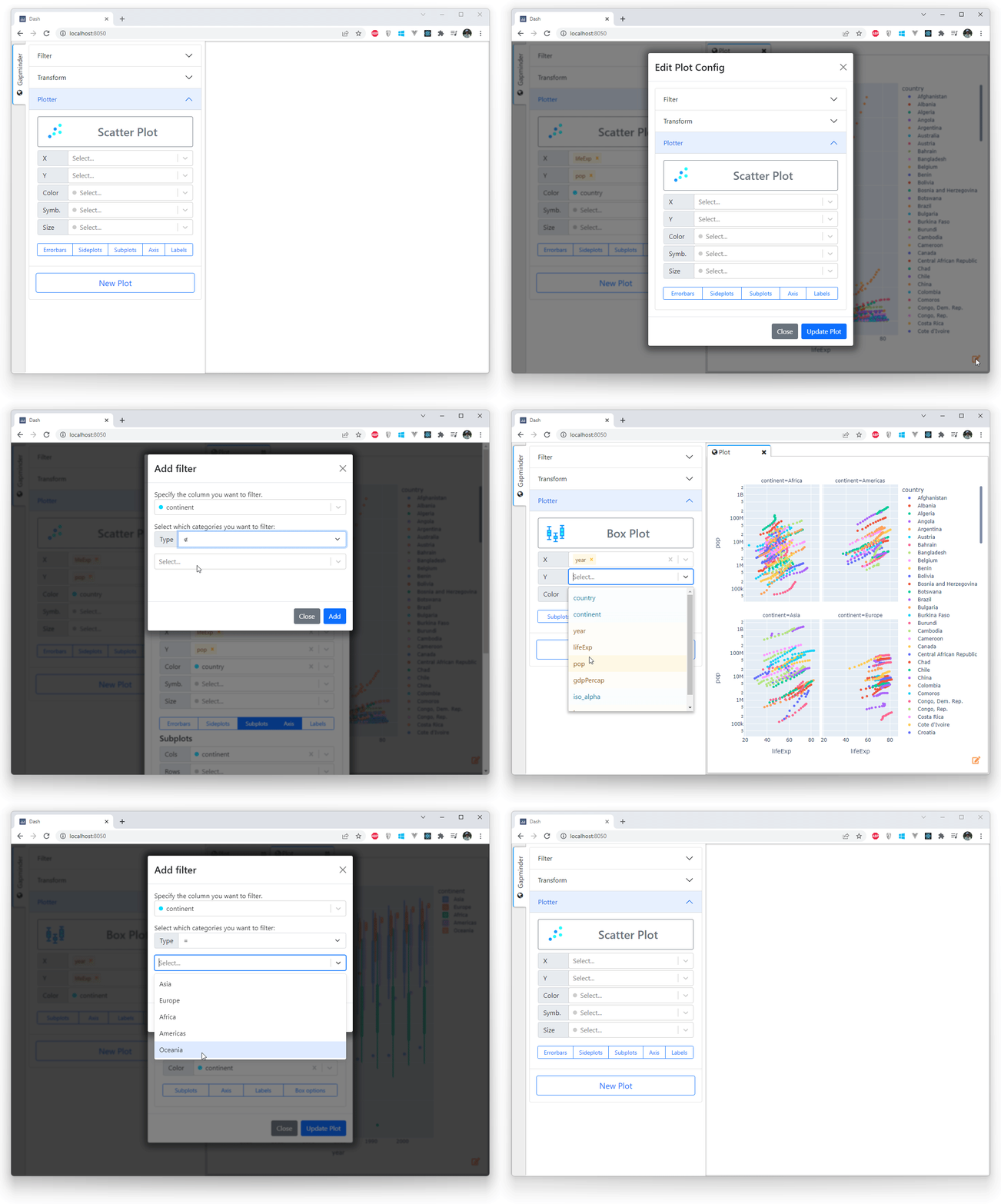
An example with the gapminder dataset and [**dash-lumino-components**](https://github.com/VK/dash-lumino-components) for the MDI layout.
## Try it
Install dependencies
```console
$ pip install dash-express-components
```
and start with quickly editable graphs:
```python
import dash_express_components as dxc
app.layout = html.Div([
# add a plot dxc.Configurator
html.Div([
dxc.Configurator(
id="plotConfig",
meta=meta,
),
], style={"width": "500px", "float": "left"}),
# add an editable dxc.Graph
html.Div([
dxc.Graph(id="fig",
meta=meta,
style={"height": "100%", "width": "100%"}
)],
style={"width": "calc(100% - 500px)", "height": "calc(100vh - 30px)",
"display": "inline-block", "float": "left"}
)
])
```
## Develop
1. Install npm packages
```console
$ npm install
```
2. Create a virtual env and activate.
```console
$ virtualenv venv
$ . venv/bin/activate
```
_Note: venv\Scripts\activate for windows_
3. Install python packages required to build components.
```console
$ pip install -r requirements.txt
```
4. Build your code
```console
$ npm run build
```
5. Run the example
```console
$ python usage.py
```