https://github.com/vlebourl/custom_vesync
Custom VeSync component for Home Assistant
https://github.com/vlebourl/custom_vesync
hacs homeassistant vesync
Last synced: about 1 year ago
JSON representation
Custom VeSync component for Home Assistant
- Host: GitHub
- URL: https://github.com/vlebourl/custom_vesync
- Owner: vlebourl
- Archived: true
- Created: 2022-04-01T13:01:20.000Z (about 4 years ago)
- Default Branch: main
- Last Pushed: 2023-12-21T08:43:23.000Z (over 2 years ago)
- Last Synced: 2024-11-06T02:39:04.027Z (over 1 year ago)
- Topics: hacs, homeassistant, vesync
- Language: Python
- Homepage:
- Size: 538 KB
- Stars: 99
- Watchers: 10
- Forks: 71
- Open Issues: 11
-
Metadata Files:
- Readme: README.md
Awesome Lists containing this project
README
# **Important message**
>
> Unfortunately, I no longer have time to maintain this repo.
> @micahqcade was kind enough to offer to take over. His fork is now the reference you should install and update from!
> Cheers to you all.
>
> https://github.com/micahqcade/custom_vesync
>
[](https://github.com/custom-components/hacs)
[](https://GitHub.com/vlebourl/custom_vesync/releases/)
# VeSync custom component for Home Assistant
Custom component for Home Assistant to interact with smart devices via the VeSync platform.
This integration is heavily based on [VeSync_bpo](https://github.com/borpin/vesync-bpo) and relies on [pyvesync](https://github.com/webdjoe/pyvesync) under the hood.
## Installation
You can install this integration via [HACS](#hacs) or [manually](#manual).
This integration will override the core VeSync integration.
### HACS
This integration can be installed by adding this repository to HACS __AS A CUSTOM REPOSITORY__, then searching for `Custom VeSync`, and choosing install. Reboot Home Assistant and configure the 'VeSync' integration via the integrations page or press the blue button below.
[](https://my.home-assistant.io/redirect/config_flow_start/?domain=vesync)
### Manual
Copy the `custom_components/vesync` to your `custom_components` folder. Reboot Home Assistant and configure the 'VeSync' integration via the integrations page or press the blue button below.
[](https://my.home-assistant.io/redirect/config_flow_start/?domain=vesync)
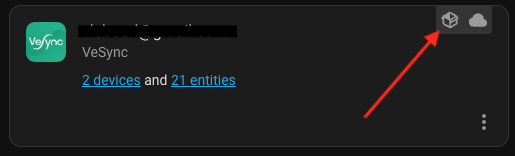
You can make sure the custom integration is in use by looking for the following icon in the Settings > Devices & Services page:
## Logging
### Enable debug logging
The [logger](https://www.home-assistant.io/integrations/logger/) integration lets you define the level of logging activities in Home Assistant. Turning on debug mode will show more information about unsupported devices in your logbook.
```yaml
logger:
default: error
logs:
custom_components.vesync: debug
pyvesync: debug
```
## TODO LIST
```
- [x] Air Fryer Properties (AirFryer158)
- [ ] Air Fryer Methods
- [ ] Create the Card
```
### Contributing
All contributions are very welcomed!
Please make sure to install `pre-commit` and run the pre-commit hook before submitting a PR.
```sh
pip install pre-commit
pre-commit install
pre-commit run --all-files
```