https://github.com/vlm-run/vlmrun-hub
A hub for various industry-specific schemas to be used with VLMs.
https://github.com/vlm-run/vlmrun-hub
ai computer-vision etl genai json multimodal pydantic pydantic-models vlm vlm-ocr
Last synced: 3 months ago
JSON representation
A hub for various industry-specific schemas to be used with VLMs.
- Host: GitHub
- URL: https://github.com/vlm-run/vlmrun-hub
- Owner: vlm-run
- License: apache-2.0
- Created: 2024-11-11T20:07:48.000Z (over 1 year ago)
- Default Branch: main
- Last Pushed: 2025-12-15T22:41:40.000Z (7 months ago)
- Last Synced: 2026-01-02T10:47:40.855Z (6 months ago)
- Topics: ai, computer-vision, etl, genai, json, multimodal, pydantic, pydantic-models, vlm, vlm-ocr
- Language: Python
- Homepage: https://docs.vlm.run/hub
- Size: 367 KB
- Stars: 537
- Watchers: 2
- Forks: 23
- Open Issues: 8
-
Metadata Files:
- Readme: README.md
- Contributing: docs/CONTRIBUTING-SCHEMA.md
- License: LICENSE
Awesome Lists containing this project
README
Welcome to **VLM Run Hub**, a comprehensive repository of pre-defined [Pydantic](https://docs.pydantic.dev/latest/) schemas for extracting structured data from unstructured visual domains such as images, videos, and documents. Designed for [Vision Language Models (VLMs)](https://huggingface.co/blog/vlms) and optimized for real-world use cases, VLM Run Hub simplifies the integration of visual ETL into your workflows.
Image
JSON

```json
{
"issuing_state": "MT",
"license_number": "0812319684104",
"first_name": "Brenda",
"middle_name": "Lynn",
"last_name": "Sample",
"address": {
"street": "123 MAIN STREET",
"city": "HELENA",
"state": "MT",
"zip_code": "59601"
},
"date_of_birth": "1968-08-04",
"gender": "F",
"height": "5'06\"",
"weight": 150.0,
"eye_color": "BRO",
"issue_date": "2015-02-15",
"expiration_date": "2023-08-04",
"license_class": "D"
}
```
### 💡 Motivation
While vision models like OpenAI's [GPT-4o](https://openai.com/index/hello-gpt-4o/) and Anthropic's [Claude Vision](https://www.anthropic.com/claude) excel in exploratory tasks like "chat with images," they often lack practicality for automation and integration, where **strongly-typed**, **validated outputs** are crucial.
The **Structured Outputs API** (popularized by [GPT-4o](https://openai.com/index/introducing-structured-outputs-in-the-api/), [Gemini](https://ai.google.dev/gemini-api/docs/structured-output)) addresses this by constraining LLMs to return data in precise, strongly-typed formats such as [Pydantic](https://docs.pydantic.dev/latest/) models. This eliminates complex parsing and validation, ensuring outputs conform to expected types and structures. These schemas can be nested and include complex types like lists and dictionaries, enabling seamless integration with existing systems while leveraging the full capabilities of the model.
### 🧰 Why use this hub of pre-defined Pydantic schemas?
- 📚 **Easy to use:** [Pydantic](https://docs.pydantic.dev/latest/) is a well-understood and battle-tested data model for structured data.
- 🔋 **Batteries included:** Each schema in this repo has been validated across real-world industry use cases—from healthcare to finance to media—saving you weeks of development effort.
- 🔍 **Automatic Data-validation:** Built-in [Pydantic validation](https://docs.pydantic.dev/latest/concepts/validators/) ensures your extracted data is clean, accurate, and reliable, reducing errors and simplifying downstream workflows.
- 🔌 **Type-safety:** With [Pydantic's type-safety](https://docs.pydantic.dev/latest/concepts/types/) and compatibility with tools like `mypy` and `pyright`, you can build composable, modular systems that are robust and maintainable.
- 🧰 **Model-agnostic:** Use the same schema with multiple VLM providers, no need to rewrite prompts for different VLMs.
- 🚀 **Optimized for Visual ETL:** Purpose-built for extracting structured data from images, videos, and documents, this repo bridges the gap between unstructured data and actionable insights.
### 📖 Schema Catalog
The VLM Run Hub maintains a comprehensive catalog of all available schemas in the [`vlmrun/hub/catalog.yaml`](vlmrun/hub/catalog.yaml) file. The catalog is automatically validated to ensure consistency and completeness of schema documentation. We refer the developer to the [catalog-spec.yaml](docs/catalog-spec.yaml) for the full YAML specification.
Category
Domains
📄 Document Processing
document.bank-statement
document.invoice
document.receipt
document.resume
document.us-drivers-license
document.utility-bill
document.us-passport
document.business-card
document.insurance-claim
document.bank-check
document.request-for-proposal
document.india.aadhaar-card
document.india.pan-card
💰 Accounting & Finance
accounting.form-w2
accounting.form-payslip
finance.balance-sheet
🏥 Healthcare
healthcare.medical-insurance-card
healthcare.hipaa-release
healthcare.pathology-report
🛒 Retail
retail.ecommerce-product-caption
retail.product-catalog
food.nutrition-facts-label
📺 Media
media.tv-news
media.nba-game-state
media.nfl-game-state
🏭 Other Industries
aerospace.remote-sensing
logistics.bill-of-lading
real-estate.lease-agreement
social.twitter-card
If you have a new schema you want to add to the catalog, please refer to the [SCHEMA-GUIDELINES.md](docs/SCHEMA-GUIDELINES.md) for the full guidelines.
### 🚀 Getting Started
Let's say we want to extract invoice metadata from an [invoice image](https://storage.googleapis.com/vlm-data-public-prod/hub/examples/document.invoice/invoice_1.jpg). You can readily use our [`Invoice`](vlmrun/hub/schemas/document/invoice.py) schema we have defined under `vlmrun.hub.schemas.document.invoice` and use it with any VLM of your choosing.
For a comprehensive walkthrough of available schemas and their usage, check out our [Schema Showcase Notebook](https://github.com/vlm-run/vlmrun-cookbook/blob/main/notebooks/01_schema_showcase.ipynb).
### 💾 Installation
```python
pip install vlmrun-hub
```
#### With [VLM Run Python SDK](https://github.com/vlm-run/vlmrun-python-sdk)
```python
import os
from PIL import Image
from vlmrun.client import VLMRun
from vlmrun.client.types import PredictionResponse
from vlmrun.common.utils import download_image
VLMRUN_BASE_URL = os.getenv("VLMRUN_BASE_URL", "https://api.vlm.run/v1")
VLMRUN_API_KEY = os.getenv("VLMRUN_API_KEY", None)
client = VLMRun(base_url=VLMRUN_BASE_URL, api_key=VLMRUN_API_KEY)
IMAGE_URL = "https://storage.googleapis.com/vlm-data-public-prod/hub/examples/document.invoice/invoice_1.jpg"
image: Image.Image = download_image(IMAGE_URL)
response: PredictionResponse = client.image.generate(
images=[image],
domain="document.invoice",
)
```
#### With [Instructor](https://github.com/jxnl/instructor) / OpenAI
```python
import instructor
from openai import OpenAI
from vlmrun.hub.schemas.document.invoice import Invoice
IMAGE_URL = "https://storage.googleapis.com/vlm-data-public-prod/hub/examples/document.invoice/invoice_1.jpg"
client = instructor.from_openai(
OpenAI(), mode=instructor.Mode.MD_JSON
)
response = client.chat.completions.create(
model="gpt-4o-mini",
messages=[
{ "role": "user", "content": [
{"type": "text", "text": "Extract the invoice in JSON."},
{"type": "image_url", "image_url": {"url": IMAGE_URL}, "detail": "auto"}
]}
],
response_model=Invoice,
temperature=0,
)
```
JSON Response:
Image
JSON Output 🔐
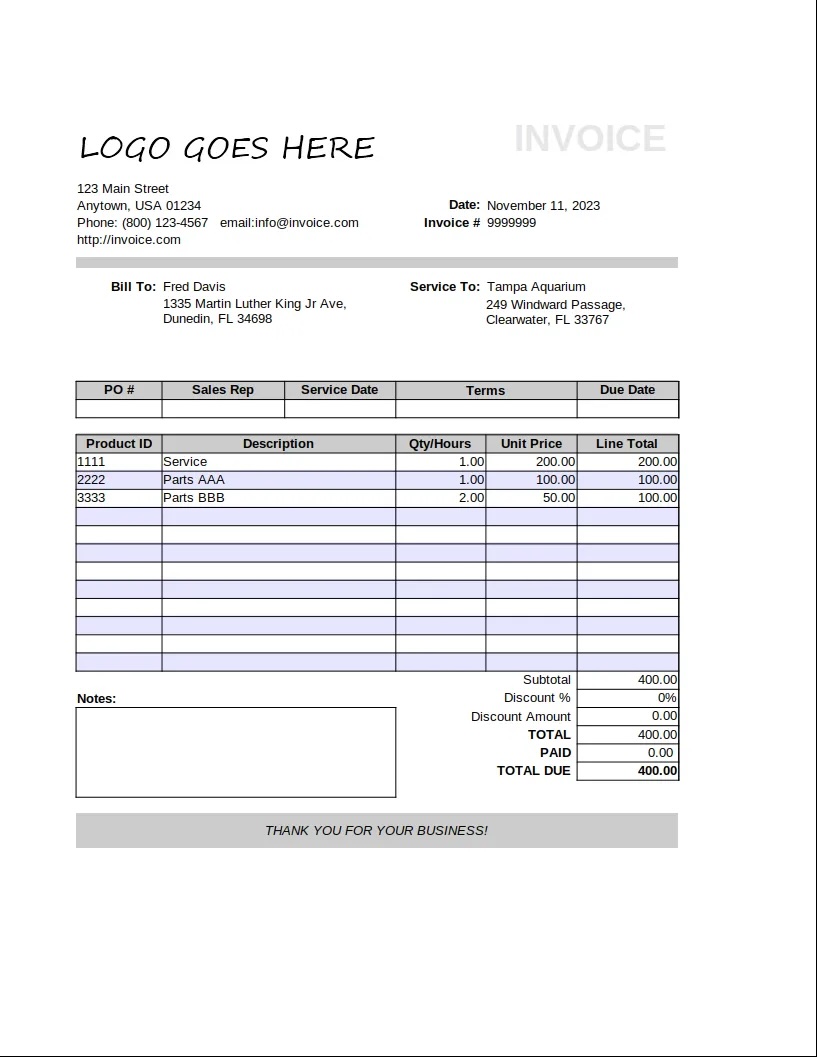
```json
{
"invoice_id": "9999999",
"period_start": null,
"period_end": null,
"invoice_issue_date": "2023-11-11",
"invoice_due_date": null,
"order_id": null,
"customer_id": null,
"issuer": "Anytown, USA",
"issuer_address": {
"street": "123 Main Street",
"city": "Anytown",
"state": "USA",
"postal_code": "01234",
"country": null
},
"customer": "Fred Davis",
"customer_email": "email@invoice.com",
"customer_phone": "(800) 123-4567",
"customer_billing_address": {
"street": "1335 Martin Luther King Jr Ave",
"city": "Dunedin",
"state": "FL",
"postal_code": "34698",
"country": null
},
"customer_shipping_address": {
"street": "249 Windward Passage",
"city": "Clearwater",
"state": "FL",
"postal_code": "33767",
"country": null
},
"items": [
{
"description": "Service",
"quantity": 1,
"currency": null,
"unit_price": 200.0,
"total_price": 200.0
},
{
"description": "Parts AAA",
"quantity": 1,
"currency": null,
"unit_price": 100.0,
"total_price": 100.0
},
{
"description": "Parts BBB",
"quantity": 2,
"currency": null,
"unit_price": 50.0,
"total_price": 100.0
}
],
"subtotal": 400.0,
"tax": null,
"total": 400.0,
"currency": null,
"notes": "",
"others": null
}
```
#### With [OpenAI Structured Outputs API](https://platform.openai.com/docs/guides/structured-outputs)
```python
import instructor
from openai import OpenAI
from vlmrun.hub.schemas.document.invoice import Invoice
IMAGE_URL = "https://storage.googleapis.com/vlm-data-public-prod/hub/examples/document.invoice/invoice_1.jpg"
client = OpenAI()
completion = client.beta.chat.completions.parse(
model="gpt-4o-mini",
messages=[
{"role": "user", "content": [
{"type": "text", "text": "Extract the invoice in JSON."},
{"type": "image_url", "image_url": {"url": IMAGE_URL}, "detail": "auto"}
]},
],
response_format=Invoice,
temperature=0,
)
```
> When working with the OpenAI Structured Outputs API, you need to ensure that the `response_format` is a valid Pydantic model with the [supported types](https://platform.openai.com/docs/guides/structured-outputs#supported-schemas).
#### Locally with [Ollama](https://ollama.com)
Note: For certain `vlmrun.common` utilities, you will need to install our main [Python SDK](https://github.com/vlm-run/vlmrun-python-sdk)
via `pip install vlmrun`.
```python
from ollama import chat
from vlmrun.common.image import encode_image
from vlmrun.common.utils import remote_image
from vlmrun.hub.schemas.document.invoice import Invoice
IMAGE_URL = "https://storage.googleapis.com/vlm-data-public-prod/hub/examples/document.invoice/invoice_1.jpg"
img = remote_image(IMAGE_URL)
chat_response = chat(
model="llama3.2-vision:11b",
format=Invoice.model_json_schema(),
messages=[
{
"role": "user",
"content": "Extract the invoice in JSON.",
"images": [encode_image(img, format="JPEG").split(",")[1]],
},
],
options={
"temperature": 0
},
)
response = Invoice.model_validate_json(
chat_response.message.content
)
```
### 📖 Qualitative Results
We periodically run popular VLMs on each of the examples & schemas in the [catalog.yaml](vlmrun/hub/catalog.yaml) file and publish the results in the [benchmarks](tests/benchmarks/) directory.
| Provider | Model | Date | Results |
| --- | --- | --- | --- |
| OpenAI | gpt-4o-2024-11-20 | 2025-01-09 | [link](tests/benchmarks/2025-01-09-gpt-4o-2024-11-20-instructor-results.md) |
| OpenAI | gpt-4o-mini-2024-07-18 | 2025-01-09 | [link](tests/benchmarks/2025-01-09-gpt-4o-mini-2024-07-18-instructor-results.md) |
| Gemini | gemini-2.0-flash-exp | 2025-01-10 | [link](tests/benchmarks/2025-01-10-gemini-2.0-flash-exp-instructor-results.md) |
| Ollama | llama3.2-vision:11b | 2025-01-10 | [link](tests/benchmarks/2025-01-10-llama3.2-vision-11b-instructor-results.md) |
| Ollama | Qwen2.5-VL-7B-Instruct:Q4_K_M_benxh | 2025-02-20 | [link](tests/benchmarks/2025-02-20-bsahane-Qwen2.5-VL-7B-Instruct-Q4_K_M_benxh-ollama-results.md) |
| Ollama + Instructor | Qwen2.5-VL-7B-Instruct:Q4_K_M_benxh | 2025-02-20 | [link](tests/benchmarks/2025-02-20-bsahane-Qwen2.5-VL-7B-Instruct-Q4_K_M_benxh-instructor-results.md) |
| Microsoft | phi-4 | 2025-01-10 | [link](tests/benchmarks/2025-01-11-phi4-instructor-results.md) |
### 📂 Directory Structure
Schemas are organized by industry for easy navigation:
```
vlmrun
└── hub
├── schemas
| ├──
| | ├── .py
| | ├── .py
| | └── ...
│ ├── aerospace
│ │ └── remote_sensing.py
│ ├── document # all document schemas are here
| | ├── invoice.py
| | ├── us_drivers_license.py
| | └── ...
│ ├── healthcare
│ │ └── medical_insurance_card.py
│ └── retail
│ │ └── ecommerce_product_caption.py
│ └── contrib # all contributions are welcome here!
│ └── .py
└── version.py
```
### ✨ How to Contribute
We're building this hub for the community, and contributions are always welcome! Follow the [CONTRIBUTING](docs/CONTRIBUTING.md) and [SCHEMA-GUIDELINES.md](docs/SCHEMA-GUIDELINES.md) to get started.
### 🔗 Quick Links
- 💬 Send us an email at [support@vlm.run](mailto:support@vlm.run) or join our [Discord](https://discord.gg/4jgyECY4rq) for help.
- 📣 Follow us on [Twitter](https://x.com/vlmrun), and [LinkedIn](https://www.linkedin.com/company/vlm-run) to keep up-to-date on our products.