https://github.com/vmariiechko/databricks-bundle-template
A custom Declarative Automation Bundles template for production-ready, multi-environment Databricks data pipeline projects
https://github.com/vmariiechko/databricks-bundle-template
ci-cd dabs data-engineering databricks declarative-automation-bundles devops template unity-catalog
Last synced: 28 days ago
JSON representation
A custom Declarative Automation Bundles template for production-ready, multi-environment Databricks data pipeline projects
- Host: GitHub
- URL: https://github.com/vmariiechko/databricks-bundle-template
- Owner: vmariiechko
- License: mit
- Created: 2025-10-30T06:01:28.000Z (8 months ago)
- Default Branch: main
- Last Pushed: 2026-05-09T14:27:48.000Z (about 2 months ago)
- Last Synced: 2026-05-09T16:35:33.418Z (about 2 months ago)
- Topics: ci-cd, dabs, data-engineering, databricks, declarative-automation-bundles, devops, template, unity-catalog
- Language: Python
- Homepage:
- Size: 854 KB
- Stars: 5
- Watchers: 0
- Forks: 1
- Open Issues: 0
-
Metadata Files:
- Readme: README.md
- Changelog: CHANGELOG.md
- Contributing: CONTRIBUTING.md
- License: LICENSE
- Code of conduct: CODE_OF_CONDUCT.md
- Codeowners: CODEOWNERS
- Security: SECURITY.md
- Roadmap: ROADMAP.md
- Agents: AGENTS.md
Awesome Lists containing this project
README
# Databricks Multi-Environment Bundle Template
[](https://github.com/vmariiechko/databricks-bundle-template/actions/workflows/test.yml)
[](https://opensource.org/licenses/MIT)
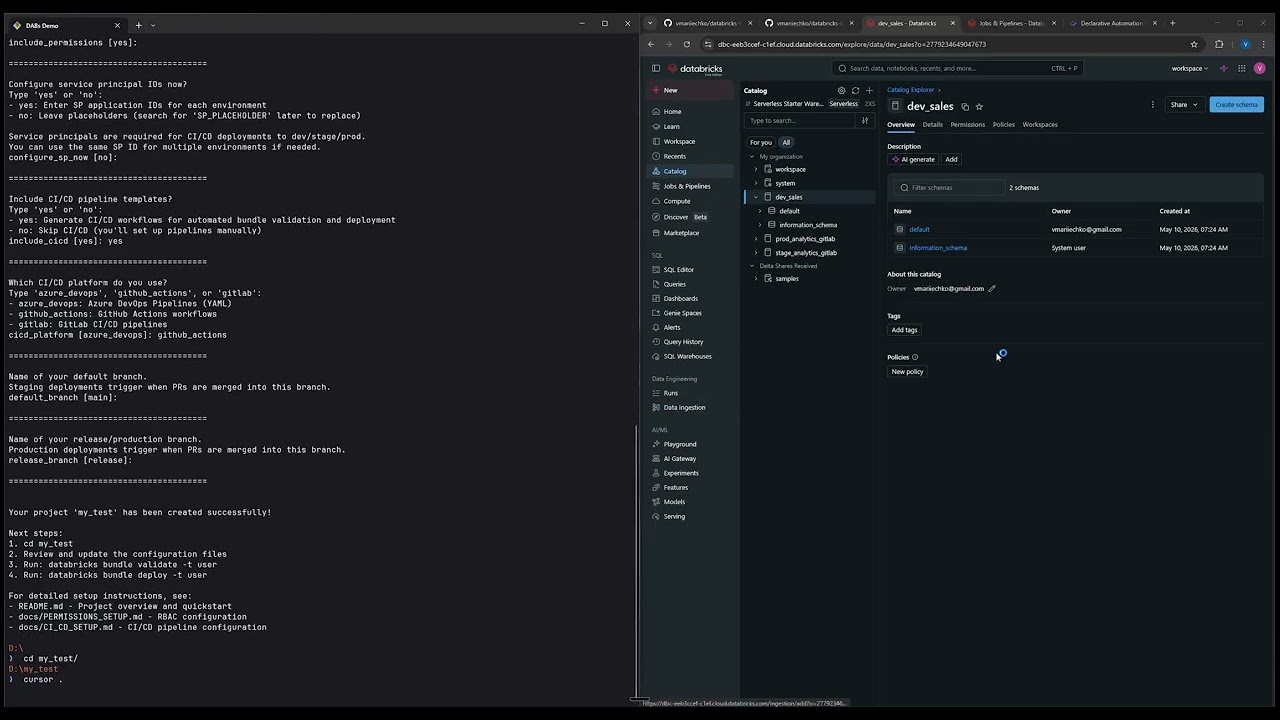
A custom template for [Declarative Automation Bundles](https://docs.databricks.com/aws/en/dev-tools/bundles/) that generates production-ready, multi-environment projects with configurable compute, permissions, and CI/CD pipelines.
## Demo
## Why This Template?
Setting up a production-grade Databricks project involves many decisions: environment isolation, compute configuration, RBAC permissions, service principal setup, CI/CD pipelines, and Unity Catalog schemas. This template encodes proven patterns for all of these so you can go from zero to a deployable bundle in minutes, not days.
## Requirements
- Databricks CLI v0.296.0+ (`pip install databricks-cli`)
- Unity Catalog enabled workspace
## Usage
```bash
databricks bundle init https://github.com/vmariiechko/databricks-bundle-template
```
Or from a local clone:
```bash
databricks bundle init /path/to/databricks-bundle-template
```
The CLI will guide you through configuration options. Your generated project includes complete documentation for deployment and customization.
**Windows users:** Use PowerShell or Command Prompt for interactive prompts. Git Bash is not supported for interactive mode.
### Quick Start with Config File
For a quick, non-interactive setup or if you prefer to skip the prompts:
```bash
# From remote (create config.json with your values first):
databricks bundle init https://github.com/vmariiechko/databricks-bundle-template \
--config-file config.json
```
```bash
# From local clone:
cp tests/configs/full_with_sp.json my-config.json # Copy and edit with your values
databricks bundle init . --config-file my-config.json
```
See [example configs](./tests/configs/) for options and refer to [Template Options](#template-options) for available values.
## What You Get
- **Multi-environment deployment** (user/stage/prod, optional dev)
- **Unity Catalog integration** with medallion architecture schemas
- **Sample ETL jobs and pipelines**
- **Optional RBAC** with environment-aware group permissions
- **Configurable compute** (classic clusters, serverless, or both)
- **CI/CD pipeline templates** (Azure DevOps, GitHub Actions, GitLab)
See the [example project](https://github.com/vmariiechko/databricks-bundle-template-example) for a pre-generated output (AWS + GitHub Actions + classic compute, no RBAC).
## Asset Library
Beyond the main template, this repo ships an **asset library**: standalone sub-templates that install individual Databricks artifacts (recovery scripts, pipelines, jobs, dashboards) into any existing bundle, whether generated by this template or not. Each asset is self-contained and installed with a single CLI command.
Current asset: **`sdp-checkpoint-recovery`** resets checkpoint selection on a Lakeflow Spark Declarative Pipeline after a source table has been dropped and recreated.
```bash
databricks bundle init https://github.com/vmariiechko/databricks-bundle-template \
--template-dir assets/sdp-checkpoint-recovery
```
See [ASSETS.md](ASSETS.md) for the full catalog and install pattern. Contributors: see [CONTRIBUTING.md — Adding an Asset](CONTRIBUTING.md#adding-an-asset).
## Template Options
| Option | Choices | Default |
|--------|---------|---------|
| Environment setup | `full` (user/stage/prod) / `minimal` (user/stage) | `full` |
| Include dev environment | `yes` / `no` | `no` |
| Compute type | `classic` / `serverless` / `both` | `classic` |
| Cloud provider | `azure` / `aws` / `gcp` | `azure` |
| Workspace setup | `single_workspace` / `multi_workspace` | `single_workspace` |
| Include permissions | `yes` / `no` | `yes` |
| Include CI/CD | `yes` / `no` | `yes` |
| CI/CD platform | `azure_devops` / `github_actions` / `gitlab` | `azure_devops` |
| Default branch | string | `main` |
| Release branch | string (full mode only) | `release` |
---
## Template Development
This section is for developers modifying the template itself.
### Repository Structure
```
databricks-bundle-template/
├── databricks_template_schema.json # Prompt definitions
├── library/helpers.tmpl # Go template helpers
├── template/
│ ├── update_layout.tmpl # Conditional directory/file skipping
│ └── {{.project_name}}/ # Generated project structure
│ ├── .azure/ # Azure DevOps CI/CD pipelines
│ ├── .github/ # GitHub Actions workflows
│ ├── .gitlab-ci.yml.tmpl # GitLab CI/CD pipeline
│ ├── docs/ # Setup guides (CI/CD, permissions, groups)
│ └── ... # Bundle config, resources, src
├── tests/ # Pytest test suite
├── ARCHITECTURE.md # Technical design
└── DEVELOPMENT.md # Developer notes
```
### Testing
```bash
# Create and activate virtual environment
python -m venv venv
source venv/bin/activate # Linux/macOS
venv\Scripts\activate # Windows
# Install dependencies
pip install -r tests/requirements_dev.txt
# Run automated tests
pytest tests/ -V
```
```bash
# Manual testing
databricks bundle init . --output-dir ../test-output --config-file tests/configs/full_with_dev.json
# Validate (requires Databricks CLI authentication)
cd ../test-output/test_full_with_dev/
databricks bundle validate -t user
```
### Documentation
- [ARCHITECTURE.md](ARCHITECTURE.md) - Design decisions and technical architecture
- [DEVELOPMENT.md](DEVELOPMENT.md) - Development notes and testing matrix
- [tests/README.md](tests/README.md) - Tests setup and guide
---
## Contributing
Contributions are welcome! See [CONTRIBUTING.md](CONTRIBUTING.md) for guidelines on how to get started.
## Roadmap
See [ROADMAP.md](ROADMAP.md) for planned features and the project direction. Highlights include asset sub-templates and advanced permissions profiles.
## Community
- **Questions & help**: [GitHub Discussions](https://github.com/vmariiechko/databricks-bundle-template/discussions)
- **Bug reports**: [Issue tracker](https://github.com/vmariiechko/databricks-bundle-template/issues)
- **Feature ideas**: [Feature requests](https://github.com/vmariiechko/databricks-bundle-template/issues/new?template=2-feature-request.yml)
## License
This project is licensed under the [MIT License](LICENSE).