https://github.com/voltagent/vercel-ai-sdk-observability
https://github.com/voltagent/vercel-ai-sdk-observability
Last synced: about 1 year ago
JSON representation
- Host: GitHub
- URL: https://github.com/voltagent/vercel-ai-sdk-observability
- Owner: VoltAgent
- License: mit
- Created: 2025-05-30T19:40:18.000Z (about 1 year ago)
- Default Branch: main
- Last Pushed: 2025-06-03T00:14:40.000Z (about 1 year ago)
- Last Synced: 2025-07-03T14:06:17.010Z (about 1 year ago)
- Language: TypeScript
- Size: 47.9 KB
- Stars: 4
- Watchers: 0
- Forks: 0
- Open Issues: 0
-
Metadata Files:
- Readme: README.md
- License: LICENSE
Awesome Lists containing this project
README
# VoltAgent LLM Observability Platform + Vercel AI SDK Integration Example
This example demonstrates how to add **VoltAgent observability** to your existing Vercel AI applications with minimal code changes. Track AI calls, tool usage, and multi-agent workflows in the VoltAgent Developer Console.
## Quick Start
```bash
git clone https://github.com/VoltAgent/vercel-ai-sdk-observability
cd vercel-ai-sdk-observability
npm install
```
### Environment Setup
**Get your VoltAgent API Keys:**
- Sign up at [https://console.voltagent.dev/](https://console.voltagent.dev/)
- Create an organization and project
- Copy your `VOLTAGENT_PUBLIC_KEY` and `VOLTAGENT_SECRET_KEY`
**Get your OpenAI API Key:**
- Visit [OpenAI Platform](https://platform.openai.com/api-keys)
- Create a new API key
Create a `.env` file and add your API keys:
```bash
# Create .env file
cp .env.example .env
```
Then add your keys to the `.env` file:
```env
# OpenAI API Key
OPENAI_API_KEY=your_openai_api_key_here
# VoltAgent Keys
VOLTAGENT_PUBLIC_KEY=your_voltagent_public_key_here
VOLTAGENT_SECRET_KEY=your_voltagent_secret_key_here
```
### Run the Demo
```bash
npm run dev
```
## Interactive Learning Demo
When you run `npm run dev`, you'll see an interactive menu:
```
🎬 VoltAgent Progressive Learning Demo
Learn how to integrate VoltAgent observability step-by-step
🚀 VoltAgent + Vercel AI SDK Progressive Examples
Learn step-by-step how to add observability:
1. Basic Telemetry (minimal setup)
2. With Tools (see tool tracking)
3. With Metadata (agent identification)
4. More Metadata (user tracking & tags)
5. Multi-Agent (parent-child relationships)
6. Run All Examples
9. Exit
Which example would you like to run? (1-6, 9):
```
Each example builds on the previous one, showing you how to progressively enhance your AI applications with VoltAgent observability.
## What You'll Learn
This example shows the **progressive enhancement** approach to adding observability:
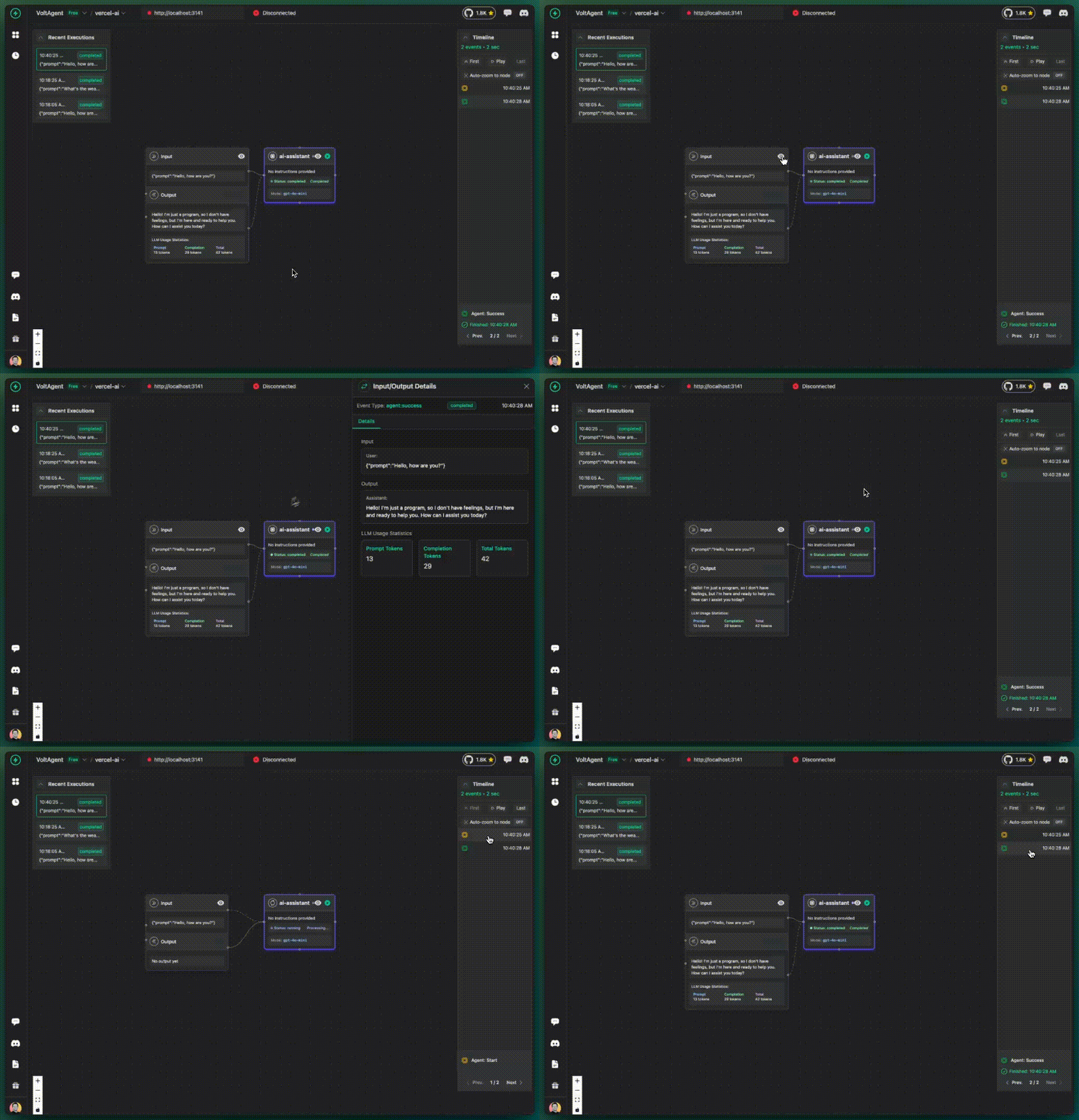
### 1. **Basic Telemetry** - Just enable tracking
```typescript
const result = await generateText({
model: openai("gpt-4o-mini"),
prompt: "Hello, how are you?",
experimental_telemetry: {
isEnabled: true, // That's it!
},
});
```
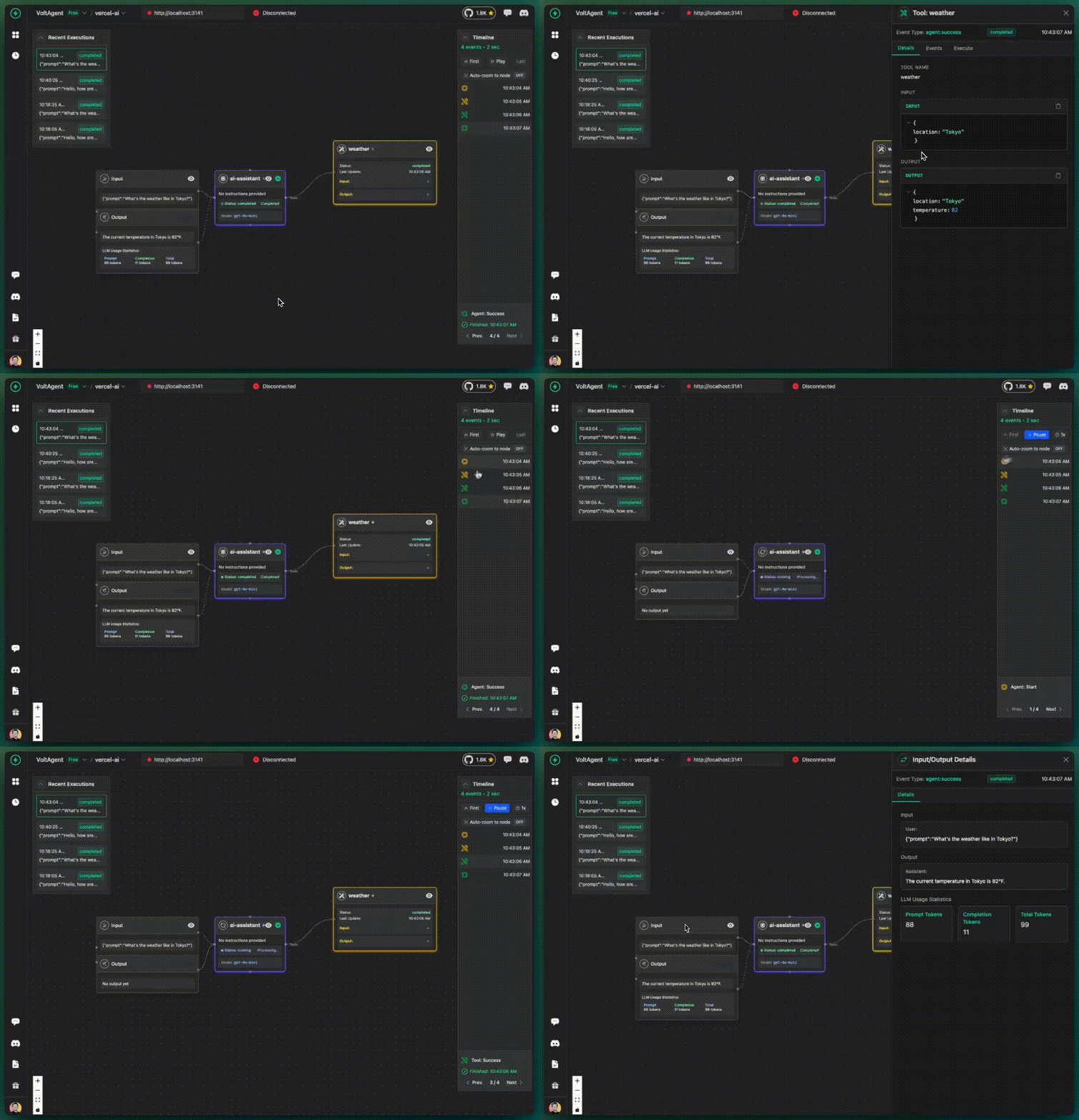
### 2. **With Tools** - Track tool usage automatically
```typescript
const result = await generateText({
model: openai("gpt-4o-mini"),
prompt: "What's the weather like in Tokyo?",
tools: {
weather: {
description: "Get the weather in a location",
parameters: z.object({
location: z.string().describe("The location to get the weather for"),
}),
execute: async ({ location }) => {
// Your tool logic here
return { location, temperature: 22 };
},
},
},
experimental_telemetry: {
isEnabled: true, // Tools tracked automatically
},
});
```
### 3. **With Agent Identity** - Better organization
```typescript
const result = await generateText({
model: openai("gpt-4o-mini"),
prompt: "What's the weather like in Paris?",
tools: { /* ... */ },
experimental_telemetry: {
isEnabled: true,
metadata: {
agentId: "weather-assistant", // ✨ Named agent
instructions: "You are a helpful weather assistant",
},
},
});
```

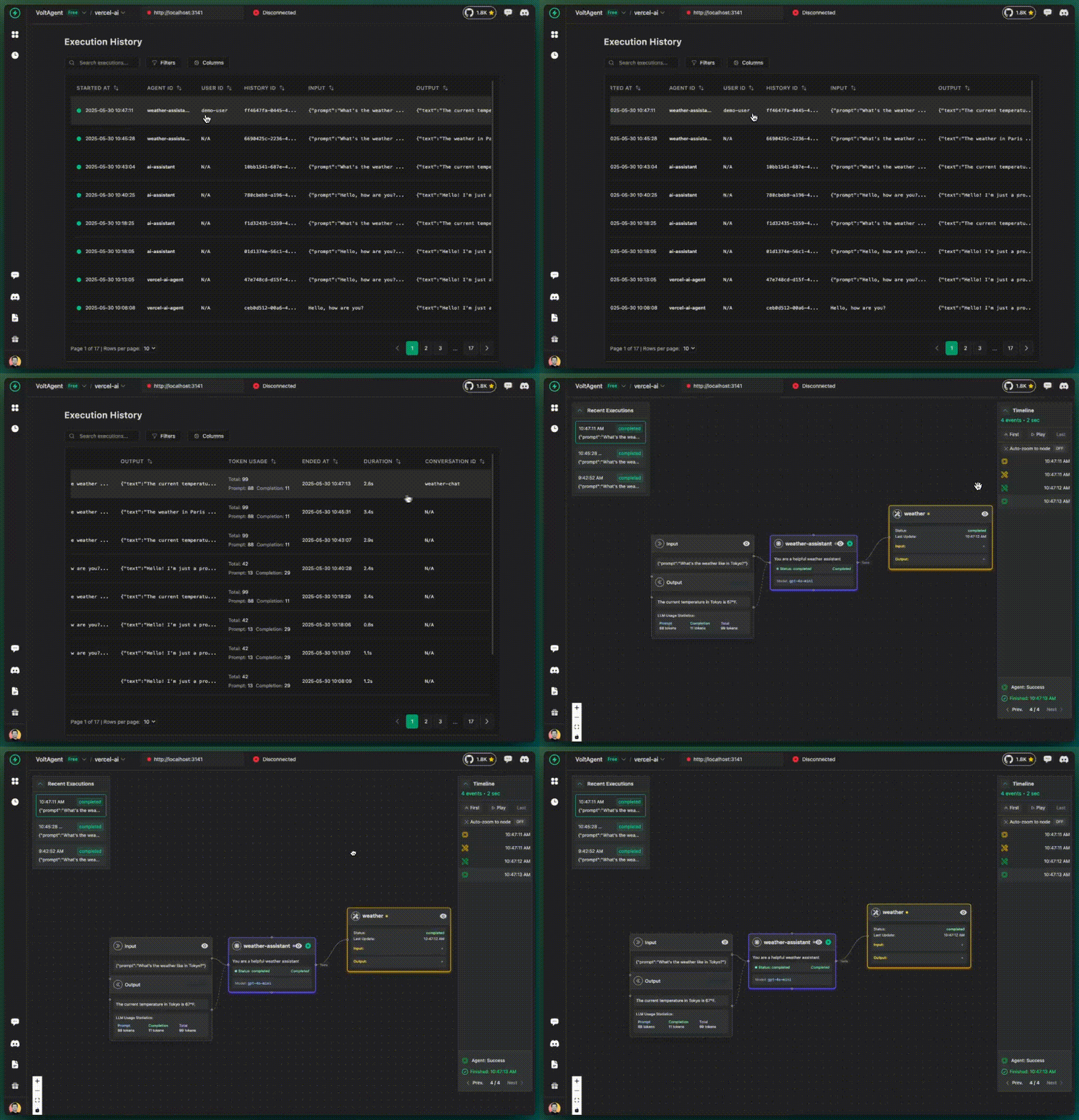
### 4. **Full Metadata** - Production-ready tracking
```typescript
const result = await generateText({
model: openai("gpt-4o-mini"),
prompt: "What's the weather like in Berlin?",
tools: { /* ... */ },
experimental_telemetry: {
isEnabled: true,
metadata: {
agentId: "weather-assistant",
instructions: "You are a helpful weather assistant",
userId: "demo-user", // 🔍 User tracking
conversationId: "weather-chat", // 💬 Conversation grouping
tags: ["weather", "demo", "production"], // 🏷️ Categories
},
},
});
```
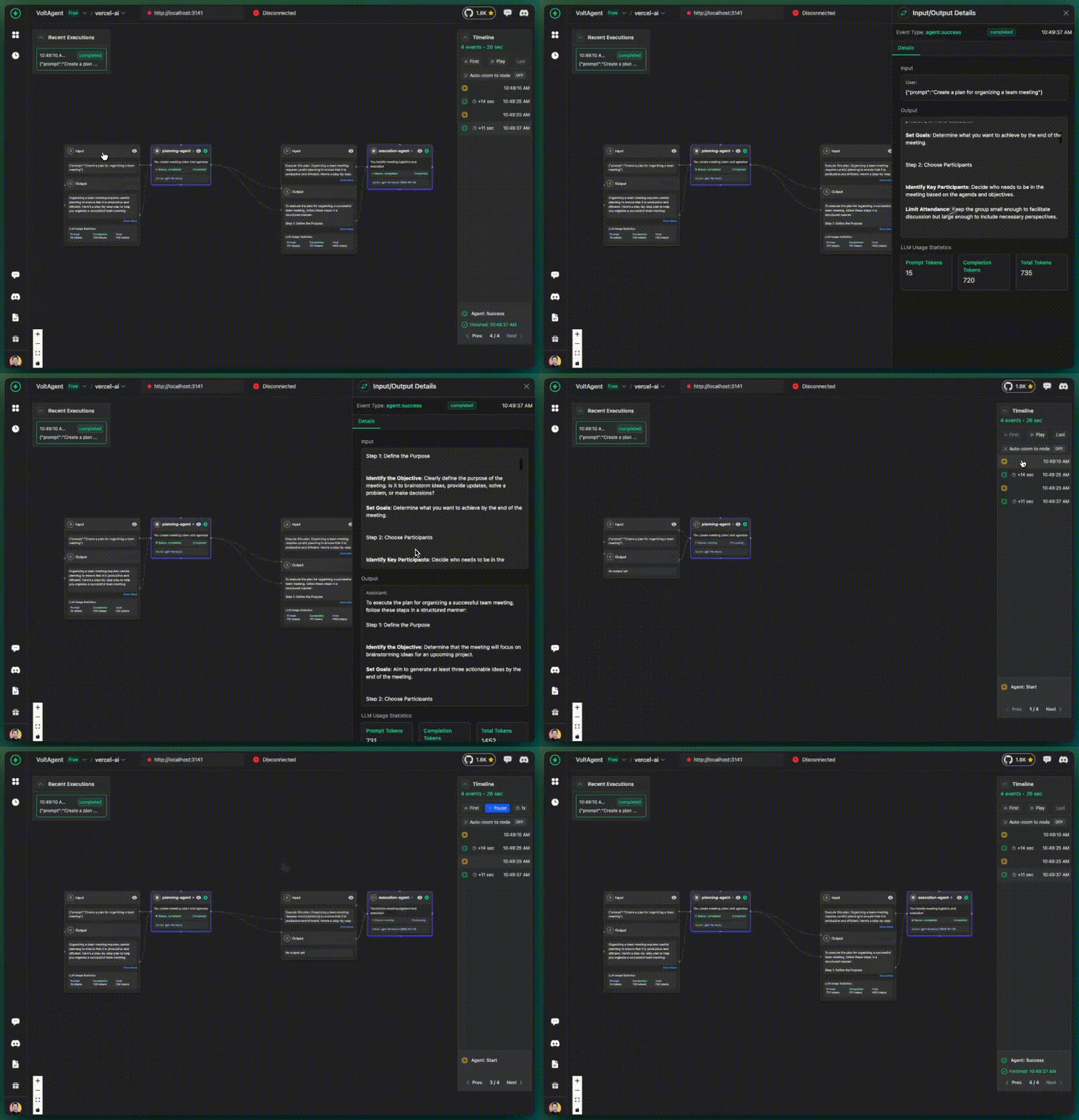
### 5. **Multi-Agent** - Complex workflows
```typescript
// Parent Agent
const { text: plan } = await generateText({
model: openai("gpt-4o-mini"),
prompt: "Create a plan for organizing a team meeting",
experimental_telemetry: {
isEnabled: true,
metadata: {
agentId: "planning-agent",
userId: "team-lead",
conversationId: "meeting-organization",
},
},
});
// Child Agent
const { text: execution } = await generateText({
model: openai("gpt-4o-mini"),
prompt: `Execute this plan: ${plan}`,
experimental_telemetry: {
isEnabled: true,
metadata: {
agentId: "execution-agent",
parentAgentId: "planning-agent", // 🔗 Parent relationship
userId: "team-lead",
conversationId: "meeting-organization",
},
},
});
```

## Setup
1. **Get VoltAgent API Keys**:
- Sign up at [console.voltagent.dev](https://console.voltagent.dev)
- Create an organization and project
- Copy your `VOLTAGENT_PUBLIC_KEY` and `VOLTAGENT_SECRET_KEY`
2. **Set Environment Variables**:
```bash
cp .env.example .env.local
# Add your keys to .env.local
```
3. **Install and Run**:
```bash
npm install
npm run dev
```
## What You Get
- 🎯 **AI Call Tracking**: Every Vercel AI SDK call tracked automatically
- 🔧 **Tool Usage Visibility**: See tool calls, inputs, outputs, and execution time
- 👤 **User Analytics**: Track AI usage by user and conversation
- 🔗 **Multi-Agent Support**: Parent-child relationships and event propagation
- 📊 **Rich Metadata**: Custom tags, instructions, and business context
- 📈 **Performance Insights**: Execution times, token usage, and costs
- 🐛 **Debugging**: Detailed traces for troubleshooting AI workflows
## Key Benefits
### ✅ Minimal Code Changes
```diff
const result = await generateText({
model: openai("gpt-4o-mini"),
prompt: "Hello world",
+ experimental_telemetry: { isEnabled: true }
});
```
### ✅ Progressive Enhancement
Start with basic tracking, add more metadata as needed:
- `isEnabled: true` → Basic tracking
- `+ agentId` → Agent identification
- `+ userId` → User analytics
- `+ conversationId` → Conversation grouping
- `+ parentAgentId` → Multi-agent workflows
### ✅ Production Ready
All examples include production best practices:
- Error handling
- Environment variables
- Graceful shutdown
- Performance optimization
## Full Documentation
📚 **[Complete Vercel AI SDK Integration Guide](https://voltagent.dev/docs-observability/vercel-ai/)**
The full documentation includes:
- Detailed setup instructions
- Complete metadata reference
- Best practices for production
- Error handling patterns
- Advanced multi-agent examples