https://github.com/vrmiguel/taruga
Taruga is a work in progress single-header turtle graphics library written in C++11
https://github.com/vrmiguel/taruga
cpp sfml turtle
Last synced: about 1 year ago
JSON representation
Taruga is a work in progress single-header turtle graphics library written in C++11
- Host: GitHub
- URL: https://github.com/vrmiguel/taruga
- Owner: vrmiguel
- License: mit
- Created: 2020-10-11T06:16:04.000Z (over 5 years ago)
- Default Branch: main
- Last Pushed: 2025-06-12T21:33:48.000Z (about 1 year ago)
- Last Synced: 2025-06-12T22:39:49.630Z (about 1 year ago)
- Topics: cpp, sfml, turtle
- Language: C++
- Homepage:
- Size: 1.56 MB
- Stars: 20
- Watchers: 1
- Forks: 3
- Open Issues: 4
-
Metadata Files:
- Readme: README.md
- License: LICENSE
Awesome Lists containing this project
README
# taruga [](https://www.codacy.com/gh/vrmiguel/taruga/dashboard?utm_source=github.com&utm_medium=referral&utm_content=vrmiguel/taruga&utm_campaign=Badge_Grade) [](https://www.codefactor.io/repository/github/vrmiguel/taruga)
Taruga is a work in progress single-header turtle graphics library written in C++11.

## Examples
### Drawing a Sierpinski fractal
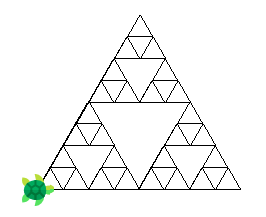
With the simple Turtle directives, we can build complex fractals!
Full source code for this example can be found [here](examples/spiral.cpp).
### Drawing a spiral
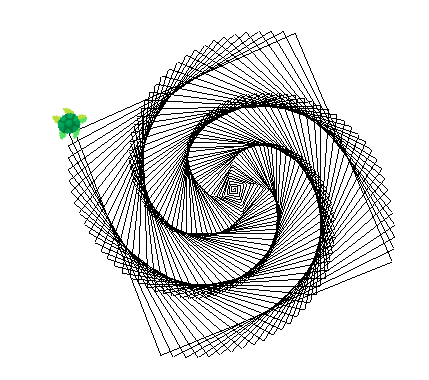
We can draw this spiral by simply moving forward and then turning to the right by slightly over 90°.
```cpp
int size = 1;
while (size <= 500)
{
turtle.forward(size++);
turtle.turn_right(91);
}
```
Full source code for this example can be found [here](examples/spiral.cpp).
### Using colors
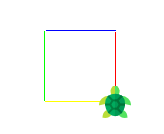
We can change around the color of the lines drawn by using `Turtle::set_line_color`, to which you can supply either an RGB triplet (by individual values or in an array) or a [sf::Color](https://www.sfml-dev.org/documentation/2.5.1/classsf_1_1Color.php).
```cpp
std::vector colors = {sf::Color::Red, sf::Color::Blue, sf::Color::Green, sf::Color::Yellow};
for(auto color : colors)
{
turtle.set_line_color(color);
turtle.forward(70);
turtle.turn_left(90);
}
```
Full source code for this example can be found [here](examples/colored_square.cpp).
### Lifting the pen up, drawing regular polygons
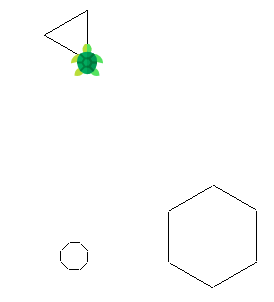
We can set the turtle's pen up or down. This allows us to move the turtle without having to draw the line of its path.
Full source code for this example can be found [here](examples/regular_polygon.cpp).
### Drawing a Koch fractal
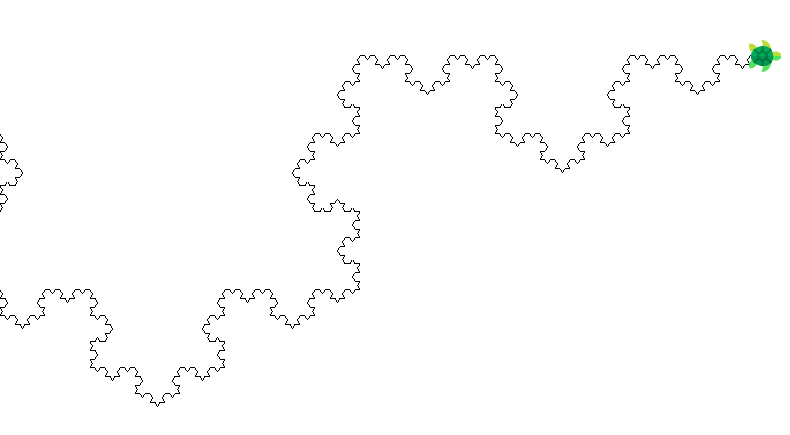
Full source code for this example can be found [here](examples/koch.cpp).
## Dependencies and how to build
The only dependencies are a C++11 conformant compiler and [SMFL](https://www.sfml-dev.org/index.php), a small multimedia API with an installed size of around 10MB.
Taruga has been built on SFML 2.5.1 and has also been tested on SFML 2.4.1. It may work on older versions of the library, but there are no guarantees.
On Ubuntu-based distributions, you can install SFML with:
```sudo apt install libsfml-dev```
On Fedora, with:
```dnf install SFML```
You can then build it ```g++ -O3 -std=c++11 your_program.cpp -lsfml-graphics -lsfml-window -lsfml-system```.
## Usage
Taruga exposes a single namespace, contained within a single header file ([`taruga.hpp`](include/taruga.hpp)).
The public methods that `taruga::Turtle` exposes are:
```cpp
void set_window_title(const char* new_title);
Turtle(); //! Default constructor. Makes a window size of 800x600 and sets the turtle to (400, 300).
Turtle(uint16_t width, uint16_t height); //! Makes a window size of width * height and sets the turtle (width/2, height/2).
explicit Turtle(const sf::Vector2f& p); //! Makes a window size of p.x * p.y and sets the turtle (p.x/2, p.y/2).
void save_to_image(const char *); //! Saves the current window view to an image with the given filename
void set_line_color(sf::Color); //! Sets the new color of the line the turtle will draw.
void set_line_color(u8, u8, u8); //! Sets the new color of the line the turtle will draw.
void set_line_color(u8[3]); //! Sets the new color of the line the turtle will draw.
void pen_up(); //! Sets the pen up so lines don't get drawn
void pen_down(); //! Sets the pen down so that the turtle draws a line wherever it walks
void set_icon(Icon); //! Allows to switch around between the two built-in icons: turtle or straight arrow.
void set_icon(sf::Texture); //! Allows for any image to be used as an icon. Do notice that Taruga won't scale the texture. If needed, use the Turtle::scale method.
void scale(float, float); //! Scales the turtle sprite
void forward(float units); //! Walk forward the given amount of units.
void backwards(float units); //! Walk backwards the given amount of units. The same as using forward() with a negative parameter.
void turn_right(float ang); //! Turns right by the specified amount of degrees.
void set_walking_speed(float); //! Sets a new walking speed
void set_rotation_speed(float); //! Sets a new rotation speed
void push_state(); //! Saves the current state in a stack
void pop_state(); //! Returns the Turtle's state to the top of the state stack
void turn_left(float ang); //! Turns left by the specified amount of degrees.
void act(); //! Start moving the turtle. Will deplete the actions queue.
```
## Licensing
The code contained in this repo is [MIT](https://opensource.org/licenses/MIT)-licensed.
Turtle icon made by Freepik, available under the [Flaticon](https://www.flaticon.com/) license.
SFML is [zlib/libpng](https://opensource.org/licenses/Zlib)-licensed.