https://github.com/vtex-apps/condition-layout
Allows displaying different blocks based on user-defined conditions
https://github.com/vtex-apps/condition-layout
hacktoberfest srv-store-framework store-framework vtex-io
Last synced: 5 months ago
JSON representation
Allows displaying different blocks based on user-defined conditions
- Host: GitHub
- URL: https://github.com/vtex-apps/condition-layout
- Owner: vtex-apps
- Created: 2020-03-16T19:04:01.000Z (over 6 years ago)
- Default Branch: master
- Last Pushed: 2025-04-09T17:33:27.000Z (about 1 year ago)
- Last Synced: 2025-04-09T18:42:24.349Z (about 1 year ago)
- Topics: hacktoberfest, srv-store-framework, store-framework, vtex-io
- Language: TypeScript
- Homepage:
- Size: 434 KB
- Stars: 7
- Watchers: 41
- Forks: 16
- Open Issues: 6
-
Metadata Files:
- Readme: docs/README.md
- Changelog: CHANGELOG.md
- Codeowners: .github/CODEOWNERS
Awesome Lists containing this project
README
📢 Use this project, [contribute](https://github.com/vtex-apps/condition-layout) to it or open issues to help evolve it using [Store Discussion](https://github.com/vtex-apps/store-discussion).
>⚠️
>
> ***Condition Layout app v1 has been deprecated in favor of Condition Layout app v2**. Although support for the former version is still granted, we strongly recommend you to access the [Migration Guide](https://github.com/vtex-apps/condition-layout/tree/master/docs/MIGRATION-GUIDE.md) and update your store theme with the app's newest version in order to keep up with the components' evolution. If you’re still using the former version, you can find its documentation [here](https://github.com/vtex-apps/condition-layout/tree/master/docs/v1-DOC.md).
# Condition Layout
[](#contributors-)
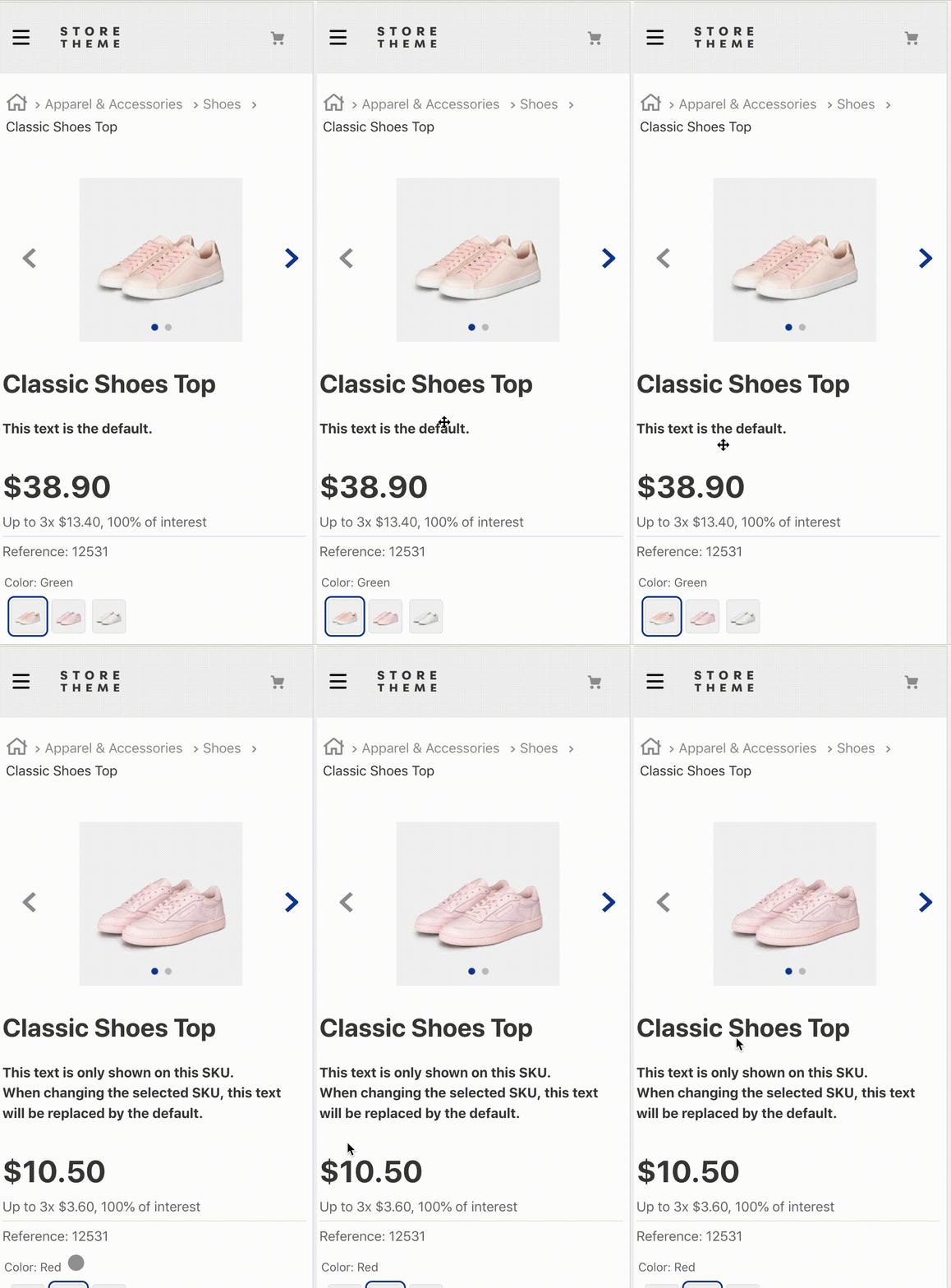
The Condition Layout app renders a component in your store when predefined conditions are met.
## Configuration
### Step 1 - Adding the Condition Layout app to your theme dependencies
In the `manifest.json` file of your theme, add the Condition Layout app as a dependency:
```diff
"dependencies": {
+ "vtex.condition-layout": "2.x"
}
```
You can now use all blocks exported by the `condition-layout` app. See the full list below:
| Block name | Description |
| -------------------------------- | ------------------------------------------------------------------------------------------------------------------------------------------------------------ |
| `condition-layout.product` | Defines the condition logic in the product context and the children blocks that will be rendered when the predefined conditions are met. |
| `condition-layout.binding` | Defines the condition logic in the current binding and the children blocks that will be rendered when the predefined conditions are met. |
| `condition-layout.category` | Defines the condition logic on the current category or department page and the children blocks that will be rendered when the predefined conditions are met. |
| `condition-layout.telemarketing` | Defines the condition logic in the user role (telemarketing) and the children blocks that will be rendered when the predefined conditions are met. |
### Step 2 - Adding the `condition-layout.product` block to your theme templates
In the product theme template, add the `condition-layout.product` block as a child. For example:
```
{
"store.product": {
"children": ["condition-layout.product"]
},
```
Or the `condition-layout.binding` block. For example:
```json
{
"store.product": {
"children": ["condition-layout.binding"]
}
}
```
Or the `condition-layout.category` block. For example:
```json
{
"store.search#my-category-page": {
"children": ["condition-layout.category"]
}
}
```
>⚠️ Never use `condition-layout` directly. Always use it with a context variant, such as `condition-layout.product`.
### Step 3 - Defining the desired conditions
Now it is time to configure the `condition-layout.product` block!
**Use the block props to define your layout condition**. You can also declare blocks of your choice as children of `condition-layout.product`. These children blocks will be rendered if the condition is met.
For example:
```diff
{
"store.product": {
"children": ["condition-layout.product#cond1"]
},
"condition-layout.product#cond1": {
+ "props": {
+ "conditions": [
+ {
+ "subject": "productId",
+ "arguments": {
+ "id": "12"
+ }
+ }
+ ]
+ "Then": "flex-layout.row#custom-pdp-layout-12",
+ "Else": "flex-layout.row#default"
+ }
+ }
```
Or for `condition-layout.binding`:
```diff
{
"store.product": {
"children": ["condition-layout.binding#cond42"]
},
"condition-layout.binding#cond42": {
+ "props": {
+ "conditions": [
+ {
+ "subject": "bindingId",
+ "arguments": {
+ "id": "13fb71d0-binding-code-here-87h9c28h9013"
+ }
+ }
+ ]
+ "Then": "flex-layout.row#just-for-this-binding",
+ "Else": "flex-layout.row#for-other-bindings"
+ }
+ }
```
Or for `condition-layout.category`:
```diff
{
"store.product": {
"children": ["condition-layout.category#cond42"]
},
"condition-layout.category#cond42": {
+ "props": {
+ "conditions": [
+ {
+ "subject": "department",
+ "arguments": {
+ "ids": ["1", "42"]
+ }
+ }
+ {
+ "subject": "category",
+ "arguments": {
+ "ids": ["301", "304"]
+ }
+ }
+ ]
+ "matchType": "any",
+ "Then": "flex-layout.row#just-for-this-category-or-department",
+ "Else": "flex-layout.row#for-other-category-or-department"
+ }
+ }
```
Or for `condition-layout.telemarketing`:
```diff
{
"store.product": {
"children": ["condition-layout.telemarketing#show-block"]
},
"condition-layout.telemarketing#show-block": {
+ "props": {
+ "conditions": [
+ {
+ "subject": "impersonable",
+ "arguments": {
+ "value": true
+ }
+ }
+ ]
+ "Then": "flex-layout.row#just-for-telemarketers",
+ "Else": "flex-layout.row#for-other-user-roles"
+ }
+ }
```
>ℹ️ In the example above, whenever users interact with a product whose ID is equal to 12, the `flex-layout.row#custom-pdp-layout-12` block is rendered. If users interact with a product whose ID is not equal to 12, the rendered block is `flex-layout.row#default`.
| Prop name | Type | Description | Default value |
| - | - | - | - |
| `conditions` | `object` | List of desired conditions. | `undefined` |
| `matchType` | `enum` | Layout rendering criteria. Possible values are: `all` (all conditions must be met to render the layout), `any` (at least one of the conditions must be met to render the layout), or `none` (no conditions must be met to render the layout). | `all` |
| `Then` | `block` | Name of the block to be rendered if the conditions are met. If no value is defined, the blocks declared as children of `condition-layout.product` will be rendered instead. | `undefined` |
| `Else` | `block` | Name of the block to be rendered if the conditions are not met. | `undefined` |
- **`conditions` object:**
| Prop name | Type | Description | Default value |
| - | - | - | - |
| `subject` | `string` | Defines, based on the product context where the block is declared, which information is needed from the UI to validate the value chosen in the `object` prop. See below the possible values for this prop. | `undefined` |
| `arguments` | `object` | Defines the condition parameters. Note that the value of this prop varies depending on the value set for the `subject` prop. See below the table with the possible values for the `subject` prop and their expected arguments. | `undefined` |
| `toBe` | `boolean` | Determines whether the data fetched in the `subject` prop must meet the predefined conditions to render the new layout (`true`) or not (`false`). | `true` |
Possible values for `subject` prop of the `condition-layout.product` block:
| Subject | Description | Arguments |
| - | - | - |
| `productId` | Product IDs currently displayed on the UI. | `{ id: string }` |
| `categoryId` | Category IDs currently displayed on the UI. | `{ id: string }` |
| `brandId` | Brand IDs currently displayed on the UI. | `{ id: string }` |
| `selectedItemId` | ID of the item currently selected by the user. | `{ id: string }` |
| `productClusters` | List of product clusters currently displayed on the UI. | `{ id: string }` |
| `categoryTree` | List of categories currently displayed on the UI. **Note:** Only available on the Product Detail Page. | `{ id: string }` |
| `specificationProperties` | List of product specifications currently displayed on the UI. | `{ name: string, value: string }`. Note: `value` is an optional prop. If omitted, only the specification name (`name`) will be checked. |
| `areAllVariationsSelected` | Determines whether all product variations currently available on the UI were selected by the user (`true`) or not (`false`). | No arguments are expected. |
| `isProductAvailable` | Determines whether the product is available (`true`) or not (`false`). | No arguments are expected. |
| `hasMoreSellersThan` | Determines whether the number of sellers for a product is greater than the argument passed. | `{ quantity: number }` |
| `hasBestPrice` | Whether the product is being given a discount on its list price. | `{ value: boolean }` or no arguments. |
| `sellerId` | Whether any of the sellers of the product are included in the list of IDs passed. | `{ ids: string[] }` |
Possible values for the `subject` prop of the `condition-layout.binding` block:
| Subject | Description | Arguments |
| ----------- | -------------------------------- | ---------------- |
| `bindingId` | ID of the desired store binding. | `{ id: string }` |
Possible values for the `subject` prop of the `condition-layout.category` block:
| Subject | Description | Arguments |
| ------------ | --------------------------------------------- | ------------------- |
| `category` | Category IDs currently displayed on the UI. | `{ ids: string[] }` |
| `department` | Department IDs currently displayed on the UI. | `{ ids: string[] }` |
Possible values for the `subject` prop of the `condition-layout.telemarketing` block:
| Subject | Description | Arguments |
| -------------- | ----------------------------------- | -------------------- |
| `impersonable` | Value of the impersonation setting. | `{ value: boolean }` |
## App behavior
The `condition-layout.product` block mainly uses the `matchType` and `conditions` props to respectively set the criteria and the conditions that blocks must meet to be rendered.
The `conditions` prop does not rely on any automatic grammar to define the desired conditions. Instead, it relies on its two props, namely `subject` and `arguments`, which together define which condition must be met by using an underlying data validation method (with specific arguments) based on the UI behavior.
Lastly, the `matchType` prop decides the necessary number of valid conditions for the layout rendering.
## Customization
The Condition Layout merely establishes a logic to render other blocks. Therefore, the app does not have its own CSS handles for customization.
Instead, you should use the handles of the child blocks.
## Contributors ✨
Thanks goes out to these wonderful people:

LucasCastroAcctGlobal
💻

vini-lima-acct
💻
This project follows the [all-contributors](https://github.com/all-contributors/all-contributors) specification. Contributions of any kind are welcome!