https://github.com/vtex-apps/flex-layout
Allows building complex custom layouts using the concept of rows and columns, setting the desired block structure and positioning in a page.
https://github.com/vtex-apps/flex-layout
hacktoberfest srv-store-framework store-framework vtex-io xp-developer
Last synced: 5 months ago
JSON representation
Allows building complex custom layouts using the concept of rows and columns, setting the desired block structure and positioning in a page.
- Host: GitHub
- URL: https://github.com/vtex-apps/flex-layout
- Owner: vtex-apps
- Created: 2019-04-09T00:17:33.000Z (about 7 years ago)
- Default Branch: master
- Last Pushed: 2025-07-17T19:52:38.000Z (11 months ago)
- Last Synced: 2025-07-17T23:07:54.895Z (11 months ago)
- Topics: hacktoberfest, srv-store-framework, store-framework, vtex-io, xp-developer
- Language: TypeScript
- Homepage:
- Size: 520 KB
- Stars: 1
- Watchers: 43
- Forks: 10
- Open Issues: 19
-
Metadata Files:
- Readme: docs/README.md
- Changelog: CHANGELOG.md
- Codeowners: .github/CODEOWNERS
Awesome Lists containing this project
README
📢 Don't fork this project. Use, [contribute](https://github.com/vtex-apps/flex-layout), or open issues through [Store Discussion](https://github.com/vtex-apps/store-discussion).
[](#contributors-)
# Flex Layout
Flex Layout is a **layout structure** built within VTEX IO Store Framework. It allows building complex custom layouts using the concept of **rows** and **columns**, setting the desired block structure and positioning in a page.
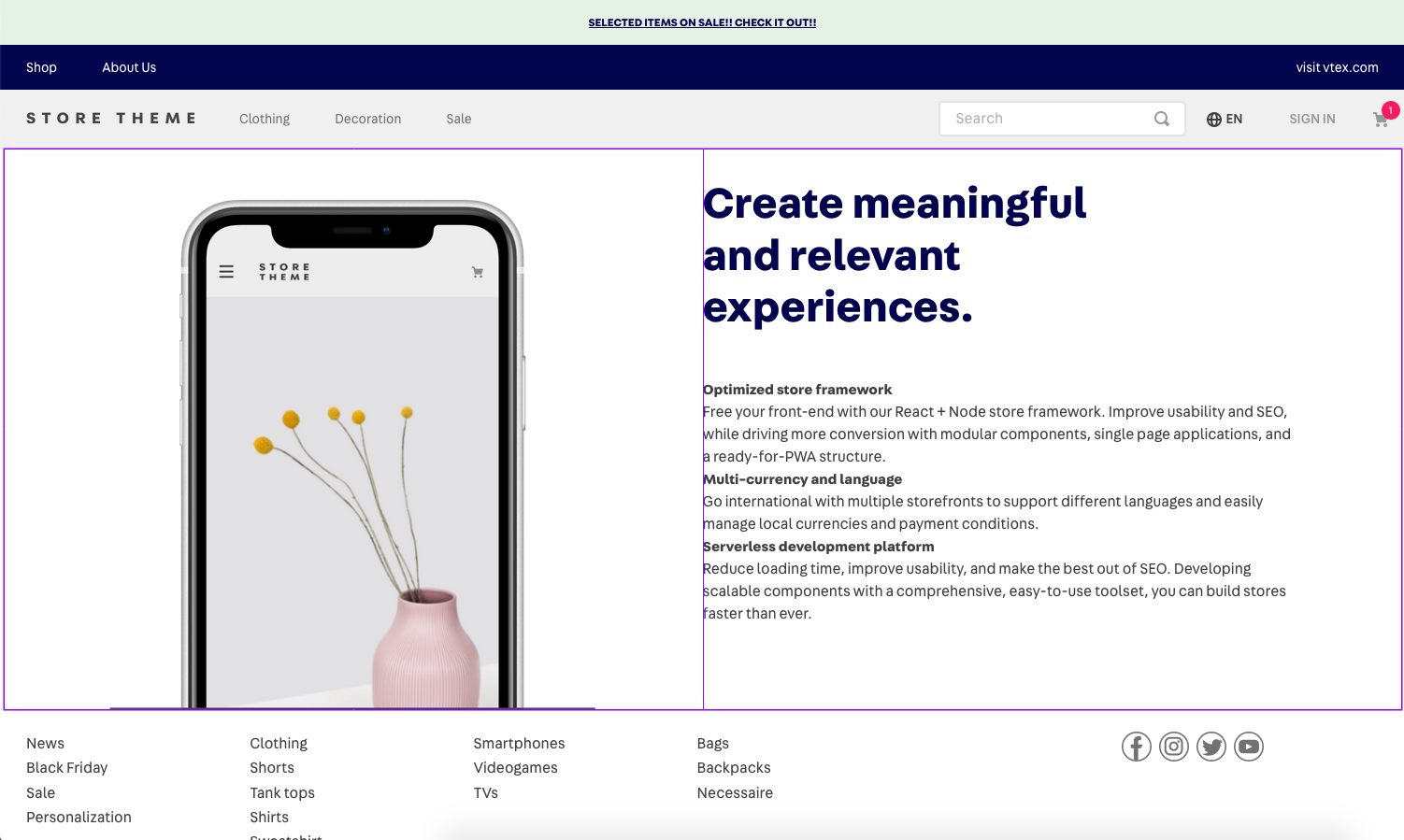 _Example of a page layout built using Flex Layout, following the one row with two columns model_
## Configuration
**Flex Layout has two basic building blocks**: `flex-layout.row` and `flex-layout.col`. You should **never** use `flex-layout`.
If you are already familiar with the [`flexbox`](https://css-tricks.com/snippets/css/a-guide-to-flexbox/) layout used in CSS, Flex Layout should be easy to grasp since this is what `flex-layout.row` and `flex-layout.col` are using under the hood.
You can use **any** array of blocks as children for `flex-layout.row` and `flex-layout.col`.
The props below support [`responsive-values`](https://github.com/vtex-apps/responsive-values), meaning that you can define different values for the same prop based on device screen size, such as mobile and desktop.
### `flex-layout.row`
| Prop name | Type | Description | Default value |
| -------------------------- | -------------------------------------------------------------- | ----------------------------------------------------------------------------------------------------------------------------------------------------------------------------------------------------------------------------- | ------------- |
| `blockClass` | `String` | Block container class. The set value of this prop functions as a block identifier for CSS customizations. ( | `""` |
| `borderColor` | `String` | The color of the border. | `undefined` |
| `borderWidth` | `0...5` | A `number` or `string` magnitude for applying the `bw` Tachyons token to the row. | `undefined` |
| `border` | `String \| String[]` | An array to define on which sides of the row a border should apply (`top`, `right`, `bottom`, `left`, or `all`). | `undefined` |
| `colGap` | `0...10` | A `number` or `string` magnitude for applying the `pr` Tachyons token to the columns in the `flex-layout.row`. | `undefined` |
| `colSizing` | `equal`|`auto` | Controls the width of the columns in the `flex-layout.row`. | `equal` |
| `fullWidth` | `Boolean` | Whether the component should occupy all the available width from its parent. | `false` |
| `horizontalAlign` | `left`|`right`|`center`|`between`|`around` | Controls horizontal alignment for the items in the `flex-layout.row`. It defaults to `between` if `colSizing` is `auto` and to `left` otherwise. | `left` |
| `colJustify` | `enum` | Controls the space between columns and borders of the `flex-layout.row`, following the `justify-content` CSS property. Possible values are `between` (no space added between borders and columns) and `around` (space added). | `between` |
| `marginBottom` | `0...10` | A `number` or `string` magnitude for applying the `mb` Tachyons token to the row. | `undefined` |
| `marginTop` | `0...10` | A `number` or `string` magnitude for applying the `mt` Tachyons token to the row. | `undefined` |
| `paddingBottom` | `0...10` | A `number` or `string` magnitude for applying the `pb` Tachyons token to the row. | `undefined` |
| `paddingTop` | `0...10` | A `number` or `string` magnitude for applying the `pt` Tachyons token to the row. | `undefined` |
| `preserveLayoutOnMobile` | `Boolean` | Whether the `flex-layout.row` should break into a column layout on mobile. | `false` |
| `preventHorizontalStretch` | `Boolean` | Prevents the row from stretching horizontally to fill its parent's width. | `false` |
| `preventVerticalStretch` | `Boolean` | Prevents the row from stretching vertically to fill its parent's height with the `items-stretch` token. | `false` |
| `rowGap` | `0...10` | A `number` or `string` magnitude for applying the `pb` Tachyons token to columns in the `flex-layout.row`. | `undefined` |
| `htmlId` | `String` | This prop adds an HTML id to `flexRow`. This allows accessing a page section using links. | `undefined` |
| `arialabel` | `string` | Aria-label to be included for accessibility purposes | `undefined` |
### `flex-layout.col`
| Prop name | Type | Description | Default value |
| ------------------------ | --------------------------------- | ---------------------------------------------------------------------------------------------------------------------------- | ------------- |
| `blockClass` | `String` | Block container class. The set value of this prop functions as a block identifier for CSS customizations | `""` |
| `borderColor` | `String` | The color of the border. | `undefined` |
| `borderWidth` | `0...5` | A `number` or `string` magnitude for applying the `bw` Tachyons token to the column. | `undefined` |
| `border` | `String \| String[]` | An array to define on which sides of the row a border should apply (`top`, `right`, `bottom`, `left`, or `all`). | `undefined` |
| `horizontalAlign` | `left`|`right`|`center` | Controls horizontal alignment for the items in the `flex-layout.col`. | `left` |
| `marginLeft` | `0...10` | A `number` or `string` magnitude for applying the `ml` Tachyons token to the column. | `undefined` |
| `marginRight` | `0...10` | A `number` or `string` magnitude for applying the `mr` Tachyons token to the column. | `undefined` |
| `paddingLeft` | `0...10` | A `number` or `string` magnitude for applying the `pl` Tachyons token to the column. | `undefined` |
| `paddingRight` | `0...10` | A `number` or `string` magnitude for applying the `pr` Tachyons token to the column. | `undefined` |
| `preventVerticalStretch` | `Boolean` | Prevents the row from stretching vertically to fill its parent's height with `height: 100%`, using `height: "auto"` instead. | `false` |
| `rowGap` | `0...10` | A `number` or `string` magnitude for applying the `pb` Tachyons token to rows in the `flex-layout.col`. | `undefined` |
| `verticalAlign` | `top`|`middle`|`bottom` | Controls vertical alignment for the items in the `flex-layout.col`. | `top` |
| `width` | `"0...100%"`|`"grow"` | Sets the width of the column. Accepts either a percentage or `"grow"`. | `undefined` |
| `arialabel` | `string` | Aria-label to be included for accessibility purposes | `undefined` |
## App behavior
- The highest level in a flex layout is **always** a row. Therefore, you can only add a `flex-layout.col` inside a `flex-layout.row` — never as a first-level block.
- Every row and column can have as **many levels as needed**.
- When creating levels, you have to **alternate between rows and columns**. You can only place columns within a row and rows within a column.
- Keep in mind that the structure that you set in your flex layout does not only affect your code organization, but will also reflect in the way that blocks will be shown and managed through the Site Editor admin. Therefore, it is always important to **take the organization of both code and Site Editor into account when planning to apply the flex layout** to a page.
To better understand Flex Layout's practical operation, you can access the recipe for [Using Flex Layout](https://developers.vtex.com/docs/guides/vtex-io-documentation-using-flex-layout)
## Customization
To apply CSS customizations to this and other blocks, follow the instructions given in the recipe for [Using CSS Handles for store customization](https://developers.vtex.com/docs/guides/vtex-io-documentation-using-css-handles-for-store-customization).
| CSS Handles |
| ---------------- |
| `flexColChild` |
| `flexCol` |
| `flexRowContent` |
| `flexRow` |
## Contributors ✨
This project follows the [all-contributors](https://github.com/all-contributors/all-contributors) specification. Contributions of any kind are welcome!