https://github.com/vtex-apps/product-comparison
https://github.com/vtex-apps/product-comparison
b2b ct-b2b
Last synced: 6 months ago
JSON representation
- Host: GitHub
- URL: https://github.com/vtex-apps/product-comparison
- Owner: vtex-apps
- Created: 2020-07-27T03:39:17.000Z (almost 6 years ago)
- Default Branch: master
- Last Pushed: 2025-08-22T11:52:21.000Z (11 months ago)
- Last Synced: 2025-08-22T13:37:58.147Z (11 months ago)
- Topics: b2b, ct-b2b
- Language: TypeScript
- Homepage:
- Size: 398 KB
- Stars: 9
- Watchers: 8
- Forks: 18
- Open Issues: 13
-
Metadata Files:
- Readme: docs/README.md
- Changelog: CHANGELOG.md
Awesome Lists containing this project
README
📢 Use this project, [contribute](https://github.com/vtex-apps/product-comparison) to it or open issues to help evolve it using [Store Discussion](https://github.com/vtex-apps/store-discussion).
# Product Comparison
[](#contributors-)
The Product Comparison app compares specifications of pre-selected SKUs, allowing customers to better understand their needs when shopping.
The app exports several blocks, which you can leverage to display a Product Comparison drawer on your store's search results page and a new Product Comparison page.
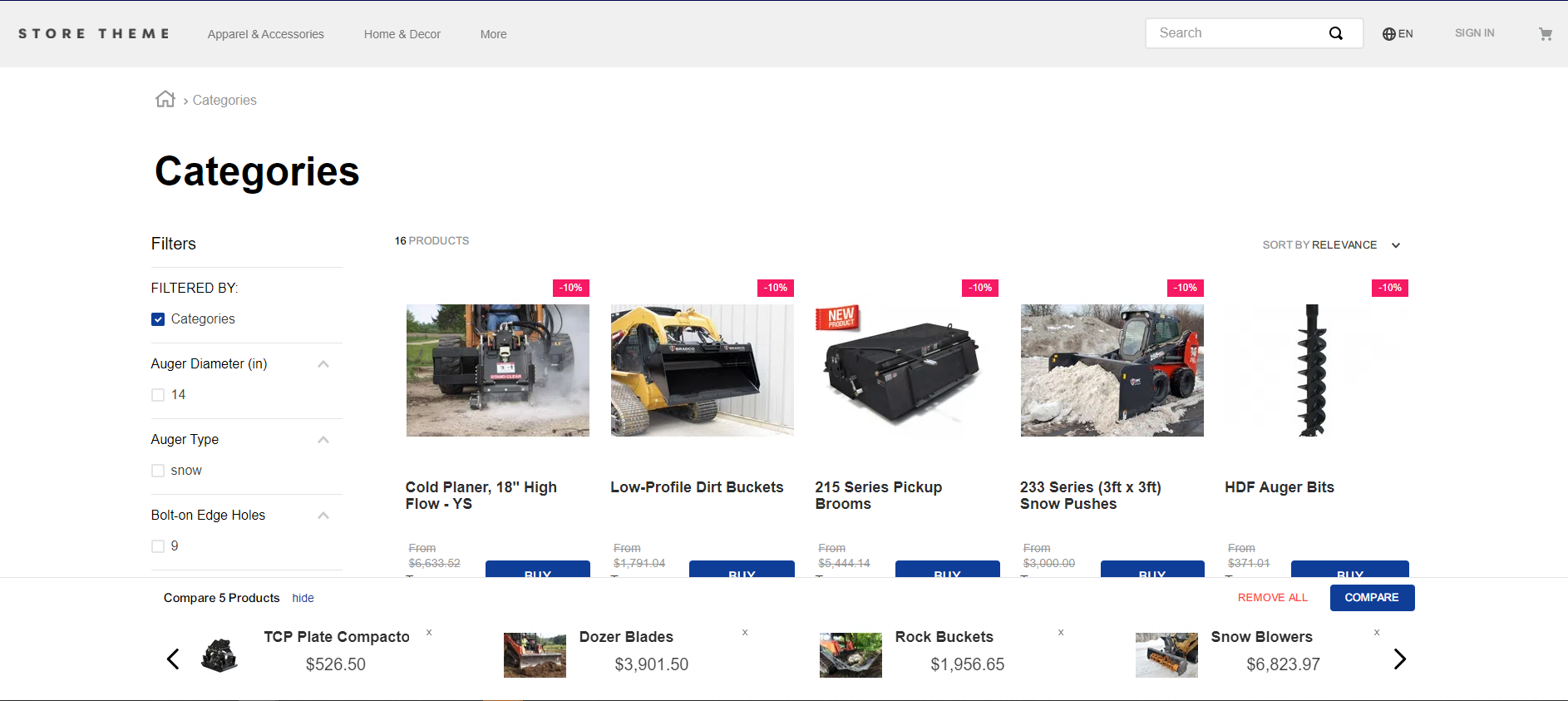
*Product Comparison drawer on the store's search results page*
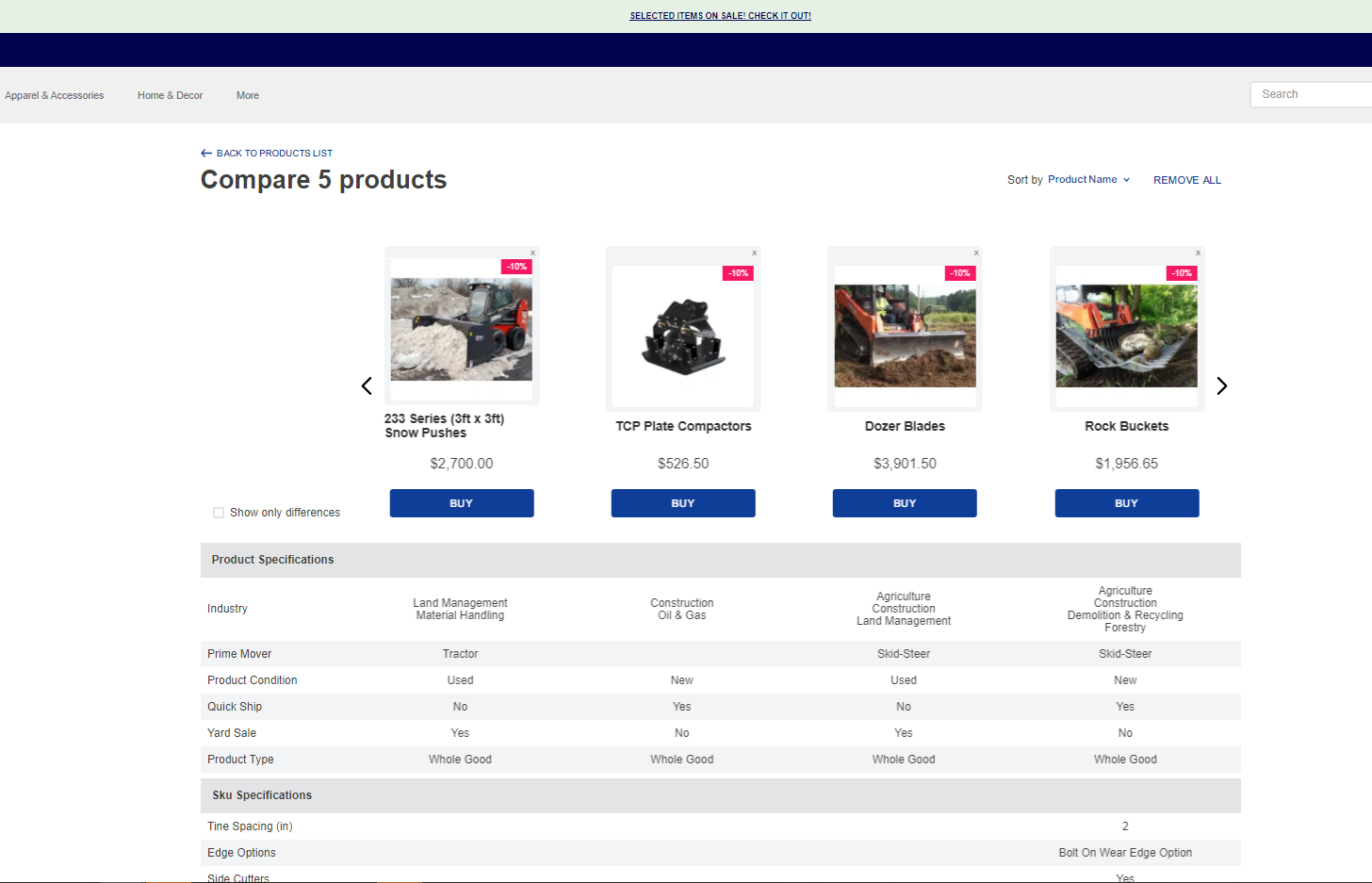
*Product Comparison page*
## Configuration
### Step 1 - Adding the Product Comparison app to your theme's dependencies
In your theme's `manifest.json` file, add the `Product Comparison` app as a dependency:
```diff
"dependencies": {
+ "vtex.product-comparison": "0.x"
}
```
Now, you can use all the blocks exported by the Product Comparison app. Check out the full list below:
| Block name | Description |
| :--------: | :------------------------: |
| `product-comparison-drawer` |  Main block that renders the drawer from the Product Comparison component in which the items will be compared. |
| `list-context.comparison-product-summary-slider` | Extends the `list-context` block to build the Product Comparison component using the [Slider Layout](https://vtex.io/docs/components/layout-blocks/vtex.slider-layout/.) |
| `product-summary.shelf.product-comparison` | Extends the default `product-summary.shelf` block (from the [Product Summary app](https://vtex.io/docs/components/all/vtex.product-summary/)) for the Product Comparison component's features. |
| `product-comparison-block` | Logical block that, once extended (see blocks listed below), renders the Product Comparison component's features. |
| `product-comparison-block.selector` | Renders the selector checkbox on the Product Comparison component. |
| `product-comparison-block.close-button` | Renders the close button on the Product Comparison component. |
| `product-comparison-block.product-summary-row` | Renders the first row to list and compare products on the Product Comparison component. |
| `list-context.comparison-row` | Extends the `list-context` block to build a row in the Product Comparison page using the [Slider Layout](https://vtex.io/docs/components/layout-blocks/vtex.slider-layout/.) |
| `product-comparison-block.grouped-product-specifications` | Renders the section for product specification groups. |
| `product-comparison-block.product-specifications` | Renders the section for product specifications. |
| `product-comparison-block.sku-specifications` | Renders the section for SKU specifications. |
### Step 2 - Adding extended interfaces
In the theme's `interfaces.json` file, add the following extended interfaces:
```diff
+{
+ "store.search.product-comparison": {
+ "around": ["comparison-context-wrapper"]
+ },
+ "search-result-layout.desktop.product-comparison": {
+ "allowed": ["product-comparison-drawer"]
+ },
"store.product.product-comparison": {
"around": ["comparison-context-wrapper"],
"allowed": ["product-comparison-drawer"]
}
+}
```
### Step 3 - Wrapping the search blocks with Product Comparison context
1. In the theme's `search.jsonc` file, replace the default `store.search` blocks with the `store.search.product-comparison` blocks, as shown in the example below:
```diff
{
...
- "store.search": {
+ "store.search.product-comparison": {
...
},
- "store.search#brand": {
+ "store.search.product-comparison#brand": {
...
},
- "store.search#department": {
+ "store.search.product-comparison#department": {
...
}
- "store.search#category": {
+ "store.search.product-comparison#category": {
...
}
- "store.search#subcategory": {
+ "store.search.product-comparison#subcategory": {
...
}
...
```
> ℹ️ The `store.search.product-comparison` blocks wrap the `store.search` block with comparison context. The replacement is needed to synchronously display the selected products in the Product Comparison drawer.
2. Replace the `search-result-layout.desktop` blocks with the `search-result-layout.desktop.product-comparison` blocks, as shown below:
```diff
{
...
"search-result-layout": {
"blocks": [
- "search-result-layout.desktop#search"
+ "search-result-layout.desktop.product-comparison#search",
"search-result-layout.mobile",
"search-not-found-layout"
]
},
```
3. Replace the `product-summary.shelf`, child of the `gallery` block, with the `product-summary.shelf.product-comparison`:
```diff
"gallery": {
- "blocks": ["product-summary.shelf"]
+ "blocks": ["product-summary.shelf.product-comparison#search"]
}
...
```
### Step 4 - Adding the Product Comparison to the product detail Page
1. In the theme's `product.json` file, replace the default `store.product` blocks with the `store.product.product-comparison` blocks, as shown in the example below:
```diff
- "store.product": {
+ "store.product.product-comparison": {
...
}
```
2. Add `product-comparison-drawer` to the `store.product.product-comparison` children, as shown in the example below:
```diff
"store.product.product-comparison": {
children:[
...
+ "product-comparison-drawer"
]
...
}
```
3. Add `product-comparison-block.selector#pdp` to the `store.product.product-comparison` block, as shown in the example below:
```diff
"store.product.product-comparison": {
...
children:[
...
+ "product-comparison-block.selector#pdp"
]
...
}
```
### Step 5 - Building the Product Comparison component
In any desired template, such as `store.search`, add the `product-comparison-drawer` block, as shown below:
```json
- "search-result-layout.desktop#search": {
+ "search-result-layout.desktop.product-comparison#search": {
"children": [
"flex-layout.row#did-you-mean",
"flex-layout.row#suggestion",
"flex-layout.row#banner-one",
"flex-layout.row#searchbread",
"flex-layout.row#searchtitle",
"flex-layout.row#result",
+ "product-comparison-drawer"
],
"props": {
"pagination": "show-more",
"preventRouteChange": false,
"mobileLayout": {
"mode1": "small",
"mode2": "normal"
}
}
}
...
```
By adding the `product-comparison-drawer` block as shown above, you will declare the following structure behind the scenes:
```json
"product-comparison-drawer": {
"blocks": ["list-context.comparison-product-summary-slider#drawer"]
},
"list-context.comparison-product-summary-slider#drawer": {
"blocks": ["product-summary.shelf.product-comparison#drawer"],
"children": ["slider-layout#comparison-drawer"]
},
"slider-layout#comparison-drawer": {
"props": {
"blockClass": "comparison-drawer",
"itemsPerPage": {
"desktop": 4,
"tablet": 3,
"phone": 1
},
"showPaginationDots": "never",
"infinite": true,
"fullWidth": true
}
},
"product-summary.shelf.product-comparison#drawer": {
"children": [
"product-summary-column#drawer-col2",
"product-comparison-block.close-button"
],
"props": {
"blockClass": "drawer-summary"
}
},
"product-summary-column#drawer-col2": {
"children": ["product-summary-name", "product-summary-price#comparison"],
"props": {
"blockClass": "drawer-summary-col2"
}
},
"product-summary-price#comparison": {
"props": {
"showListPrice": false,
"showSellingPriceRange": false,
"showLabels": false,
"showInstallments": false,
"showDiscountValue": false
}
}
```
> ℹ️ *The code above is a default implementation of the Product Comparison component. To make any changes, declare the code above in your theme and perform the needed updates according to the available blocks.*
### Step 6 - Building the Product Comparison page
1. In the `/store/blocks` folder, create a new file called `product-comparison.json` and include the following JSON:
```json
"store.custom#product-comparison-list": {
"blocks": ["comparison-page"]
},
"comparison-page": {
"children": ["slider-layout-group#comparison-page"]
},
"slider-layout-group#comparison-page": {
"children": [
"product-comparison-block.product-summary-row",
"product-comparison-block.grouped-product-specifications"
]
},
"product-comparison-block.product-summary-row": {
"blocks": ["list-context.comparison-product-summary-slider#comparison-page"]
},
"list-context.comparison-product-summary-slider#comparison-page": {
"blocks": ["product-summary.shelf.product-comparison#comparison-page"],
"children": ["slider-layout#comparison-page-product-summary"]
},
"product-summary.shelf.product-comparison#comparison-page": {
"children": [
"flex-layout.row",
"product-summary-image#comparison-page",
"product-summary-name",
"product-summary-space",
"product-summary-price#comparison",
"product-summary-buy-button"
],
"props": {
"blockClass": "comparison-page-summary"
}
},
"flex-layout.row": {
"children": ["product-comparison-block.close-button"],
"props": {
"blockClass": "close",
"horizontalAlign": "right"
}
},
"product-summary-image#comparison-page": {
"props": {
"width": 200,
"heightProp": 200
}
},
"product-comparison-block.grouped-product-specifications": {
"blocks": ["list-context.comparison-row#comparison-page-row"]
},
"list-context.comparison-row#comparison-page-row": {
"children": ["slider-layout#comparison-no-arrows"]
},
"slider-layout#comparison-page-product-summary": {
"props": {
"blockClass": "comparison-page",
"itemsPerPage": {
"desktop": 4,
"tablet": 3,
"phone": 1
},
"showPaginationDots": "never",
"infinite": true,
"fullWidth": true
}
},
"slider-layout#comparison-no-arrows": {
"props": {
"itemsPerPage": {
"desktop": 4,
"tablet": 3,
"phone": 1
},
"showPaginationDots": "never",
"infinite": true,
"fullWidth": true,
"blockClass": "comparison-page",
"showNavigationArrows": "never"
}
}
```
2. In the theme's `routes.json` file, add a new route for the Product Comparison page:
```diff
+{
+ "store.custom#product-comparison-list": {
+ "path": "/product-comparison"
+ }
+}
```
#### `product-comparison-block.grouped-product-specifications` props
| Prop name | Type | Description | Default value |
| :------------: | :-----------: | :----------------------------: | :-----------: |
| `productSpecificationsToHide` | `[string]` | List of product fields that should be hidden in the Product Comparison page. The desired product fields must be separated by a comma. | `undefined` |
| `productSpecificationGroupsToHide` | `[string]` | List of product specification groups that should be hidden on the Product Comparison page. The desired product specification groups must be separated by a comma. | `undefined` |
#### `product-comparison-block.product-specifications` props
| Prop name | Type | Description | Default value |
| :------------: | :-----------: | :----------------------------: | :--------: |
| `productSpecificationsToHide` | `[string]` | List of product fields that should be hidden in the Product Comparison page. The desired product fields must be separated by a comma. | `undefined` |
#### `product-comparison-block.sku-specifications` props
| Prop name | Type | Description | Default value |
| :------------: | :-----------: | :----------------------------: | :--------: |
| `skuSpecificationsToHide` | `[string]` | List of SKU specification fields that should be hidden on the Product Comparison page. The desired SKU specification fields must be separated by a comma. | `undefined` |
#### `product-comparison-block.product-summary-row` props
| Prop name | Type | Description | Default value |
| :------------: | :-----------: | :----------------------------: | :--------: |
| `isShowDifferenceDefault` | `boolean` | Set the "show only differences" checkbox to true as the default value on the comparison page. | `false` |
=======
### Step 7 - Change the comparison bucket size
This is an optional configuration, so you can set a fixed number in the app configuration to change the maximum number of items in the comparison bucket.
The default value is 10 items; if you exceed the maximum limit, you will receive a notification.
#### Instructions
1. Go to `/admin/apps`, then find the `Product Comparison` app under `Installed` apps.
2. Click Settings.
3. Enter the maximum comparison bucket size for your application.
## Customization
To apply CSS customizations in this and other blocks, follow the instructions in [Using CSS Handles for store customization](https://vtex.io/docs/recipes/style/using-css-handles-for-store-customization).
| CSS Handles |
| :--------------------------: |
| `closeButton` |
| `closeButtonContainer` |
| `compareProductsButton` |
| `comparisonButtons` |
| `comparisonCol` |
| `drawer` |
| `drawerContainer` |
| `expandCollapseButton` |
| `fieldNameCol` |
| `fieldNameCol` |
| `productFieldValue` |
| `productSelectorContainer` |
| `productSpecificationValue` |
| `productSpecificationValues` |
| `productSummaryRowContainer` |
| `rowContainer` |
| `showDifferencesContainer` |
| `skuFieldValue` |
| `skuSpecificationValue` |
| `skuSpecificationValues` |
| `title` |
| `removeAllItemsButtonWrapper`|
| `compareProductButtonWrapper`|
| `removeAllWrapper` |
| `drawerTitleOuterContainer` |
| `drawerTitleInnerContainer` |
| `drawerOpened` |
| `drawerClosed` |
## Contributors ✨
Thanks goes to these wonderful people:
This project follows the [all-contributors](https://github.com/all-contributors/all-contributors) specification. Contributions of any kind are welcome!