https://github.com/vtex-apps/product-quantity
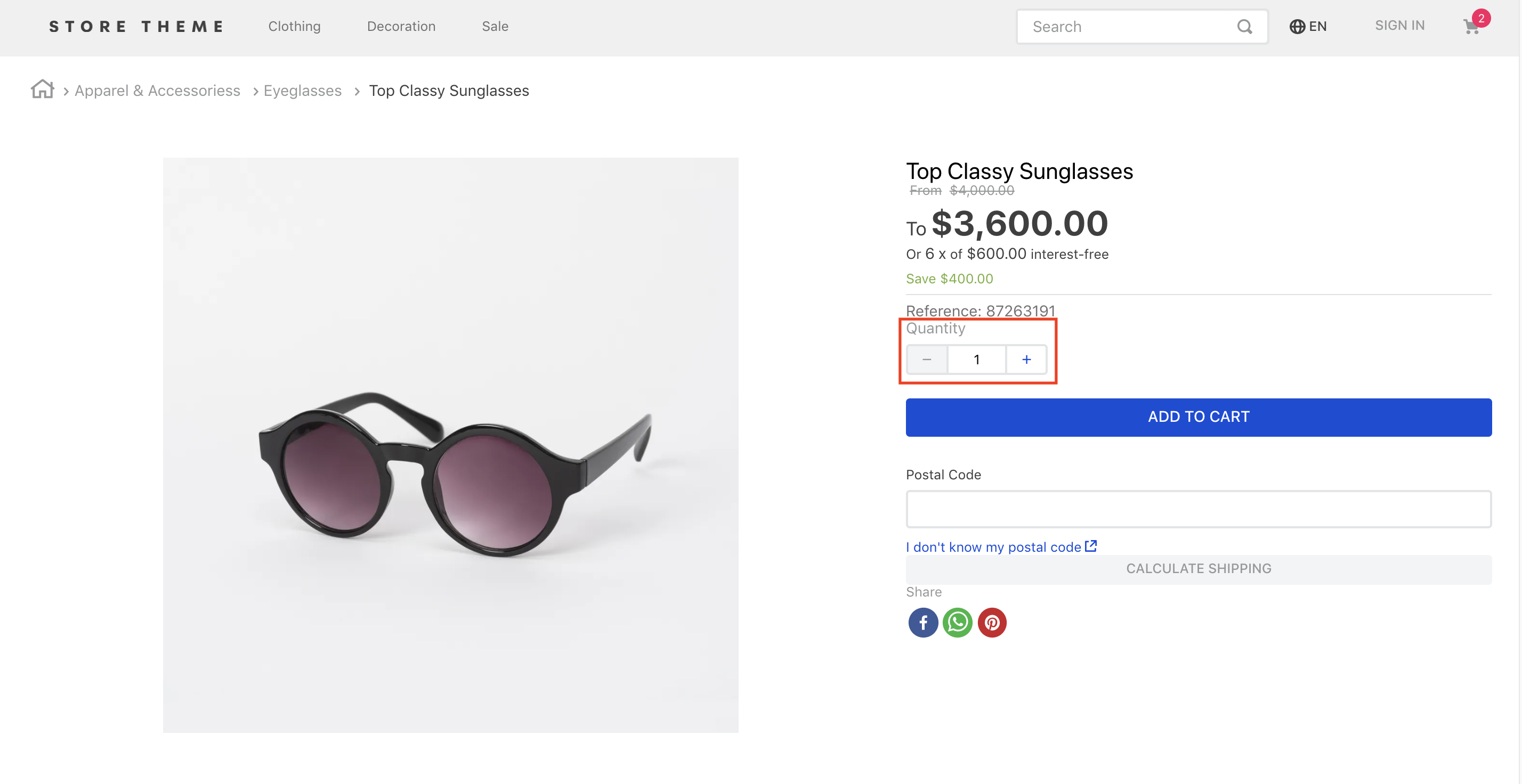
The Product Quantity allows users to a add a chosen amount of the displayed product in their cart.
https://github.com/vtex-apps/product-quantity
hacktoberfest store-framework vtex-io
Last synced: 6 months ago
JSON representation
The Product Quantity allows users to a add a chosen amount of the displayed product in their cart.
- Host: GitHub
- URL: https://github.com/vtex-apps/product-quantity
- Owner: vtex-apps
- Created: 2019-06-03T17:28:32.000Z (about 7 years ago)
- Default Branch: master
- Last Pushed: 2025-12-04T14:17:48.000Z (7 months ago)
- Last Synced: 2025-12-07T22:29:08.524Z (7 months ago)
- Topics: hacktoberfest, store-framework, vtex-io
- Language: TypeScript
- Homepage:
- Size: 423 KB
- Stars: 0
- Watchers: 43
- Forks: 14
- Open Issues: 7
-
Metadata Files:
- Readme: docs/README.md
- Changelog: CHANGELOG.md
- Codeowners: .github/CODEOWNERS
Awesome Lists containing this project
README
📢 Don't fork this project. Use, [contribute](https://github.com/vtex-apps/product-quantity), or open issues through [Store Discussion](https://github.com/vtex-apps/store-discussion).
# Product Quantity
[](#contributors-)
The Product Quantity allows users to a add a chosen amount of the displayed product in their cart.
## Configuration
1. Add the Product Quantity app to your dependencies in the theme's `manifest.json` file:
```json
"dependencies": {
"vtex.product-quantity": "1.x"
}
```
You are now able to use all blocks that are exported by the Product Quantity app. Check out the full list below:
| Block name | Description |
| --------- | ------------ |
| `product-quantity` | Displays a quantity selector on the product details page. This block must be declared in the theme's `store.product` page template. |
| `product-summary-quantity` | Displays a quantity selector on [Product Summary](https://vtex.io/docs/components/all/vtex.product-summary/)'s blocks. This block must be declared as a children of the `product-summary.shelf` block. |
2. According to your desired scenario, add the `product-quantity`/`product-summary-quantity` blocks to your theme. For example:
```diff
"flex-layout.col#product-price": {
"props": {
"preventVerticalStretch": true,
"rowGap": 0
},
"children": [
"product-name",
"product-price#product-details",
"product-separator",
+ "product-quantity",
"sku-selector",
"flex-layout.row#buy-button",
"availability-subscriber",
"shipping-simulator",
"share"
]
},
"product-quantity": {
"props": {
"warningQuantityThreshold": 9999999,
"showUnit": true
}
},
```
*In the example above a Product Details Page is built using Flex Layout and the `product-quantity` block.*
### `product-quantity` and `product-summary-quantity` props
| Prop name | Type | Description | Default Value |
| --- | --- | --- | --- |
| `warningQuantityThreshold` | `number` | Displays the quantity of remaining items in stock if the available quantity is less than or equal to the value given to this property. | `0` (the quantity is not displayed) |
| `showUnit` | `boolean` |Whether the unit of measurement should be displayed (`true`) or not (`false`). | `true` |
| `size` | `enum`| Preset size values for `font-size` and `padding`. You can check these value measures by accessing the [VTEX Styleguide](https://styleguide.vtex.com/#/Components/Forms/NumericStepper). Possible values are: `small`, `regular`, and `large`. | `small` |
| `showLabel` | `boolean` | Whether a label should be displayed (`true`) or not (`false`). | `true` |
| `selectorType` | `enum` | Defines how the quantity selector should initially behave. Possible values are: `stepper` (displays an input field where the quantity can be directly defined, in addition to side buttons to increase or decrease the value) and `dropdown` (shows a list of predefined-quantity options. In case the last quantity option is selected by users, the component is replaced with an input). | `stepper` |
| `quantitySelectorStep` | `enum` | Defines how the number of products that have unitMultiplier will works. Possible values are: `singleUnit` (the quantity will be not affected with the unitMultiplier) and `unitMultiplier` (the quantity will be affected with the unitMultiplier). | `unitMultiplier` |
## Customization
In order to apply CSS customizations in this and other blocks, follow the instructions given in the recipe on [Using CSS Handles for store customization](https://vtex.io/docs/recipes/style/using-css-handles-for-store-customization).
| CSS Handles |
| ------------------------------------------ |
| `availableQuantityContainer` |
| `quantitySelectorContainer` |
| `quantitySelectorDropdownContainer` |
| `quantitySelectorDropdownMobileContainer` |
| `quantitySelectorInputContainer` |
| `quantitySelectorInputMobileContainer` |
| `quantitySelectorStepper` |
| `quantitySelectorTitle` |
| `summaryContainer` |
## Contributors ✨
Thanks goes to these wonderful people:
This project follows the [all-contributors](https://github.com/all-contributors/all-contributors) specification. Contributions of any kind are welcome!
