https://github.com/vtex-apps/search-result
VTEX Search Result app
https://github.com/vtex-apps/search-result
hacktoberfest intelligent-search store-framework vtex-io
Last synced: 3 months ago
JSON representation
VTEX Search Result app
- Host: GitHub
- URL: https://github.com/vtex-apps/search-result
- Owner: vtex-apps
- Created: 2017-01-11T12:36:24.000Z (over 9 years ago)
- Default Branch: master
- Last Pushed: 2026-04-06T00:10:06.000Z (3 months ago)
- Last Synced: 2026-04-06T02:21:29.185Z (3 months ago)
- Topics: hacktoberfest, intelligent-search, store-framework, vtex-io
- Language: JavaScript
- Homepage:
- Size: 4.72 MB
- Stars: 23
- Watchers: 51
- Forks: 65
- Open Issues: 40
-
Metadata Files:
- Readme: docs/README.md
- Changelog: CHANGELOG.md
- Codeowners: .github/CODEOWNERS
Awesome Lists containing this project
README
📢 Use this project, [contribute](https://github.com/vtex-apps/search-result) to it or open issues to help evolve it using [Store Discussion](https://github.com/vtex-apps/store-discussion).
# Search Result
[](#contributors-)
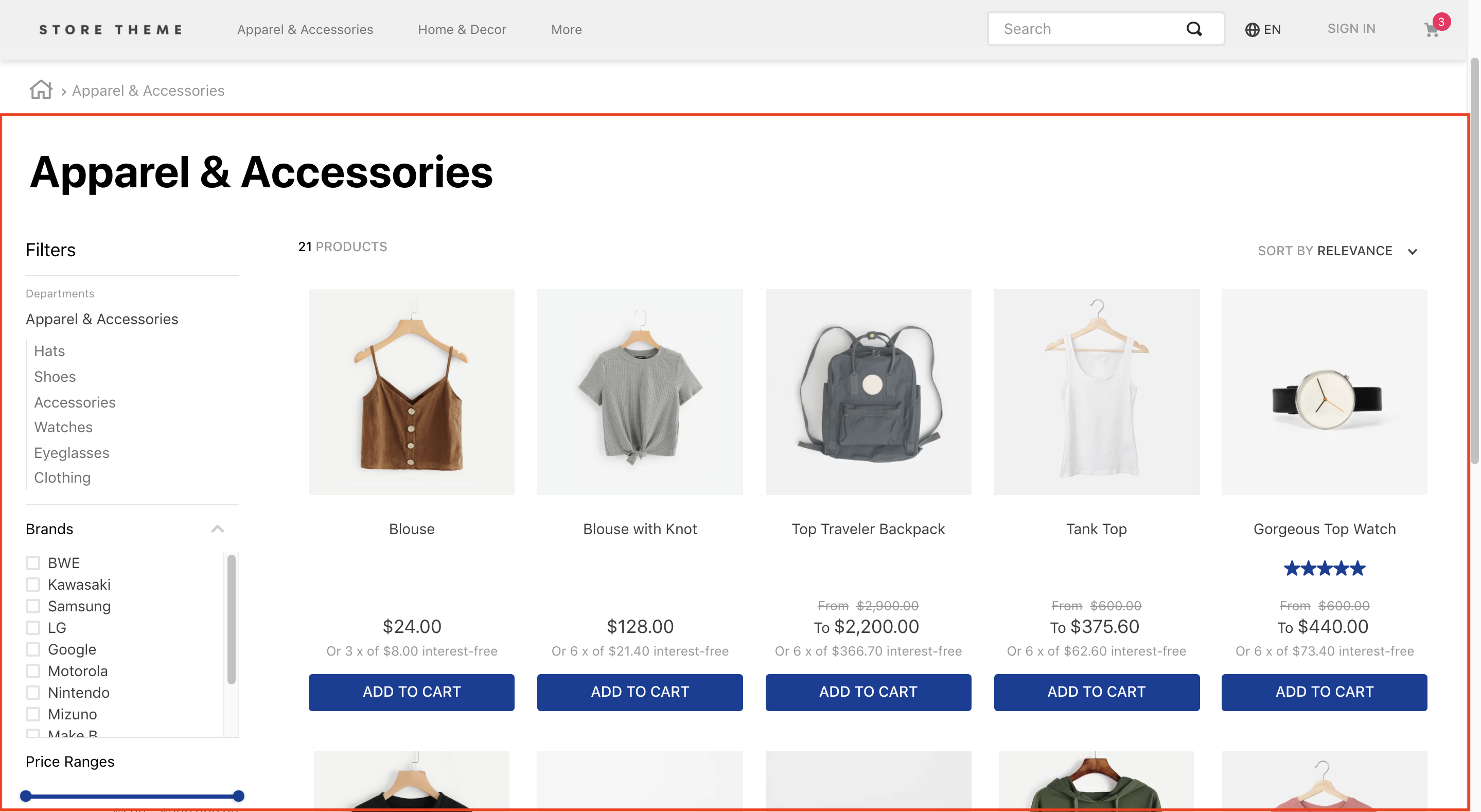
The Search Result app handles the results returned by the [VTEX Search API](https://developers.vtex.com/docs/guides/search-overview) and displays them to users.
The app exports all store blocks expected on a search results page, such as the filters and the product gallery.
## Configuration
To configure the VTEX Search Result, follow the instructions below.
### Adding the Search Result app to your theme's dependencies
In your theme's `manifest.json`, add the Search Result app as a dependency:
```json
"dependencies": {
"vtex.search-result": "3.x"
}
```
Now, you can use all the blocks exported by the `search-result` app. See the complete list below:
#### `search-result` blocks
| Block name | Description |
|---|---|
| `search-result-layout` | 
Builds the search result page using its three children blocks: `search-result-layout desktop`, `search-result-layout.mobile`, and `search-not-found-layout`. Use it in the `store.search` template, as it uses context from the VTEX Search API. |
| `search-result-layout.customQuery` | 
Use this block instead of `search-result-layout` when the search result is declared in a template that doesn't fetch Search context, such as Home. It accepts a `querySchema` prop that executes search custom queries. It also supports three children blocks: `search-result-layout.desktop`, `search-result-layout.mobile`, and `search-not-found-layout`. |
| `search-result-layout.desktop` | 
Builds the search result page structure for desktop mode. |
| `search-result-layout.mobile` | Builds the search result page structure for mobile mode. If `search-result-layout.mobile` isn't provided, `search-result-layout.desktop` is used. |
| `search-layout-switcher` | Enables mobile users to switch between layout modes. |
| `search-not-found-layout` | Builds the entire search results page structure for scenarios where no result was found. It renders when users search for a term that doesn't return a product. |
| `gallery` | 
Displays the gallery with all the products found in the search. |
| `gallery-layout-switcher` | Allows users to switch between available `gallery` layouts. Learn more in the guide [Building a search results page with multiple layouts](https://developers.vtex.com/vtex-developer-docs/docs/vtex-io-documentation-building-a-search-results-page-with-multiple-layouts). |
| `gallery-layout-option` | Defines how each layout option renders for users. Learn more in the guide [Building a search results page with multiple layouts](https://developers.vtex.com/vtex-developer-docs/docs/vtex-io-documentation-building-a-search-results-page-with-multiple-layouts). |
| `not-found` | Contains text and a description for a page not found in the search. Declare it as a child of `search-not-found-layout`. |
| `search-content` | 
Decides, behind the scenes, which block to display: either the `gallery` block (if products are found) or the `not-found` (if selected filters lead to an empty search results page). This means both `gallery` and `not-found` must be declared `search-content` children. |
| `store.not-found#search` | When configured, it displays a `404` error message when the server can’t return what the browser's request is, or isn’t configured to handle that request. |
| `search-products-count-per-page` | Displays the total number of products on the search results page. |
| `search-products-progress-bar` | Displays a progress bar of products on the search results page. |
| `order-by.v2` | Allows users to choose the product order on the search results page. |
| `filter-navigator.v3` | Allows users to apply different filters to the search. On mobile, it renders a button that, when clicked, displays all available filters in a sidebar. |
| `total-products.v2` | Displays the total number of products found for that search. |
| `search-title.v2` | Displays a title for the performed search. |
| `search-fetch-more` | Displays the **Show more** button. This button doesn't render when the user is on the last page. |
| `search-fetch-previous` | Displays the **Show previous** button. This button doesn't render when the user is on the first page. |
| `sidebar-close-button` | Displays an `X` button on the filter sidebar on mobile. |
## Adding the Search Result to page templates
Search Result app data usually displays on search pages (`store.search`), but you can add it to any other page.
When adding to the search page, use the `search-result-layout`, which fetches data from the template's current search context. To add the app to another page, use the [`search-result-layout.customQuery`](#search-result-blocks) block.
On the desired store page, add the `search-result-layout` block or the `search-result-layout.customQuery` to the correct template blocks list. Check both codes below as examples.
On search pages:
```json
"store.search": {
"blocks": ["search-result-layout"]
}
```
On other pages:
```diff
"store.home": {
"blocks": [
"carousel#home",
"shelf#home",
+ "search-result-layout.customQuery#home"
]
}
```
### Defining how the search query data should be fetched
Before declaring the blocks into the search results layout, define how the search results will be fetched.
You should define these results through a custom query on the homepage. On the search template, use the already provided context.
If you use `search-result-layout`, the blocks define the fetched data from the `context`. If you use `search-result-layout.customQuery`, send the props through the `querySchema` to configure the custom query.
Using `search-result-layout`:
```json
{
"store.search": {
"blocks": ["search-result-layout"],
"props": {
"context": {
"skusFilter": "FIRST_AVAILABLE",
"simulationBehavior": "default"
}
}
}
}
```
Using `search-result-layout.customQuery`:
```json
{
"store.home": {
"blocks": [
"carousel#home",
"shelf#home",
"search-result-layout.customQuery#home"
]
},
"search-result-layout.customQuery#home": {
"props": {
"querySchema": {
"skusFilter": "FIRST_AVAILABLE",
"simulationBehavior": "default"
}
}
}
}
```
Check all props to configure your search data in the table below.
### The `context` and `querySchema` props
| Prop name | Type | Description | Default value |
|---|---|---|---|
| `queryField` | `string` | 
Query string of the search URL that defines the results to fetch in the custom query. Example: `Blue`. This prop only works if `mapField` is also declared. | `undefined` |
| `mapField` | `string` | 
Search URL's `map` parameter to define which results to fetch in the custom query. Example: `specificationFilter_100`. This prop only works if the `queryField` prop is also declared. | `undefined` |
| `maxItemsPerPage` | `number` |Maximum number of items per search page. The maximum value of this prop is `50`. If a higher number is added, the query will fail. | `10` |
| `orderByField` | `enum` | Determines the order products follow when displayed. Possible values are named after the sorting type: `OrderByReleaseDateDESC`, `OrderByBestDiscountDESC`, `OrderByPriceDESC`, `OrderByPriceASC`, `OrderByNameASC`, `OrderByNameDESC`, or `OrderByTopSaleDESC`.
`ASC` and `DESC` stand for ascending order and descending order, respectively, based on the position of each value's corresponding code in the [ASCII table](http://www.asciitable.com/).
`OrderByTopSaleDESC` considers the number of units sold of the product in the past 90 days, taking into account only ecommerce orders (no physical store orders) from `order-placed` events (Example: Without checking if the payment was approved). If the store has an app, it's possible to consider events from the app — provided they're implemented on the store's side, as they aren't enabled by default. If the shopper has an ad-blocking extension or a browser restriction that disables sending events, their navigation won't be counted.
If not set to any of the mentioned values, the fallback behavior is sorting by [relevance settings](https://help.vtex.com/tracks/vtex-intelligent-search--19wrbB7nEQcmwzDPl1l4Cb/1qlObWIib6KqgrfX1FCOXS).
`OrderByScoreDESC` is **not** a valid value for this prop. | `""` |
| `hideUnavailableItems` | `boolean` | Determines whether the search result should hide unavailable items (`true`) or not (`false`). This prop only hides items that are unavailable according to indexed information, without taking into account `simulationBehavior`. | `false` |
| `facetsBehavior` | `string` | Defines the filters' behavior. When set to `Dynamic`, results are restricted according to the filters the user selected. If set to `Static`, all filters continue to display to the user, even if there are no results. | `Static` |
| `skusFilter` | `enum` | Refines the SKUs returned for each product in the query. Fewer returned SKUs result in a more performant shelf query. Available value: `FIRST_AVAILABLE` (returns only the first available SKU), `ALL_AVAILABLE` (returns all available SKUs), and `ALL` (returns all product SKUs). | `ALL_AVAILABLE` |
| `simulationBehavior` | `enum` | Defines whether the search data will be up-to-date (`default`) or fetched using the cache (`skip`). Use the last option only if you prefer faster queries over the most up-to-date prices or inventory. | `default` |
| `installmentCriteria` | `enum` | Defines which price to display when different installments are available. Possible values: `MAX_WITHOUT_INTEREST` (displays the maximum installment option with no interest attached) or ´MAX_WITH_INTEREST` (displays the maximum installment option, whether it has interest attached or not). | `"MAX_WITHOUT_INTEREST"` |
| `excludedPaymentSystems` | `string` | List of payment systems not to consider when displaying installment options to users. This prop works only if `installmentCriteria` is also declared. Otherwise, all available payment systems display regardless. | `undefined` |
| `includedPaymentSystems` | `string` | List of payment systems to consider when displaying installment options to users. This prop works only if `installmentCriteria` is also declared. Otherwise, all available payment systems display regardless. | `undefined` |
>ℹ️ Pagination doesn't display results after page 50. You can configure it to display more products per page by increasing the number of products on each page using the `maxItemsPerPage` prop.
>⚠️ When the `simulationBehavior` prop is set as `skip`, it defines that the search data should only be fetched using the store's cache. This may impact the content displayed on store pages, as cache storage changes based on user interaction on each page.
You must define the query for the following search pages:
* Brand
* Department
* Category
* Subcategory
This allows you to define custom behaviors for your store's search pages. For example:
```json
{
"store.search": {
"blocks": ["search-result-layout"],
"props": {
"context": {
"skusFilter": "FIRST_AVAILABLE",
"simulationBehavior": "default"
}
}
},
"store.search#category": {
"blocks": ["search-result-layout"],
"props": {
"context": {
"skusFilter": "FIRST_AVAILABLE",
"simulationBehavior": "default"
}
}
},
"store.search#brand": {
"blocks": ["search-result-layout"],
"props": {
"context": {
"skusFilter": "FIRST_AVAILABLE",
"simulationBehavior": "default"
}
}
},
"store.search#department": {
"blocks": ["search-result-layout"],
"props": {
"context": {
"skusFilter": "FIRST_AVAILABLE",
"simulationBehavior": "default"
}
}
},
"store.search#subcategory": {
"blocks": ["search-result-layout"],
"props": {
"context": {
"skusFilter": "FIRST_AVAILABLE",
"simulationBehavior": "default"
}
}
}
}
```
### Defining your search results page's layout and behavior
Now you can structure the `search-result-layout` or the `search-result-layout.customQuery` blocks. Both require the `search-result-layout.desktop` as a child. You can also provide props to other children, such as `search-result-layout.mobile` and `search-not-found-layout`.
Depending on your store's scenario, structure the `search-result-layout` or the `search-result-layout.customQuery` by declaring their children and then configuring them using the [Flex Layout](https://developers.vtex.com/docs/guides/vtex-flex-layout) blocks and their props. For example:
```json
{
"search-result-layout": {
"blocks": [
"search-result-layout.desktop",
"search-result-layout.mobile",
"search-not-found-layout"
]
},
"search-result-layout.desktop": {
"children": [
"flex-layout.row#searchbread",
"flex-layout.row#searchtitle",
"flex-layout.row#result"
],
"props": {
"preventRouteChange": true
}
}
}
```
#### The `search-result-layout.desktop`, `search-result-layout.mobile`, and `search-not-found-layout` props
| Prop name | Type | Description | Default value |
|--------------------------|-----------|---------------------------|-----------------|
| `hiddenFacets` | `object` | Indicates which filters should be hidden. The possible values are in [this table](#the-hiddenfacets-object). | `undefined` |
| `showFacetQuantity` | `boolean` |Determines whether the resulting amount in each filter should appear beside its name on the `filter-navigator.v3` block (`true`) or not (`false`). | `false` |
| `showFacetTitle` | `boolean` | Determines whether the facet title should appear on the selected filters section on the `filter-navigator.v3` block (`true`) or not (`false`). | `false` |
| `blockClass` | `string` | Unique block ID for [CSS customization](https://developers.vtex.com/docs/guides/vtex-io-documentation-using-css-handles-for-store-customization#using-the-blockclass-property). | `undefined` |
| `trackingId` | `string` | ID for Google Analytics to track store metrics based on the Search Result block. | `Search result` |
| `mobileLayout` | `object` | Controls how the search results page displays to users using the mobile layout. Possible values are in [this table](#the-mobilelayout-object). | `undefined` |
| `defaultGalleryLayout` | `string` | Determines the default name of the gallery layout on the search results page. This prop is required when the `gallery` block explicitly defines several layouts. This prop's value must match the layout name defined in the `name` prop from `layouts` object. | `undefined` |
| `thresholdForFacetSearch` | `number` | Specifies the minimum number of facets that must be displayed for the search bar to appear. If you declare `0`, the search bar always displays. | `undefined` |
| `preventRouteChange` | `boolean` | Keeps page customizations even when the user applies new filters. This prop only changes the URL's query string rather than the entire URL, preventing a full page reload when filters are applied. | `false` |
| `showShippingMethodFacet` | `boolean` | Determines whether Shipping filters should display (`true`) or not (`false`). | `false` |
#### The `mobileLayout` object
| Prop name | Type | Description | Default value |
| --------- | ------ | ---------------------------------------------------------------------------------------------------------------------------------------------------------------------------- | ------------- |
| `mode1` | `enum` | Defines the default layout for the mobile search results page. Possible values: `normal`, `small`, or `inline`. | `normal` |
| `mode2` | `enum` | Defines which layout sets for the mobile search results page when users click the layout selector button. Possible values are also `normal`, `small`, or `inline`. | `small` |
#### The `hiddenFacets` object
| Prop name | Type | Description | Default value |
| ---------------------- | --------- | ---------------------------------------------------------------------------------------------------------------------------------- | ------------- |
| `brands` | `boolean` | Determines whether Brand filters should be hidden (`true`) or not (`false`). | `false` |
| `categories` | `boolean` | Determines whether Category filters should be hidden (`true`) or not (`false`). | `false` |
| `priceRange` | `boolean` | Determines whether Price filters should be hidden (`true`) or not (`false`). | `false` |
| `specificationFilters` | `object` | Indicates which specification filters should be hidden. Possible values are in [this table](#the-specificationfilters-object). | `undefined` |
#### The `specificationFilters` object
| Prop name | Type | Description | Default value |
| --------------- | --------- | -------------------------------------------------------------------------------------------------------------------------------- | ------------- |
| `hideAll` | `boolean` | Determines whether specification filters should be hidden (`true`) or not (`false`). | `false` |
| `hiddenFilters` | `object` | Object array of specification filters that should be hidden. Possible values are in [this table](#the-hiddenfilters-object). | `undefined` |
#### The `hiddenFilters` object
| Prop name | Type | Description | Default value |
| --------- | -------- | ------------------------------------------------------- | ------------- |
| `name` | `string` | Defines the name of the specification filter that you want to hide. | `undefined` |
### Using the Flex Layout to build your search results page
You can build your search results page with the [Flex Layout](https://developers.vtex.com/docs/guides/vtex-flex-layout) app and the other blocks exported by the Search Results app, such as the `gallery`.
Below are the available blocks to build your store's search results page and their existing props.
#### The `gallery` block
The `gallery` block defines how fetched items display on the store's search results page.
When declared with no props, it expects the [`product-summary.shelf`](https://developers.vtex.com/docs/guides/vtex-product-summary) as a child and consequently the block structure inherited from it.
However, you can use the `layouts` prop to provide several layouts for the page, allowing your store to arrange items that best fit your users' needs.
In a scenario where multiple layouts are provided, your store users will be able to shift between them according to their needs using the `gallery-layout-switcher` block, described in [the table below](#the-gallery-layout-switcher-props). The `gallery` will then render the component provided by the currently selected layout.
Learn more in [Building a search results page with multiple layouts](https://developers.vtex.com/docs/guides/vtex-io-documentation-building-a-search-results-page-with-multiple-layouts).
##### The `gallery-layout-switcher` props
| Prop name | Type | Description | Default value |
| ----------------------- | ------------------ | --------------------------------------------------------------------------------------------------------------------------------------------------------------------------------------------------------------------------------------------------------------------------------------------------------------------------------------------------------------------------------------------- | ------------------- |
| `layouts` | `object` | Arranges and displays items on the search results page. If no value is provided, the `gallery` block must receive a `product-summary-shelf` block as a child. Check [this table](#the-layouts-object) for props of this block. | `undefined` |
| `undefined` | `block` | Defines which blocks should reder per layout. The prop name is not `undefined`, you must include the value passed on the `component` prop. This prop's value must match the block name you choose to render in that specific layout. | `undefined` |
| `customSummaryInterval` | `number` | Defines the item interval at which the **Gallery** should render a custom `product-summary` block. For example, declaring `5` renders a custom block at every four items rendered, as shown [on this image](https://user-images.githubusercontent.com/1207017/101687291-0cff1780-3a49-11eb-9c00-678b70001c8a.jpg). This prop doesn't support `layouts` yet. | `undefined` |
| `CustomSummary` | `block` | Defines a block to render according to the interval defined by the `customSummaryInterval` prop. | `undefined` |
| `preferredSKU` | `PreferredSKUEnum` | Controls which SKU will initially be selected in the product summary. | `"FIRST_AVAILABLE"` |
For `PreferredSKUEnum`:
| Name | Value | Description |
| --------------- | ----------------- | -------------------------------------------------------------- |
| First Available | `FIRST_AVAILABLE` | First available SKU in stock found or first SKU without stock. |
| Last Available | `LAST_AVAILABLE` | Last available SKU in stock found or last SKU without stock. |
| Cheapest | `PRICE_ASC` | Cheapest SKU in stock found or first SKU without stock. |
| Most Expensive | `PRICE_DESC` | Most expensive SKU in stock found or first SKU without stock. |
>⚠️ To select which SKU should take preference over this prop, you can create a product specification (field) and, for each product, assign the value of the desired SKU to be initially selected. If the specification doesn't exist or the value is empty, it will use the `preferredSKU` prop as a fallback. Learn more in [Recipes](https://developers.vtex.com/docs/guides/storefront-implementation).
##### The `layouts` object
| Prop name | Type | Description | Default value |
| ------------- | ------------------- | ----------------------------------------------------------------------------------------------------------------------------------------------------------------------------------------------------------------------------------------------------------------------------------------------------------------------------------------------------------------------------------------------------------------------------------------------------------------------------------------------------------------------------------------------------------------------------------------------------------------------------------------------------------------------- | ------------- |
| `name` | `string` | 
Specifies the layout name. This value must be unique. For example, not equal to other layout names declared in the `gallery` block. | `undefined` |
| `component` | `string` | 
Names the `undefined` prop from the `gallery` block, which declares the block to render in this layout. This prop's value can be anything as long as it's PascalCased, meaning the first letter of each word in its name is capitalized. **Caution**: For this to work, the chosen value must be named after the `gallery` block's `undefined` prop. _Don’t use the `component` prop's value to directly pass the desired block name itself_. See the example below to understand the underlying logic behind this prop. | `undefined` |
| `itemsPerRow` | `number` / `object` | 
Specifies the number of items to display in each row of this layout. This prop works with [responsive values](https://developers.vtex.com/docs/apps/vtex.responsive-values/), so it also accepts an object with different numbers for desktop, tablet, or phone screen sizes (_see the table below_). | `undefined` |
##### The `itemsPerRow` object
| Prop name | Type | Description | Default value |
| --------- | -------- | ------------------------------------------------ | ------------- |
| `desktop` | `number` | Number of slides to show on desktop devices. | `undefined` |
| `tablet` | `number` | Number of slides to show on tablet devices. | `undefined` |
| `phone` | `number` | Number of slides to show on phone devices. | `undefined` |
##### Example of a `gallery` block
```json
{
"gallery": {
"props": {
"layouts": [
{
"name": "whole",
"component": "OneOrTwoLineSummary",
"itemsPerRow": 1
},
{
"name": "two",
"component": "OneOrTwoLineSummary",
"itemsPerRow": 2
},
{
"name": "many",
"component": "ManyByLineSummary",
"itemsPerRow": {
"desktop": 5,
"mobile": 1
}
}
],
"OneOrTwoLineSummary": "product-summary.shelf",
"ManyByLineSummary": "product-summary.shelf"
}
}
}
```
#### The `gallery-layout-switcher` block
The `gallery-layout-switcher` block is a logical block that allows users to switch between the available `gallery` layouts.
It receives no props and expects [the `gallery-layout-option` block](#the-gallery-layout-option-block) as a child. For the accessibility features to work correctly, define the options in the same order as the layouts.
#### The `gallery-layout-option` block
This block defines how each layout option renders for users.
| Prop name | Type | Description | Default value |
| --------- | -------- | ------------------------------------------------------------------------------------------------------------------------------------------------------------------------------------------------------------- | ------------- |
| `name` | `string` | 
Specifies the name of the layout option. This prop's value must match the one passed to the [`name` prop](#the-layouts-object). | `undefined` |
##### Example of the `gallery-layout-switcher` and the `gallery-layout-option` blocks
```jsonc
{
"gallery-layout-switcher": {
"children": [
//It follows the same whole -> two -> many order
"gallery-layout-option#whole",
"gallery-layout-option#two",
"gallery-layout-option#many"
]
},
"gallery-layout-option#whole": {
"props": {
"name": "whole"
},
"children": ["icon-single-grid", "rich-text#option-whole"]
},
"gallery-layout-option#two": {
"props": {
"name": "two"
},
"children": ["icon-inline-grid", "rich-text#option-two"]
},
"gallery-layout-option#many": {
"props": {
"name": "many"
},
"children": ["icon-menu", "rich-text#option-many"]
}
}
```
#### `filter-navigator.v3` block
This block renders a filter selector for the fetched results.
| Prop name | Type | Description | Default value |
|---|---|---|---|
| `categoryFiltersMode` | `enum` | Determines whether the category filters use the `href` attribute with category page URLs (`href`) or not (`default`). By default, the filters use HTML divs with `role="link"`. Setting this prop's value to `href` creates a link, which can improve the SEO ranking of your category pages. | `default` |
| `layout` | `enum` | Determines whether the **Filter Navigator** layout is responsive (`responsive`) or not (`desktop`). You can use `desktop` when the **Filter Navigator** is configured to display in a [drawer](https://developers.vtex.com/docs/guides/vtex-store-drawer). | `responsive` |
| `maxItemsDepartment` | `number` | Specifies the maximum number of departments to display before the **See more** button triggers. | `8` |
| `maxItemsCategory` | `number` | Specifies the maximum number of category items to display before the **See more** button triggers. | `8` |
| `initiallyCollapsed` | `boolean` | Makes the search filters start collapsed (`true`) or open (`false`). | `false` |
| `openFiltersMode` | `enum` | Defines how many filters can open simultaneously on the **Filter Navigator** component. Possible values are `many` (more than one filter can open simultaneously) and `one` (only one filter can open). If `one` is declared, all filters collapse before user interaction, regardless of the `initiallyCollapsed` prop's value. | `many` |
| `filtersTitleHtmlTag` | `string` | Specifies the HTML tag for the filter's title. | `h5` |
| `scrollToTop` | `enum` | Scrolls the page to the top (`auto` or `smooth`) or not (`none`) when selecting a facet. | `none` |
| `truncateFilters` | `boolean` | Determines whether a filter selector with more than 10 filter options shortens the list and displays a **See more** button (`true`) or not (`false`). | `false` |
| `closeOnOutsideClick` | `boolean` | Determines whether the **Filter Navigator** component closes when users click outside of it (`true`) or not (`false`). This prop only works if the `openFiltersMode` prop is set to `one`. | `false` |
| `appliedFiltersOverview` | `enum` | Determines whether an overview of the applied filters displays (`show`) or not (`hide`). | `hide` |
| `totalProductsOnMobile` | `enum` | Determines whether the **Filter Navigator** displays the total number of products on mobile devices (`show`) or not (`hide`). | `hide` |
| `fullWidthOnMobile` | `boolean` | Determines whether the `filter-navigator.v3` renders on mobile using the full screen width (`true`) or not (`false`). | `false` |
| `navigationTypeOnMobile` | `enum` | Defines how mobile users should navigate on the filter selector component. Possible values are `page` (only one list of options can be seen at a time) or `collapsible` (all lists of options can be seen simultaneously). | `page` |
| `updateOnFilterSelectionOnMobile` | `boolean` | Determines whether search results on mobile update based on the filter selection (`true`) or not (`false`). This prop only works if the `preventRouteChange` prop is declared as `true`. | `false` |
| `drawerDirectionMobile` | `Enum` | Determines whether search filters on mobile open to the left (`drawerLeft`) or to the right (`drawerRight`). | `drawerLeft` |
| `showClearByFilter` | `boolean` | Determines whether a clear button (which erases all selected filter options) displays alongside the filter name (`true`) or not (`false`). | `false` |
| `showClearAllFiltersOnDesktop` | `boolean` | Determines whether a clear button displays (`true`) or not (`false`). This button resets all selected filters. | `false` |
| `priceRangeLayout` | `enum` | Determines whether a text field for entering the desired price range displays (`inputAndSlider`) or not (`slider`). | `slider` |
| `facetOrdering` | `array` | Applies custom sorting rules for filters. The default behavior sorts items by quantity, in descending order. | `undefined` |
| `showQuantityBadgeOnMobile` | `boolean` | Displays a badge for mobile users indicating how many active filters there are. | `false` |
- **`facetOrdering` object:**
| Prop name | Type | Description | Default value |
|---|---|---|---|
| `key` | `string` | Specifies the facet key to sort. Possible values are `category-1`, `category-2`, `category-3` (for department, category, and subcategory), `brand`, or a product specification name. | `undefined` |
| `orderBy` | `enum` | Specifies the field from facets to use when sorting entries. Possible values are `name` and `quantity`. | `undefined` |
| `order` | `enum` | Determines whether the filter should sort by ascending (`ASC`) or descending (`DESC`) order. | `ASC` |
For example:
```jsonc
{
"filter-navigator.v3": {
"props": {
"facetOrdering": [
{
"key": "brand",
"orderBy": "name",
"order": "ASC"
}
]
}
}
}
```
>⚠️ The `facetOrdering` prop conflicts with the `enableFiltersFetchOptimization` flag on `vtex.store`, as it returns only the top filter values ordered by count. To achieve the desired outcome with `facetOrdering`, set `enableFiltersFetchOptimization` as `false` in your `vtex.store` Admin settings.
#### The `order-by` block
The `order-by` block renders a dropdown button with [sorting options](#the-sorting-options-for-the-order-by-block) to display the fetched results. See the block props in the table below.
##### The `order-by` props
| Prop name | Type | Description | Default value |
| ---------------------- | ---------- | ------------------------------------------------------------------------------------------------------------------------------- | ------------- |
| `specificationOptions` | `[object]` | Indicates which sorting options by specification will be displayed. This only works for stores using `vtex.search-resolver@1.x` | `undefined` |
| `hiddenOptions` | `[string]` | Indicates which sorting options will be hidden. Example: `["OrderByNameASC", "OrderByNameDESC"]` | `undefined` |
| `showOrderTitle` | `boolean` | Determines whether the selected order value (example: `Relevance`) displays (`true`) or not (`false`). | `true` |
- **`specificationOptions` Object:**
| Prop name | Type | Description | Default value |
| --------- | ------ | ------------------------------------------------------------------------------------------------------------------------------------------------------------- | ------------- |
| value | string | Value sent for sorting in the API. It must be in the format `{specification key}:{asc/desc}`. Example: `"size:desc"` or `"priceByUnit:asc"`. | `undefined` |
| label | string | Label that displays in the sorting options. Example: `"Price by unit, ascending"` | `undefined` |
##### Sorting options for the `order-by` block
| Sorting option | Value |
| ------------------------ | --------------------------- |
| Relevance | `""` |
| Top Sales Descending | `"OrderByTopSaleDESC"` |
| Release Date Descending | `"OrderByReleaseDateDESC"` |
| Best Discount Descending | `"OrderByBestDiscountDESC"` |
| Price Descending | `"OrderByPriceDESC"` |
| Price Ascending | `"OrderByPriceASC"` |
| Name Ascending | `"OrderByNameASC"` |
| Name Descending | `"OrderByNameDESC"` |
| Collection | `"OrderByCollection"` |
#### The `search-fetch-more` block
The `search-fetch-more` block renders a `Show more` button that loads the following search results page. See the block props in the table below.
>ℹ️ This block doesn't render if there is no next page.
##### The `search-fetch-more` prop
| Prop name | Type | Description | Default value |
| ---------------------- | ------ | -------------------------------------------------------------------------------------------------------------------------------------------------------------------------------------------------------------------------------------------- | ------------- |
| `htmlElementForButton` | `enum` | Specifies which HTML element displays for the `Show more` button component. Possible values: `a` (displays a `` element with `href` and `rel` attributes) or `button` (displays a `` element without `href` and `rel` attributes). | `button` |
#### The `search-fetch-previous` block
The `search-fetch-previous` block renders a `Show previous` button that loads the previous search results page. See the block props in the table below.
>ℹ️ This block doesn't render if there is no previous page.
##### The `search-fetch-previous` prop
| Prop name | Type | Description | Default value |
| ---------------------- | ------ | ------------------------------------------------------------------------------------------------------------------------------------------------------------------------------------------------------------------------------------------------ | ------------- |
| `htmlElementForButton` | `enum` | Specifies which HTML element displays for `Show previous` button component. Possible values: `a` (displays a `` element with `href` and `rel` attributes) or `button` (displays a `` element without `href` and `rel` attributes). | `button` |
#### The `search-products-count-per-page` block
The `search-products-count-per-page` block shows the product count per search page. When declared, this block doesn't need any props.
#### The `search-products-progress-bar` block
The `search-products-progress-bar` block shows a progress bar of search results. When declared, this block doesn't need any props.
#### The `sidebar-close-button` block
The `sidebar-close-button` block is the `Close` button rendered on the top right of the mobile filter sidebar.
##### The `sidebar-close-button` props
| Prop name | Type | Description | Default value |
| --------- | -------- | ------------------------ | ------------- |
| `size` | `number` | Size of the button icon. | `30` |
| `type` | `string` | Type of the button icon. | `line` |
## Customization
To apply CSS customization in this and other blocks, follow the instructions given in the recipe on [Using CSS Handles for store customization](https://developers.vtex.com/docs/guides/vtex-io-documentation-building-a-search-results-page-with-multiple-layouts).
| CSS handles |
| -------------------------------------- |
| `accordionFilter` |
| `accordionFilterContainer` |
| `accordionFilterContent` |
| `accordionFilterItemActive` |
| `accordionFilterItemBox` |
| `accordionFilterItemHidden` |
| `accordionFilterItemIcon` |
| `accordionFilterItemOptions` |
| `accordionFilterItemTitle` |
| `accordionFilterItem` |
| `accordionFilterOpen` |
| `accordionSelectedFilters` |
| `border` |
| `breadcrumb` |
| `buttonShowMore` |
| `categoriesContainer` |
| `categoryGroup` |
| `categoryParent` |
| `clearAllFilters` |
| `container` |
| `dropdownMobile` |
| `filter` |
| `filterAccordionBreadcrumbs` |
| `filterBreadcrumbsContent` |
| `filterBreadcrumbsText` |
| `filterBreadcrumbsItem` |
| `filterBreadcrumbsItemName` |
| `filterAccordionItemBox--{facetValue}` |
| `filterApplyButtonWrapper` |
| `filterAvailable` |
| `filterIsOpen` |
| `filterButtonsBox` |
| `filterClearButtonWrapper` |
| `filterContainer--{facetType}` |
| `filterContainer--b` |
| `filterContainer--c` |
| `filterContainer--priceRange` |
| `filterContainer--{selectedFilters}` |
| `filterContainer--{title}` |
| `filterContainer` |
| `filterIcon` |
| `filterItem--{facetValue}` |
| `filterItem--selected` |
| `filterItem` |
| `filterMessage` |
| `filterPopup` |
| `filterPopupArrowIcon` |
| `filterPopupButton` |
| `filterPopupContent` |
| `filterPopupContentContainer` |
| `filterPopupContentContainerOpen` |
| `filterPopupFooter` |
| `filterPopupOpen` |
| `filterPopupTitle` |
| `filterSelected` |
| `filterSelectedFilters` |
| `filterTotalProducts` |
| `filtersWrapper` |
| `filtersWrapperMobile` |
| `filterTemplateOverflow` |
| `filterTitle` |
| `filterTitleSpan` |
| `footerButton` |
| `galleryItem` |
| `galleryItem--custom` |
| `galleryItem--{displayMode}` |
| `galleryTitle` |
| `gallery` |
| `galleryLayoutSwitcher` |
| `galleryLayoutOptionButton` |
| `layoutSwitcher` |
| `loadingOverlay` |
| `loadingSpinnerInnerContainer` |
| `loadingSpinnerOuterContainer` |
| `orderByButton` |
| `orderByDropdown` |
| `orderByOptionItem` |
| `orderByOptionItem--selected` |
| `orderByOptionsContainer` |
| `orderByText` |
| `orderBy` |
| `productCount` |
| `progressBarContainer` |
| `progressBar` |
| `progressBarFiller` |
| `resultGallery` |
| `searchNotFoundInfo` |
| `searchNotFoundOops` |
| `searchNotFoundTerm` |
| `searchNotFoundTextListLine` |
| `searchNotFoundWhatDoIDo` |
| `searchNotFoundWhatToDoDotsContainer` |
| `searchNotFoundWhatToDoDots` |
| `searchNotFound` |
| `searchResultContainer` |
| `seeMoreButton` |
| `selectedFilterItem` |
| `showingProductsContainer` |
| `showingProductsCount` |
| `showingProducts` |
| `switch` |
| `totalProductsMessage` |
| `totalProducts` |
## Contributors ✨
Thanks goes out to these wonderful people ([emoji key](https://allcontributors.org/docs/en/emoji-key)):

grupo-exito-ecommerce
💻

Ygor Neves
💻

Marcos André Suarez Ewbank
💻

Beatriz Miranda
💻

felipeireslan
💻

Julio Moreira
💻

Antonio Cervelione
💻
This project follows the [all-contributors](https://github.com/all-contributors/all-contributors) specification. Contributions of any kind welcome!