https://github.com/vtex-apps/wish-list
https://github.com/vtex-apps/wish-list
app-store us-1st-party-apps
Last synced: 5 months ago
JSON representation
- Host: GitHub
- URL: https://github.com/vtex-apps/wish-list
- Owner: vtex-apps
- Created: 2020-05-05T13:52:06.000Z (about 6 years ago)
- Default Branch: master
- Last Pushed: 2024-12-13T15:35:08.000Z (over 1 year ago)
- Last Synced: 2024-12-13T17:14:38.240Z (over 1 year ago)
- Topics: app-store, us-1st-party-apps
- Language: C#
- Homepage:
- Size: 1.63 MB
- Stars: 12
- Watchers: 46
- Forks: 25
- Open Issues: 23
-
Metadata Files:
- Readme: docs/README.md
- Changelog: CHANGELOG.md
Awesome Lists containing this project
README
📢 Use this project, [contribute](https://github.com/vtex-apps/wish-list) to it or open issues to help evolve it using [Store Discussion](https://github.com/vtex-apps/store-discussion).
# Wishlist
## ⚠️ Maintenance ⚠️
*Starting June 1st 2023, this application will no longer be maintained by VTEX.*
---
[](#contributors-)
Designed for **B2C** stores, the Wishlist app adds a heart icon to digital shelves and product details pages, allowing users to add their desired products to a wishlist.
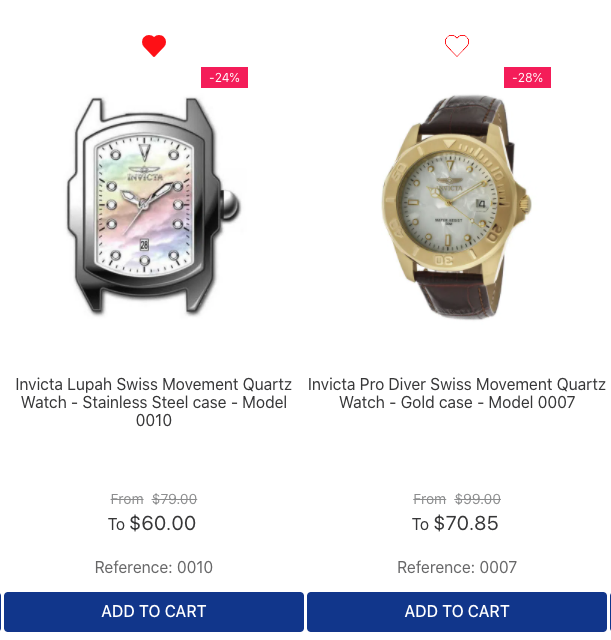
_Example of heart icons on a shelf._
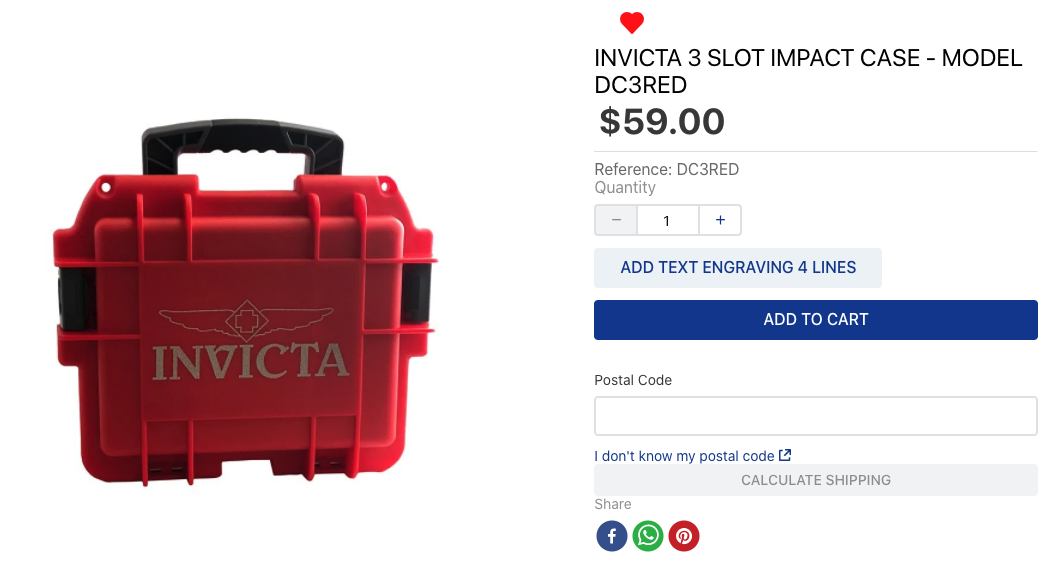 _Example of a heart icon on a product details page._
In addition, it generates a brand-new route called `/wishlist` under the My Account menu, creating a page with the items users added to the wishlist.
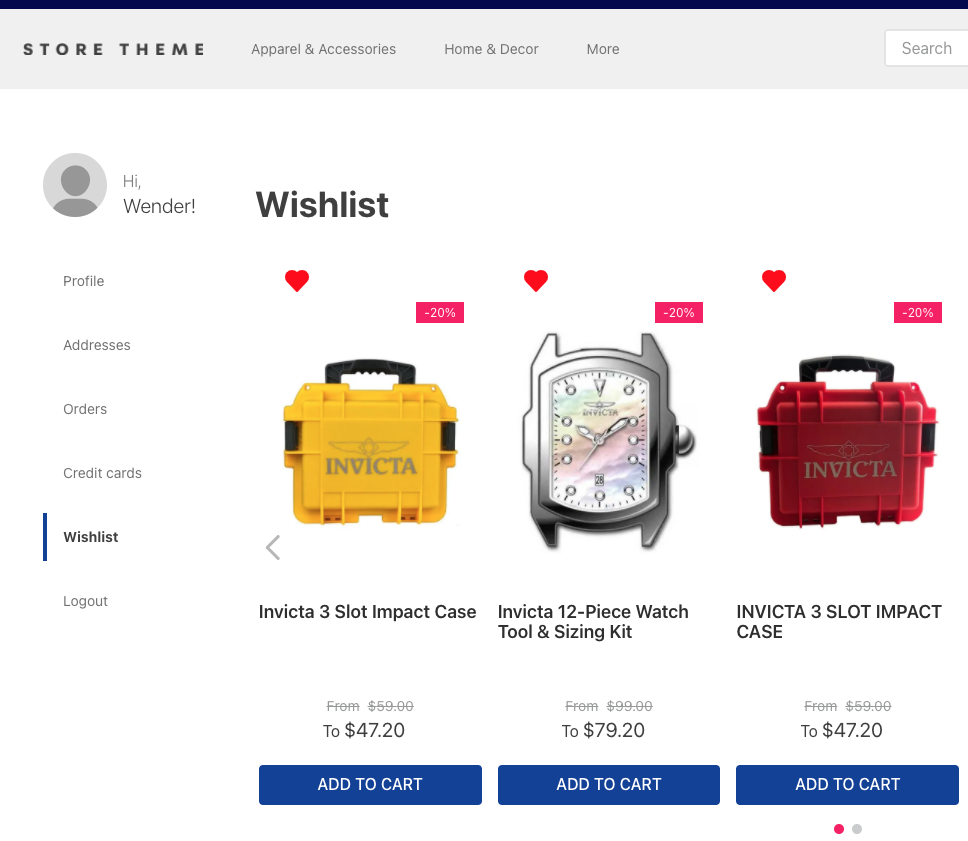 _Example of a wishlist page._
## Configurating the wishlist
1. [Install](https://developers.vtex.com/docs/guides/vtex-io-documentation-installing-an-app/) the Wishlist app in the desired VTEX account by running `vtex install vtex.wish-list` in your terminal.
2. Open your Store Theme app directory in the code editor.
3. Add the Wishlist app to your theme's `manifest.json` file inside **peerDependencies** as shown below:
```diff
"peerDependencies": {
+ "vtex.wish-list": "1.x"
}
```
> ℹ️ _The Wishlist app can export two theme blocks when added as a dependency: `add-to-list-btn` and `list-context.wishlist`. These are responsible for adding the heart icon to other theme blocks and providing product data to build the `/wishlist`, which is also shared with the My Account page._
4. Add the `add-to-list-btn` block in the `store.product` template's children block list. For example:
```diff
{
"store.product": {
"children": [
"product-name",
"product-reviews",
+ "add-to-list-btn"
]
},
```
5. Declare the `add-to-list-btn` block as a child of the [`product-summary.shelf` blocks](https://developers.vtex.com/docs/guides/vtex-product-summary/) in your theme. For example:
```diff
"product-summary.shelf": {
"children": [
+ "add-to-list-btn",
"product-summary-name",
"product-rating-inline",
"product-summary-price",
"add-to-cart-button"
]
}
```
> ℹ️ _The new route called `/wishlist`, which creates the Wishlist custom page containing the products added to the wishlist, already has a default template and is rendered under the My Account menu. No further action is required. However, you can **customize the Wishlist page by overwriting the template**. To do so, you have to create a brand new one as you wish. See more details in the **Advanced configurations** section below._
## Advanced configurations
The Wishlist app architecture allows you to customize the `/wishlist` page using other blocks. Currently, its default implementation is as follows:
`store.wishlist` interface for the route `/wishlist` and `my-account-page.wishlist-page` along with `my-account-link.wishlist-link` for the Wishlist section under My Account.
**wishlist.jsonc**
```json
{
"my-account-link.wishlist-link": {
"props": {
"label": "My Wishlist"
}
},
"my-account-page.wishlist-page": {
"props": {
"title": "Wishlist"
},
"children": ["list-context.wishlist"]
},
"store.wishlist": {
"blocks": ["flex-layout.row#top", "list-context.wishlist"]
},
"flex-layout.row#top": {
"children": ["flex-layout.col#title"]
},
"flex-layout.col#title": {
"children": ["rich-text#title"],
"props": {
"blockClass": "titleWishlist",
"preventVerticalStretch": true
}
},
"rich-text#title": {
"props": {
"text": "### Wishlist"
}
},
"list-context.wishlist": {
"blocks": ["product-summary.shelf#wishlist"],
"children": ["slider-layout#wishlist"]
},
"product-summary.shelf#wishlist": {
"children": [
"add-to-list-btn",
"product-summary-image",
"product-summary-name",
"product-summary-space",
"product-summary-price",
"add-to-cart-button"
]
},
"slider-layout#wishlist": {
"props": {
"itemsPerPage": {
"desktop": 5,
"tablet": 3,
"phone": 1
},
"showNavigationArrows": "desktopOnly",
"showPaginationDots": "always",
"infinite": false,
"fullWidth": true,
"blockClass": "shelf"
}
}
}
```
Add the `plugins.json` file to your theme's `/store/` folder. This will add the Wishlist to My Account.
**plugins.json**
```json
{
"my-account-pages > my-account-page": "my-account-page.wishlist-page",
"my-account-menu > my-account-link": "my-account-link.wishlist-link"
}
```
By "default implementation" we mean that, by installing the Wishlist app in your store, you're using the `json` above behind the scenes to build the new page template (`/wishlist`), as shown in the third image displayed above.
Therefore, to customize the `/wishlist` page configuration, you need to:
1. Create a `wishlist.jsonc` file under `store/blocks`.
2. Create a `plugins.json` file under `store/`.
3. Copy the code above, paste it in the new file, and change it as you wish.
4. Deploy your changes.
If you want to configure the layout without the `slider-layout` dependency, you can use the `list-context-renderer` to wrap the `product-summary.shelf`. Learn more [here](https://github.com/vtex-apps/list-context#list-context-renderer).
#### `my-account-link.wishlist-link` props
| Prop name | Type | Description | Default value |
|:---------:|:--------:|:-----------------------------------------------------:|:-------------:|
| `label` | `string` | Changes the section menu label on the My Account page | `Wishlist` |
## Usages
There are a couple of URLs to read, search and change data for the app:
To read the schema of the Wishlist app:
```
curl --request GET \
--url 'https://{{accountName}}.vtexcommercestable.com.br/api/dataentities/wishlist/schemas/wishlist' \
--header 'VtexIdClientAutCookie: {authToken}' \
```
To GET all the wishlist data:
```
curl --request GET \
--url 'https://{environment}--{accountName}.myvtex.com/_v/wishlist/export-lists' \
--header 'VtexIdClientAutCookie: {authToken}' \
```
To search for a wishlist by user email:
```
curl --request GET \
--url 'https://{{accountName}}.vtexcommercestable.com.br/api/dataentities/wishlist/search?' \
--header 'VtexIdClientAutCookie: {authToken}' \
```
To PATCH a wishlist to Master Data:
```
curl --request PATCH \
--url 'https://{{accountName}}.vtexcommercestable.com.br/api/dataentities/wishlist/documents' \
--header 'VtexIdClientAutCookie: {authToken}' \
--data '
[
"Email",
"Name",
.
.
.
"IsPublic",
]
'
```
To DELETE a wishlist from Master Data:
```
curl --request DELETE \
--url 'https://{{accountName}}.vtexcommercestable.com.br/api/dataentities/wishlist/documents/{documentId}' \
--header 'VtexIdClientAutCookie: {authToken}' \
```
## Custom URL for toast messages
To change the link of the toast message:
```json
{
"add-to-list-btn#myButton": {
"props": {
"toastURL": "/wishlist"
}
}
}
```
| Prop name | Type | Description | Default value |
|:----------:|:--------:|:-------------------------------------:|:---------------------:|
| `toastURL` | `string` | Changes the link of the toast message | `/account/#wishlist'` |
## Custom view for empty wishlists
To show a custom view if no product has been added to the wishlist:
```diff
{
"list-context.wishlist": {
+ "blocks": ["wishlist-empty-list", "product-summary.shelf#wishlist"],
"children": ["slider-layout#wishlist"],
"props": {
"showViewEmptyList": true
}
},
"wishlist-empty-list": {
"children": [
"rich-text#description"
]
},
"rich-text#description": {
"props": {
"text": "### There are no products",
"textAlignment": "CENTER",
"textPosition": "CENTER",
"font": "t-heading-2"
}
},
}
```
#### `list-context.wishlist` props
| Prop name | Type | Description | Default value |
|:-------------------:|:---------:|:----------------------------------------------------------------:|:-------------:|
| `showViewEmptyList` | `boolean` | Shows a custom view if no product has been added to the wishlist | `false` |
## Customization
To apply CSS customizations to this and other blocks, follow the instructions in [Using CSS handles for store customization](https://developers.vtex.com/docs/guides/vtex-io-documentation-using-css-handles-for-store-customization).
| CSS handles |
| ----------------------- |
| `columnText` |
| `columnThumb` |
| `linkText` |
| `linkThumb` |
| `listItemsContainer` |
| `listName` |
| `listTab` |
| `productDescription` |
| `productItemRow` |
| `productTitle` |
| `thumb` |
| `wishlistContainer` |
| `wishlistIcon` |
| `wishlistIconContainer` |
| `emptyMessage` |
## PII Compliance
This app can be used in a Personal Identifiable Information (PII) compliant account. In this case, shopperId is the Profile ID.
**Note**: If you are changing type of the account from regular to PII, you must replace the email values with profile ID values in the WishList data entity!
## Contributors ✨
Thanks goes to these wonderful people:
This project follows the [all-contributors](https://github.com/all-contributors/all-contributors) specification. Contributions of any kind are welcome!