https://github.com/w3cdpass/.wezterm.lua
tmux like Key-Binding in .wezterm.lua
https://github.com/w3cdpass/.wezterm.lua
key-binding tmux wezterm
Last synced: 5 months ago
JSON representation
tmux like Key-Binding in .wezterm.lua
- Host: GitHub
- URL: https://github.com/w3cdpass/.wezterm.lua
- Owner: w3cdpass
- Created: 2024-10-17T08:48:22.000Z (over 1 year ago)
- Default Branch: main
- Last Pushed: 2024-11-03T06:24:37.000Z (over 1 year ago)
- Last Synced: 2025-04-09T02:24:24.495Z (about 1 year ago)
- Topics: key-binding, tmux, wezterm
- Homepage:
- Size: 5.86 KB
- Stars: 0
- Watchers: 1
- Forks: 0
- Open Issues: 0
-
Metadata Files:
- Readme: readme.md
Awesome Lists containing this project
README
## Windows Configuration Steps
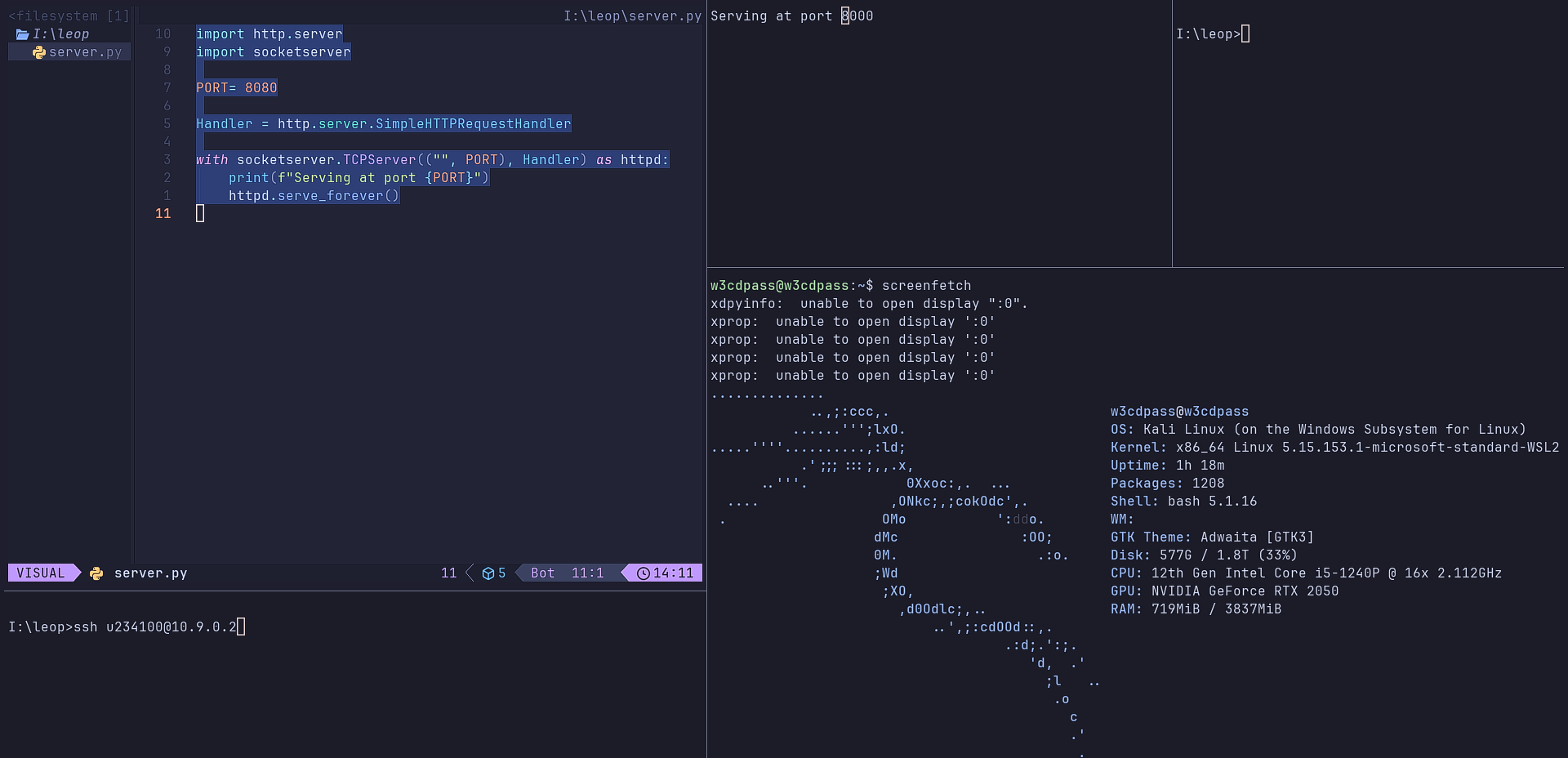
1. **Navigate to WezTerm Config Directory**.
Create a file name `.wezterm.lua` in you `%USERPROFILE%` directory.
```lua
vim %USERPROFILE%\.wezterm.lua
-- vim ~/.wezterm.lua <--[Linux/WSL or macOS]
```
2. **Add the Following Config**.
Copy and paste the following configuration into your `.wezterm.lua` file.
```lua
local wezterm = require("wezterm")
local config = wezterm.config_builder()
-- you can add custom color_scheme
config.color_scheme = "Catppuccin Mocha"
-- you can add custom font
config.font = wezterm.font("JetBrains Mono")
--Key Binding
config.keys = {
{ key = "2", mods = "ALT", action = wezterm.action({ SplitHorizontal = { domain = "CurrentPaneDomain" } }) },
{ key = "3", mods = "ALT", action = wezterm.action({ SplitVertical = { domain = "CurrentPaneDomain" } }) },
{ key = "LeftArrow", mods = "CTRL", action = wezterm.action({ ActivatePaneDirection = "Left" }) },
{ key = "RightArrow", mods = "CTRL", action = wezterm.action({ ActivatePaneDirection = "Right" }) },
{ key = "UpArrow", mods = "CTRL", action = wezterm.action({ ActivatePaneDirection = "Up" }) },
{ key = "DownArrow", mods = "CTRL", action = wezterm.action({ ActivatePaneDirection = "Down" }) },
{ key = "RightArrow", mods = "ALT|SHIFT", action = wezterm.action({ AdjustPaneSize = { "Right", 1 } }) },
{ key = "LeftArrow", mods = "ALT|SHIFT", action = wezterm.action({ AdjustPaneSize = { "Left", 1 } }) },
{ key = "DownArrow", mods = "ALT|SHIFT", action = wezterm.action({ AdjustPaneSize = { "Down", 1 } }) },
{ key = "UpArrow", mods = "ALT|SHIFT", action = wezterm.action({ AdjustPaneSize = { "Up", 1 } }) },
}
return config
```
4. **Save the File**
Run `Wezterm` and use `Key-Binding` that are give below .
---
## Key Bindings in `.wezterm.lua` .
| **Action** | **Key Combination** | **Description** |
|--------------------------|---------------------------------|------------------------------------------|
| **Pane Splitting** | | |
| Split to the right | `ALT + 2` | Split the current pane horizontally |
| Split to the bottom | `ALT + 3` | Split the current pane vertically |
| | | |
| **Pane Navigation** | | |
| Move to the left pane | `CTRL + LeftArrow` | Switch to the pane on the left |
| Move to the right pane | `CTRL + RightArrow` | Switch to the pane on the right |
| Move to the top pane | `CTRL + UpArrow` | Switch to the pane above |
| Move to the bottom pane | `CTRL + DownArrow` | Switch to the pane below |
| | | |
| **Pane Resizing** | | |
| Increase pane width | `ALT + SHIFT + RightArrow` | Make the current pane wider |
| Decrease pane width | `ALT + SHIFT + LeftArrow` | Make the current pane narrower |
| Increase pane height | `ALT + SHIFT + DownArrow` | Make the current pane taller |
| Decrease pane height | `ALT + SHIFT + UpArrow` | Make the current pane shorter |
---
### More on [Official docs of `$WezTwem`](https://wezfurlong.org/wezterm/config/files.html) site .