https://github.com/wagiminator/attiny13-tinyremotexl
12-Button IR Remote Control
https://github.com/wagiminator/attiny13-tinyremotexl
arduino attiny attiny13 attiny13a avr diy ir pcb project remote
Last synced: 5 months ago
JSON representation
12-Button IR Remote Control
- Host: GitHub
- URL: https://github.com/wagiminator/attiny13-tinyremotexl
- Owner: wagiminator
- License: other
- Created: 2021-06-20T10:37:27.000Z (about 5 years ago)
- Default Branch: main
- Last Pushed: 2022-12-12T19:16:16.000Z (over 3 years ago)
- Last Synced: 2025-04-12T11:43:09.035Z (over 1 year ago)
- Topics: arduino, attiny, attiny13, attiny13a, avr, diy, ir, pcb, project, remote
- Language: C++
- Homepage: https://oshwlab.com/wagiminator/attiny13-tinyremoteir-xl
- Size: 1010 KB
- Stars: 44
- Watchers: 2
- Forks: 5
- Open Issues: 0
-
Metadata Files:
- Readme: README.md
- License: LICENSE
Awesome Lists containing this project
README
# TinyRemoteXL - 12-Button IR Remote Control based on ATtiny13A
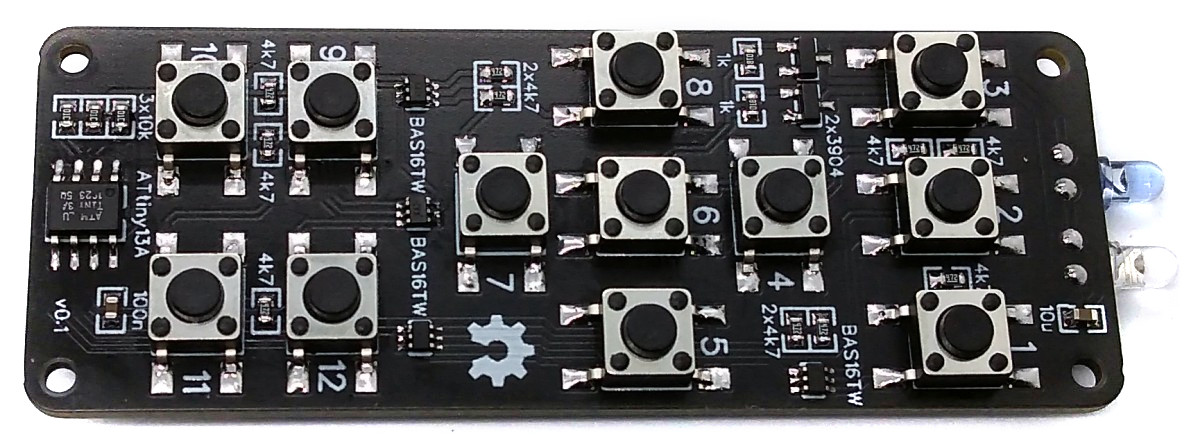
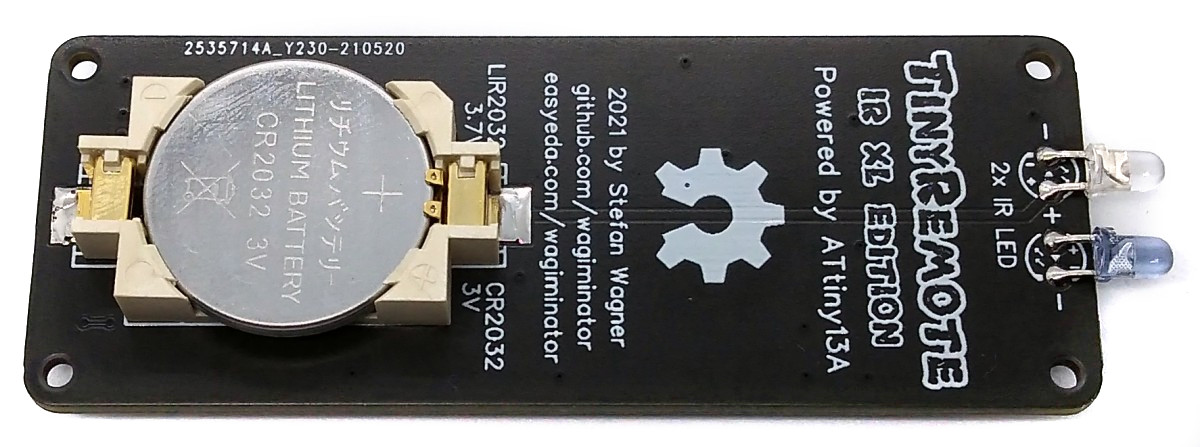
TinyRemoteXL is a 12-button IR remote control based on an ATtiny13A powered by a CR2032 or LIR2032 coin cell battery.
- Design Files (EasyEDA): https://easyeda.com/wagiminator/attiny13-tinyremoteir-xl
# Hardware
The basic hardware is similar to the 5-button [TinyRemote](https://github.com/wagiminator/ATtiny13-TinyRemote). The main difference is that the ATtiny13 has to query 12 buttons here. There are various options for using a larger number of buttons with just a few pins. However, most of them do not meet the following conditions:
- there are only four pins available for twelve buttons,
- a keystroke must trigger an asynchronous interrupt to wake the ATtiny from deep sleep mode,
- the circuit must not consume any electricity as long as no button is pressed.
A combination of voltage dividers and a couple of diodes does the trick:
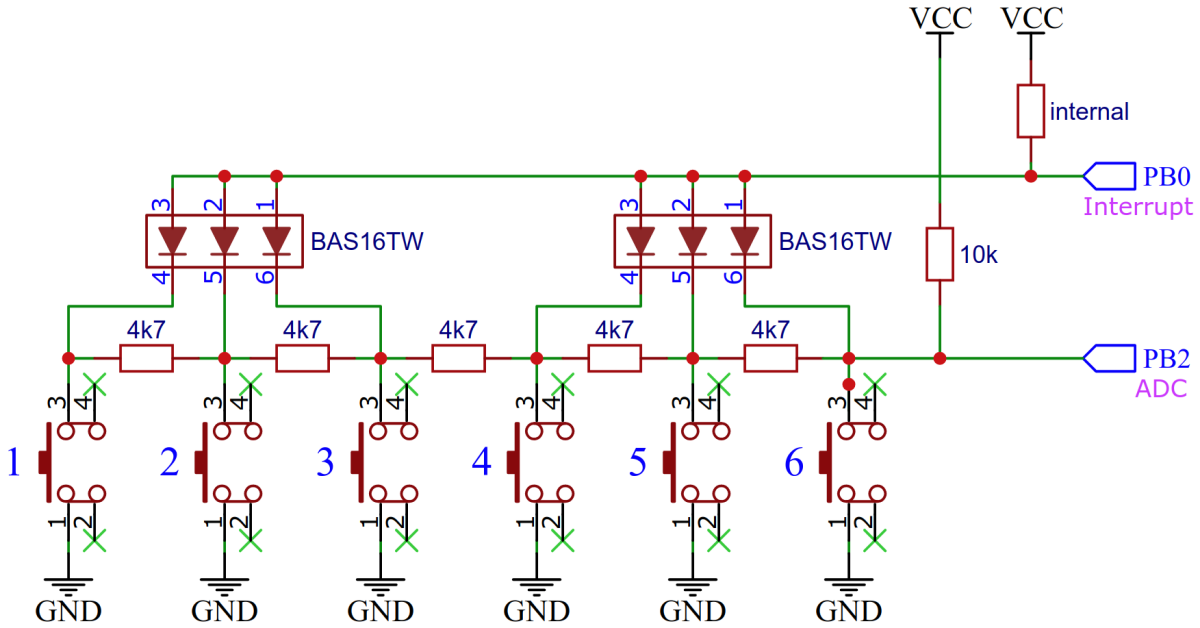
If, for example, button 4 is pressed, pin PB0 is pulled to ground via the corresponding diode and a pin change interrupt is triggered, which wakes up the ATtiny. The diodes prevent the 4k7 resistors of the voltage divider from shorting out. The voltage that can be measured at PB2 via the ADC results from the supply voltage divided by the 10k resistor on the upper side and two 4k7 resistors (= 9k4) on the lower side. This value depends on the key pressed.
# Software
## IR Protocol Implementation
The implementation for the NEC, SAMSUNG, SONY and RC-5 protocol is taken from [TinyRemote](https://github.com/wagiminator/ATtiny13-TinyRemote). Refer to this project for a complete explanation.
## Setting the IR Codes
Before compiling you have to define the IR commands for each button. Different protocols and device addresses can be used. Several codes can also be assigned to a single key, separated by semicolons.
```c
#define KEY1 NEC_sendCode(0x04,0x08) // LG TV Power: addr 0x04, cmd 0x08
#define KEY2 RC5_sendCode(0x00,0x0B) // Philips TV Power: addr 0x00, cmd 0x0B
#define KEY3 SON_sendCode(0x01,0x15,12) // Sony TV Power: addr 0x01, cmd 0x15, 12-bit version
#define KEY4 SAM_sendCode(0x07,0x02) // Samsung TV Power: addr: 07, cmd: 02
#define KEY5 NEC_sendCode(0xAB04,0x08);SON_sendCode(0xE401,0x15,20)
[...]
```
## Button Detection
If a key has been pressed, a pin change interrupt is triggered and the ATtiny is brought out of sleep mode. The pressed key is then identified via the voltage divider between the individual keys using the ADC of the ATtiny.
```c
// Pin assignments
#define BINT1_PIN PB0 // interrupt pin for buttons 1..6
#define BINT2_PIN PB3 // interrupt pin for buttons 7..12
#define BADC1_AP 1 // ADC port for buttons 1..6
#define BADC2_AP 2 // ADC port for buttons 7..12
// Button ADC thresholds
const uint8_t THRESHOLDS[] PROGMEM = {217, 173, 158, 136, 103, 41, 0};
// ADC read button row and return button number
uint8_t readButtonRow(uint8_t port) {
PRR = 0; // power on ADC
ADMUX = (1< Board -> MicroCore** and select **ATtiny13**.
- Go to **Tools** and choose the following board options:
- **Clock:** 1.2 MHz internal osc.
- **BOD:** BOD disabled
- **Timing:** Micros disabled
- Connect your programmer to your PC and to the ATtiny.
- Go to **Tools -> Programmer** and select your ISP programmer (e.g. [USBasp](https://aliexpress.com/wholesale?SearchText=usbasp)).
- Go to **Tools -> Burn Bootloader** to burn the fuses.
- Open the TinyRemoteXL sketch and click **Upload**.
### If using the precompiled hex-file
- Make sure you have installed [avrdude](https://learn.adafruit.com/usbtinyisp/avrdude).
- Connect your programmer to your PC and to the ATtiny.
- Open a terminal.
- Navigate to the folder with the hex-file.
- Execute the following command (if necessary replace "usbasp" with the programmer you use):
```
avrdude -c usbasp -p t13 -U lfuse:w:0x2a:m -U hfuse:w:0xff:m -U flash:w:tinyremotexl.hex
```
### If using the makefile (Linux/Mac)
- Make sure you have installed [avr-gcc toolchain and avrdude](http://maxembedded.com/2015/06/setting-up-avr-gcc-toolchain-on-linux-and-mac-os-x/).
- Connect your programmer to your PC and to the ATtiny.
- Open a terminal.
- Navigate to the folder with the makefile and sketch.
- Run `PROGRMR=usbasp make install` to compile, burn the fuses and upload the firmware (change PROGRMR accordingly).
# References, Links and Notes
1. [TinyRemote](https://github.com/wagiminator/ATtiny13-TinyRemote)
2. [TinyRemote RF](https://github.com/wagiminator/ATtiny13-TinyRemoteRF)
3. [IR remote control explanations by San Bergmans](https://www.sbprojects.net/knowledge/ir/index.php)
4. [IR remote control by Christoph Niessen (german)](http://chris.cnie.de/avr/tcm231421.html)
5. [IR remote control detective by David Johnson-Davies](http://www.technoblogy.com/show?24A9)
6. [Infrared communication concepts (altium.com)](https://techdocs.altium.com/display/FPGA/Infrared+Communication+Concepts)
7. [NEC decoder based on ATtiny13A](https://github.com/wagiminator/ATtiny13-TinyDecoder)
8. [OSC Calibrator](https://github.com/wagiminator/ATtiny84-TinyCalibrator)
9. [ATtiny13A datasheet](http://ww1.microchip.com/downloads/en/DeviceDoc/doc8126.pdf)
# License

This work is licensed under Creative Commons Attribution-ShareAlike 3.0 Unported License.
(http://creativecommons.org/licenses/by-sa/3.0/)