https://github.com/wallentx/numa-check
ChatGPT teaches me C++
https://github.com/wallentx/numa-check
chatgpt cpp
Last synced: about 1 year ago
JSON representation
ChatGPT teaches me C++
- Host: GitHub
- URL: https://github.com/wallentx/numa-check
- Owner: wallentx
- License: gpl-3.0
- Created: 2023-02-07T02:33:55.000Z (over 3 years ago)
- Default Branch: main
- Last Pushed: 2023-02-10T21:27:13.000Z (over 3 years ago)
- Last Synced: 2025-06-27T23:43:21.633Z (about 1 year ago)
- Topics: chatgpt, cpp
- Language: C++
- Homepage:
- Size: 26.4 KB
- Stars: 2
- Watchers: 1
- Forks: 0
- Open Issues: 0
-
Metadata Files:
- Readme: README.md
- License: LICENSE
Awesome Lists containing this project
README
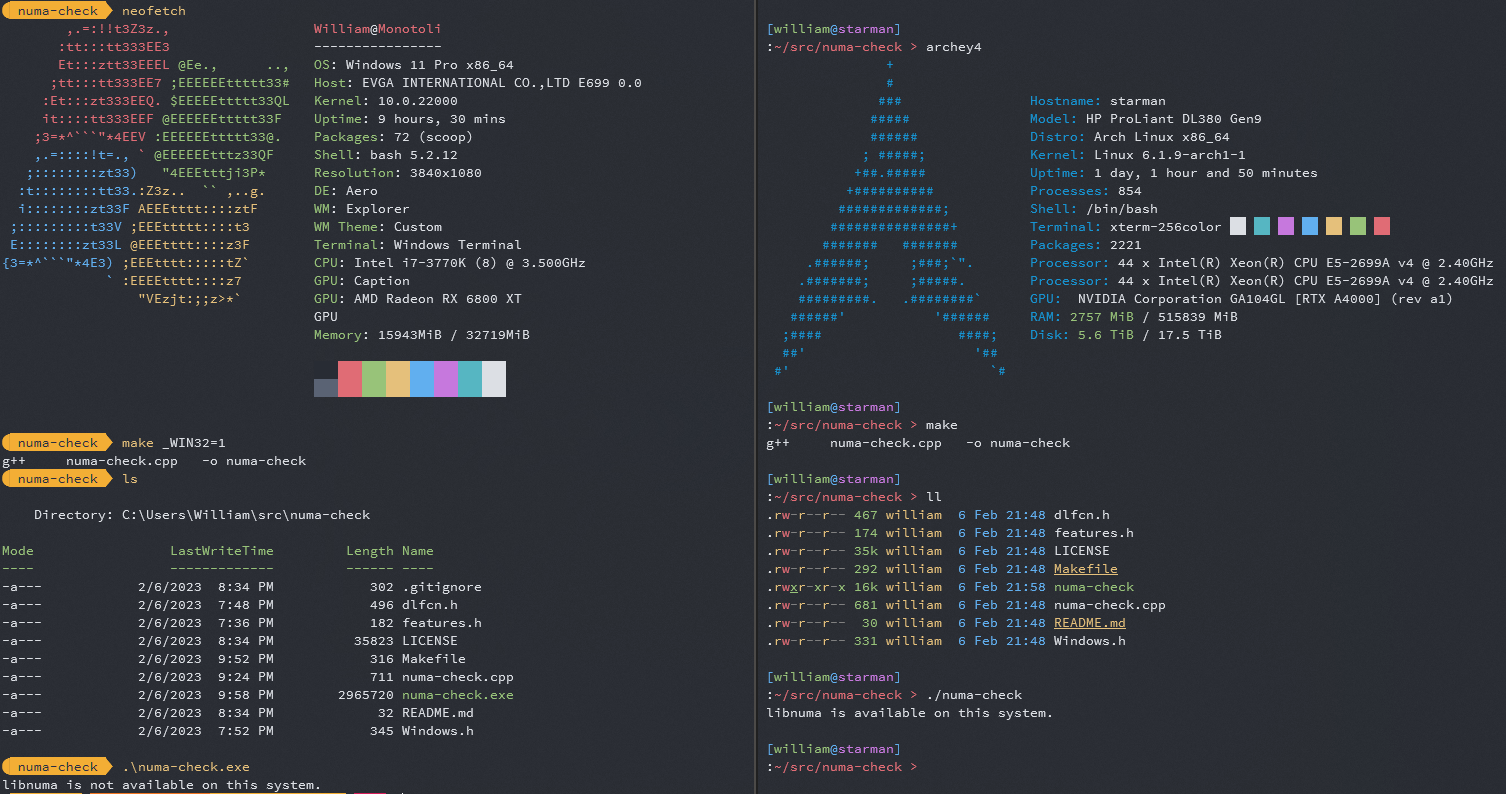
### ChatGPT teaches me C++
***
**Human:**
show me some c++ sample app that uses RTLD_LAZY binding to check for the presence of libnuma
***
**Assistant:**
Here is an example C++ program that uses RTLD_LAZY binding to check for the presence of the `libnuma` library:
```cpp
#include
#include
int main() {
void* handle;
char* error;
handle = dlopen("libnuma.so", RTLD_LAZY);
if (!handle) {
std::cerr << "Cannot open libnuma: " << dlerror() << std::endl;
return 1;
}
dlerror(); // Clear any previous error
int (*numa_available)(void);
numa_available = (int(*)(void)) dlsym(handle, "numa_available");
if ((error = dlerror())) {
std::cerr << "Cannot find numa_available: " << error << std::endl;
dlclose(handle);
return 1;
}
std::cout << "libnuma is available, numa_available() returned "
<< numa_available() << std::endl;
dlclose(handle);
return 0;
}
```
This program uses the `dlopen` function to open the `libnuma.so` library with the `RTLD_LAZY` flag. If the library is successfully opened, the program uses the `dlsym` function to retrieve the address of the `numa_available` function. If the function is successfully retrieved, the program calls the `numa_available` function and prints the result. If the library cannot be opened or the function cannot be found, the program prints an error message and exits with a non-zero status.
***
**Human:**
what would the contents of 'dlfcn.h' be in the example code you gave me?
***
**Assistant:**
`dlfcn.h` is a header file that provides access to the dynamic linker functionality in the Unix-like operating systems. The header file is part of the C library and provides functions for dynamically loading shared libraries at runtime, such as `dlopen`, `dlsym`, and `dlclose`. Here is the typical contents of the `dlfcn.h` header file:
```cpp
#ifndef _DLFCN_H
#define _DLFCN_H
#include
#define RTLD_LAZY 0x00001
#define RTLD_NOW 0x00002
#define RTLD_BINDING_MASK 0x3
#define RTLD_NOLOAD 0x00004
#define RTLD_DEEPBIND 0x00008
#ifdef __cplusplus
extern "C" {
#endif
void *dlopen (const char *__file, int __mode);
void *dlsym (void *__restrict __handle,
const char *__restrict __name);
int dlclose (void *__handle);
char *dlerror (void);
#ifdef __cplusplus
}
#endif
#endif
```
Note that the actual contents of `dlfcn.h` may vary slightly depending on the system and compiler being used. The contents shown above should be representative of the typical contents of the header file.
***
**Human:**
what would the contents of 'features.h' be from your numa code example?
***
**Assistant:**
`features.h` is a header file that can be used to specify the features that a program requires or provides. The exact contents of this file can vary widely depending on the system, compiler, and other factors. However, here is a typical contents of a `features.h` file:
```cpp
#ifndef _FEATURES_H
#define _FEATURES_H
/* Always enable certain features by default. */
#define _POSIX_C_SOURCE 200809L
#define _XOPEN_SOURCE 700
#endif /* _FEATURES_H */
```
This file can be used to specify various POSIX and X/Open standards that your program requires or provides. In this example, the program is requiring the POSIX 2008.9 standard and the X/Open 2007 standard. By including this header file, the program will have access to the standard library functions specified by these standards.
Note that the contents of `features.h` may vary widely depending on the specific system and compiler you are using, so it's best to consult your system documentation for the exact contents of this file on your system.
***
**Human:**
dlfcn.h isn't a valid thing on windows. what would i use instead?
***
**Assistant:**
On Windows, the equivalent to the `dlfcn.h` header file is the `Windows.h` header file, which provides access to the Windows API. The Windows API provides functionality for dynamic linking of libraries, which is similar to the functionality provided by the `dlopen` function in Unix-like systems.
Here is an example of how you can check for the presence of a library (in this case, `libnuma`) in Windows using the Windows API:
```cpp
#include
#include
int main() {
HMODULE hNuma = LoadLibrary("numa.dll");
if (!hNuma) {
std::cout << "libnuma is not available on this system." << std::endl;
return 1;
}
std::cout << "libnuma is available on this system." << std::endl;
FreeLibrary(hNuma);
return 0;
}
```
In this example, the `LoadLibrary` function is used to load the `numa.dll` library. If the library is not present, the function returns `NULL`. If the library is present, the function returns a handle to the library, which can be used to access the library's functions and data. In this case, the handle is stored in the `hNuma` variable. Finally, the `FreeLibrary` function is used to unload the library when it is no longer needed.
***
**Human:**
how would I make a conditional to only include dlfcn.h for linux, but Windows.h if on windows
***
**Assistant:**
You can use preprocessor directives in C++ to conditionally include the appropriate header file based on the operating system.
Here's an example of how you can achieve this:
```cpp
#ifdef _WIN32
#include
#else
#include
#endif
#include
int main() {
#ifdef _WIN32
HMODULE hNuma = LoadLibrary("numa.dll");
if (!hNuma) {
std::cout << "libnuma is not available on this system." << std::endl;
return 1;
}
std::cout << "libnuma is available on this system." << std::endl;
FreeLibrary(hNuma);
#else
void* hNuma = dlopen("libnuma.so", RTLD_LAZY);
if (!hNuma) {
std::cout << "libnuma is not available on this system: " << dlerror() << std::endl;
return 1;
}
std::cout << "libnuma is available on this system." << std::endl;
dlclose(hNuma);
#endif
return 0;
}
```
In this example, the preprocessor directive `#ifdef _WIN32` checks if the macro `_WIN32` is defined. If it is, the code inside the `#ifdef` block is compiled and executed. If it is not, the code inside the `#else` block is compiled and executed.
In this way, you can ensure that the appropriate header file is included and the appropriate functions are used for each operating system.
***
**Human:**
how do i make the Makefile use main.cpp if linux, but win-main.cpp if windows?
***
**Assistant:**
You can use conditional statements in a Makefile to compile different source files based on the platform. Here's an example of what the Makefile could look like:
```cpp
ifdef WINDOWS
SOURCES = win-main.cpp
else
SOURCES = main.cpp
endif
TARGET = app
CC = g++
CFLAGS = -Wall
$(TARGET): $(SOURCES)
$(CC) $(CFLAGS) -o $@ $^
.PHONY: clean
clean:
rm -f $(TARGET)
```
This Makefile uses the `ifdef` statement to conditionally include either `main.cpp` or `win-main.cpp` in the `SOURCES` variable, based on whether the `WINDOWS` flag is defined. The `CC` variable is set to `g++`, which is the C++ compiler on Linux. The `CFLAGS` variable sets some compiler flags.
The `$(TARGET)` rule compiles the source files into the target binary. The `clean` rule removes the target binary.
***
**Human:**
how do I compile that and pass the WINDOWS flag?
***
**Assistant:**
To compile the Makefile and pass the `WINDOWS` flag, you can run the following command:
```sh
make WINDOWS=1
```
This sets the `WINDOWS` flag to `1`, which allows the Makefile to use the `win-main.cpp` source file instead of `main.cpp`. The `make` command will then compile the source file and generate the target binary.
If you want to compile without the `WINDOWS` flag, simply run the `make` command without the `WINDOWS` flag:
```sh
make
```
This will use the default source file, which is `main.cpp`.
***
Exported on February 6, 2023 10:00 PM.