https://github.com/wangrongding/folder-print
🌿快速生成文件夹目录结构,支持定义目录层级,支持生成到 markdown 文件。
https://github.com/wangrongding/folder-print
direcrory-structure file-tree folder folder-print
Last synced: about 1 year ago
JSON representation
🌿快速生成文件夹目录结构,支持定义目录层级,支持生成到 markdown 文件。
- Host: GitHub
- URL: https://github.com/wangrongding/folder-print
- Owner: wangrongding
- Created: 2022-10-18T12:15:11.000Z (over 3 years ago)
- Default Branch: main
- Last Pushed: 2022-10-19T06:14:18.000Z (over 3 years ago)
- Last Synced: 2025-03-14T07:03:30.512Z (about 1 year ago)
- Topics: direcrory-structure, file-tree, folder, folder-print
- Language: JavaScript
- Homepage: https://www.npmjs.com/package/folder-print
- Size: 8.79 KB
- Stars: 12
- Watchers: 2
- Forks: 1
- Open Issues: 0
-
Metadata Files:
- Readme: README.md
Awesome Lists containing this project
README
# folder-print
## 介绍(Description)
快速生成文件夹目录结构,支持定义目录层级,支持生成到 markdown 文件。
Quickly generate folder directory structure, support for defining directory hierarchy, support for generating to markdown files.
## 安装(Install)
```sh
npm i folder-print -g
```
当然你也可以直接使用 npx 运行
Of course you can also run it directly with npx
```sh
npx folder-print
```
## 使用(usage)
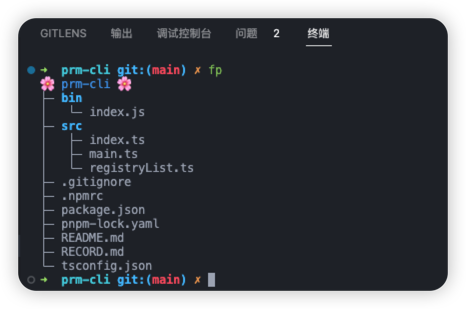
### 输出当前目录的树形结构:(默认输出最大层级为 10)
Output the tree structure of the current directory: (default output maximum level is 10)
```sh
fp
# or
folder-print
# 免安装(No installation)
npx folder-print
```
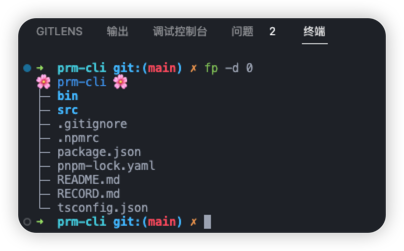
### 指定输出最大层级
(Specify the maximum level of output)
```sh
# 指定输出最大层级(Specify the maximum level of output)
fp -d 0
# or
folder-print -d 0
# 免安装(No installation)
npx folder-print -d 0
```
指定输出最大层级
Specify the maximum level of output
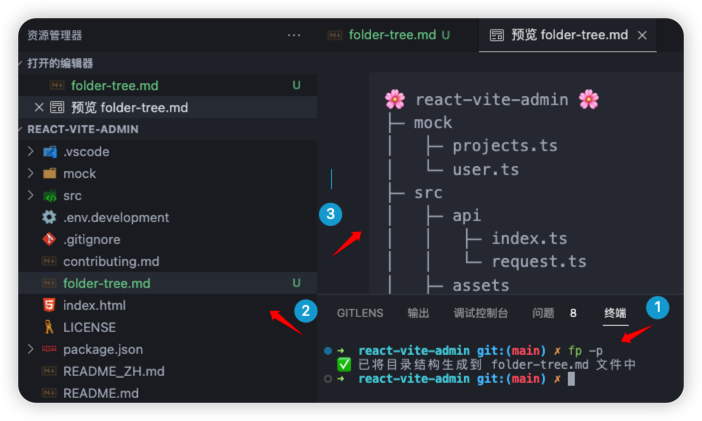
### 将输出结果保存到文件中
Save the output result to a file
```sh
# 将输出结果保存到文件中(Save the output result to a file)
fp -p
# or
folder-print -p
# 免安装(No installation)
npx folder-print -p
```