https://github.com/wangrunlin/cloudflare-ai-web
https://github.com/wangrunlin/cloudflare-ai-web
Last synced: 11 months ago
JSON representation
- Host: GitHub
- URL: https://github.com/wangrunlin/cloudflare-ai-web
- Owner: wangrunlin
- License: apache-2.0
- Created: 2024-04-26T12:58:43.000Z (about 2 years ago)
- Default Branch: main
- Last Pushed: 2024-04-26T12:58:48.000Z (about 2 years ago)
- Last Synced: 2025-02-09T08:30:38.221Z (over 1 year ago)
- Language: TypeScript
- Homepage: https://cloudflare-ai-web-ochre-alpha.vercel.app
- Size: 127 KB
- Stars: 0
- Watchers: 1
- Forks: 0
- Open Issues: 0
-
Metadata Files:
- Readme: README.md
- License: LICENSE
Awesome Lists containing this project
README
# cloudflare-ai-web
## AI 启动!
### 一键部署(推荐)
[](https://vercel.com/new/clone?repository-url=https%3A%2F%2Fgithub.com%2FJazee6%2Fcloudflare-ai-web&env=CF_TOKEN,CF_GATEWAY&envDescription=%E7%8E%AF%E5%A2%83%E5%8F%98%E9%87%8F%E4%BF%A1%E6%81%AF%E8%AF%B7%E6%9F%A5%E7%9C%8B&envLink=https%3A%2F%2Fgithub.com%2FJazee6%2Fcloudflare-ai-web)
示例:https://ai.jaze.top
### Deno Deploy
https://dash.deno.com
- Fork 本仓库
- Build Step改为`NITRO_PRESET=deno-deploy npm run build_node`
- Deploy Project
- 设置环境变量
### Docker
```bash
docker run -d --name cloudflare-ai-web \
-e CF_TOKEN=YOUR_CF_TOKEN \
-e CF_GATEWAY=YOUR_CF_GATEWAY \
-p 3000:3000 \
--restart=always \
jazee6/cloudflare-ai-web
```
## 特性
- 利用 Cloudflare Workers AI 快速搭建多模态AI平台
- 支持 Serverless 部署,无需服务器
- 支持开启访问密码,聊天记录本地存储
- 轻量化(~638 kB gzip)
- 支持`ChatGPT` `Gemini Pro`
### 模型支持
https://developers.cloudflare.com/workers-ai/models/
你可以在`./utils/db.ts`中增删模型
## 部署说明
### 环境变量列表
| 名称 | 描述 |
|----------------|------------------------------------|
| CF_TOKEN | Cloudflare Workers AI Token |
| CF_GATEWAY | Cloudflare AI Gateway URL |
| OPENAI_API_KEY | OpenAI API Key (需要ChatGPT时填写) |
| G_API_KEY | Google AI API Key (需要GeminiPro时填写) |
| G_API_URL | Google AI 反代 (非美国ip填写,或参考以下配置) |
| PASSWORD | 访问密码 (可选) |
#### CF_TOKEN
https://dash.cloudflare.com/profile/api-tokens
- 单击创建令牌
- 使用Workers AI (Beta)模板
- 单击继续以显示摘要
- 单击创建令牌
- 复制您的令牌,设置环境变量
#### CF_GATEWAY
https://dash.cloudflare.com/
- Cloudflare 侧栏 AI - AI Gateway
- 添加新 AI Gateway
- 填写名称和URL slug创建
- 单击右上角API Endpoints
- 复制您的Universal Endpoint,设置环境变量
#### G_API_KEY
https://ai.google.dev/tutorials/rest_quickstart#set_up_your_api_key
#### G_API_URL
参考 https://github.com/Jazee6/gemini-proxy 搭建反代
或者在`nuxt.config.ts`中添加以下配置
```
nitro: {
vercel: {
regions: ["cle1", "iad1", "pdx1", "sfo1", "sin1", "syd1", "hnd1", "kix1"]
}
}
```
## Star History
[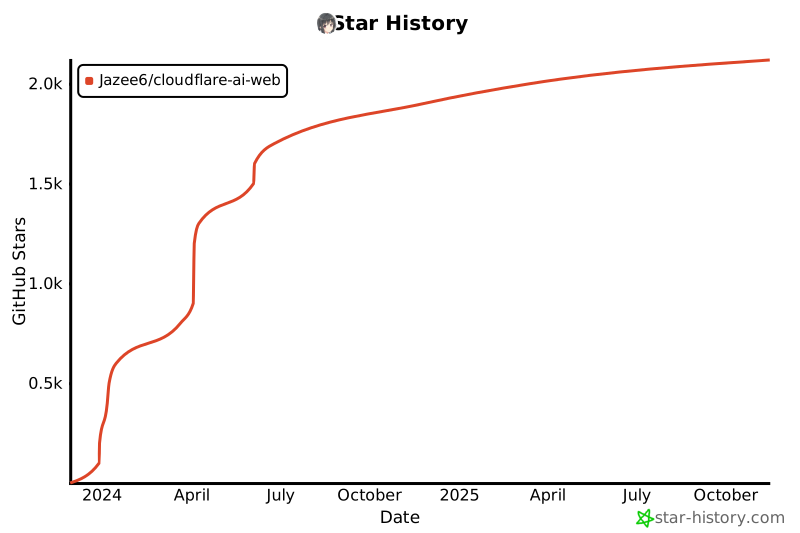](https://star-history.com/#Jazee6/cloudflare-ai-web&Date)