https://github.com/warengonzaga/xplorescan
Never memorize a blockchain explorer again. 🛰️🌐💻
https://github.com/warengonzaga/xplorescan
blockchain cli command-line command-line-tool explorer hacktoberfest web3
Last synced: over 1 year ago
JSON representation
Never memorize a blockchain explorer again. 🛰️🌐💻
- Host: GitHub
- URL: https://github.com/warengonzaga/xplorescan
- Owner: warengonzaga
- License: gpl-3.0
- Created: 2024-02-23T09:49:37.000Z (over 2 years ago)
- Default Branch: main
- Last Pushed: 2024-10-14T02:03:39.000Z (almost 2 years ago)
- Last Synced: 2025-04-12T19:23:40.698Z (over 1 year ago)
- Topics: blockchain, cli, command-line, command-line-tool, explorer, hacktoberfest, web3
- Language: JavaScript
- Homepage: https://xplorescan.xyz
- Size: 439 KB
- Stars: 7
- Watchers: 2
- Forks: 1
- Open Issues: 6
-
Metadata Files:
- Readme: README.md
- Contributing: contributing.md
- Funding: .github/funding.yml
- License: license
- Code of conduct: code_of_conduct.md
- Security: security.md
Awesome Lists containing this project
README
# XploreScan 🛰️ [](https://warengonzaga.com) [](https://stars.github.com/nominate)
[](https://github.com/web3philippines) [](https://github.com/sponsors/warengonzaga) [](https://github.com/warengonzaga/xplorescan/releases) [](https://github.com/warengonzaga/xplorescan/stargazers) [](https://github.com/warengonzaga/xplorescan/blob/main/license) [](https://npmjs.com/package/xplorescan)
[](https://github.com/warengonzaga/xplorescan)
An all-in-one command-line tool for blockchain explorers, simplifying searches for addresses, transaction hashes, and more without the need to remember multiple explorer URLs for different chains. 🛰️🌐💻
Have suggestions in mind? [Let me know!](https://github.com/warengonzaga/xplorescan/issues)
Like this project? **Leave a star**! ⭐⭐⭐⭐⭐
## 😎 Demo
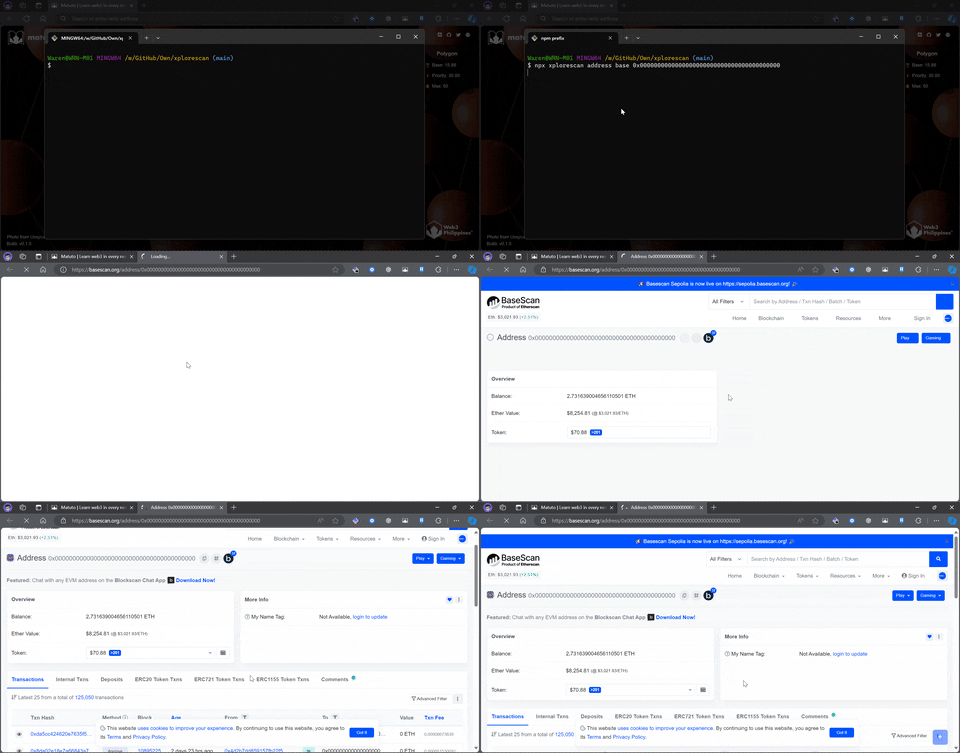
Here's the demo how quickly you can explore a wallet address on [Base](https://base.org) using `xplorescan`.
[](https://github.com/warengonzaga/xplorescan)
## 🚀 Quick Start
Explore wallet address on eth by running the following command:
```bash
npx xplorescan address eth 0x0000000000000000000000000000000000000000
```
If you don't want to use `npx`, you can install it globally using `npm`:
```bash
npm i -g xplorescan
```
## ❣️ Inspiration
I believe in the saying "necessity is the mother of invention". I created this tool because I need a simple and fast way to explore blockchain data without the need to remember multiple explorer URLs for different chains. I work at [@thirdweb](https://thirdweb.com) and we are building a decentralized web platform that supports multiple chains (700+ EVMs). This tool will help me and my team to simplify our workflow and make it easier to explore blockchain data.
## ⚡ Features
- 🚀 **Fast and Easy**: No need to remember multiple explorer URLs for different chains.
- 🌐 **Multi-Chain Support**: Supports multiple chains like Ethereum, Polygon, and [more](https://github.com/warengonzaga/xplorescan/blob/main/source/data/explorers.json).
- 📦 **All-in-One Tool**: Simplifies searches for addresses, transaction hashes, and more.
## 🕹️ Usage
```bash
npx xplorescan
```
### 🏠 Address Command
To explore a wallet address, use the following command:
```bash
npx xplorescan address
```
### 📜 Contract Command
To explore a smart contract, use the following command:
```bash
npx xplorescan contract
```
### 📄 Transaction Command
To explore a transaction, use the following command:
```bash
npx xplorescan transaction
```
_More features coming soon..._
- [x] Transaction Command
- [ ] Block Command
- [ ] ENS Command
- [ ] Web App (GUI) 👀
## 💻 Development
To run the project locally, you need to have [Node.js](https://nodejs.org) installed on your machine. Then, you can clone the repository and install the dependencies:
```bash
git clone
cd xplorescan
yarn install
```
To run the project, you can use the following command:
```bash
yarn dev
```
To build the project, you can use the following command:
```bash
yarn build
```
To setup the CLI on your local machine, you can use the following command:
```bash
npm install -g .
```
If you are in a Linux environment such as WSL on Windows 11, you can use the following command to setup the project:
```bash
yarn setup:ubuntu
```
You can also reset the setup using the following command:
```bash
yarn reset:ubuntu
```
## ⚙️ Project Activity

## 🎯 Contributing
Contributions are welcome, create a pull request to this repo and I will review your code. Please consider to submit your pull request to the `dev` branch. Thank you!
Read the project's [contributing guide](./contributing.md) for more info.
## 🐛 Issues
Please report any issues and bugs by [creating a new issue here](https://github.com/warengonzaga/xplorescan/issues/new/choose), also make sure you're reporting an issue that doesn't exist. Any help to improve the project would be appreciated. Thanks! 🙏✨
## 🙏 Sponsor
Like this project? **Leave a star**! ⭐⭐⭐⭐⭐
Want to support my work and get some perks? [Become a sponsor](https://github.com/sponsors/warengonzaga)! 💖
Or, you just love what I do? [Buy me a coffee](https://buymeacoffee.com/warengonzaga)! ☕
Recognized my open-source contributions? [Nominate me](https://stars.github.com/nominate) as GitHub Star! 💫
## 📋 Code of Conduct
Read the project's [code of conduct](./code_of_conduct.md).
## 📃 License
This project is licensed under [GNU General Public License v3.0](https://opensource.org/licenses/GPL-3.0).
## 📝 Author
This project is created by **[Waren Gonzaga](https://github.com/warengonzaga)**, with the help of awesome [contributors](https://github.com/warengonzaga/xplorescan/graphs/contributors).
[](https://github.com/warengonzaga/xplorescan/graphs/contributors)
---
💻 with ❤️ by [Waren Gonzaga](https://warengonzaga.com) and [Him](https://www.youtube.com/watch?v=HHrxS4diLew&t=44s) 🙏